
GIGABYTE B550 Gaming X V2
4.5Editor score
Affordable AM4 support
Solid power delivery
Essential connectivity
Discover the top Gigabyte Motherboard options for gamers and pros. This guide compares features, power, and connectivity to help you choose the right one.
Choosing the right motherboard is crucial for building a powerful and reliable computer system. Gigabyte offers a wide range of options suitable for various needs and budgets.
We analyzed ten top models based on performance, connectivity, and user feedback to create this comprehensive list. Each board brings unique strengths to the table for different build styles.
Our picks highlight specific use cases so you can find the perfect match for your setup. Keep in mind that pricing and availability may vary over time.
4.5Editor score

4.4Editor score

4.2Editor score
This side-by-side comparison highlights key specifications across all ten models to help you decide quickly based on your specific hardware and performance needs.


This is our top pick for gamers and creators seeking a reliable AM5 platform. With a high rating, it delivers excellent performance for modern Ryzen processors.
We may earn a commission when you buy through this link, at no additional cost to you.
Its 14+2+1 power phase design ensures stable power even under heavy loads. The advanced thermal guards keep temperatures low during long gaming sessions.
While it comes at a mid range price, the connectivity options justify the cost. Some users might find the BIOS interface overwhelming at first.
If you want a solid foundation for a high end PC build, this motherboard is highly recommended. It balances performance and features exceptionally well.
The 14+2+1 power phases paired with 70A stages provide robust support for multi core CPUs without overheating.
Support for PCIe 5.0 M.2 and USB-C ensures your build is ready for future high speed storage and devices.
We may earn a commission when you buy through this link, at no additional cost to you.
This model represents the cutting edge of AM5 connectivity with integrated WIFI7. It stands out for its speed and robust build quality.
We may earn a commission when you buy through this link, at no additional cost to you.
The 16+2+2 power design handles high end CPUs effortlessly. Dual USB4 ports allow for rapid data transfer and high speed docking stations.
Users should note that WIFI7 is new and may not be universally available yet. The price reflects these premium features but may be steep.
For those wanting the fastest wireless and wired connections today, this is the top choice. It future proofs your system significantly.
WIFI7 delivers ultra low latency and higher throughput compared to previous standards for seamless online experiences.
Dual USB4 ports provide flexible connectivity for high bandwidth external drives and monitors without extra adapters.
We may earn a commission when you buy through this link, at no additional cost to you.
The X870E AORUS PRO ICE brings a premium white theme to the AM5 ecosystem. It matches the performance of the Elite model visually.
We may earn a commission when you buy through this link, at no additional cost to you.
Its power design mirrors the Elite with 16+2+2 phases ensuring stability. The Sensor Panel Link adds a unique touch for monitoring system health.
Aesthetics come at a cost which is reflected in the price point. Users building white PCs will find it hard to beat.
If visual appeal is as important as performance, this board is a standout. It ensures your build looks sleek and runs cool.
The all white PCB and heatsinks create a cohesive look for high end white themed gaming PCs.
The Sensor Panel Link feature allows you to attach custom displays to show live performance metrics.
We may earn a commission when you buy through this link, at no additional cost to you.
This motherboard is built for enthusiasts using the latest Intel Core Ultra chips. It offers top tier connectivity and power delivery.
We may earn a commission when you buy through this link, at no additional cost to you.
With five M.2 slots and Thunderbolt 4 support you get incredible speed and flexibility. The 10GbE LAN is perfect for home servers.
The price is high and the new socket means less compatibility with older hardware. It is best for those who need maximum performance.
For power users requiring extreme speeds and modern standards, this board is ideal. It pushes the limits of what a workstation can do.
Dual Thunderbolt 4 ports offer speeds up to 40Gbps for external displays and storage.
The 10GbE LAN provides wired network speeds far exceeding standard Gigabit Ethernet for fast transfers.
We may earn a commission when you buy through this link, at no additional cost to you.
The Eagle AX proves you do not need to spend a fortune to get a modern AM5 board. It scores highly on value and performance.
We may earn a commission when you buy through this link, at no additional cost to you.
Its 12+2+2 power phases handle most Ryzen CPUs with ease. WiFi 6E is included which is rare at this price point.
The lack of USB4 or extreme thermal features keeps the cost down but limits future expansion. Most users will not miss these features.
If you want a solid budget build without sacrificing key modern specs, this is the one to get. It offers the best price performance ratio.
This board delivers essential high performance features like DDR5 and PCIe 5.0 at a very accessible price.
Triple M.2 slots allow you to add plenty of fast storage without needing add on cards.
We may earn a commission when you buy through this link, at no additional cost to you.
This board is perfect for those upgrading an older AM4 system without moving to DDR5. It maximizes the potential of Ryzen 5000 chips.
We may earn a commission when you buy through this link, at no additional cost to you.
The 12+2 power phase ensures stable performance for high core counts. Q-Flash Plus allows BIOS updates without a CPU installed.
While AM4 is mature and lacks future upgrade paths it remains a solid choice for budget builds. DDR4 is still fast enough for gaming.
If you already have DDR4 memory or want to save on RAM costs this is a smart pick. It bridges the gap to modern features.
The AM4 platform remains competitive for gaming and productivity even years after its release.
Q-Flash Plus simplifies updates by letting you flash BIOS with just power and a USB drive.
We may earn a commission when you buy through this link, at no additional cost to you.
This Eagle model brings Z790 features to a more accessible price range. It supports the latest Intel CPUs well for gaming.
We may earn a commission when you buy through this link, at no additional cost to you.
Its 12+1+1 phase design is adequate for most non extreme overclocking. WiFi 6E and 2.5GbE LAN add great networking value.
Users wanting heavy overclocking might prefer a higher phase board. However for standard use this delivers stability and performance.
For builders wanting Intel performance without breaking the bank this is a strong candidate. It balances features and cost effectively.
Support for 12th 13th and 14th Gen processors ensures wide compatibility for a long time.
EZ-Latch features make removing graphics cards and storage drive easier during upgrades.
We may earn a commission when you buy through this link, at no additional cost to you.
This elite board takes Intel performance to the next level with better power and cooling than the Eagle. It is great for sustained loads.
We may earn a commission when you buy through this link, at no additional cost to you.
The 16+1+2 phase design supports high end Core i9 chips well. Four M.2 slots allow for extensive high speed storage setups.
It lacks some premium ports like Thunderbolt but covers all essential bases. The price is higher but justified for performance seekers.
If you are building a high end Intel PC this is the safer choice over the Eagle. It ensures better stability and cooling.
The 16 phase design provides extra headroom for multi core processors to boost without throttling.
Four M.2 slots mean you can fill your system with top tier NVMe drives easily.
We may earn a commission when you buy through this link, at no additional cost to you.
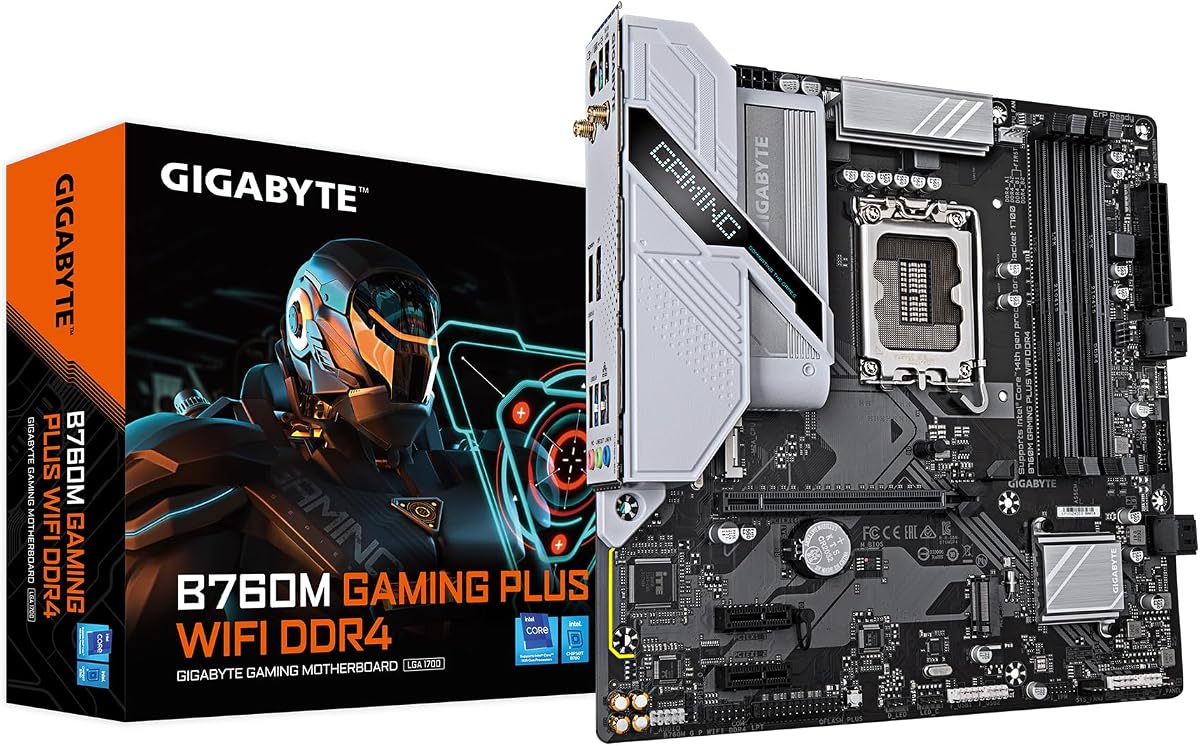
This board is perfect for smaller cases that still need to handle modern Intel processors. It combines compact size with essential WiFi features.
We may earn a commission when you buy through this link, at no additional cost to you.
The hybrid digital power phase is steady for daily tasks. Q-Flash Plus ensures you can update BIOS without hassle.
The reduced expansion slots mean less room for cards but fine for most users. DDR4 keeps costs down significantly for gamers.
For small form factor builds on a budget this is a great option. It fits well in compact cases without sacrificing connectivity.
The Micro-ATX size saves space while maintaining full support for high end Intel CPUs.
Included WiFi lets you connect without cables which is ideal for small clean desk setups.
We may earn a commission when you buy through this link, at no additional cost to you.
This entry level board proves you can build a reliable AM4 system on a tight budget. It handles most Ryzen processors well.
We may earn a commission when you buy through this link, at no additional cost to you.
The 10+3 phase design is sufficient for standard gaming workloads. Front USB-C makes connecting modern devices convenient.
Lack of onboard WiFi means you might need an adapter. But for wired setups this is one of the best budget choices available.
If you need the most affordable AM4 option that does not cut major corners, pick this. It is ideal for simple budget gaming PCs.
Priced under most competitors it delivers the core features needed for a capable system.
Front USB-C port allows easy access for charging phones and connecting devices quickly.
We may earn a commission when you buy through this link, at no additional cost to you.
Selecting the right motherboard requires understanding your CPU, memory, and expansion needs. These factors will guide your decision.
Ensure the motherboard supports your processor. AM5 for Ryzen 9000/8000/7000, AM4 for older models, LGA 1700 for 12th14th Gen Intel, and LGA 1851 for Core Ultra.
Always match the socket to the CPU to ensure physical fit and functionality.
Newer boards use DDR5 which offers higher speeds but older or budget options may use DDR4. Check your budget and performance needs.
DDR5 is future proof while DDR4 offers better value for budget builds.
Look at the power phase design. Higher numbers like 16+2+2 mean better support for high end CPUs and overclocking.
Adequate VRM stages prevent throttling under heavy loads and ensure stability.
Count the M.2 slots for storage and PCIe slots for graphics cards. Most users need at least two M.2 slots.
More slots allow for future upgrades and faster storage expansion.
Check for USB 4 Type-C, WiFi versions like 6E or 7 and Ethernet speed. Modern boards often include USB4 for fast peripherals.
Fast networking is crucial for streaming and online gaming.
ATX boards fit standard cases while Micro-ATX fit smaller ones. Ensure the board size matches your case.
Choosing the right size saves space and ensures all parts fit correctly.
Good heatsinks and thermal guards on VRMs and M.2 slots help keep temperatures low. Look for covered heatsinks.
Proper cooling ensures longevity and consistent performance.
Some boards come with 5 year warranties while others have less. A longer warranty indicates confidence in the product.
Always check warranty terms before buying for peace of mind.
When installing your motherboard always ground yourself to prevent static damage and use the included standoffs in the case.
Update the BIOS immediately after building to ensure compatibility with your CPU and RAM using Q-Flash or similar tools.
Keep the system free of dust and ensure good airflow around the motherboard to prevent overheating over time.
The B650 AORUS Elite AX is our top pick for Ryzen 9000 because it offers excellent power delivery and DDR5 support. For premium connectivity the X870 AORUS Elite WIFI7 is ideal with its new wireless features.
Yes most modern Gigabyte motherboards support DDR5 including the B650 Z890 and X870 models. Older AM4 and some B760 boards still use DDR4 for budget builds.
Not all Gigabyte motherboards include WiFi. Models with AX in the name usually have it. Budget models like the B550 Gaming X V2 often do not include it.
Yes the new Z890 AORUS Master supports Intel Core Ultra processors. This is the latest platform for high performance Intel builds with modern features.
Q-Flash Plus lets you update the BIOS using just a USB drive and power. You do not need to install the CPU or RAM to update the firmware.
Choose ATX for full size cases and maximum expansion. Micro-ATX is better for compact builds and costs less but has fewer slots.
Our top picks cover the best in budget premium and overall performance for both AMD and Intel users.
Prioritize CPU compatibility and power delivery to ensure your build lasts and runs smoothly.
Always check current prices and stock availability as they can change frequently on major retailers.