
Canon PIXMA TR4720
3.8Editor score
Wireless connectivity
Built-in fax capability
Compact home design
This guide compares the top 10 cheap fax machines for home and office use in 2026 focusing on value performance and reliability for your communication needs.
Finding a reliable fax machine on a budget can be challenging in today's digital landscape. Many businesses and home offices still require fax capabilities for legal documents and secure communications. This guide helps you navigate the options available without breaking the bank.
We have evaluated ten distinct models based on their features, user ratings, and overall value proposition. Our analysis considers transmission speed, paper capacity, and additional functionalities like copying and scanning. This ensures you get a comprehensive view of what each device offers.
Each pick includes detailed specifications and user feedback to help you make an informed decision. Prices and availability can fluctuate frequently so be sure to check the current listings before purchasing. We aim to provide clear insights into the strengths and weaknesses of every model.
3.8Editor score

4.1Editor score

4.0Editor score
This side-by-side comparison highlights the key specifications and capabilities of each model to help you choose quickly.




The Brother FAX-575 stands out as a reliable choice for those needing a dedicated fax machine. It holds a solid rating from users who appreciate its straightforward operation. The device combines faxing phone and copying functions into one compact unit.
We may earn a commission when you buy through this link, at no additional cost to you.
Its transmission speed is a major highlight allowing you to send pages in about fifteen seconds. The 512 KB memory can store up to 25 pages which is useful for busy periods. Black and white copying is sharp with 400 dpi resolution.
While it lacks modern wireless connectivity the wired connection ensures stability for critical documents. The 50 sheet paper capacity reduces the need for frequent refills. Some users might find the interface dated but it remains functional.
This model is ideal for small offices that prioritize function over form. It delivers consistent performance for faxing essential paperwork without complications. We recommend it for buyers seeking a traditional fax machine experience.
The 9600 BPS modem ensures documents send quickly reducing wait times during busy workdays.
Storing up to 25 pages in memory helps handle high volume sending without paper jams.
We may earn a commission when you buy through this link, at no additional cost to you.
This renewed version of the Brother FAX-575 offers the same functionality at a lower cost. It is a great option for budget conscious buyers who want trusted performance. The unit undergoes inspection to ensure it meets working standards.
We may earn a commission when you buy through this link, at no additional cost to you.
Users get access to the same fast modem and memory capabilities as the new model. The 50 sheet paper capacity remains generous for daily tasks. It is a practical choice for temporary setups or secondary offices.
Buying renewed means accepting some wear which may affect aesthetics but not function. The rating reflects mixed experiences likely due to individual unit conditions. Always check the seller warranty before finalizing your purchase.
We suggest this for those who do not mind pre-owned equipment to save money. It provides the same utility for faxing without the premium price tag. Consider it if upfront cost is your main concern.
Choosing a renewed unit allows you to access reliable fax technology for less upfront investment.
The core features remain identical to the new model ensuring consistent faxing performance.
We may earn a commission when you buy through this link, at no additional cost to you.
The Sharp UXB20 brings inkjet technology to the fax category offering color potential. It features a robust set of dialing options for frequent contacts. The 24 page out of paper memory is a safety net for lost documents.
We may earn a commission when you buy through this link, at no additional cost to you.
Transmission speed matches the standard of 15 seconds per page which is adequate. The multi-copy function allows up to 99 copies helping with document distribution. Corded handset connectivity ensures stable voice calls alongside faxing.
However the lower rating suggests some reliability issues or user dissatisfaction. Inkjet maintenance may be higher than laser alternatives over time. It suits users who specifically need inkjet printing for their fax needs.
This device is best for environments where speed dialing and memory are key. It handles moderate fax volumes well if maintained properly. Verify the current condition if buying used to avoid potential defects.
With 30 speed dial presets you can reach frequent contacts quickly without memorizing numbers.
The 24 page out of paper memory prevents data loss during paper jams or shortages.
We may earn a commission when you buy through this link, at no additional cost to you.
This HP model focuses on wireless convenience making it easy to print from any device. It includes HP AI to optimize layouts reducing wasted paper during printing. The app support allows control from your smartphone for added flexibility.
We may earn a commission when you buy through this link, at no additional cost to you.
While it handles basic faxing it is primarily designed for home office printing. The 60 sheet tray provides reasonable capacity for light use. The design is compact fitting well into small spaces or home desks.
Fax capabilities are present but not the primary focus compared to dedicated machines. The instant ink trial helps manage costs initially but subscriptions follow. Users should verify fax compatibility with their specific needs.
We recommend this for home users who need printing first and fax second. The wireless features modernize the workflow significantly. It is a good entry point for those needing versatile document handling.
HP AI removes unwanted content from web pages ensuring clean prints without extra adjustments.
Dual-band Wi-Fi connects you to the printer from anywhere in the home office.
We may earn a commission when you buy through this link, at no additional cost to you.
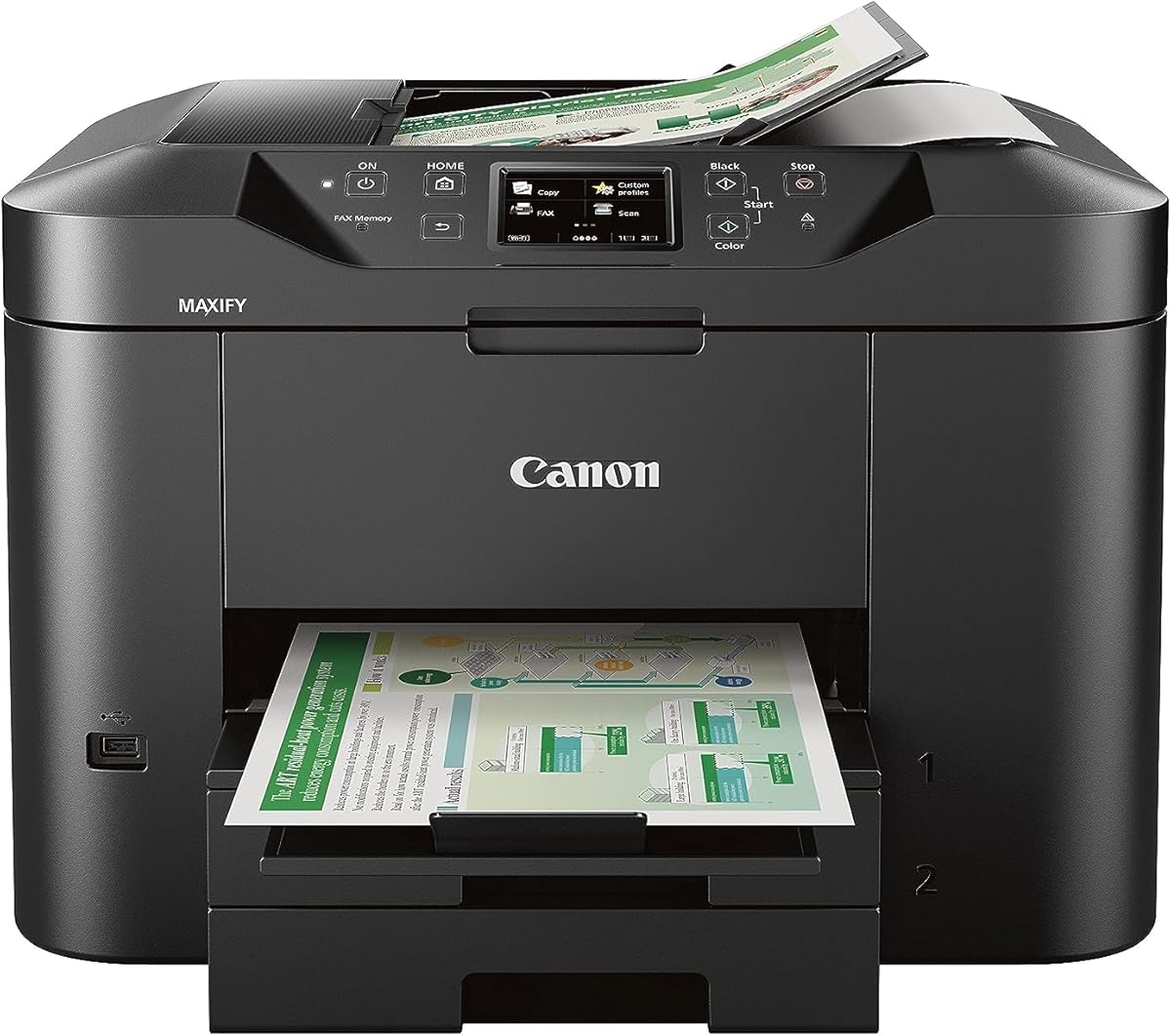
The Canon PIXMA TR4720 is a true 4-in-1 printer that includes built-in fax functionality. It is designed for easy setup and cartridge replacement to minimize downtime. The front paper tray makes loading documents quick and convenient.
We may earn a commission when you buy through this link, at no additional cost to you.
Its compact design fits any home office space while providing versatile document handling. The auto document feeder supports scanning and faxing multiple pages easily. Users appreciate the simple mobile app integration for remote tasks.
While it lacks high speed features it covers all basics for small businesses. The cost effective nature makes it accessible for tight budgets. Fax quality is sufficient for standard documents and contracts.
This is our top budget pick for those needing reliable fax and print features. It balances price and performance well for everyday tasks. We suggest it for home offices prioritizing value and ease of use.
The design allows for fast cartridge installation reducing time lost on maintenance.
The auto document feeder speeds up sending multiple pages via fax or scan.
We may earn a commission when you buy through this link, at no additional cost to you.
This business focused printer handles high volumes with a massive 500 sheet capacity. The 20000 page duty cycle ensures it can last for years of heavy use. Dual Resistant High Density inks produce text that resists smudging.
We may earn a commission when you buy through this link, at no additional cost to you.
While it is more expensive it offers reliability for demanding environments. Mobile scanning and printing allow staff to work remotely efficiently. Support is entirely US based which simplifies troubleshooting when issues arise.
Fax capabilities are integrated into this robust system for seamless document flow. It is a premium option for small businesses needing durability. The size may be too large for very small home desks.
We recommend this for offices where faxing is frequent and document quality matters. It is built to withstand rigorous daily operations. Consider it if you need a printer that will not break down often.
With 20000 pages monthly capability this printer suits high volume business environments well.
Smudge resistant ink ensures your legal and financial documents remain legible over time.
We may earn a commission when you buy through this link, at no additional cost to you.
The Canon PIXMA TR8620a brings smart features to faxing with Alexa integration. You can receive notifications when ink is low or even place reorder via voice. This level of automation reduces the risk of running out during critical tasks.
We may earn a commission when you buy through this link, at no additional cost to you.
It supports auto two-sided printing which saves paper and improves efficiency. The 200 sheet capacity ensures you are ready for large jobs without interruption. Photo and document printing quality is high for a versatile machine.
While the price is higher the convenience features justify the cost for many users. The warranty covers the device for a year ensuring support if needed. It blends fax functionality with modern smart home compatibility seamlessly.
We suggest this for tech savvy users who want seamless ink management. The voice commands streamline daily operations significantly. It is a premium choice for those who value advanced connectivity.
Alexa integration lets you check printer status or reorder ink without touching the device.
Auto duplex printing cuts paper usage in half while maintaining professional document quality.
We may earn a commission when you buy through this link, at no additional cost to you.
This Brother unit uses laser technology to deliver sharp professional text documents. With 21 ppm speed it processes fax pages quickly without delays. The laser output is resistant to fading ensuring documents stay legible.
We may earn a commission when you buy through this link, at no additional cost to you.
As a dedicated fax machine it focuses entirely on sending and receiving data. It is ideal for environments where internet fax services are not desired. The hardware is robust and built to handle daily faxing needs.
However it does not offer wireless connectivity or copying features like others. You must use a direct line for all operations which may limit placement. It remains a strong choice for traditional fax users.
We recommend this for offices needing a standalone fax solution. It is reliable and simple to operate. Consider it if laser quality is your top priority for document clarity.
Laser technology ensures text remains sharp and readable for formal and legal documents.
21 pages per minute speed means your fax queue clears out quickly during peak times.
We may earn a commission when you buy through this link, at no additional cost to you.
The Brother IntelliFax 575 Thermal uses thermal transfer technology for document output. It is Energy Star certified helping reduce power consumption during operation. The 10 sheet ADF adds convenience for multi-page faxing tasks.
We may earn a commission when you buy through this link, at no additional cost to you.
Thermal paper is often used which can fade over time but is cheap to buy. The 512 KB memory helps store multiple documents for later transmission. This renewed model offers cost savings for budget buyers.
The lower rating indicates some inconsistency in performance or condition. Buyers should inspect the unit carefully before accepting delivery. It suits those who prefer thermal fax technology over ink or laser.
We suggest this for users needing a basic fax and copy combo at low cost. It is compact enough for small desks. Verify the paper type requirements before purchasing to ensure you have supplies.
Energy Star certification ensures the machine uses less electricity during standby times.
Thermal transfer offers a low maintenance alternative to traditional ink cartridge systems.
We may earn a commission when you buy through this link, at no additional cost to you.
The Panasonic KX-FHD331 supports plain paper faxing making it easy to store. It includes caller ID compatibility so you know who is calling or sending. The interface connects with answering machines for voice and fax handling.
We may earn a commission when you buy through this link, at no additional cost to you.
Transmission speed is standard at 9.6 Kbps which takes longer for large files. The 6-month warranty with exchange provides some protection against defects. It is a basic machine for those who prefer traditional faxing.
The low rating suggests issues with durability or ease of use. Users may find the features limited compared to modern all-in-ones. Verify availability before buying as this model may be discontinued.
We recommend this only if plain paper support is a strict requirement. It is a no-frills option for minimal fax needs. Consider upgrading if you need faster speeds or better build quality.
Using standard office paper simplifies document storage and archiving for your team.
Identify incoming fax sources instantly to manage incoming documents more efficiently.
We may earn a commission when you buy through this link, at no additional cost to you.
Choosing the right fax machine requires understanding your specific needs and budget constraints. We have outlined key factors to help you narrow down your options effectively.
Transmission speed determines how quickly your documents are sent over the phone line. Look for a modem speed of at least 9600 bps to ensure efficient communication. Faster speeds save time especially if you send multiple pages daily.
Prioritize faster transmission to avoid long waits during critical business hours.
Paper capacity refers to the number of sheets the machine can hold at once. Models with 50 sheets or more reduce the frequency of refilling trays. This is important for busy offices where interruptions slow down work.
Select a machine with high capacity to maintain workflow efficiency.
Memory allows the machine to store pages when paper runs out or lines are busy. At least 512 KB is recommended to store a few pages safely. This feature prevents loss of important documents during technical issues.
Ensure sufficient memory to safeguard against unexpected fax transmission errors.
Print resolution affects the clarity of your copied or faxed documents. Aim for at least 300 dpi for readable text and logos. Higher resolution ensures professional quality for legal or client facing paperwork.
Choose higher resolution to guarantee crisp and legible document copies.
Connectivity options determine how you interact with the machine. Some models offer wireless printing while others are strictly wired. Consider your workflow needs when selecting between traditional and smart connectivity.
Match connectivity to your office setup for ease of use and accessibility.
Additional features like auto feeders or caller ID add value to the machine. Decide if you need scanning or copying functions alongside faxing. Extra features can increase cost but improve overall utility.
Evaluate which features truly benefit your daily tasks before paying extra.
Reliability and warranty coverage are critical for long term satisfaction. Check user ratings for signs of consistent performance. A warranty provides peace of mind in case of hardware failure.
Always check warranty terms to protect your investment against defects.
Cost efficiency involves looking beyond the purchase price to ongoing expenses. Consider ink or toner costs as well as paper usage. A cheap machine might cost more over time if maintenance is high.
Factor in running costs to determine true affordability over the device's life.
To start using your fax machine connect the power cable and ensure the phone line is securely attached. Load the paper tray with the appropriate type of paper such as plain or thermal sheets. Follow the on-screen prompts to set the time and date for accurate transmission logs.
Regular maintenance includes cleaning the glass scanner area and the paper path. Dust and debris can cause jams or streaks on your documents. Use a soft dry cloth to wipe surfaces and avoid harsh chemicals that could damage components.
Monitor ink or toner levels frequently to avoid interruptions during important faxes. If your machine uses thermal paper store it away from heat and light to prevent fading. Following these simple care steps extends the life of your device significantly.
Most fax machines require a dedicated phone line to function correctly. Sharing the line with voice calls can lead to interrupted transmissions. However some modern all-in-one printers support digital faxing over internet connections.
Inkjet fax machines use liquid ink to print documents while laser machines use toner powder. Laser units generally produce sharper text and are faster for high volume tasks. Inkjets are often cheaper upfront but may cost more to maintain over time.
Yes you can use online fax services to send documents from your computer. These services convert your files to fax format and transmit them over the network. This eliminates the need for physical hardware entirely.
Open the access panels carefully and remove any stuck paper gently. Check the paper tray guides to ensure they are adjusted correctly. Avoid pulling paper forcefully which can damage internal rollers or gears.
This issue may result from incorrect receive settings on your machine. Check that auto receive mode is enabled and the phone line is active. Test by sending a fax from another machine to identify the problem.
Renewed machines are inspected and tested by sellers but vary in condition. They can be a cost effective option if they come with a warranty. Always read the product description to understand the refurbishment process.
We reviewed ten models ranging from dedicated fax units to all-in-one printers with fax capabilities. The Brother FAX-575 stands out for reliability while the Canon PIXMA TR4720 offers the best value for budgets. The Canon PIXMA TR8620a is ideal for those who want smart features.
Prioritize the features that matter most to your daily work such as speed or paper capacity. If you send documents frequently look for larger memory and faster transmission. For occasional users compact all-in-ones provide necessary functionality.
Remember that prices fluctuate so always verify current pricing before making a purchase. Our list provides a solid starting point for finding the right machine for your needs. Check the links for the most up to date availability and deals.