
Inwa Computer Speakers
4.2Editor score
Affordable price point for quality audio
Simple button controls for volume
Compact design saves desk space
This guide compares the top 10 clip on speakers for laptop to help you find the best audio solution for your workspace needs today.
Enhancing your laptop audio experience is essential for productivity and entertainment. Clip on speakers offer a space-saving solution that delivers superior sound compared to built-in laptop speakers. They attach easily to monitors or desktops, providing clear audio without cluttering your workspace.
We evaluated ten top models based on sound quality, ease of use, and compatibility. Our analysis covers wired options with USB connectivity, ensuring reliable performance across various operating systems. Each product offers unique features like adaptive channel switching or RGB lighting to suit different preferences and setups.
Each pick highlights key strengths and potential trade-offs to help you decide. We focus on build quality, sound clarity, and connection versatility. Prices and availability can change frequently, so verify details before purchasing to ensure you get the best value for your specific needs.
4.2Editor score

4.5Editor score

4.2Editor score
This side-by-side comparison highlights the key features of each speaker to help you choose quickly. Look at connectivity, control methods, and design specifics to find the perfect match for your laptop setup.


This speaker model stands out as a top choice for laptop users seeking enhanced audio. It boasts a rating of 4.2 stars and delivers powerful sound with deep bass. The adaptive-channel-switching feature ensures correct audio positioning regardless of clip placement.
We may earn a commission when you buy through this link, at no additional cost to you.
The dual ultra-magnetic drivers provide high-quality stereo sound that surpasses built-in laptop speakers. Touch control buttons make muting and volume adjustments intuitive. Compatibility extends across Windows, macOS, ChromeOS, and Linux systems easily.
While it lacks wireless options, the wired connection ensures stable audio performance. The USB-C adapter adds versatility for modern devices. Users should check audio settings to ensure correct playback device selection.
Ideal for professionals and students needing reliable sound in a compact form. This speaker saves desktop space while delivering immersive audio. It is a solid recommendation for those prioritizing sound quality and ease of use.
The G-Sensor ensures left and right channels remain correct whether clipped top or bottom.
Supports Windows, macOS, ChromeOS, and Linux with included USB-C adapter for modern laptops.
We may earn a commission when you buy through this link, at no additional cost to you.
The OHAYO model earns high praise with a 4.5 rating. It features a built-in G-Sensor for automatic channel switching. The 16W output provides clear balanced sound ideal for calls and media.
We may earn a commission when you buy through this link, at no additional cost to you.
Bluetooth 5.3 allows wireless streaming while USB ensures stable PC audio. The RGB lighting adds a dynamic visual element to your setup. A built-in microphone supports clear communication during meetings.
It may not suit ultra-thin screens due to clamping requirements. USB power is needed for both modes which limits portability slightly. The roller wheel offers precise volume adjustment from zero to one hundred percent.
Perfect for gamers and home office users wanting style and substance. The dual-mode capability meets diverse needs effectively. This speaker combines functionality with aesthetic appeal beautifully.
Five customizable RGB modes sync with audio rhythm for an immersive experience.
Switch between Bluetooth and PC mode easily with a single button press.
We may earn a commission when you buy through this link, at no additional cost to you.
Cirqon offers a streamlined experience with a 4.2 rating. The innovative volume knob simplifies power and volume adjustments. Its sturdy clamp fits screens from 0.1 to 0.98 inches securely.
We may earn a commission when you buy through this link, at no additional cost to you.
Power and audio run through a single USB connection. This eliminates extra cables and software needs. The compact design keeps your workspace neat and organized.
It focuses on core functionality without extra bells or whistles. The clear loud sound meets daily office needs well. Users get reliable performance with minimal setup effort.
Great for those who value simplicity and clean desk aesthetics. This speaker delivers clear audio without fuss. It is a practical choice for everyday use and portability.
One knob handles power and volume precisely for quick access from any position.
Requires only one USB connection for power and audio without extra software.
We may earn a commission when you buy through this link, at no additional cost to you.
This speaker model delivers impressive audio with a 4.3 rating. Its dual super-magnetic drivers provide powerful volume and deep bass. No extra buttons mean you adjust volume directly on your system.
We may earn a commission when you buy through this link, at no additional cost to you.
The plug-and-play design simplifies setup across Windows macOS and Linux. It includes a USB-C adapter for newer devices. The clamp fits monitors from 0.1 to 1 inch thick easily.
Relying on system controls might be less convenient for some users. Monitor USB ports may not support audio output which limits options. However the sound quality is robust for its size.
A strong choice for users who prefer system-level audio control. This speaker enhances your listening experience without clutter. It balances performance and simplicity effectively for home or office.
Eliminates extra buttons by using system volume controls for seamless operation.
Clamps easily to monitor sides or bottom to save desktop space.
We may earn a commission when you buy through this link, at no additional cost to you.
This listing currently shows limited available information. Ratings and features are not fully populated in the database. Buyers should verify specifications on the product page directly.
We may earn a commission when you buy through this link, at no additional cost to you.
Missing details prevent a full evaluation of sound quality or design. It is possible this model is discontinued or undergoing updates. Always check current listings for the latest features and pricing.
Without concrete specs we cannot compare it to other options. The listing might serve as a placeholder or old model reference. Proceed with caution and confirm details before purchasing.
For now this entry remains a placeholder for future updates. Users should look at fully documented models for clarity. Reliable product data is key to making an informed audio choice.
Check product page for latest specs as current data is incomplete.
We may earn a commission when you buy through this link, at no additional cost to you.
This model offers robust connectivity with a 4.2 rating. It supports USB and Type-C plug-and-play cables for diverse systems. The unique M-Button and volume wheel simplify adjustments effectively.
We may earn a commission when you buy through this link, at no additional cost to you.
Spring-loaded clip attachment fits monitors up to 1.26 inches thick. Dual high-performance drivers deliver clear stereo audio with deep bass. No drivers are needed for instant sound experience.
While it focuses on wired stability it lacks Bluetooth streaming. Users should manage the single USB cable for best desk aesthetics. Control features stand out compared to basic USB speakers.
An excellent pick for gaming and office use requiring reliable audio. The design ensures clean visuals with enhanced sound quality. It balances ease of use and performance effectively.
Volume wheel and M-Button offer smooth precise control for quick adjustments.
Includes USB-C adapter to work with iPhone iPad and Android devices easily.
We may earn a commission when you buy through this link, at no additional cost to you.
This listing currently shows limited available information. Ratings and features are not fully populated in the database. Buyers should verify specifications on the product page directly.
We may earn a commission when you buy through this link, at no additional cost to you.
Missing details prevent a full evaluation of sound quality or design. It is possible this model is discontinued or undergoing updates. Always check current listings for the latest features and pricing.
Without concrete specs we cannot compare it to other options. The listing might serve as a placeholder or old model reference. Proceed with caution and confirm details before purchasing.
For now this entry remains a placeholder for future updates. Users should look at fully documented models for clarity. Reliable product data is key to making an informed audio choice.
Check product page for latest specs as current data is incomplete.
We may earn a commission when you buy through this link, at no additional cost to you.
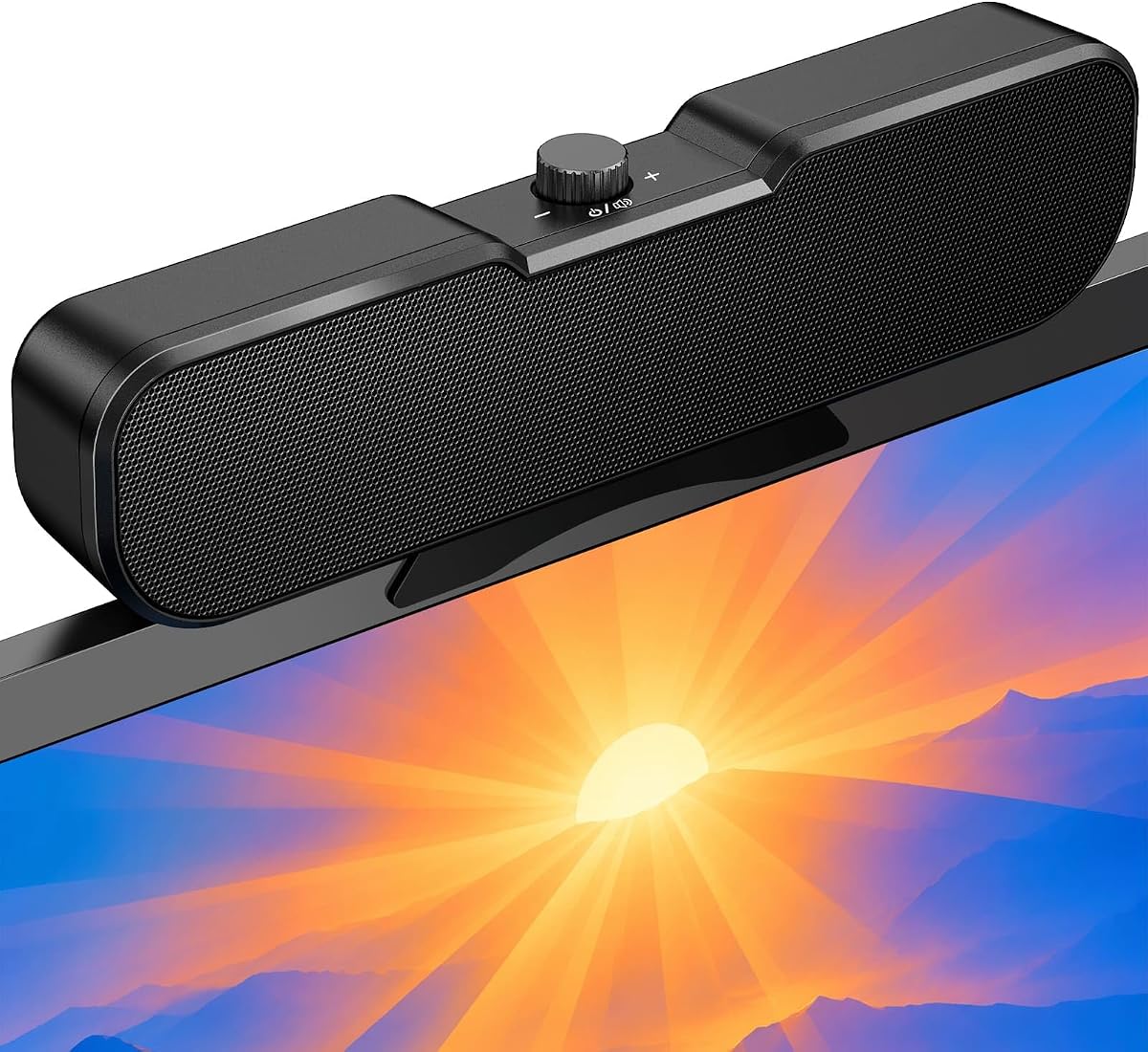
Inwa offers an affordable option with a 4.2 rating. Its 10 watts of power ensures amazing sound quality in a compact bar. Three top buttons make volume and mute adjustments effortless.
We may earn a commission when you buy through this link, at no additional cost to you.
The spring clip mounts securely to most monitors up to 1.18 inches thick. Silicone pads protect your monitor surface effectively. A single USB cable handles both power and audio.
It lacks advanced features but delivers reliable daily performance. The sound quality is clear for meetings and casual listening. Life time technical support adds peace of mind for buyers.
Perfect for budget-conscious users needing straightforward audio enhancement. This speaker balances cost and functionality well. It is a practical choice for students and small offices.
Three buttons on top allow intuitive volume up down and mute control.
Silicone pads on clip protect monitor surfaces while ensuring stability.
We may earn a commission when you buy through this link, at no additional cost to you.
This Inwa model offers clear audio with a 4.3 rating. Dual 5W high-sensitive drivers deliver balanced sound that upgrades laptop audio. Ultra-narrow clip design keeps your screen visuals completely uninterrupted.
We may earn a commission when you buy through this link, at no additional cost to you.
The adjustable angle lets you direct sound where you need it. One-touch controls on the top panel make settings simple. A built-in USB-C adapter ensures compatibility with modern devices.
It focuses on core audio performance without wireless extras. Users should ensure sound card drivers are updated for best results. The design minimizes clutter while maximizing sound clarity effectively.
Excellent for users seeking a clean efficient audio upgrade. This speaker provides clear sound with minimal setup. It suits those prioritizing visual aesthetics alongside audio quality.
Dual 5W high-sensitive drivers provide surprisingly clear balanced sound.
Ultra-narrow clip adapts to various thicknesses while staying out of view.
We may earn a commission when you buy through this link, at no additional cost to you.
Choosing the right clip on speakers involves evaluating connectivity sound quality and design features. This guide covers key factors to help you make an informed decision.
Most clip on speakers use USB or USB-C connections for both power and audio. Ensure your laptop has compatible ports. Some models also support Bluetooth for wireless streaming flexibility.
Check for built-in adapters if you have newer devices with limited USB-A ports. Wired options ensure stable audio without latency issues during calls or gaming.
Look for dual drivers and passive radiators for richer bass and clearer audio. Power output measured in watts affects volume and depth. Higher wattage generally means louder and more dynamic sound.
Prioritize models that offer stereo separation for an immersive experience. Balanced sound ensures speech clarity in meetings and depth in music.
Clips should be sturdy with silicone pads to protect your monitor. Measure your monitor thickness to ensure compatibility. Space-saving designs keep your desk clean and organized efficiently.
Adjustable angles or clip positions allow you to direct sound optimally. A low profile ensures the speaker does not obstruct your screen view.
Touch buttons knobs or rollers offer different control experiences. Some models rely on system volume settings for simplicity. Consider how often you need quick access to mute or volume.
Intuitive controls save time and prevent workflow interruptions. Look for tactile feedback if using the speaker frequently during meetings.
Ensure the speakers support your operating system such as Windows macOS or Linux. Plug and play functionality avoids driver installation hassles. Compatibility with tablets and phones adds extra versatility.
Check for specific incompatibilities with certain monitor USB ports. Some models may require updated audio drivers for full functionality.
Built-in microphones are useful for video calls without extra peripherals. Pickup range affects voice clarity during conversations. Integrated mics keep setups streamlined for remote work.
If you use a dedicated headset, ensure the speaker supports audio switching. Clear mic performance is key for professional communication needs.
RGB lighting adds aesthetic appeal without impacting sound quality. Customizable modes can sync with audio for a dynamic experience. Consider if lighting fits your workspace vibe and lighting conditions.
Low power consumption ensures lights do not drain system resources. Adjustable brightness allows you to control visual intensity as needed.
Reliable customer support helps resolve setup or technical issues quickly. Lifetime technical support signals manufacturer confidence in product quality. Warranty terms protect your investment against defects.
Check response times for customer service inquiries to avoid downtime. Clear troubleshooting guides can simplify your experience significantly.
Start by attaching the speaker securely to your monitor top bottom or side. Ensure the clip grips firmly without obstructing any ports. Connect the USB cable to your laptop for power and audio simultaneously.
Adjust volume settings using the speaker controls or your system menu. Calibrate audio levels for balanced sound quality. Regularly check connections to maintain consistent performance.
Clean the speaker with a soft dry cloth to prevent dust buildup. Avoid liquid cleaners near electronic components. Store in a dry place when not in use to prolong lifespan.
Most modern models operate plug and play without needing driver installation. They work directly with standard audio settings on Windows macOS or Linux. Some advanced features might require software updates for best performance.
Yes many speakers support USB-C connectivity for tablets and smartphones. Ensure your device supports audio output via USB. An included adapter often helps with older USB-A ports.
Some models warn against installing on ultra-thin screens to avoid tipping. Check the clamp specifications for maximum thickness limits. Place them on the desktop or monitor instead for safety.
Ensure the audio driver is up to date and the USB port works. Select the correct playback device in system volume mixer settings. Restart your computer to refresh audio detection if needed.
Many models feature passive radiators and dual drivers for enhanced bass. They provide deep sound despite compact sizes. Look for specifications mentioning bass performance for best results.
Most are designed for PC laptops and tablets so console compatibility is limited. Check product details for specific device support. Gaming PCs benefit most from these audio solutions.
Attach the speaker above the monitor for direct audio projection. Ensure it faces you without obstruction. Adjustable angles help direct sound precisely to your listening position.
Most draw power from the USB port consuming minimal energy. RGB lighting adds slight usage but remains efficient. They are designed to avoid draining laptop battery significantly.
We explored ten top clip on speakers offering diverse features and designs. Each model provides distinct advantages whether you need wireless flexibility or wired stability.
Prioritize sound quality and compatibility to match your specific needs. A reliable speaker enhances both work and entertainment experiences significantly.
Remember to verify current pricing and availability before buying. Technology evolves quickly so checking latest specs ensures you get the best value today.