
Zobirez 420W 10-Port
4.5Editor score
Ten ports included
420W power
Cables included
This guide compares the top charging stations for multiple devices to help you organize your electronics and power laptops phones and tablets efficiently.
Managing power for laptops smartphones and tablets can clutter your desk quickly. A quality charging station for multiple devices consolidates outlets and cables into one organized hub. This reduces tripping hazards and keeps your workspace tidy while ensuring every gadget stays powered up.
We evaluated ten top-rated charging stations based on port count output wattage build quality and safety features. Our analysis focuses on models that support modern USB-C standards alongside legacy USB-A connections. This list covers diverse needs from compact travel solutions to powerful desktop organizers.
Each pick highlights key specifications real user ratings and ideal use cases for your setup. We include detailed pros and cons to help you weigh trade-offs between price and performance. Remember that stock levels and availability can shift so check current listings before purchasing.
4.5Editor score

4.6Editor score

4.7Editor score
The following table compares the core specifications of each model to help you find the right fit for your devices.




The Zobirez 420W charging station offers a robust solution for power users needing multiple outlets. With a rating of 4.5 stars it delivers significant power across ten ports including five USB-C connections. This model stands out for its ability to charge laptops alongside phones simultaneously.
We may earn a commission when you buy through this link, at no additional cost to you.
Its design features a durable one-piece slot construction made from high-quality ABS material. The middle slots are wider and taller to accommodate devices with cases like iPads. This ensures stability and prevents the station from sliding around your desk during use.
While the build is sturdy the footprint is larger than compact models which may clutter smaller surfaces. Additionally the included cables are short which works well for organization but limits reach for devices further away. These are minor trade-offs for the power capacity provided.
This station is ideal for families or offices where multiple devices need charging daily. If you need a central hub that handles high-power needs and keeps cables managed this is a strong choice to consider.
The 420W total output ensures that even power-hungry devices like laptops can charge quickly alongside phones.
Including eight short mixed charging cables reduces the need to find and purchase separate cords immediately.
We may earn a commission when you buy through this link, at no additional cost to you.
The Zobirez 750W charging station is designed for users who need maximum power delivery across many devices. Rated at 4.6 stars it combines five USB-C and five USB-A ports to deliver up to 750W total output. This makes it suitable for charging multiple laptops or high-demand accessories.
We may earn a commission when you buy through this link, at no additional cost to you.
Each USB-C port can output up to 120W making it ideal for fast charging MacBooks and other USB-C laptops. The design uses a one-piece slot structure with wide center bays for tablets with thick cases. This ensures devices stay upright and spaced out while charging safely.
The main trade-off is the higher cost and weight compared to simpler models. It is a significant investment for a home office or family charging station. However the extra power and safety protections justify the cost for those needing reliability.
Choose this model if you require high-speed charging for premium devices and want a comprehensive organizer. It supports a wide range of tech and keeps everything powered without fighting over outlets.
With 120W per USB-C port you can charge most modern laptops without needing a dedicated wall charger.
Advanced protections like over-voltage and overheat guard help keep your devices safe during long charging sessions.
We may earn a commission when you buy through this link, at no additional cost to you.
The Anker Prime Charging Station delivers ultra-powerful 200W output in a compact form factor. With a rating of 4.6 stars it is designed to power six devices at once efficiently. Its small footprint saves desk space while still providing high-speed charging for laptops and phones.
We may earn a commission when you buy through this link, at no additional cost to you.
Each USB-C port supports up to 100W when used individually which allows for rapid charging of MacBooks. The proprietary safety system monitors temperature to protect your devices during use. It is built for desk stability with a sturdy design that weighs slightly more than a water bottle.
This model is not intended for travel due to its size and power requirements. It is best suited for a permanent spot on a work desk or home counter. The weight ensures it stays stable but limits portability for commuters.
If you need a reliable and efficient charger for a permanent setup this is an excellent option. Anker reputation for quality and safety makes it a safe bet for valuable electronics.
Charging two 14 inch MacBook Pros to 50 percent in under thirty minutes demonstrates its high power delivery.
About the width of an iPhone 17 it fits easily on crowded desks without taking up much room.
We may earn a commission when you buy through this link, at no additional cost to you.
This 6-Port GaN Charging Station is a compact solution for decluttering your desk or travel bag. Rated at 4.3 stars it measures just over 3 inches wide and fits easily into a pocket. It allows you to charge up to six devices simultaneously from a single outlet.
We may earn a commission when you buy through this link, at no additional cost to you.
The total output is 100W which is sufficient for smartphones tablets and accessories like earbuds. It includes a 5ft detachable AC extension cord to reach wall outlets behind desks or nightstands. The universal compatibility ensures it works with most iPhone Samsung and Android devices.
The main limitation is that it is designed for mobile devices and not intended for laptops. If you need to charge a MacBook or high-power laptop this model may not provide enough power. It is best for phones and small electronics only.
For travelers or those with limited space this is a convenient and lightweight option. The included extension cord adds flexibility for reaching outlets in tight spaces.
The lightweight hub fits into your bag or pocket for easy transport while on the go.
Built-in intelligent circuit management guards against over-charging and short circuits to protect battery health.
We may earn a commission when you buy through this link, at no additional cost to you.
The Anker MagGo Charging Station is designed for users deeply invested in the Apple ecosystem. With a rating of 4.6 stars it offers fast 15W wireless charging consistent with original MagSafe technology. It supports three devices at once including phones watches and earbuds.
We may earn a commission when you buy through this link, at no additional cost to you.
Certified fast charging for Apple Watch enables it to power from zero to one hundred percent in under ninety minutes. You can adjust the angle vertically up to 45 degrees for optimal viewing in StandBy mode. This makes it perfect for bedside use or desktop display.
This station is optimized for Apple devices which limits compatibility with other brands. The price is higher than general chargers but the convenience and design justify the cost. It is not suitable for Android phones or non-MagSafe cases.
If you have multiple Apple devices and want a clean desk setup this is the top choice. It combines speed certification and style in a single compact unit.
Official certification ensures your Apple Watch charges quickly and safely with no need for its own cable.
Adjustable vertical angles allow you to find the best view for notifications while the device charges.
We may earn a commission when you buy through this link, at no additional cost to you.
The Anker Desktop Charger combines a power strip and charging station into one robust unit. Rated at 4.7 stars it features three AC outlets and six USB ports for a total of nine connections. It provides 100W output on specific USB-C ports for fast device charging.
We may earn a commission when you buy through this link, at no additional cost to you.
Built-in surge protection rated at 300J helps protect devices from voltage spikes and risks. The eight-point safety system is engineered to guard against overvoltage and short circuits. The weight ensures it stays stable on desktop surfaces during regular use.
This unit is larger than a standard charging brick and takes up more outlet space. It is ideal for a home office where you need to plug in monitors or speakers alongside phones. The surge protection adds a layer of safety not found in basic hubs.
Choose this if you want a single place for both high-power devices and electronics. It reduces the need for multiple adapters and keeps your power setup secure.
The 300J surge protector shields your equipment from electrical spikes and unstable grid power.
Having AC outlets alongside USB ports means you can plug in lamps or speakers and charge phones.
We may earn a commission when you buy through this link, at no additional cost to you.
The MSTJRY Charging Station is a practical and affordable option for basic desktop organization. Rated at 4.3 stars it allows you to charge up to five devices simultaneously from one outlet. It includes seven short cables to match various iPhone and Android devices right out of the box.
We may earn a commission when you buy through this link, at no additional cost to you.
The design features removable dividers to hold larger tablets with thick cases securely. A power switch gives a visual indication that the unit is active and ready for use. It automatically detects devices and adjusts voltage to minimize charging time.
Since this model only uses USB-A ports it may not be as fast as modern USB-C hubs. It is best for older devices or situations where you do not need maximum speed. The dividers must be pressed firmly to stay in place during setup.
This station is a great gift for family members who need a simple charging solution. It keeps cables tidy and works well for nightstands or kitchen counters.
The included cables cover most common device types so you do not need to buy extra cords.
The power switch provides a quick way to see if the station is on without plugging into the wall.
We may earn a commission when you buy through this link, at no additional cost to you.
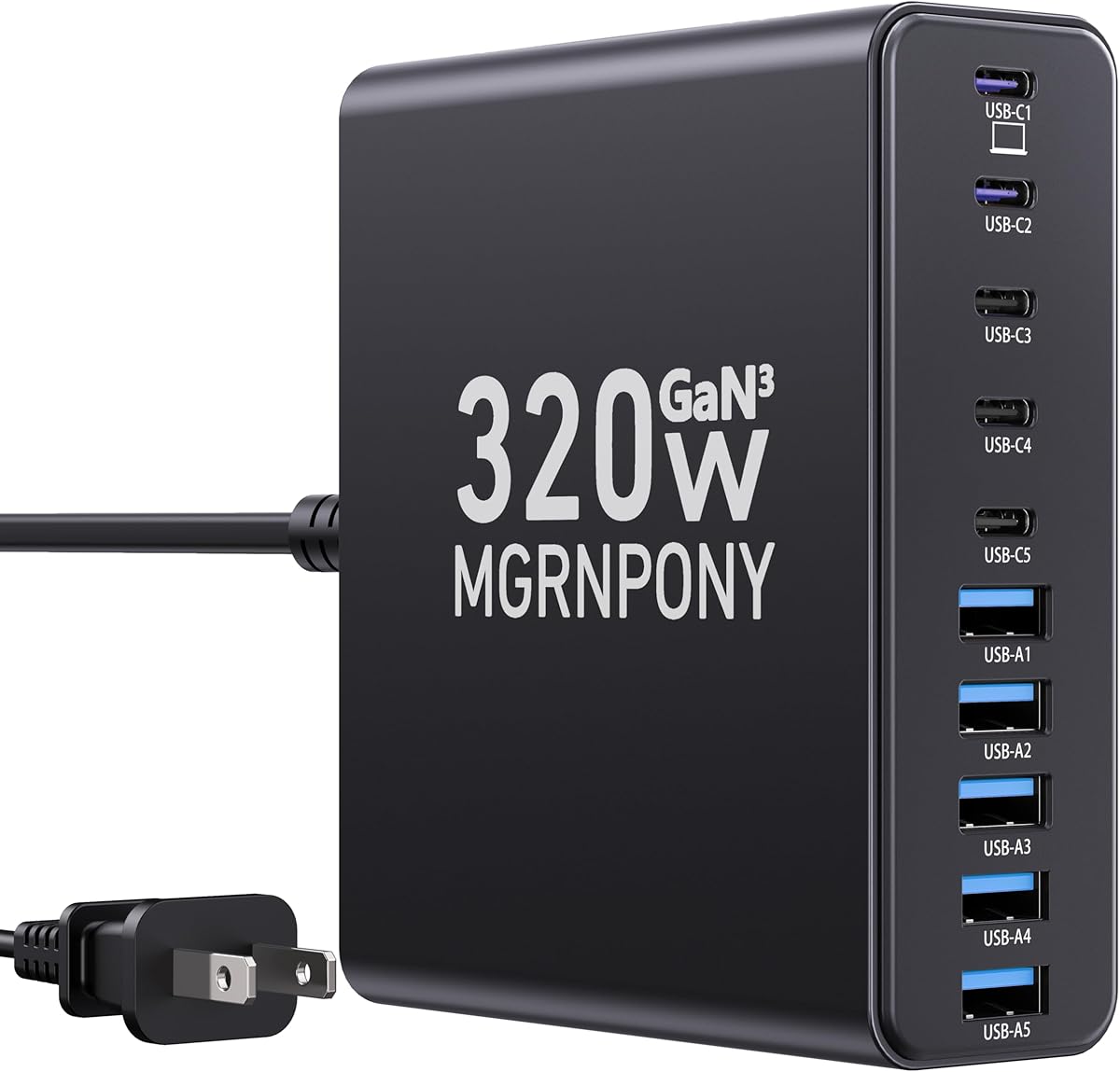
The MGRNPONY 320W Charging Station features GaN III technology for enhanced protection and speed. With a rating of 4.5 stars it can charge up to ten devices at once via five USB-C and five USB-A ports. The dedicated USB-C port powers laptops while others support older devices or accessories.
We may earn a commission when you buy through this link, at no additional cost to you.
Temperature monitoring checks safeguards over three million times daily to prevent overheating and overcharging. It supports PD PPS outputs of 65W 30W and 20W for quick charging of phones and tablets. You can place it horizontally or vertically to save space on your desk.
The output distribution may be complex to manage when all ten ports are in use. It is best to prioritize high-demand devices on specific ports for optimal speed. The compact design makes it suitable for travel despite the high wattage.
This model is a strong choice if you need high port density without sacrificing speed. It balances performance and safety for a variety of electronic needs.
GaN III technology ensures higher efficiency and smaller size compared to traditional silicon chargers.
The ability to orient the unit vertically helps save valuable space on crowded countertops.
We may earn a commission when you buy through this link, at no additional cost to you.
This retractable charging station solves cable clutter with four retractable cords of 80cm length. Rated at 4.4 stars it supports up to eight devices simultaneously with a total output of 105W. It combines GaN technology for faster speeds and smaller size in a compact dock.
We may earn a commission when you buy through this link, at no additional cost to you.
The retractable cords are perfect for charging iPhones and Android phones without leaving long wires hanging. It supports fast charging for devices like iPhone 18 Pro and Galaxy S26 models. The unit works as both a docking station and a portable extension cord solution.
Retractable cables can sometimes tangle or lose tension over time with heavy use. The mechanism adds complexity to the build which may affect long-term reliability compared to fixed cables. Regular care helps maintain the spring action.
Ideal for nightstands or desks where space is tight and cable mess is a concern. It keeps your area clean while providing power for multiple daily users.
The retractable design pulls cords back into the unit when not in use to reduce clutter.
With 105W total output you can charge phones and tablets at high speeds simultaneously.
We may earn a commission when you buy through this link, at no additional cost to you.
The Lcssio 300W Charging Station focuses on a sturdy construction that does not disassemble. Rated at 4.5 stars it offers eight ports including dual 65W ports for laptops. The design includes anti-slip rubber pads to protect your desktop from scratches and sliding.
We may earn a commission when you buy through this link, at no additional cost to you.
The middle slots are designed to be wider and higher to accommodate thicker devices with cases. It shares a total output of 300W across the ports to support modern devices and accessories. The housing is made from flame-retardant material for safety.
Unlike some other models the cables are included but the main unit does not have a travel focus. It is a permanent desktop solution that prioritizes safety and build quality. The anti-slip pads keep it stable even during heavy usage.
This station is a reliable choice for home or office use where durability is key. It handles high-power devices well while protecting your desk surface.
Solid housing without disassembly points ensures longevity and resistance to accidental drops.
Extra wide slots allow large tablets with protective cases to fit securely in the charging dock.
We may earn a commission when you buy through this link, at no additional cost to you.
Selecting the right charging station requires evaluating your specific device needs and available space.
Total wattage determines how many high-power devices you can charge at once. If you need to charge laptops alongside phones look for models offering 200W or more. Lower wattage units are sufficient for phones and small accessories.
Prioritize higher total wattage if you want to avoid slow charging when multiple ports are in use.
Modern devices rely on USB-C for fast charging so ensure your station includes enough USB-C ports. Some models mix USB-C and USB-A which is useful for legacy devices. Check if specific ports support high-wattage delivery for laptops.
A balanced mix of USB-C and USB-A ports ensures compatibility with your entire device collection.
Sturdy construction made from flame-retardant materials protects your devices and desk. Look for one-piece designs or secure dividers to prevent wobbling. Non-slip rubber pads help keep the station stable during use.
Choose units with solid construction to ensure safety and long-term durability on your desk.
Many stations come with mixed cable kits to reduce initial setup costs. Verify that the included cables match your devices and are long enough for your space. If cables are not included factor in the cost of purchasing separate ones.
Inclusive cable kits save time and money but check compatibility before relying on them.
Consider the physical dimensions of the station relative to your desk or nightstand. Compact models are better for travel while larger units offer more ports. Ensure there is enough clearance for devices to sit upright.
Measure your available space before buying to avoid overcrowding your workspace.
Advanced safety features like over-voltage and overheat protection safeguard your electronics. Look for certification and safety systems that monitor temperature. This is critical when charging high-cost devices like laptops.
Always prioritize models with built-in safety protections to prevent damage to your gadgets.
Determine if you need a stationary station or a portable one. Travel-friendly units are smaller and lighter but may have lower wattage. Desktop units are larger and offer more ports but are harder to transport.
Select a design that matches your primary use case whether at home or on the go.
Trusted brands often offer better customer service and warranty support. Reviews can highlight common issues like cable durability or port failures. Researching user feedback helps avoid models with recurring defects.
Choose a reputable manufacturer to ensure reliability and access to support if needed.
Place the charging station on a flat stable surface away from direct heat or sunlight. Ensure the outlet is easily accessible and the cord is not stretched taut. Use the non-slip pads to keep the unit from sliding during daily use.
Plug in devices using the correct cable types for optimal charging speed. Avoid bending or kinking the cords to prevent damage over time. If your station has removable dividers press them firmly into place to secure larger devices.
Periodically unplug the unit to clean dust from the ports with a dry brush. Do not use liquids or harsh chemicals on the housing. If the unit stops charging check the power cord and outlet before assuming the device is faulty.
Yes many models support charging laptops and phones simultaneously. Ensure the station offers enough total wattage to handle both devices. Look for dedicated USB-C ports that support high-power delivery for laptops.
Most modern charging stations include safety features like overcharge and overheat protection. These features allow safe overnight use. However always check the product specifications for specific safety certifications.
Some stations come with mixed cable kits included in the box. Others require you to purchase cables separately. Check the product details to see what is included before ordering.
USB-C ports generally support faster charging and newer devices. USB-A ports are older but still compatible with many accessories. A good station offers both types to support all your gadgets.
Compact models are designed for travel and fit easily in bags. However larger high-wattage units may be better for stationary desktop use. Check the weight and dimensions before packing for a trip.
Yes you can charge tablets headphones e-readers and smartwatches. Just ensure the port type matches the device requirements. Check wattage limits to avoid slow charging for high-power devices.
We explored ten distinct charging stations ranging from compact travel units to powerful desktop hubs. The Anker Prime offers exceptional power for its size while the Zobirez models provide massive port counts for families. Your choice depends on the number of devices and your need for speed.
Prioritize models with adequate wattage and USB-C support to future-proof your setup. Safety features like surge protection and flame-retardant materials are essential for valuable electronics. A good charging station keeps your environment organized and your tech ready.
Always verify current stock and compatibility before finalizing your purchase. Prices and availability change regularly so check the latest listings for the best fit. Your perfect solution may be just a click away.