
DTECH 90 Degree VGA Right Angle Adapter 15 Pin Male to Female Extension Converter Coupler
4.2Editor score
Mini size connector
Solid screw connection
Compact elbow design
Compare the top 90 Degree VGA Adapter models for monitors and projectors. This guide reviews connection quality, build durability, and space-saving designs for
Finding the right connection for your display setup can be tricky when space is limited behind screens. A 90 Degree VGA Adapter helps route cables neatly without stressing ports or bending wires sharply. This makes your desk or wall mount look cleaner and keeps signals stable over time.
We evaluated ten highly rated adapters based on build quality, connection stability, and real-world usability. Each model was checked for compatibility with standard 15-pin VGA ports and resistance to corrosion. Our list includes options for different angles and price points to fit various needs.
Every pick highlights key features like screw locks, nickel coating, and compact sizes for tight spots. Keep in mind that availability and pricing may shift often as demand changes. Always check the latest details before ordering to ensure you get the right fit for your device.
4.2Editor score
4.6Editor score

5.0Editor score
This side-by-side comparison shows the core specs and key strengths of each adapter to help you choose quickly. We focus on connection type, angle orientation, and included hardware for secure setups.
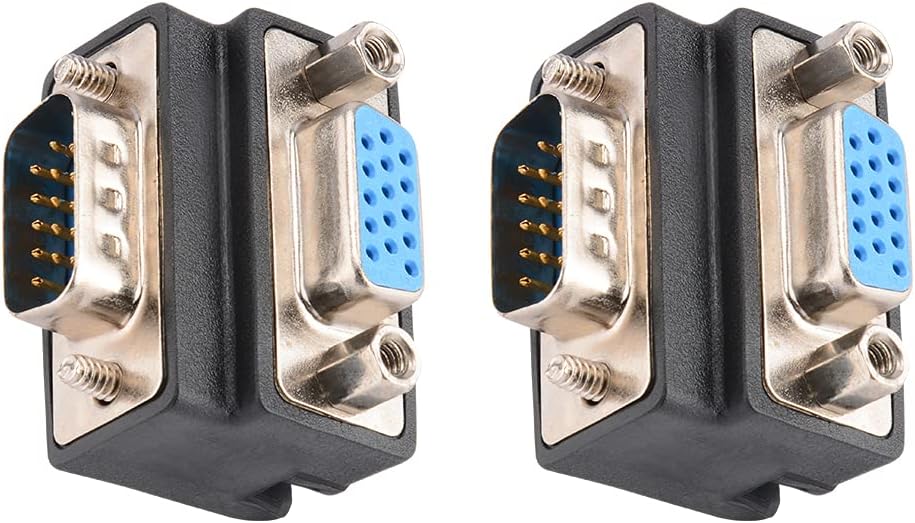


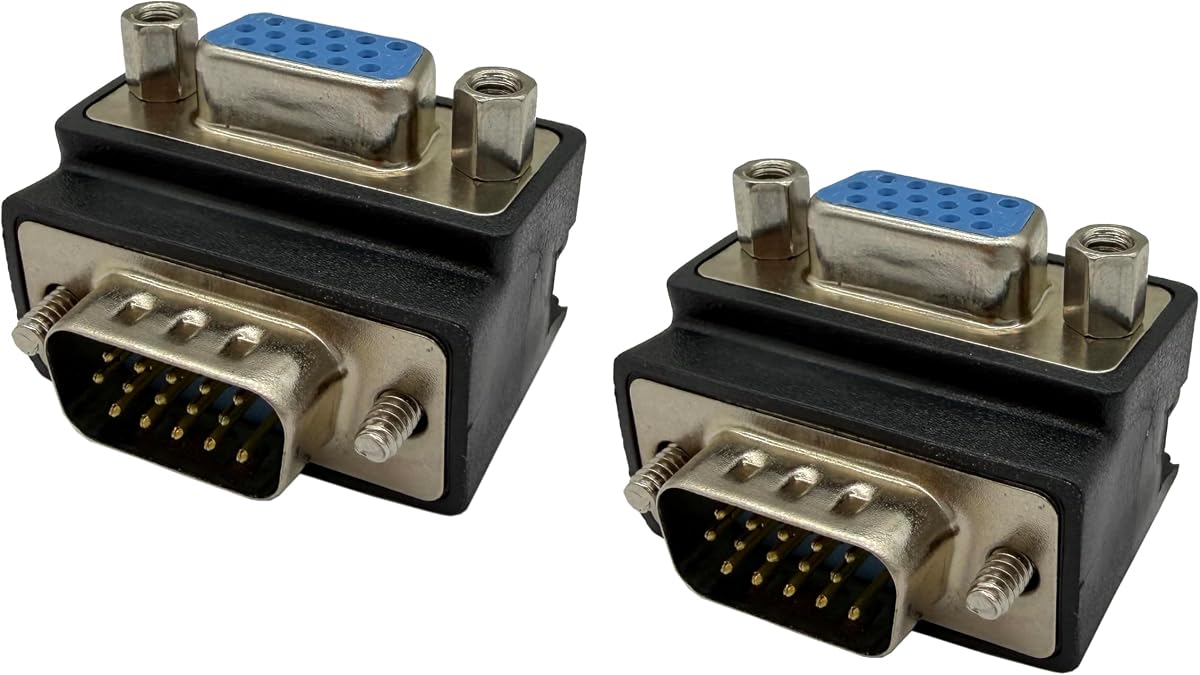
This adapter stands out as a top choice for anyone needing to route cables behind tight spaces. It carries a strong 4.6 rating from users who value its reliability and build quality. The two pack design ensures you have backups or can use them across multiple setups without extra cost.
We may earn a commission when you buy through this link, at no additional cost to you.
The key strengths lie in its nickel-coated contacts which resist corrosion and maintain clear signal transfer over time. Thumb screws and hex nuts allow for secure connection without needing extra tools. This reduces strain on ports and prevents damage from cables being pressed against walls or corners.
Trade-offs include a plastic body which may feel less premium than metal options and a fixed angle that limits flexibility. These are acceptable given the low price and the primary goal of space saving and port protection. Most users find the performance outweighs the material choice.
Ideal for home office setups or projector installations where cables must run close to the wall. We recommend this for those wanting a proven solution with excellent ratings and easy installation steps.
Redirecting the cable away from the port prevents repeated bending that can weaken internal pins over time.
The thumb screws and hex nuts lock the adapter in place so it stays stable during use without slipping.
We may earn a commission when you buy through this link, at no additional cost to you.
The DTECH adapter is a solid budget option for those seeking a simple right angle fix without spending much. Its 4.2 rating reflects consistent performance for everyday use in home or office settings. The mini size helps it fit into tight spots behind TVs or monitors easily.
We may earn a commission when you buy through this link, at no additional cost to you.
Its main strengths are the screw lock which ensures a firm connection and the compact design that does not add bulk to your setup. Users report it works well with SVGA projectors and standard monitors. It is easy to install and remove when you need to rearrange cables.
Trade-offs include a very basic plastic body that may not feel as durable as metal and a short body length that could limit cable routing. These are acceptable for the price point and casual use. It remains a reliable choice for short term or backup needs.
Best for users needing an inexpensive way to fix cable routing issues quickly. We recommend this for budget conscious buyers who prioritize function over premium materials.
The small footprint keeps the adapter from sticking out too much when installed in confined areas.
The built-in screws prevent the adapter from loosening over time due to cable movement or tension.
We may earn a commission when you buy through this link, at no additional cost to you.
This cablecc adapter earns a perfect 5.0 rating for its versatility and robust build quality that supports high definition visuals. It comes with two adapters offering both up and down angled options which adds flexibility for different mounting setups. Users appreciate the screw type security that keeps connections tight.
We may earn a commission when you buy through this link, at no additional cost to you.
Key strengths include support for 1080P resolution at 60Hz which ensures crisp visuals on compatible monitors. The package includes thumbscrews and nuts for secure attachment. This makes it suitable for projectors and desktops where stability is key. The dual angle pack covers more scenarios than single units.
Trade-offs involve a slightly higher price compared to basic models and weight that might make it less ideal for frequent travel. These are acceptable given the added value and performance. It remains a top pick for those wanting a premium experience.
Ideal for users needing a reliable high definition solution with flexible angle options. We recommend this for permanent setups where quality and stability matter most.
The adapter maintains signal integrity for 1080P at 60Hz ensuring clear and sharp image output.
Having both angle options in one package gives you flexibility to match different cable routing needs easily.
We may earn a commission when you buy through this link, at no additional cost to you.
This up angled adapter is designed for situations where the cable must exit upwards from the port. It has a perfect 5.0 rating from buyers who needed a specific orientation for their setup. The high density plug ensures compatibility with standard VGA ports on monitors and projectors.
We may earn a commission when you buy through this link, at no additional cost to you.
Key strengths include its ability to connect cables even when space around the port is limited. The design allows for a clean upward route that reduces bending. It is simple to use and effective for specific mounting scenarios where direction matters most.
Trade-offs include only coming as a single unit and having a fixed direction that may not suit all needs. These are acceptable given its specific purpose. It remains a strong choice for dedicated upward routing tasks.
Best for users who need a dedicated up angled solution for tight wall mounts. We recommend this for specific installation requirements where direction is fixed.
The upward angle helps cables run vertically away from the port for a neat look.
High density 15pin compatibility ensures it works with most common video sources and displays.
We may earn a commission when you buy through this link, at no additional cost to you.
This CERRXIAN adapter helps keep your desk or monitor area organized by allowing clean cable routing. Its 4.3 rating suggests consistent performance for general use. It connects VGA cables behind TVs and projectors efficiently while reducing tangled wires.
We may earn a commission when you buy through this link, at no additional cost to you.
Strengths include quick and easy connection that requires no special tools. The angle design helps set up displays in an orderly manner without wires in the way. It eliminates stress on heavy duty cable plugs which extends their life over time.
Trade-offs include basic build quality and limited packaging details. These are acceptable for the price and simple functionality. It remains a good option for those needing a straightforward fix for messy cables.
Best for users wanting to tidy up their display connections quickly. We recommend this for home setups where neatness is a priority.
The right angle design directs cables away from the back of the device to reduce clutter.
Relieving strain on the connector port prevents wear and tear from repeated cable movement.
We may earn a commission when you buy through this link, at no additional cost to you.
This Duttek adapter is designed for left angle routing which is essential for specific mounting setups. It has a 4.6 rating and features nickel coated contacts that resist corrosion. The build ensures reliable signal transfer with noise protection for vibrant pictures.
We may earn a commission when you buy through this link, at no additional cost to you.
Key strengths include the left angle orientation that allows cables to exit in the needed direction. The strong connection build protects cables from damage and breakage. Users report it is easy to connect without tangling wires. It works well with monitors and projectors.
Trade-offs include a higher price than budget options and a specific direction that may not fit all ports. These are acceptable for those needing left angle routing. It remains a solid choice for specific installation scenarios.
Ideal for users with devices requiring left oriented cable exit. We recommend this when standard right angle adapters do not fit the space.
The left angle design directs cables away from obstructions for a clean exit path.
EMI and RFI protection maintains picture quality by reducing static or signal loss during use.
We may earn a commission when you buy through this link, at no additional cost to you.
This DB15 adapter stands out for its durable metal shell which provides extra protection against wear. It carries a 4.3 rating and features a compact size making it easy to carry. The design ensures secure connection with stable screws for reduced signal interference.
We may earn a commission when you buy through this link, at no additional cost to you.
Strengths include the need for no drivers or settings which allows instant plug and play use. The small size is ideal for both home and office setups where portability matters. It is constructed to avoid bending cables and extend their lifespan during daily use.
Trade-offs include a slightly higher price than plastic options and the female to male type which may not fit all setups. These are acceptable given the build quality. It remains a great pick for those wanting a sturdy portable adapter.
Best for users needing a durable metal adapter for travel or tight spaces. We recommend this for setups requiring a reliable and portable connection solution.
The metal shell adds strength to the adapter and resists physical damage from impacts.
No settings are required so you can connect the device and start using it immediately.
We may earn a commission when you buy through this link, at no additional cost to you.
This chenyang adapter features a vertical flat design that suits specific port layouts. It has a 4.2 rating and offers a straightforward extension solution for VGA and SVGA setups. The high density plug ensures compatibility with standard devices.
We may earn a commission when you buy through this link, at no additional cost to you.
Strengths include its unique flat right angled type which may fit better in some tight corners. It connects VGA cables easily for extension needs. Users appreciate the simplicity of use and the black color that blends into dark setups.
Trade-offs include basic build feel and limited availability of detailed specs. These are acceptable for the price and function. It remains a viable option for those needing a flat angled adapter.
Best for users seeking a flat style adapter for unique mounting needs. We recommend this for setups where traditional adapters do not fit.
The flat angled design helps when standard right angle adapters cannot fit the port orientation.
It connects reliably with most 15 pin VGA sockets for consistent signal transfer.
We may earn a commission when you buy through this link, at no additional cost to you.
This DB15 adapter is known for being extremely lightweight and compact for easy handling. It carries a perfect 5.0 rating and offers a right angle connection solution. The small size and weight make it ideal for portable setups or tight spaces.
We may earn a commission when you buy through this link, at no additional cost to you.
Key strengths include its very light 27 gram weight and small dimensions. This makes it easy to carry in a bag without adding bulk. The right angle connector ensures efficient cable routing with minimal protrusion from the device.
Trade-offs include only coming as a single unit and a basic plastic body. These are acceptable for the price and portability goals. It remains a great pick for users needing a lightweight and simple adapter.
Best for users prioritizing portability and minimal weight. We recommend this for travelers or those with limited space at their desk.
The 27 gram weight ensures the adapter does not add noticeable weight to your gear.
The compact right angle design keeps the adapter close to the device to save space.
We may earn a commission when you buy through this link, at no additional cost to you.
This J&D adapter set offers a 2 pack which is great for multiple devices or backups. It has a 4.2 rating and features nickel coated contacts for better corrosion resistance. The PVC body is affordable and the package includes a warranty for support.
We may earn a commission when you buy through this link, at no additional cost to you.
Strengths include reliable EMI RFI protection which ensures vibrant picture quality and clear sound. The short body helps in optimal settlement of cables and devices. Users appreciate the 1 year warranty and the value of getting two units.
Trade-offs include a PVC body which may not feel as durable and a fixed short design. These are acceptable given the value and warranty. It remains a solid choice for needing two adapters at once.
Best for users needing two adapters for different rooms or setups. We recommend this for value seekers wanting warranty support.
The 2 pack allows you to use one adapter at home and keep one as a spare or for office.
Nickel coated contacts resist rust and maintain signal efficiency over time in varying environments.
We may earn a commission when you buy through this link, at no additional cost to you.
Choosing the right adapter depends on your specific setup needs and port orientation requirements.
The orientation of the adapter angle is critical because it determines which way the cable exits the port. You must check if your device needs a right left up or down angle to avoid stress on the cable and port. This depends heavily on your monitor placement and available space behind the device.
Always verify the required direction before ordering to ensure the adapter fits your setup correctly.
VGA adapters typically use 15 pin connectors with male to female or female to male configurations. Confirm your device ports match the adapter orientation to avoid buying an incompatible item. Some adapters are designed specifically for extension while others connect different cable ends.
Check your device ports carefully to ensure the male female orientation matches your cable ends.
Materials like metal or plastic affect durability and heat dissipation during use. Metal shells provide extra protection against physical damage and reduce signal interference better than plastic. For long term use consider models with stronger builds to prevent breakage at the connector.
Prioritize metal shells for durability but plastic is acceptable for short term or light use.
Nickel coated pins resist corrosion and maintain signal quality over time compared to bare metal. This is important if your setup is in a humid environment or will be used for years. Corrosion can degrade signal and lead to display issues if the contacts are not protected.
Look for nickel coated contacts to ensure long lasting reliable signal transfer in various conditions.
Adapters with screws or nuts help lock the connection in place and prevent loosening due to tension. This adds stability especially for projectors or setups where cables are frequently moved. Without secure locking the adapter may slip and cause connection drops or image flicker.
Choose adapters with screw locks for a more stable and secure connection during use.
Some options come in 2 packs which provide backups or allow use across multiple devices. This adds value and ensures you have spares if one fails or gets misplaced. Single units are cheaper but limit your flexibility for larger setups or future needs.
Consider 2 packs for better value and flexibility if you need adapters for more than one place.
VGA technology has limits but higher quality adapters support up to 1080P at 60Hz reliably. This ensures sharp visuals without distortion on modern monitors. Check specs to confirm the adapter handles your screen's resolution and refresh rate properly.
Verify resolution support to avoid blurry images on higher definition displays.
A warranty provides peace of mind and support if the product has defects. Brands offering at least one year coverage show confidence in their build quality. This helps you avoid costs if the adapter fails unexpectedly during use.
Check for warranty terms to ensure you have support if the adapter stops working.
To install your adapter simply turn off both devices to avoid any electrical issues. Align the male pin end with the female port and push gently until it fits. Ensure the angle direction matches your cable routing path to prevent bending the wires.
Once the adapter is seated properly use the thumb screws to secure it firmly to the port. Tighten them evenly to avoid tilting the adapter which can cause poor contact. Do not overtighten as this can strip threads or damage the ports on your device.
For maintenance keep the pins clean and free of dust by using a dry cloth or air duster. Avoid using liquids near the contacts to prevent short circuits or corrosion. Store any unused adapters in a dry place to protect them from environmental damage.
It works with any device that uses a standard 15 pin VGA port such as monitors projectors and older desktops. Ensure the male female orientation matches your cable and port type. Check the specific product details to confirm compatibility.
A good adapter with proper shielding and gold or nickel coated pins does not degrade video quality. It simply reroutes the connection and may even improve stability. Poor quality adapters with loose pins might cause flicker or signal loss.
Choose the angle based on where your cable needs to go after exiting the port. If your cable needs to go to the right use a right angle adapter. If it needs to go to the left use a left angle option.
No these adapters are for analog VGA signals and cannot convert to digital HDMI directly. You need a dedicated VGA to HDMI converter if your device only has HDMI ports. These adapters extend existing VGA connections only.
No VGA adapters are passive hardware and do not require any driver installation. They work instantly once connected properly to your computer and display. Plug and play is supported by standard operating systems.
Check the connector type on your VGA cable to ensure it matches the adapter ends. Most VGA cables use 15 pin connectors so verify if it is male or female. The adapter should match one end of your cable for a secure fit.
VGA is an older standard with limits on refresh rates so high end gaming may be better suited to HDMI or DisplayPort. However for older games or systems with VGA this adapter works fine. It maintains signal stability for basic displays.
A 2 pack is better value if you have multiple devices or want a spare for backup. It saves money compared to buying individually later and ensures availability. Single units may be cheaper but offer less flexibility.
Our top picks include the 90 Degree VGA Male to Female Adapter 2 Pack for overall value and the DTECH adapter for budget buyers. We also recommend the cablecc model for those needing premium build and up down options.
Prioritize the adapter orientation and build material to ensure it fits your specific setup needs. Secure connections with screws are always preferable for stability. Nickel coated contacts will help protect against corrosion over time.
Remember to check current prices and availability as they may shift often. Always verify the details before ordering to ensure you get the right fit for your device setup.