
Raycue Mac mini M6, M5 Pro, M4 Dock & Stand with 8T NVMe SSD Enclosure
4.3Editor score
10-in-1 Ports
10Gbps Data Transfer
Wi-Fi Shielding
This guide compares the top Mac Mini M4 dock options for storage, connectivity, and design to help you choose the perfect station for your setup.
Choosing the right dock for your Mac Mini M4 can transform your workspace into a powerful productivity hub. These devices expand connectivity and storage while keeping your desk organized and sleek. A good dock matches your Mini's design and offers reliable ports for all your essential peripherals without cluttering your area.
We evaluated the leading Mac Mini M4 docks based on build quality, port selection, storage expansion, and cooling performance. Our comparison looks at real-world usability for creative pros and everyday users. Each entry highlights key features to help you find the perfect fit for your specific workflow needs.
Every pick below shows detailed specs, pros, and cons to guide your decision. We focus on practical benefits like data speeds, display support, and ease of use. Note that prices and availability can change over time, so check current listings before buying to ensure you get the best deal.
4.3Editor score

4.8Editor score

4.5Editor score
Here is a side-by-side look at the top Mac Mini M4 docks available this month. Each entry lists key specs like port count, storage support, and display capabilities to help you compare at a glance.


The 4URPC Mac Mini dock ranks first with an impressive 4.8 rating. It combines a stand, hub, and storage expansion in one sleek unit designed for M4, M5, and M6 models. Its standout feature is the ability to support triple displays when paired with the Mac's built-in ports.
We may earn a commission when you buy through this link, at no additional cost to you.
This dock offers 13 ports including HDMI, DisplayPort, USB-A, USB-C, and SD slots. You can expand storage up to 8TB with an NVMe SSD for fast access to large media files. The 10Gbps transfer speed ensures smooth editing workflows without bottlenecks during data movement.
While the dock is powerful, it does not include an SSD, so you must purchase one separately. It also recommends an external power adapter for stable multi-device setups. These trade-offs are acceptable given the extensive connectivity and storage capabilities it provides.
Ideal for editors, designers, and power users who need maximum connectivity and storage. If you want a single solution that simplifies your desk while boosting performance, this dock delivers exceptional value and functionality for your Mac Mini M4 setup.
The dock supports HDMI 4K660Hz and DisplayPort 4K@144Hz. Combined with your Mac Mini's HDMI or Thunderbolt ports, you can create a triple-screen workspace for multitasking and reference.
With an NVMe enclosure supporting up to 8TB, you can store thousands of hours of video or photo libraries locally. This removes dependency on cloud storage and speeds up file access significantly.
We may earn a commission when you buy through this link, at no additional cost to you.
Raycue offers a budget-friendly option that doesn't compromise on core features. With a 4.3 rating, it expands connectivity and storage effectively. The dock supports M4, M5, and M6 models and features a clean design that fits any workspace.
We may earn a commission when you buy through this link, at no additional cost to you.
Its 10-in-1 hub includes fast USB-A and USB-C ports for peripherals. The integrated NVMe enclosure allows storage expansion up to 8TB with 10Gbps speeds. A unique feature is the conductive paint shielding that blocks Wi-Fi interference for stable wireless performance.
As a budget pick, it lacks some premium materials and extra ports found in higher-end models. The cooling design is passive, which works well for most tasks but may warm up under heavy sustained loads. Still, the value proposition is strong for most users.
Perfect for students, freelancers, or anyone seeking an affordable dock without sacrificing speed. If you want to expand your Mac Mini M4 capabilities without spending heavily, this Raycue dock provides reliable performance and essential connectivity.
The dock's conductive paint shield reduces 5G Wi-Fi interference. This ensures your Mac's wireless connection stays stable while using multiple USB devices simultaneously.
With 10Gbps ports and NVMe support, file transfers are quick. You can move large video files or photo libraries efficiently without long wait times.
We may earn a commission when you buy through this link, at no additional cost to you.
UGREEN delivers a premium docking solution with a 4.5 rating. Its design matches Mac Mini curves perfectly, providing both functionality and style. The dock integrates storage expansion and connectivity hubs into a single compact unit.
We may earn a commission when you buy through this link, at no additional cost to you.
It features 11 ports including multiple USB-A, USB-C, and SD readers. Up to 8TB of NVMe storage can be added for high-speed data access. The precision-engineered design includes a power lever so you can turn on your Mac without lifting the dock.
The dock is priced higher than basic options, reflecting its build quality and features. You'll need to buy an SSD separately and may need an external adapter for heavy multi-device setups. These considerations are minor given the overall quality and performance.
Best for professionals who value design and build quality alongside performance. If you want a premium dock that looks great and offers extensive connectivity and storage options, the UGREEN Mac Mini dock is a top choice for your M4 setup.
Designed to match your Mac Mini's curves and footprint perfectly. The dock includes anti-slip pads and a power lever for convenience.
Supports up to 8TB NVMe SSDs for fast internal storage expansion. This is ideal for creative work, backups, and local media storage.
We may earn a commission when you buy through this link, at no additional cost to you.
This UGREEN dock excels with display capabilities. Rated 4.4, it offers DisplayPort output up to 4K@144Hz for smooth visuals. It is ideal for creators who need high refresh rates and fast data transfer.
We may earn a commission when you buy through this link, at no additional cost to you.
The hub includes 10 ports including USB-A, USB-C, SD, and DP. It supports NVMe storage expansion up to 8TB with 10Gbps speeds. The power lever adds convenience for turning your Mac on without lifting it.
Like similar models, it does not include an SSD. You may need an external adapter for multiple devices. These trade-offs are acceptable given the display and storage performance it provides for professionals.
Great for users who prioritize display quality and storage speed. If you need a dock that supports high refresh rates and fast local storage, this UGREEN model delivers excellent performance.
The dock supports 4K@144Hz on Mac Mini M4 Pro and 4K@144Hz on M4. Perfect for creative work and entertainment.
10Gbps transfer speeds ensure quick file access. Ideal for video editing and large media workflows.
We may earn a commission when you buy through this link, at no additional cost to you.
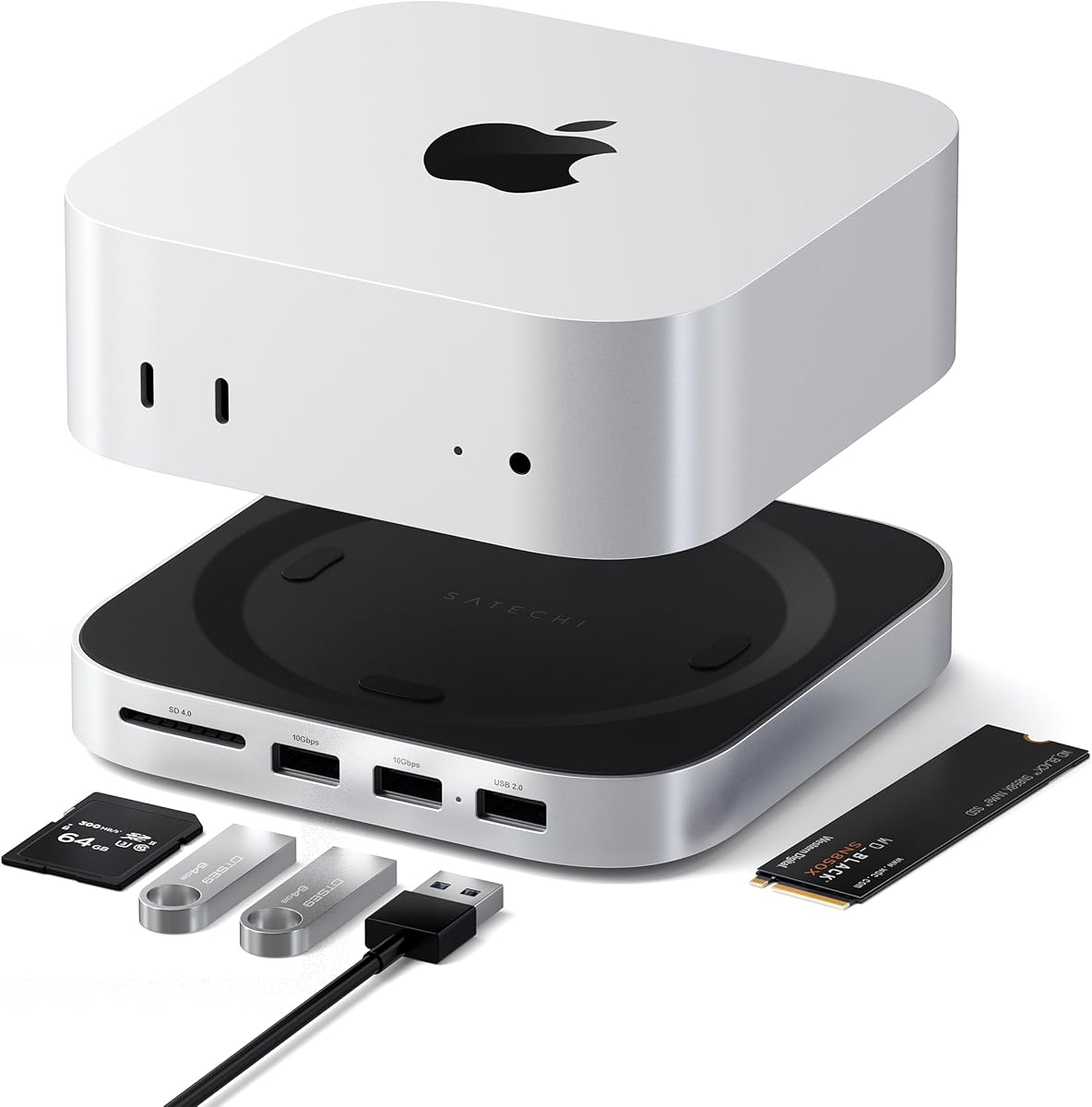
Satechi is known for quality accessories, and this dock reflects that. With a 4.5 rating, it offers a solid aluminum build and optimized cooling. It supports M4, M5, and M6 Mac Minis seamlessly.
We may earn a commission when you buy through this link, at no additional cost to you.
It features 5 front-facing ports including USB-A and SD. The dock supports up to 4TB NVMe SSDs for storage. Its recessed top and bottom vents ensure proper airflow for consistent performance.
While it has fewer ports than some models, it focuses on reliability and aesthetics. The lack of included SSD and fewer USB-A options may limit heavy users. Still, it remains a trusted choice for Mac enthusiasts.
Ideal for users who value build quality and brand reliability. If you want a simple, sturdy dock with front-facing convenience, Satechi delivers a premium experience.
Crafted from industry-grade aluminum for durability and style. The finish matches Apple devices perfectly.
Ports are positioned for easy front access without moving your Mac. This keeps your desk organized and efficient.
We may earn a commission when you buy through this link, at no additional cost to you.
ACASIS offers advanced storage with dual NVMe bays for up to 16TB. Rated 3.9, it supports multiple displays and includes fans for cooling. It suits users needing maximum local storage and active thermal management.
We may earn a commission when you buy through this link, at no additional cost to you.
The dock includes ports for USB-A, SD, and display outputs. With RAID options, you can configure drives for speed or redundancy. The 65W adapter ensures stable power for heavy workloads.
The active fans may add noise compared to passive models. Setup is more involved due to multiple drive configurations. These factors suit professionals who need robust storage solutions regardless of noise.
Best for power users requiring huge storage and dual drive support. If you need a dock that handles massive local media libraries with active cooling, ACASIS provides a powerful solution.
Two NVMe slots allow up to 16TB total. Supports RAID 0 for speed or other modes for redundancy.
Silent dual fans maintain safe temperatures under load. Ideal for sustained data transfer or video processing.
We may earn a commission when you buy through this link, at no additional cost to you.
Raycue's 8T NVMe dock offers strong value with a 4.3 rating. It supports fast 10Gbps transfers and includes Wi-Fi shielding. The compact design fits well in most desks.
We may earn a commission when you buy through this link, at no additional cost to you.
The dock provides 10 ports including USB-A, USB-C, SD, and audio. It accommodates NVMe SSDs up to 8TB for expanded storage. The short 20cm cable keeps the setup tidy.
It lacks an included SSD and may require external adapters for multiple devices. Passive cooling is sufficient for typical workloads. These trade-offs are acceptable for the price and performance.
Ideal for users seeking affordable high-speed connectivity and storage. If you want a reliable dock without breaking the bank, this Raycue model is a solid choice.
Conductive paint blocks 5G Wi-Fi signals to maintain wireless stability during heavy USB usage.
10Gbps ports support quick file transfers. Great for media work and backups.
We may earn a commission when you buy through this link, at no additional cost to you.
ACASIS dual-bay dock is built for storage enthusiasts. Rated 4.6, it supports two NVMe SSDs for up to 16TB. Active cooling ensures thermal safety during long sessions.
We may earn a commission when you buy through this link, at no additional cost to you.
It includes HDMI, USB-A, USB-C, and SD ports. The included adapter and thermal pads simplify setup. It is designed for M4, M5, and M6 Mac Minis.
The noise from fans may be noticeable in quiet environments. You must buy SSDs separately. These factors suit users prioritizing storage capacity over silence.
Best for professionals needing massive local storage and dual drive options. If you work with large video projects and need reliable performance, this ACASIS dock meets those needs.
Dual NVMe bays allow up to 16TB total. Perfect for archival and editing workflows.
4K@60Hz HDMI output supports secondary displays for multitasking or reference.
We may earn a commission when you buy through this link, at no additional cost to you.
UGREEN Thunderbolt 4 dock provides top-tier bandwidth. Rated 4.3, it supports 40Gbps transfer and dual 4K displays. It works with Mac Mini and other Thunderbolt 4 devices.
We may earn a commission when you buy through this link, at no additional cost to you.
It features three Thunderbolt ports, USB-A, Ethernet, and 85W charging. This allows a fully powered setup without extra chargers. The design is compact and robust.
The dock does not include an NVMe enclosure like other picks. It is pricier than standard hubs. These trade-offs are acceptable for users who prioritize Thunderbolt speed.
Ideal for pros needing maximum bandwidth and multi-monitor setups. If you want the fastest data and display options, this Thunderbolt 4 dock delivers outstanding performance.
40Gbps transfer allows extremely fast data movement. Supports 8K displays on compatible systems.
Extends to two 4K@60Hz monitors. Perfect for creative workflows and multitasking.
We may earn a commission when you buy through this link, at no additional cost to you.
RayCue HDMI dock supports both SATA and NVMe SSDs. Rated 4.3, it is a flexible storage solution. The 10-in-1 hub covers most connectivity needs for Mac Mini M4.
We may earn a commission when you buy through this link, at no additional cost to you.
It includes USB-A, USB-C, SD, HDMI, and audio ports. The enclosure supports up to 8TB. An extra power port is available for stable drives.
The dock requires external power for drives. It is designed for M4, M5, and M6 models. These features suit users needing SATA options alongside NVMe.
Best for users with existing SATA SSDs or those wanting mixed drive support. If you want flexible storage and solid connectivity at a fair price, this RayCue dock is practical.
Supports both NVMe and SATA M.2 SSDs. This adds versatility for various storage types.
4K@60Hz HDMI output extends display to HDTVs or monitors. Ideal for media consumption and meetings.
We may earn a commission when you buy through this link, at no additional cost to you.
M5 Retro dock stands out with a vintage Macintosh-inspired design and built-in 5-inch display. Rated 4.4, it merges nostalgia with modern tech. It is a unique choice for those wanting style and function.
We may earn a commission when you buy through this link, at no additional cost to you.
It features 14 ports including USB-C up to 80Gbps, USB-A, and SD readers. The integrated display shows notifications, clocks, or lyrics. Storage expands up to 8TB with NVMe SSDs.
The dock lacks an SSD and is priced higher than standard hubs. The display and retro aesthetics may not suit every workspace. However, it delivers unmatched character and connectivity.
Best for users who want a standout desk centerpiece. If you value design, notifications, and high-speed ports, this M5 Retro dock provides a unique experience.
5-inch HD screen shows notifications or media info. Adds visual utility without extra devices.
Thunderbolt 5 edition with 80Gbps bandwidth. Future-ready for ultra-fast data transfer.
We may earn a commission when you buy through this link, at no additional cost to you.
Choosing the right dock requires evaluating storage expansion, port types, cooling, and design to match your Mac Mini M4 setup and workflow needs.
Most docks include an NVMe SSD enclosure supporting 2230 to 2280 drives. Check if SATA is supported if you need that option. Capacity ranges from 4TB to 16TB depending on single or dual bays.
Look for docks with enough capacity for your media files and fast 10Gbps transfers. Ensure the enclosure includes thermal pads for heat management.
Docks range from 5 to 14 ports. Essential ports include USB-A, USB-C, SD, and display outputs. Ensure there are enough 10Gbps ports for fast external drives and peripherals.
Count your devices and choose a dock that matches their requirements. Extra USB-A ports can replace separate hubs.
Many docks offer HDMI or DisplayPort outputs. Some support up to 4K@144Hz for high refresh rates. Check compatibility with your Mac Mini model for multi-monitor setups.
For multi-screen work, combine dock outputs with your Mac's built-in HDMI or Thunderbolt to achieve triple displays.
Passive docks rely on aluminum and vents. Active docks use fans that add noise but manage heat better. Consider your tolerance for noise if using docks for long sessions.
Ensure the dock has adequate bottom ventilation to prevent your Mac Mini from overheating.
Aluminum alloys provide durability and match Mac Mini design. Plastic may be affordable but less premium. Look for anti-slip pads for stability and scratch protection.
A solid build ensures longevity and a professional look on your workspace.
Some docks draw power from Mac Mini, others include adapters. External adapters provide more stability for multiple devices. Always check power requirements if running SSDs and peripherals simultaneously.
Opt for self-powered docks if using multiple high-draw devices to avoid disconnections.
Most docks come with short cables to reduce clutter. Typical lengths range from 4cm to 20cm. Ensure the cable is long enough to reach your Mac Mini without stretching.
Short cables keep your desk neat. Consider extensions if your setup requires more distance.
Prices vary from affordable to premium. Basic models offer essential ports and storage. Premium models add Thunderbolt, active cooling, and displays. Determine which features matter most.
Balance cost with your storage and performance needs to find the best value.
Plug the dock into your Mac Mini's USB-C port and ensure it sits flat. Insert your NVMe SSD using the included screwdriver if needed, and place it inside the enclosure. Ensure all ports are aligned properly before closing.
Keep the dock in a well-ventilated area away from direct sunlight. Clean dust from vents using compressed air to maintain cooling. Avoid stacking heavy objects on top of the dock to prevent damage.
If you notice disconnections, check the power adapter and cables. Ensure the dock has sufficient power for all connected devices. Avoid unplugging SSDs while powered on to prevent data loss.
Some docks support SATA M.2 SSDs while others support only NVMe. Check the product specs carefully before buying. For example, certain RayCue models explicitly support SATA SSDs alongside NVMe.
Most docks do not include an SSD. You will need to purchase an NVMe SSD separately. This allows you to choose capacity and speed that fits your budget and needs.
These docks are designed for M4, M5, and M6 models. M3 Macs have different dimensions and port layouts. Ensure the dock lists compatibility with your specific Mac model before purchasing.
Some docks draw power from your Mac Mini, others include adapters. For multiple devices, an external adapter is recommended to avoid disconnections. Check the product description for power requirements.
Quality docks include vents and design features to maintain airflow. Ensure the dock is not blocking your Mac Mini's fan vents. Follow recommended placement to prevent overheating.
Most docks include short cables around 4cm to 20cm to reduce clutter. Check product specs for exact lengths. Extensions are available if you need more reach to your Mac Mini.
The top picks for Mac Mini M4 docks include 4URPC for overall value, Raycue for budget, and UGREEN for premium features. Each offers strong connectivity, storage expansion, and build quality tailored for M4, M5, and M6 models.
Prioritize storage capacity, port count, and cooling based on your workflow. Creative pros may want triple displays and NVMe bays, while casual users might prefer simple hubs with front ports.
Prices and availability can change. Always check current listings before buying to ensure you get the best deal for the dock that fits your Mac Mini M4 setup.