
E1000 Heat Shrink Label Maker, Wire Label Maker Waterproof-Labels
4.4Editor score
Includes heat shrink and flexible tapes
QWERTY keyboard for fast typing
Three cable modes for quick setup
This guide compares the top label maker for network cables to help you choose durable waterproof models with heat shrink and compliant standards for any
Organizing complex network infrastructures requires precise labeling to ensure safety and efficiency. A reliable label maker for network cables helps technicians identify wires quickly without confusion. The right tool provides durable, waterproof labels that withstand harsh environmental conditions found in data centers and industrial settings.
We evaluated ten leading models based on print quality, battery life, and compliance with industry standards. Our comparison focuses on features like heat shrink compatibility, battery life, and software integration for bulk labeling. Each product was selected for its ability to handle specific networking tasks effectively.
Every pick below highlights key specifications and real-world performance metrics for network professionals. We include details on tape compatibility and portability to suit different job site needs. Please note that product availability and pricing may change frequently on retail platforms.
4.4Editor score

4.6Editor score
4.3Editor score
The following table provides a side-by-side comparison of all ten selected label makers. We highlight key technical specifications and capabilities relevant to network cabling projects.


The Makeid P31S stands out as a top contender for network professionals needing industrial grade labeling. It features a high resolution 300 DPI print head that ensures sharp text and barcodes even on small cable tags. This precision is critical for avoiding identification errors in dense network racks.
We may earn a commission when you buy through this link, at no additional cost to you.
Its thermal transfer technology produces labels that are water resistant and oil proof for up to ten years. The device supports over thirty different label sizes including heat shrink and self laminating wraps. Additionally it meets ANSI and TIA standards which is often required for compliance audits in data centers.
While it is more expensive than basic models the battery life justifies the cost for heavy users. The 2600 mAh rechargeable battery allows up to ninety days of standby use between charges. This ensures the device is ready whenever you arrive at a jobsite without needing to find outlets.
We recommend this model for network engineers who prioritize durability and compliance. It is ideal for those managing large infrastructures where label longevity and readability are non-negotiable. The included PC software also helps streamline bulk labeling tasks for efficiency.
The device is built to withstand harsh environments typical of data centers and industrial sites. Its robust construction ensures reliable operation even after drops or exposure to dust.
Meeting ANSI and TIA standards ensures your labels remain legible and valid for safety inspections. This is essential for professional network installation and maintenance work.
We may earn a commission when you buy through this link, at no additional cost to you.
The E1000 is an excellent choice for users needing reliable labeling without breaking the bank. It comes with two packs of 12mm heat shrink tube tapes which are perfect for wire identification. This immediate readiness makes it a favorite for quick installations and repairs.
We may earn a commission when you buy through this link, at no additional cost to you.
Typing is efficient thanks to the familiar QWERTY keyboard layout. Users can create complex labels or flags quickly without navigating complex menus. The three cable modes simplify the process of creating wraps and fixed length labels automatically.
Power flexibility is another key advantage as it supports both USB C and six AAA batteries. This means you can charge it during the day or swap batteries on the go. The device also minimizes waste by printing twenty labels at a time with optimized settings.
For home office owners or small business IT staff this model offers great value. It balances cost with essential features needed for managing cables in server racks or under desks. We suggest it for those who need heat shrink functionality on a budget.
Including heat shrink tapes out of the box saves time and extra purchasing. You can start labeling wires immediately upon unboxing the device.
The QWERTY keyboard reduces the learning curve for new users. This allows for faster data entry during time sensitive network setups.
We may earn a commission when you buy through this link, at no additional cost to you.
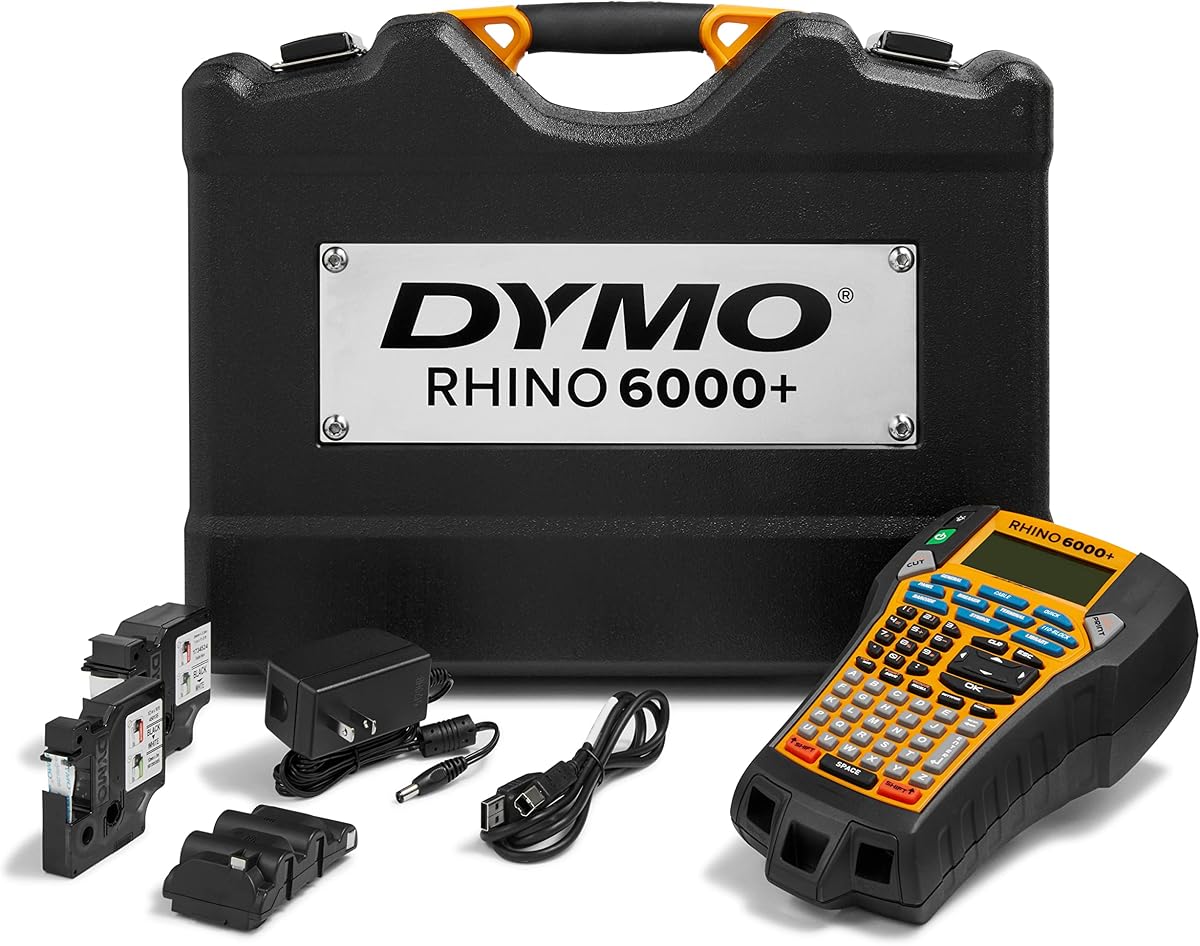
The DYMO Rhino 6000 represents the high end of industrial labeling with advanced connectivity options. It allows you to create complex barcodes and layouts using software on your PC before printing. This precision is vital for large scale data center tagging and asset management.
We may earn a commission when you buy through this link, at no additional cost to you.
The device meets key industry standards including ANSI and TIA/EIA-606-B which is crucial for compliance. It features exclusive hot keys that automatically size and format text saving valuable time during use. The included vinyl and nylon tapes ensure versatile application options for different environments.
A rechargeable lithium ion battery powers the unit for long sessions without needing replacements. The hard carry case provides protection for the device and accessories during transport. This robustness ensures it remains safe during daily field work and travel.
We recommend this for network managers overseeing large projects requiring standardized labeling. The ability to sync with computers ensures consistency across all labels printed. If you need professional grade tools this model delivers unmatched functionality and durability.
Connecting to a computer allows for detailed editing and bulk printing. This reduces manual errors and speeds up the labeling process significantly.
Adhering to strict industry standards ensures safety and professionalism. This is essential for enterprises and public infrastructure projects.
We may earn a commission when you buy through this link, at no additional cost to you.
This VolenGo model features a backlit LCD screen which is perfect for dark server rooms or basements. The backlight ensures you can see your text clearly without needing extra lighting sources. It is a practical solution for working in low light conditions effectively.
We may earn a commission when you buy through this link, at no additional cost to you.
The device prints at 203 DPI which is sufficient for clear text on most tape widths. It supports waterproof laminated tapes that resist water and oil for long term use. The three cable modes make it easy to switch between different labeling styles quickly.
Users appreciate the intuitive setup and menus that make it friendly for all skill levels. It includes 16 fonts and 100 frames allowing for creative organization labels. This versatility makes it suitable for both professional and home office needs.
We suggest this for technicians who often work in dimly lit environments. The screen visibility alone saves time and frustration during installation. It is a reliable choice for general organization and basic network cable management tasks.
The backlit screen eliminates the need for flashlights in dark areas. This improves workflow speed in cramped server racks.
Laminated tapes ensure the text remains readable despite humidity or spills. This extends the lifespan of your network identification tags.
We may earn a commission when you buy through this link, at no additional cost to you.
The Brother P-touch PTH111 simplifies electrical identification with dedicated one-touch keys for cables. You can instantly switch between cable wrap and flag modes without navigating menus. This speed is highly beneficial for technicians moving quickly through a wiring closet.
We may earn a commission when you buy through this link, at no additional cost to you.
The graphical LCD allows you to preview your label before printing to avoid errors. This feature reduces wasted tape and ensures accuracy in critical network environments. The device is designed for portability with a detachable wrist strap for secure handling.
It uses Brother Genuine TZe tapes which are known for durability and clarity. The adhesive options provide strong bonds on smooth and rough surfaces alike. This reliability ensures labels stay in place even in busy industrial settings.
We recommend this for general office or workshop organization needs. It is ideal for those who value ease of use and quick turnaround. For simple cable wrapping tasks this model offers excellent performance and convenience.
Previewing labels on screen prevents costly mistakes before printing. This maintains professionalism in your labeling work.
The lightweight design and strap allow for easy carrying around the shop. You never have to carry a heavy case for quick jobs.
We may earn a commission when you buy through this link, at no additional cost to you.
The Brady M210 is designed as a robust tool for field service technicians. It features a sturdy housing that withstands drops and bumps common in construction sites. This durability ensures it keeps working even when the environment is rough or unpredictable.
We may earn a commission when you buy through this link, at no additional cost to you.
It offers a straightforward interface that focuses on essential labeling tasks. The compatibility with Brady tapes ensures consistent quality and adhesion. Users trust this brand for critical infrastructure labeling where failure is not an option.
While it lacks advanced connectivity features its reliability is its main selling point. It is easy to operate without extensive training making it ideal for shared tools. This simplicity reduces downtime during important installation processes.
We suggest this for contractors and engineers who prioritize reliability over bells and whistles. It is a workhorse device that gets the job done consistently. For heavy duty field work this model is a solid investment.
Built to withstand the demands of industrial environments. This ensures longevity in harsh conditions.
A focus on core functions reduces the learning curve for new staff. Training time is minimized for efficiency.
We may earn a commission when you buy through this link, at no additional cost to you.
The Epson LW-PX700 supports tape widths up to one inch which is useful for large asset tags. This capability makes it suitable for labeling main distribution frames and heavy duty cables. It provides the versatility needed for complex industrial labeling requirements.
We may earn a commission when you buy through this link, at no additional cost to you.
A standout feature is the lifetime warranty which demonstrates strong manufacturer confidence. If the device fails on the worksite it is replaced without questions. This policy provides peace of mind for businesses relying on consistent equipment performance.
The auto rewind feature reduces waste and time spent on tape handling. It includes a complete kit with an adapter and starter tape for immediate use. This readiness ensures you can start working right away without extra purchases.
We recommend this for facilities management and large office setups. The wide tape support and warranty are valuable assets for long term use. It is a smart choice for organizations needing durable and compliant labeling.
The lifetime warranty ensures your investment is protected indefinitely. This reduces long term maintenance costs significantly.
Handling wider tapes allows for more detailed labels and barcodes. This is useful for main entry points in a network.
We may earn a commission when you buy through this link, at no additional cost to you.
The Brady M211 connects via Bluetooth to your phone for label creation. This mobile integration allows you to design labels using your phone's app which is intuitive. It is perfect for tech savvy professionals who prefer working on mobile devices.
We may earn a commission when you buy through this link, at no additional cost to you.
It is built to military standards ensuring resistance to drops and shocks. This ruggedness protects the device in demanding environments where equipment abuse is common. The attached magnet lets you stick the printer to metal panels hands free.
The belt clip and hard case make transport convenient and safe. You can attach the printer to your belt and access it quickly while working. This design optimizes efficiency for technicians moving around a site constantly.
We suggest this for remote workers or field technicians with smartphones. The mobile workflow saves time and integrates well with modern tools. It is a premium choice for those needing rugged and connected labeling capabilities.
Connecting to a phone streamlines the label design process. This improves flexibility and accessibility on site.
The magnet and clip allow you to focus on wiring tasks without holding the printer. This improves safety during installation.
We may earn a commission when you buy through this link, at no additional cost to you.
The DYMO 5200 is built for handling complex data labels with ease. Its five line display allows you to view larger strings of text before printing. This is crucial for managing long network paths and detailed asset IDs accurately.
We may earn a commission when you buy through this link, at no additional cost to you.
It features exclusive hot keys that automatically size and format text. This automation speeds up the process of creating standardized industrial labels. The pre-programmed symbol library includes essential icons for electrical and data connections.
This model supports Code 39 and Code 128 barcodes for tracking. The large backlit display ensures visibility in all lighting conditions. It is a trusted tool for facilities requiring precise and consistent identification.
We recommend this for data centers needing robust inventory management. Its ability to handle detailed text makes it superior for complex racks. For legacy systems or high precision needs this model remains relevant and effective.
The five line display supports longer addresses and IDs. This avoids cutting off text on complex labels.
Pre-loaded symbols save time entering special characters manually. This improves accuracy in labeling.
We may earn a commission when you buy through this link, at no additional cost to you.
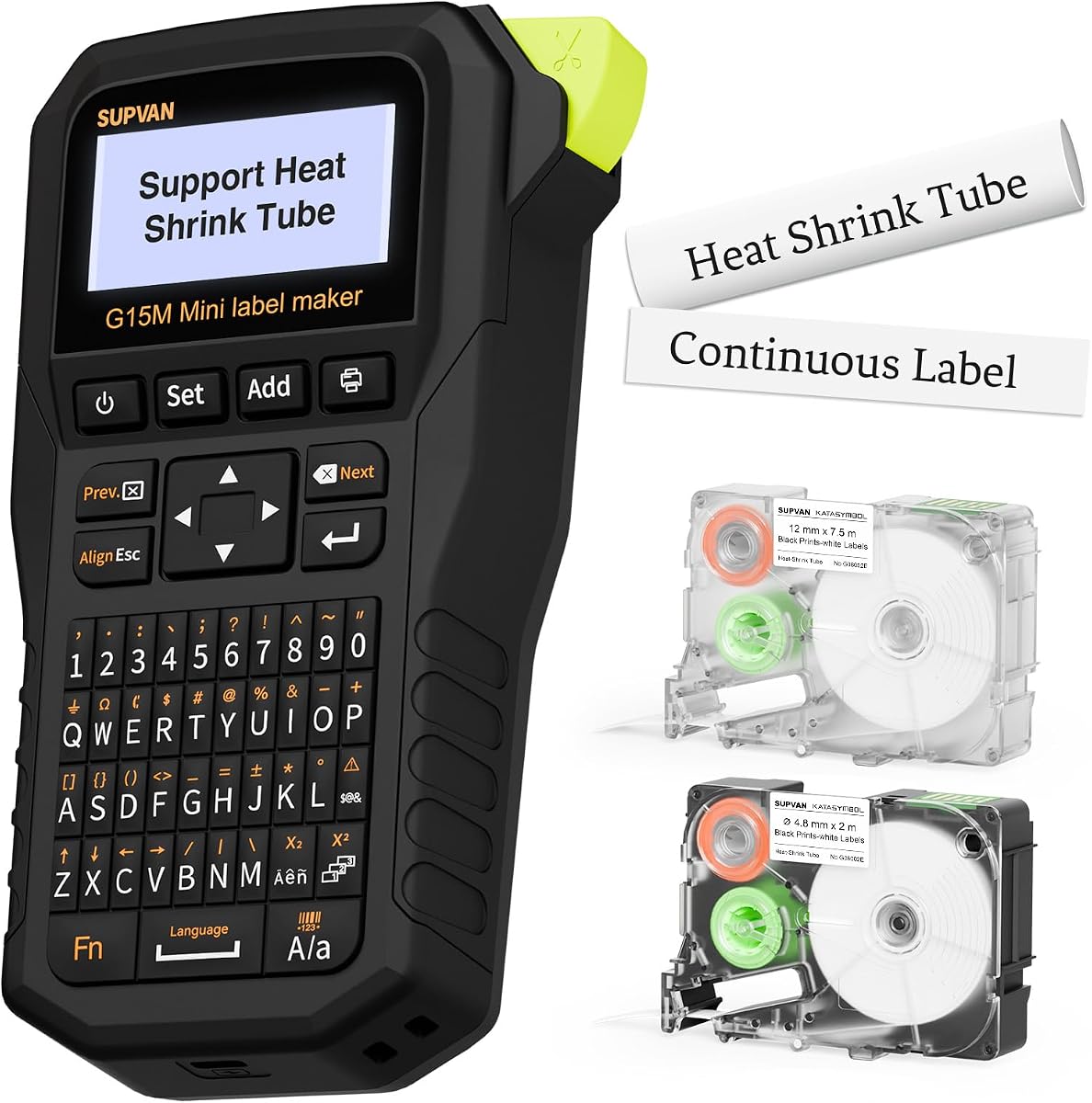
The SUPVAN G15M is designed for portability and efficiency in tight spaces. It is small and light making it easy to carry in a backpack or tool belt. Its minimal margin printing saves material which helps reduce long term costs.
We may earn a commission when you buy through this link, at no additional cost to you.
It uses a 1200 mAh battery that lasts up to three months on a single charge. This rechargeable feature reduces waste from disposable batteries. The heat shrink tube support makes it versatile for wire labeling on the go.
Users can customize labels with multiple font styles and icons. It prints up to four lines of text which is sufficient for most network tags. The thermal transfer technology ensures labels last up to ten years indoors.
We suggest this for students or home users needing basic cable management. It is a compact solution that does not compromise on essential features. For quick jobs and easy transport this model is highly recommended.
The minimal margin design saves significant tape material. This cost saving adds up over many labels.
Three months of standby means less charging time. This keeps your device ready when needed most.
We may earn a commission when you buy through this link, at no additional cost to you.
Selecting the right label maker requires considering print type, tape compatibility, and compliance standards for your specific network environment.
Thermal transfer printers are generally preferred for network cables because they produce durable oil proof labels. Direct thermal printers may fade over time and are less suitable for harsh industrial conditions. Look for models that offer long life print heads for consistent quality.
Choose thermal transfer technology for permanent labels that resist chemicals and sunlight.
Ensure the device supports heat shrink tubes and self laminating wraps for cables. Heat shrink provides a snug fit that stays put on round wires. Self laminating wraps protect the text from physical damage in high traffic areas.
Confirm the device supports heat shrink and self laminating tapes for cables.
For commercial installations ANSI and TIA/EIA standards are often required. These standards ensure labels remain readable and organized for compliance. Check that the device allows formatting that matches these guidelines.
Verify compliance with ANSI and TIA standards for professional networks.
Rechargeable batteries are convenient for field work but ensure long life. AAA batteries are easy to replace but may need frequent changes. Consider the standby time and operational hours per charge.
Prioritize long life battery options for uninterrupted field labeling.
A backlit screen is vital for working in dark racks or basements. Larger displays allow you to preview complex labels before printing. Avoid models with tiny screens if you need to review long text.
Select a model with a backlit screen for visibility in dark areas.
PC software enables bulk importing of data which saves time on large jobs. Mobile apps via Bluetooth allow for flexible labeling on the move. Consider your workflow needs for centralized management.
Opt for PC or mobile connectivity if you need bulk data import.
Network technicians often face drops and bumps so ruggedness matters. Look for reinforced housing and warranty coverage. Military grade ratings are a plus for field devices.
Choose a rugged device with good warranty to protect your investment.
Simple menus and one-touch keys speed up the labeling process. Familiar keyboard layouts like QWERTY reduce training time. Complex interfaces can slow down your work on site.
Pick an intuitive device with familiar layouts to improve speed.
Start by loading the correct tape into the device ensuring it clicks into place. Select the appropriate mode such as cable wrap or flag. Enter your text and use the preview screen to check for errors.
For heat shrink labels print the tag and apply it to the cable before heating. Use a heat gun to shrink the label tightly around the wire. Ensure the label is fully cured before exposing it to water or chemicals.
Clean the print head regularly with alcohol swabs to prevent debris buildup. Store the device in a dry place to protect electronic components. Replace tape cartridges promptly when the ribbon runs out to avoid damage.
Heat shrink tape is ideal for round cables as it adheres tightly. Self laminating wrap works well for flat wires and prevents abrasion. Both options provide long term resistance to chemicals and dust.
Most industrial models support heat shrink tubes of various sizes. Always check the tape width supported by the device before buying. Many kits include specific heat shrink cartridges for convenience.
You can use standalone modes without a computer. However PC software is useful for bulk data and complex formats. Basic needs can be met using the device's keypad alone.
High quality thermal transfer labels can last over ten years. Exposure to sunlight or harsh chemicals may reduce this lifespan. Proper application and tape choice ensure maximum durability.
Thermal transfer uses a ribbon for durable oil proof labels. Direct thermal is cheaper but fades over time and is less robust. For networking always choose thermal transfer for permanence.
Yes many devices support Code 39 and Code 128 barcodes. This is essential for inventory tracking and compliance. Ensure the print resolution is high enough to scan easily.
Most handheld units use AAA batteries or rechargeable lithium packs. Some models allow USB charging or AC adapter options. Check power requirements to ensure compatibility with your setup.
A warranty is crucial for protecting your investment. High end models often include lifetime warranties for professional use. This coverage ensures support if the device fails during a job.
We have reviewed ten top models ranging from budget friendly to premium industrial grade. Each device offers unique strengths whether you need heat shrink or barcode support. Choose based on your specific infrastructure needs and budget.
Prioritize durability and compliance standards for professional network work. Devices like the Makeid P31S and DYMO 6000 offer robust features for large data centers. For simpler tasks the E1000 provides excellent value.
Always check current availability and features before purchasing. Prices and stock vary often so verify specifications on the product page. With the right tool your network labeling will be clean and efficient.