
YUNZII QL75 Retro Typewriter Hot Swap RGB Keyboard
4.4Editor score
QMK/VIA programmable
Tri-mode connectivity
Built-in device stand
Discover the top keyboards that sound like a typewriter for 2026. We compare mechanical switches, retro designs, and typing experiences to help you choose the
If you crave the nostalgic clack of a vintage machine while typing on modern tech, keyboards that sound like a typewriter offer the perfect blend. These devices use mechanical switches and round keycaps to recreate the satisfying acoustic feedback of old-school writing tools without sacrificing speed or reliability for daily tasks.
To compile this list, we evaluated ten standout models based on switch type, build quality, connectivity options, and overall aesthetic appeal. We focused on how closely each keyboard mimics the tactile and auditory experience of classic typewriters while ensuring they meet contemporary standards for gaming, office work, and creative writing.
Each pick highlights unique features like hot-swappable switches, wireless connectivity, and custom lighting to suit different preferences. Keep in mind that product availability and pricing fluctuate frequently, so always verify current details before making a purchase decision to ensure you get the best value for your specific needs.
4.4Editor score

4.3Editor score

4.5Editor score
This side-by-side comparison highlights the key differences between our top ten picks. From wireless flexibility to full-size layouts, each model offers a distinct approach to delivering that classic typewriter sound and feel in a modern package.


This wireless mechanical keyboard delivers an authentic typewriter experience through its blue switches and round keycaps. With a 4.3 rating from users, it stands out for combining vintage aesthetics with modern functionality like Bluetooth 5.0 connectivity. It is ideal for writers and gamers who want a satisfying acoustic feel without the clutter of wires.
We may earn a commission when you buy through this link, at no additional cost to you.
The blue switches provide a clear tactile bump and audible click that mimics old-school machines. The hot-swappable design allows you to customize the sound further by changing switches easily. Additionally, the 14 backlight modes and stainless-steel lever for volume control add a layer of personalization that enhances the desktop setup.
While the lack of a numeric keypad might deter data entry professionals, the compact design frees up desk space. The 83-key layout is concise yet functional for most tasks. Some users might prefer a wider color selection, but the wood finish and punk style round keycaps already offer a distinct look.
If you prioritize a classic typing sound and need to switch between multiple devices seamlessly, this model is a top contender. It balances affordability with premium features like hot-swappability and solid connectivity options. For anyone seeking a reliable daily driver with a nostalgic edge, this keyboard delivers excellent value.
The blue switches are engineered to replicate the rhythmic clack of vintage typewriters, satisfying users who crave auditory feedback during long typing sessions.
Connecting via Bluetooth 5.0 or USB-C allows you to switch between a laptop, tablet, or phone effortlessly, making it perfect for multi-device workflows.
We may earn a commission when you buy through this link, at no additional cost to you.
The YUNZII QL75 is a robust choice for enthusiasts who demand premium features alongside a retro look. With a 4.4 rating, it is praised for its QMK/VIA support, enabling deep customization of key mappings and macros. This mechanical keyboard bridges the gap between vintage charm and high-end technical capability.
We may earn a commission when you buy through this link, at no additional cost to you.
Its hot-swappable PCB supports both 3-pin and 5-pin switches, allowing you to tailor the acoustic profile to your exact liking. The tri-mode connectivity ensures you can use it with up to five devices simultaneously, which is rare in this category. The built-in stand for tablets or phones adds practical utility to its aesthetic appeal.
The learning curve for programming macros might be steep for casual users, but power users will appreciate the flexibility. The slightly higher price is justified by the durable construction and extensive customization options. If you want a keyboard that grows with your skills, this is a worthy investment.
For professionals who type extensively and value ergonomics, the graduated row height and wireless reliability make it a top pick. It offers a complete package for those who want a stylish, functional, and highly adaptable typing experience. The wooden aesthetic complements any modern office setup beautifully.
QMK and VIA support provide endless options for remapping keys and creating complex macros, making this keyboard suitable for specialized workflows.
Switch between Bluetooth, 2.4GHz wireless, and wired USB-C connections seamlessly to manage multiple devices without interruption or lag.
We may earn a commission when you buy through this link, at no additional cost to you.
The YUNZII QL108 offers a full-size layout with 104 keys, making it ideal for users who need a numeric keypad. With a 4.5 rating, it is highly regarded for its metal panel and hot-swappable switches at a budget-friendly price. The Onyx Gray switches provide a smooth yet tactile feel that appeals to typists and gamers alike.
We may earn a commission when you buy through this link, at no additional cost to you.
Its shine-through keycaps maintain the retro look while ensuring visibility in low-light environments. The metal frame adds stability that is often missing in cheaper plastic keyboards. Web programming support means you can customize keys without installing bulky software, enhancing convenience for everyday tasks.
While it lacks wireless connectivity, the stable USB-C connection ensures zero latency, which is crucial for gaming. The weight of the metal frame prevents sliding but reduces portability. However, the cost savings and functional layout make it an excellent choice for a stationary desktop setup.
If you need a dedicated number pad without breaking the bank, this model is a strong candidate. It balances premium features like hot-swap compatibility with an affordable price point. For students or office workers needing a full keyboard with a classic vibe, the QL108 fits the bill perfectly.
The inclusion of a numeric keypad ensures compatibility with data entry tasks and spreadsheet work, addressing a common limitation in compact keyboards.
The sturdy metal shell provides a solid typing base and protects internal components, ensuring longevity even with heavy daily use.
We may earn a commission when you buy through this link, at no additional cost to you.
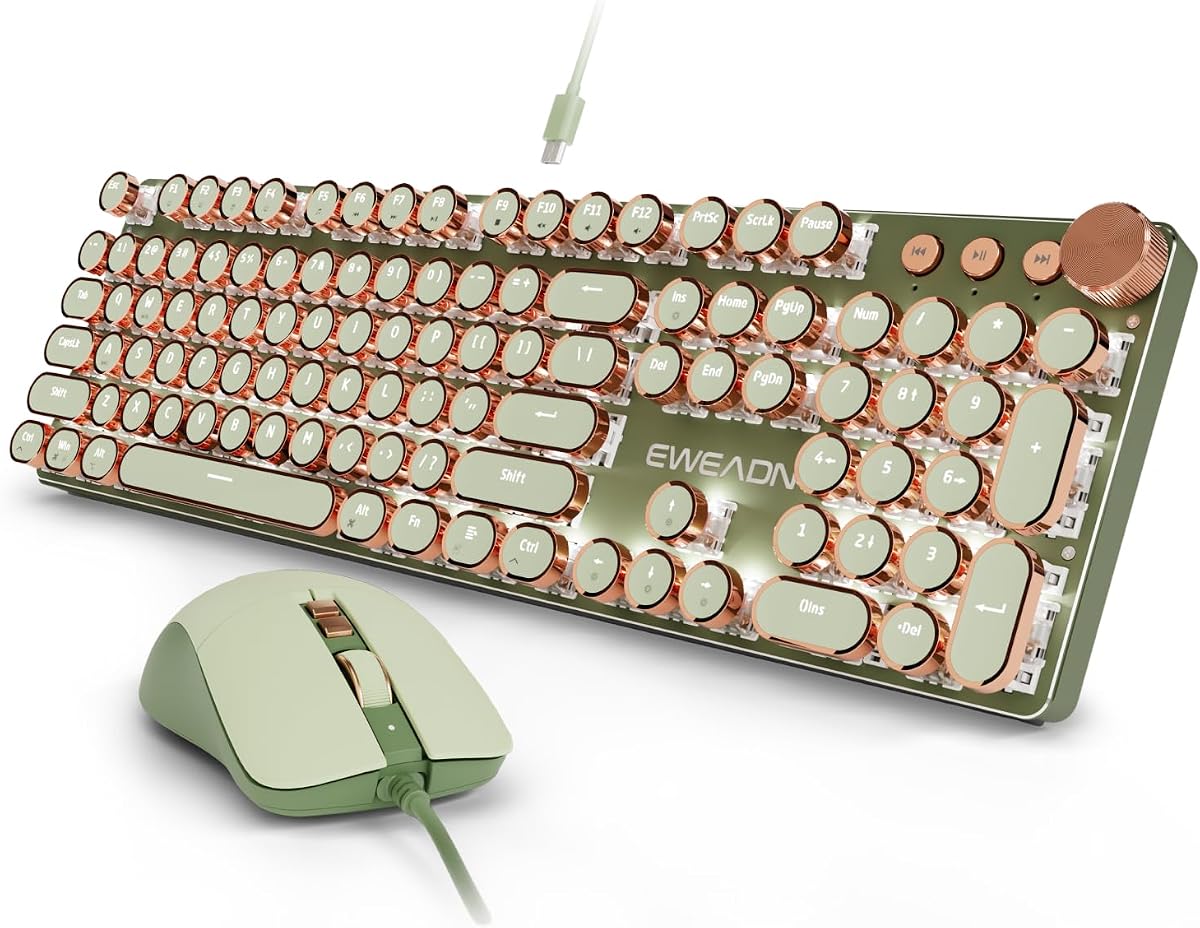
This combo offers a complete desk solution with a keyboard and mouse designed for aesthetic cohesion. It holds a 4.4 rating for its green aesthetic and functional design. The low-noise pink switches provide a gentler typing experience compared to blue switches, making it suitable for shared environments where noise is a concern.
We may earn a commission when you buy through this link, at no additional cost to you.
The integrated metal rotary knob for volume control is a convenient feature often missing in budget setups. Dynamic lighting modes enhance the workspace ambiance without requiring software installation. The mouse features adjustable DPI settings, ensuring precision for various tasks from browsing to design work.
While the pink switches lack the classic 'clack' of a typewriter, they still offer a soft pop that feels responsive. The wired nature limits mobility but guarantees stability. If you prefer a quieter office vibe and need a matching set, this is a practical and stylish choice.
For teams or home offices looking to upgrade both peripherals at once, this combo saves time and money. The ergonomic mouse design complements the keyboard's comfort level. It is a solid option for users who value visual consistency and reliable performance over raw acoustic feedback.
The bundled mouse matches the keyboard's aesthetic perfectly, providing a unified look for your workspace without mismatched components.
Pink switches dampen harsh clacking into a gentle sound, ideal for open offices or late-night work sessions where sound isolation is preferred.
We may earn a commission when you buy through this link, at no additional cost to you.
This keyboard focuses on a clean, steampunk-inspired look with round keycaps and a white LED backlight. With a 3.9 rating, it offers a straightforward solution for those who want a typewriter vibe without complex features. The linear custom switches provide a smooth feel with moderate resistance, suitable for rapid typing.
We may earn a commission when you buy through this link, at no additional cost to you.
The aluminum alloy panel gives it a sturdy feel, and the adjustable tilt feet allow for ergonomic adjustments. Full key anti-ghosting ensures that rapid keystrokes register accurately, which is essential for gaming. The dedicated volume knob adds convenience without needing to reach for system settings.
While the switch feel is less tactile than blue switches, it reduces finger fatigue during long sessions. The simpler lighting effects might not impress gamers looking for RGB customization. However, its simplicity makes it easy to set up and use right out of the box.
For users who prioritize a traditional layout and durable build over advanced programmability, this is a good fit. It delivers a reliable typing experience with a nostalgic touch. If you want a clean, functional keyboard that looks great on a desk, this model offers solid basic performance.
The volume knob and dedicated multimedia keys provide quick access to essential functions, streamlining your workflow without extra steps.
An aluminum alloy panel ensures the keyboard remains stable on the desk, preventing sliding during intense typing or gaming sessions.
We may earn a commission when you buy through this link, at no additional cost to you.
This pink wireless keyboard stands out for its high user rating and reliable battery life. With a 4.7 score, it is celebrated for its crisp blue switches and seamless connectivity. The design blends modern wireless freedom with a classic typewriter look, making it a favorite among creative professionals.
We may earn a commission when you buy through this link, at no additional cost to you.
The massive 5000mAh battery ensures weeks of use on a single charge, reducing downtime for recharging. Tri-mode connectivity allows switching between Bluetooth, 2.4GHz, and wired USB-C, fitting almost any setup need. The metal faceplate adds durability and a premium feel that resists wear over time.
The lighting is limited to white backlight, which maintains a clean aesthetic but lacks RGB variety. The pink color scheme is specific, though perfect for certain desk themes. Its high satisfaction score suggests it meets expectations well across different user groups.
For anyone seeking a high-performance wireless keyboard with strong battery life, this is a top choice. The tactile feedback ensures a satisfying typing experience while the wireless capability keeps the desk tidy. It is a stylish, practical option for those who value reliability and aesthetics equally.
The upgraded 5000mAh rechargeable battery supports weeks of continuous wireless use, ensuring uninterrupted workflow without frequent charging.
A metal faceplate provides a robust construction that withstands daily use while maintaining a sleek, professional appearance on your desk.
We may earn a commission when you buy through this link, at no additional cost to you.
This wireless set includes a detachable wrist rest and a phone holder, making it a versatile tool for comfort and multitasking. With a 4.4 rating, it is popular for its convenience features. The round typewriter-style keys offer a classic look while providing a comfortable typing experience for extended periods.
We may earn a commission when you buy through this link, at no additional cost to you.
The magnetic wrist rest supports proper posture, reducing strain during long work sessions. The phone holder keeps your mobile device within view without cluttering the desk. It is fully compatible with both Mac and Windows, ensuring broad usability across different work environments.
The switches feel softer and less clicky than dedicated mechanical options, which might disappoint purists. The 7-color backlight is functional but lacks the complexity of RGB. However, for a plug-and-play solution that focuses on ergonomics, this kit is highly practical.
Ideal for office workers or students who need a clean, comfortable setup, this combo delivers essential features without complication. The rechargeable nature of both devices saves on battery costs. If ergonomics and desk organization are your priorities, this is a strong contender.
Keep your smartphone upright and visible to check messages or video calls without breaking focus on your main screen.
The soft sponge wrist rest attaches magnetically to support your wrists, preventing fatigue during long typing or browsing sessions.
We may earn a commission when you buy through this link, at no additional cost to you.
This model provides a classic typewriter experience at an accessible price point. With a 4.3 rating, it is recognized for its blue switches and metal panel construction. The rhythmic clacking sound and tactile feedback offer a satisfying typing experience that closely resembles traditional machines.
We may earn a commission when you buy through this link, at no additional cost to you.
The RGB lighting modes allow you to customize the aesthetic to match your room. The metal panel ensures stability and adds a touch of premium feel to an otherwise budget device. Its wide compatibility means it works seamlessly across different operating systems without needing drivers.
Lack of wireless connectivity limits its use to a fixed workstation, which might not suit travelers. The build is robust but not as feature-rich as higher-end models. However, it delivers excellent value for the price, focusing on core performance and aesthetics.
For those on a tight budget who still want a durable, clicky keyboard, this is a smart choice. It combines a vintage look with modern durability at an entry-level price. If you prioritize sound and feel over wireless features, this keyboard offers great utility.
The blue mechanical switches provide a distinct, audible click that mimics the rhythm of a vintage typewriter for a nostalgic feel.
A metal panel construction gives the keyboard a premium, durable feel without the high cost typically associated with metal builds.
We may earn a commission when you buy through this link, at no additional cost to you.
FINEDAY's keyboard brings unique aluminum levers and wheels that mimic the mechanical operation of old machines. With a 4.2 rating, it appeals to those who want tactile controls beyond standard keys. The built-in stand and 5000mAh battery ensure ergonomic comfort and long wireless usage.
We may earn a commission when you buy through this link, at no additional cost to you.
The left lever functions as an Enter key, while the wheels adjust brightness and volume precisely. This mechanical precision offers a tangible interaction rare in modern keyboards. The 9.22-degree cradling angle supports a natural wrist position, reducing strain during extended typing.
Users new to mechanical controls might find the learning curve slightly challenging. The higher price reflects these specialized features and build quality. However, the functionality offers a level of interaction that enhances the vintage aesthetic beyond just appearance.
If you enjoy tactile interfaces and want a keyboard that feels like a physical instrument, this is a standout option. It combines nostalgia with high-capacity battery life for a truly immersive experience. For enthusiasts who appreciate engineering details, this model is worth the investment.
Dedicated aluminum levers and wheels provide precise, physical interaction for functions like brightness and volume, enhancing the vintage feel.
A built-in stand and cradling angle support natural wrist positioning, promoting comfort during long periods of work or gaming.
We may earn a commission when you buy through this link, at no additional cost to you.
The Redragon K710 offers a reliable full-size layout with extensive RGB capabilities. With a 4.5 rating, it is praised for its tri-mode connectivity and metal plate construction. The blue switches deliver a satisfying clicky sound that aligns well with the typewriter aesthetic.
We may earn a commission when you buy through this link, at no additional cost to you.
Using the proprietary software, you can customize each key's color and lighting effects to create vibrant displays. The anti-ghosting technology ensures every keystroke is captured accurately during intense gaming. The metal plate adds stability, making the keyboard feel solid on any desk.
Setting up custom lighting requires software installation, which may be a hurdle for some users. The switch noise is audible but consistent with mechanical standards. Overall, it balances features, performance, and aesthetics effectively for a competitive price.
For gamers who want a typewriter look with vibrant lighting, this is a top choice. The wireless option ensures a tidy desk while the full-size layout supports data entry. If you want a feature-rich keyboard that supports detailed customization, this model is highly recommended.
Software support allows individual key customization, letting you create unique lighting patterns that match your personal style or game themes.
The 104-key layout with anti-ghosting ensures reliable performance for both gaming and productivity tasks without any missed inputs.
We may earn a commission when you buy through this link, at no additional cost to you.
Choosing the right keyboard requires balancing sound preference, build quality, and connectivity needs. This guide outlines key factors to help you select a model that fits your workflow and aesthetic preferences.
Mechanical switches define the sound and feel of your keyboard. Blue switches are known for their loud, clicky feedback that mimics typewriters, while tactile browns offer a quieter experience. Linear switches provide smooth travel without clicks but may lack the classic sound. Consider your environment and sensitivity to noise when choosing.
Focus on blue or tactile switches if you crave that authentic clicky sound, but be mindful of noise levels in shared workspaces.
Round keycaps are central to the typewriter aesthetic and provide a unique tactile feel compared to standard squared profiles. They often have a concave center that aligns with your fingertips for comfort. Ensure the keycaps are made of durable materials like PBT or double-shot plastic to prevent wear over time.
Look for round keycaps made from durable plastic to maintain the vintage look and feel without fading or scratching.
Decide between wired and wireless options based on your usage patterns. Wireless keyboards offer flexibility and cleaner desks via Bluetooth or 2.4GHz dongles but may have slight input lag. Wired USB connections provide zero latency and reliability, which is crucial for competitive gaming or precise work.
Choose wireless for convenience in multi-device setups or wired for latency-free performance in gaming scenarios.
Full-size keyboards include a numeric keypad and offer complete functionality for data entry, while compact layouts like 65% or 75% save desk space. Ensure the layout matches your workflow; if you rarely use numbers, a compact model may suit better. Check for ergonomics features like tilting feet.
Select a full-size layout for data entry or a compact design for desk space and portability.
Materials like aluminum panels or sturdy ABS plastic contribute to durability and stability. Heavier keyboards resist sliding during vigorous typing or gaming. Check for features like hot-swappable PCBs which allow future customization without buying a new unit. Quality construction ensures longevity and consistent performance.
Opt for metal frames or robust plastic housings to ensure the keyboard feels solid and lasts through years of daily use.
For wireless models, battery life determines how often you need to recharge. Look for capacities around 5000mAh for weeks of usage without interruption. Some keyboards have auto-sleep modes to conserve power. USB-C charging is standard and convenient for modern setups.
Prioritize models with high-capacity batteries to minimize charging interruptions and maximize wireless freedom.
LED backlighting ranges from single-color white to vibrant RGB patterns. Adjustable brightness helps in low-light environments. Software support allows you to remap keys or set macros. Consider whether you prefer simple lighting or complex RGB customization for your visual style.
Check for adjustable lighting and software support to tailor the keyboard to your personal workflow and visual preferences.
Budget keyboards offer basic functionality and aesthetics but may lack premium features like hot-swap switches or high-capacity batteries. Premium models justify higher prices with better build quality, programmability, and advanced connectivity. Determine your budget ceiling and prioritize features that impact your daily experience most.
Balance your budget against desired features, ensuring the final choice offers good long-term value for your specific needs.
To ensure longevity, keep the keyboard clean by regularly dusting it with compressed air. Use a soft brush or cloth to wipe down keycaps without using harsh chemicals. Avoid eating or drinking near the device to prevent spills that could damage internal components.
For wireless models, charge the battery fully before first use and periodically check connections to ensure stable pairing. If the battery drains quickly, reduce backlight brightness or turn off unused features to save power. Store the USB receiver safely when not in use to avoid loss.
Customize the lighting and key mappings through provided software to suit your workflow. Adjust typing angles using adjustable feet for ergonomic comfort. When not using the keyboard for long periods, unplug it or turn it off to conserve energy and extend battery life.
Most typewriter-style keyboards use blue switches which are loud and clicky, designed to mimic vintage machines. However, some models offer quieter tactile options. If you work in a shared space, check for low-noise switch variants.
Yes, many typewriter-style keyboards support anti-ghosting and N-key rollover features essential for gaming. Check for low latency, especially in wireless models, to ensure responsive gameplay during intense sessions.
A hot-swappable keyboard allows you to change switches without soldering. This feature lets you experiment with different sounds and tactile feels without buying a new keyboard, offering great flexibility for customization.
Most modern typewriter keyboards are compatible with both Mac and Windows systems. Verify specific key layout differences and software support to ensure seamless functionality across different operating systems.
Battery life varies by model but many offer 5000mAh capacity for weeks of use. Factors like lighting intensity and usage frequency affect duration, so check product specs for expected battery performance.
Many models include ergonomic features like adjustable feet or concave keycaps for finger comfort. Look for built-in wrist rests or stands to further enhance ergonomic support during long typing sessions.
We have highlighted ten top-tier keyboards that capture the essence of vintage typewriters with modern mechanical performance. From the retro wireless versatility of the first pick to the robust customization of the premium options, each offers a unique take on sound and style.
Prioritize your needs regarding connectivity, layout size, and switch sound to find the perfect match. Whether you choose a budget-friendly wired option or a high-end wireless model, the right keyboard will enhance your typing experience and elevate your workspace aesthetics.
Always check current prices and availability before making a purchase since deals and stock fluctuate frequently. Investing in a quality typewriter-style keyboard is a choice that blends nostalgia with productivity, ensuring you enjoy every keystroke.