
Canon MegaTank G3270
4.1Editor score
Up to 6,000 black pages
Simple LCD display
Affordable entry price
Ink tank printers have revolutionized home and office printing by offering massive ink capacity and drastically lower cost per page. These devices eliminate the need for frequent cartridge replacements, providing users with years of continuous printing right out of the box.
We compared ten leading models from Canon, Epson, and HP based on print quality, connectivity options, and included ink volume. Our analysis focuses on real-world performance metrics like page yield, scanning resolution, and ease of maintenance for everyday users.
Each product listing below highlights key specifications, pros, and cons to help you make an informed decision. Please note that prices and availability can change frequently, so verify current details before purchasing your next printer.
4.1Editor score

4.2Editor score

4.1Editor score
As an Amazon Associate we earn from qualifying purchases.
The following table provides a side-by-side overview of the ten selected ink tank printers, detailing their core specifications and unique selling points for quick comparison.




The Canon MegaTank G3270 stands out as a top contender in the ink tank category due to its exceptional value proposition. With a rating of 4.1 stars, users appreciate the generous amount of ink included in the box which translates to years of printing without additional purchases.
We may earn a commission when you buy through this link, at no additional cost to you.
This printer is designed for efficiency and economy. It can print up to 6,000 black and white pages and 7,700 color pages on a single set of inks. This capability ensures that users rarely run out of ink during critical printing tasks.
While it lacks auto-duplexing and has a smaller screen than some competitors, the savings on ink justify these trade-offs for many households. The straightforward design means fewer points of failure and simpler maintenance requirements over the long term.
We recommend this model for budget-conscious users who prioritize low operating costs over advanced features. It is an excellent choice for students, home offices, and small businesses looking to reduce their monthly printing expenses significantly.
The included ink bottles provide enough supply for up to two years of typical usage, drastically reducing the frequency of repurchasing consumables compared to traditional cartridge printers.
Users can connect via wireless networks to print from smartphones and computers easily, ensuring seamless integration into modern digital workflows without complicated cables.
We may earn a commission when you buy through this link, at no additional cost to you.
The Epson EcoTank ET-2803 delivers impressive performance with its Micro Piezo Heat Free technology. It receives a 4.2 rating for balancing print quality with environmental responsibility by reducing cartridge waste significantly in landfills.
We may earn a commission when you buy through this link, at no additional cost to you.
Its design focuses on minimizing user frustration. The high capacity ink tanks and unique EcoFit bottles make refilling easy without mess or stress. This system supports printing up to 4,500 black and 7,500 color pages per replacement set.
The limitation on using genuine ink is a necessary safeguard for performance and warranty coverage. Users must adhere to this requirement to avoid potential damage to the permanent printhead which is engineered for reliability over time.
This printer is ideal for eco-conscious buyers seeking a reliable workhorse. It offers a modern connectivity experience with AirPrint and voice activated printing, making it suitable for smart homes and tech savvy families.
By eliminating disposable cartridges, this model helps reduce millions of pounds of plastic waste annually, aligning with sustainable printing practices for environmentally aware consumers.
The Micro Piezo system uses pressure rather than heat to eject ink, resulting in lower energy consumption and a more durable permanent printhead compared to thermal inkjet printers.
We may earn a commission when you buy through this link, at no additional cost to you.
Positioned as a premium option, the HP Smart Tank 5003 offers a compelling mix of convenience and capacity. With up to three years of ink included, it aims to be the last printer users need for their home office setup.
We may earn a commission when you buy through this link, at no additional cost to you.
The standout feature is the mess-free refill system. Users can simply plug ink bottles into the tanks and let them drain without squeezing or spilling. This design choice greatly improves the user experience during maintenance.
While it comes at a higher upfront cost, the longevity and ease of use justify the investment. The AI capabilities suggest advanced optimization for print quality, though users should verify how these features integrate into daily workflows.
We suggest this for professionals who value reliability and speed. The borderless printing capability adds versatility for creative projects, making it a strong candidate for home offices needing both documents and high quality graphics.
The refill system is engineered to prevent spills, making it accessible for users who may find traditional ink handling tedious or messy during maintenance cycles.
AI capabilities aim to optimize print settings automatically, potentially improving color accuracy and text sharpness without requiring manual adjustment from the user.
We may earn a commission when you buy through this link, at no additional cost to you.
The Epson EcoTank ET-2903 targets users who need speed without sacrificing quality. Boasting 11 pages per minute for black and 6 for color, it handles busy households with minimal waiting time for documents.
We may earn a commission when you buy through this link, at no additional cost to you.
Its permanent printhead design ensures professional-grade reliability over the life of the printer. The high-resolution output at 5760 x 1440 dpi allows for stunning photographic prints that rival dedicated photo printers in many cases.
Navigation is simplified with a 1.44 color screen, making setup and scanning easier than on monochrome interfaces. The EcoFit bottles continue the tradition of spill-free refilling which is a major plus for maintenance.
This model is best suited for environments where time is money. Whether it is a home office or a small business, the combination of speed, ink capacity, and print quality makes it a robust and versatile workhorse.
With zero warmup time and rapid print speeds, this printer minimizes downtime between tasks, ensuring that users can stay focused on their primary work activities.
The high DPI resolution enables exceptional detail in photos and graphics, allowing users to produce professional materials directly from their home desk.
We may earn a commission when you buy through this link, at no additional cost to you.
The Canon Megatank G3290 distinguishes itself with automatic two-sided printing, a feature often missing in entry-level tank models. This saves paper and time for users who frequently print long documents or reports at home.
We may earn a commission when you buy through this link, at no additional cost to you.
Its interface is more advanced than competitors in this price range, featuring a 2.7 inch color touchscreen. This makes navigating menus and scanning documents more intuitive for users who prefer visual controls over physical buttons.
Like other Canon models, it includes enough ink to last up to two years and supports high page counts. The savings on ink remain a primary selling point, potentially reducing long term expenses by up to a thousand dollars.
We recommend this for users who need duplex printing and a better display. It strikes a good balance between advanced features and affordability, making it a strong candidate for active home offices with higher volume needs.
Automatic double sided printing reduces paper consumption by half for double-sided tasks and eliminates the need to manually flip pages during printing operations.
The color touchscreen provides a more modern experience, allowing users to manage settings and scan functions with ease, improving overall workflow efficiency.
We may earn a commission when you buy through this link, at no additional cost to you.
The Epson EcoTank ET-4800 is designed to handle all basic office needs in one device. While its rating is slightly lower, it retains the core benefits of the EcoTank line including low running costs and reliable printing.
We may earn a commission when you buy through this link, at no additional cost to you.
It offers a high-resolution flatbed scanner which is useful for digitizing documents or photos. The color display simplifies the copying process, allowing users to adjust settings directly on the printer without a computer.
The focus on zero cartridge waste aligns with broader environmental goals. By using refillable bottles, it reduces plastic waste significantly compared to standard inkjet models that require frequent cartridge disposal.
This printer is suitable for users who prioritize functionality and simplicity. It is a solid choice for small businesses that need reliable scanning and copying alongside high-volume printing capabilities without complex setup.
The built-in scanner supports high-resolution imaging, making it easy to archive documents or create digital copies of physical materials efficiently.
The refillable tank system keeps operational costs low, ensuring that printing high volumes of documents does not lead to unexpected monthly expenses.
We may earn a commission when you buy through this link, at no additional cost to you.
The Epson EcoTank ET-2980 builds on the proven success of the EcoTank series with a focus on longevity. It includes enough ink to last up to three years, reducing the frequency of maintenance for busy users.
We may earn a commission when you buy through this link, at no additional cost to you.
Its unique EcoFit bottles ensure simple refilling without mess or stress. This feature is particularly beneficial for households with children or in environments where spills can be problematic during routine maintenance tasks.
The emphasis on genuine ink ensures optimal print quality and performance. While non-genuine ink may save money initially, using official supplies protects the printer from damage not covered by the limited warranty.
We recommend this model for those seeking a reliable long-term investment. Its balance of capacity, ease of use, and quality ensures that users get consistent output over many years of daily usage.
The design prioritizes durability with features like a permanent printhead that lasts the life of the printer, reducing the need for technical support or part replacement.
The Epson Smart Panel app enhances mobile printing, allowing users to send jobs and manage scans directly from their smartphones for added convenience.
We may earn a commission when you buy through this link, at no additional cost to you.
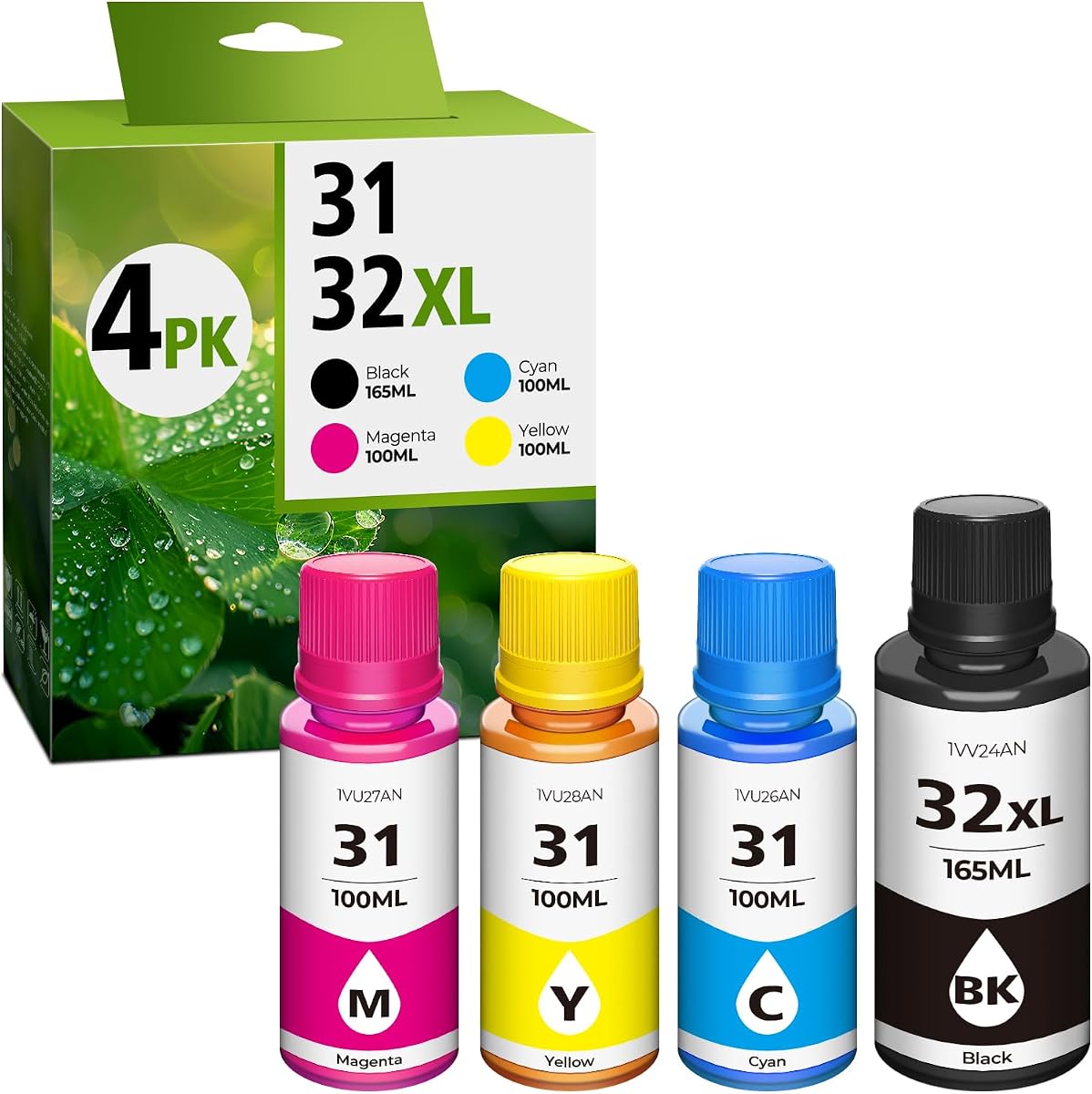
For users looking to maximize savings, the 31 Ink 32XL Set offers a high-yield alternative to OEM supplies. With a rating of 4.4, customers appreciate the volume and reliability of these compatible ink bottles for their printers.
We may earn a commission when you buy through this link, at no additional cost to you.
Each black bottle provides up to 9,500 pages, significantly extending the time between refills. This makes it a cost-effective solution for high-volume users who need to keep printing without interruption or high costs.
It is important to note that these are dye inks rather than pigment black. Users should ensure their printer settings are compatible to avoid issues with water resistance or print longevity on standard paper.
We suggest this set for users comfortable with third-party options. It provides a straightforward way to keep printers running economically while maintaining vibrant color output for everyday documents and photos.
The increased capacity means fewer purchases over time, allowing users to focus on productivity rather than constantly managing inventory or budget for supplies.
Designed for easy refilling, these bottles minimize effort and leakage, ensuring that maintaining your printer is a quick and hassle-free process.
We may earn a commission when you buy through this link, at no additional cost to you.
Another variation of the HP Smart Tank series, this model focuses on reliability for home office users. It promises to be the last printer you need with up to three years of ink and a simple setup process.
We may earn a commission when you buy through this link, at no additional cost to you.
The mess-free refill system ensures that maintenance remains a non-issue. By allowing users to plug bottles directly into the tanks, HP has removed one of the most common pain points associated with ink tank printers.
While some users report mixed experiences with specific AI features, the core printing functionality remains solid. The ability to produce sharp text and rich colors consistently is what matters most for daily document production.
This printer is best suited for home offices that need simplicity. If you want a device that works right out of the box and stays out of your way, this model offers a practical solution with minimal maintenance.
The design minimizes interaction points during refilling, reducing the risk of ink spills and making the printer more approachable for users who want a plug-and-play experience.
From standard documents to borderless photos, the versatility of the print engine ensures that users can handle a variety of tasks without needing multiple devices.
We may earn a commission when you buy through this link, at no additional cost to you.
The Epson EcoTank ET-2988 (Renewed) offers a cost-effective entry into the premium features of the EcoTank line. It provides high-speed printing and automatic duplexing at a lower price point than new units.
We may earn a commission when you buy through this link, at no additional cost to you.
With speeds of 15 pages per minute for black and 8 for color, it is one of the fastest in the comparison. This speed, combined with duplex printing, makes it highly productive for users who need quick turnaround times.
Choosing a renewed model can save money, but users should be aware of the condition and warranty terms. However, the core benefits of high capacity and low cost per page remain intact regardless of the device age.
We recommend this for buyers comfortable with refurbished hardware. It is a smart choice for those who want advanced features like auto-duplex and high speed without paying the full retail price for a new printer.
Refurbished units provide access to higher-end features at reduced costs, offering a practical way to upgrade your printing infrastructure without overspending on brand new equipment.
The combination of rapid speeds and automatic double-sided printing maximizes efficiency, allowing users to complete large print jobs quickly and with minimal manual intervention.
We may earn a commission when you buy through this link, at no additional cost to you.
Selecting the right ink tank printer involves balancing upfront costs with long-term savings and specific feature needs. This guide outlines the key factors to consider for a smart investment.
Ink capacity is the primary advantage of tank printers. Look for models that promise 2 to 3 years of ink in the box. High page yields reduce the frequency of refills and lower the cost per page significantly.
Prioritize models with high yields to ensure your printer can handle large volumes of printing without requiring frequent maintenance or supply purchases.
Speed varies between models. Some offer 11 PPM while others reach 15 PPM. Consider how fast you need to print for documents versus photos. Higher DPI ensures better photo quality but may slow down text printing.
Choose a speed that matches your workflow needs to avoid bottlenecks during busy work periods.
Modern printers should offer wireless printing and mobile app support. Features like AirPrint and voice-activated printing add convenience. Ensure the printer connects easily to your existing network infrastructure.
Check for robust wireless options to enable printing from various devices without physical cables.
Most ink tank printers include a flatbed scanner. Look for high-resolution scanning if you digitize documents often. Auto document feeders are useful but less common in budget models.
Ensure the scanner meets your resolution needs for clarity and accuracy in digital copies.
Mess-free refilling is crucial. Models with direct-fill tanks or EcoFit bottles prevent spills. A good design should allow easy alignment of bottles with ink ports to avoid waste.
Select a system with a user-friendly refill mechanism to reduce stress during maintenance.
Auto two-sided printing saves paper and time. This feature is essential for document-heavy users. If not included, you will have to flip pages manually, which increases the risk of errors.
Prioritize models with built-in duplex printing if you frequently print long reports or double-sided documents.
A larger touchscreen simplifies navigation. LCD displays allow users to see settings clearly. Touchscreens are more intuitive than physical buttons for complex tasks like scanning.
Opt for a model with a clear and responsive screen to make daily operations easier.
Stick with reputable brands like Canon, Epson, or HP for better support. Using genuine ink ensures warranty compliance. Some models have permanent printheads designed to last the life of the unit.
Verify warranty terms and ink compatibility to protect your investment against future issues.
Start by filling the ink tanks carefully. Use the provided bottles and follow the color labels to avoid mixing ink. The bottles usually have a keying system to prevent wrong connections and spillage.
Regular maintenance is key to preventing clogs. Use the printer's cleaning tool if prints start to fade or show lines. Keep the printer covered when not in use to protect it from dust and debris.
Run a test page every few weeks to ensure the printhead remains clean. If you do not use the printer often, print a few color pages weekly to keep the ink flowing freely and dry out.
Yes, over time they are significantly cheaper. The upfront cost is higher but you save on expensive cartridges. You can print thousands of pages per bottle compared to hundreds with cartridges.
Some models allow it but manufacturers recommend genuine ink to protect the warranty. Using non-genuine ink might void support or cause damage not covered by the standard warranty terms.
Yes, if left unused for months the printhead can dry out. It is important to print at least once a week to keep the ink fresh and prevent clogs from forming inside the system.
Most printers come with enough ink for years of use. After the initial fill, you may only need to refill once a year or less depending on your usage volume and page count.
Yes, almost all modern ink tank printers support Wi-Fi and mobile printing. You can connect via AirPrint for iOS or the Epson Panel app to print from your smartphone directly.
Absolutely, they are designed for high-volume tasks. The large ink capacity and low cost per page make them ideal for families or small offices that print dozens of pages daily.
We have reviewed the top 10 ink tank printers available in November 2026 to help you find the right fit. The Canon MegaTank G3270 offers great value while the HP Smart Tank 5003 brings premium features.
Prioritize your specific needs such as speed or duplexing before buying. While all these models save money on ink, they differ in convenience and features. Choose the one that fits your workflow best.
Remember to check current prices and availability before purchasing. Prices can fluctuate frequently, so verify the latest deals to ensure you get the best value for your investment today.