
Canon MegaTank G3270
4.1Editor score
Up to two years ink included
Affordable entry price
Simple wireless setup
This guide compares the top 10 ink tank printers for home and office use, highlighting key features, reliability, and savings on ink costs.
Finding the right printer for your home or office can be challenging when traditional cartridges drain your budget quickly. Ink tank printers offer a revolutionary solution by using refillable bottles instead of small cartridges, drastically reducing the cost per page. These devices are designed for high-volume printing needs without sacrificing print quality or speed, making them ideal for students, families, and small businesses alike.
We have evaluated the latest models available in the market to bring you a comprehensive list of the best options. Our selection process considers print quality, connectivity features, ink capacity, and overall user experience to ensure you get a reliable machine. Each product on this list has been chosen based on its ability to deliver consistent performance and long-term value for various printing requirements.
Every pick below showcases specific strengths that cater to different needs, from budget-friendly models to high-end machines with advanced features. Please note that product availability and pricing can change frequently, so we recommend checking the latest details before making a purchase. This guide aims to simplify your decision-making process by providing clear, expert-backed insights into the world of ink tank printing.
4.1Editor score

4.2Editor score

4.2Editor score
This table provides a side-by-side comparison of all ten selected ink tank printers, allowing you to quickly identify which model best fits your specific requirements.





The Epson EcoTank ET-2803 stands out as a top contender in the ink tank printer category, earning a solid 4.2-star rating from users. It replaces traditional cartridges with high-capacity ink bottles, offering up to two years of ink in the box. This model is perfect for those who want to reduce waste and save money over time while maintaining excellent print quality.
We may earn a commission when you buy through this link, at no additional cost to you.
Its Micro Piezo Heat-Free technology ensures sharp text and vibrant colors on virtually any paper type. The built-in flatbed scanner allows for easy document copying and navigation through a color display. Connectivity options include wireless printing and voice-activated commands via smart devices, making it highly convenient for modern home offices.
While the printer offers many benefits, the initial setup process requires some patience to prime the ink system properly. Additionally, it lacks auto duplex printing, which means you print hand flip pages for two-sided documents. These trade-offs are generally acceptable given the substantial cost savings and reliability it provides.
This printer is ideal for families or small businesses that print frequently and want to avoid cartridge hassles. We recommend the Epson EcoTank ET-2803 as the best overall choice for users seeking a balance of performance, efficiency, and ease of use.
Each ink bottle set is equivalent to about 80 individual cartridges, leading to dramatic savings on replacement ink compared to traditional printers.
Easily print from your smart device using AirPrint or the Epson Smart Panel app, ensuring seamless integration with your existing tech ecosystem.
We may earn a commission when you buy through this link, at no additional cost to you.
The Canon MegaTank G3270 is an excellent entry-level option for anyone looking to switch to ink tank technology without a huge investment. With a 4.1-star rating, it offers great value by including enough ink for up to two years out of the box. This model supports wireless printing, copying, and scanning, making it a versatile all-in-one device.
We may earn a commission when you buy through this link, at no additional cost to you.
Users can print up to 6,000 black and white or 7,700 color pages using a single set of inks. The 1.35-inch square LCD display provides easy navigation for basic tasks. It is designed to save up to $1,000 on ink compared to traditional cartridge printers, which is a major selling point for budget-conscious buyers.
The main limitations are the lack of automatic double-sided printing and the smaller screen size compared to higher-end models. However, for basic home use where cost is the primary concern, these features are often not critical. The printer remains reliable and efficient for everyday documents and photos.
If you need a printer that is easy on the wallet and still offers high volume printing, the Canon MegaTank G3270 is a smart choice. It delivers on its promise of low-cost printing and is highly recommended for students and families.
The single set of inks supports printing up to 7700 color pages, ensuring you do not run out of ink frequently.
Set it up once and enjoy reliable wireless printing with minimal maintenance required over time.
We may earn a commission when you buy through this link, at no additional cost to you.
The Epson EcoTank ET-2903 represents the premium tier of ink tank printers with a 4.2-star rating and robust features. It comes with enough ink to last up to three years, reducing the need for frequent replacements. The printer delivers stunning photographic print quality with high resolution and supports wireless printing from smart devices.
We may earn a commission when you buy through this link, at no additional cost to you.
Its productivity features include print speeds of 11 black pages per minute with zero warm-up time, which is faster than many other models. The 1.44-inch color display makes navigation simple, and the permanent printhead is designed to last the life of the printer. This durability ensures long-term performance without degradation.
While the initial investment is higher, the long-term savings on ink and the speed benefits justify the cost for heavy users. The large size might be a constraint for smaller spaces, but the reliability is worth it. This model is built for those who prioritize speed and quality in their printing tasks.
For users seeking the best in reliability and performance, the Epson EcoTank ET-2903 is the top recommendation. It combines high capacity with advanced features to handle demanding printing needs efficiently.
Epson Heat-Free technology delivers a unique permanent printhead designed to last the life of the printer, enhancing reliability.
High 5760 x 1440 dpi print resolution ensures exceptional photos and text quality on a wide range of media.
We may earn a commission when you buy through this link, at no additional cost to you.
The Canon Megatank G3290 offers an upgraded experience with a 2.7-inch color touchscreen and auto duplex printing. With a 4.2-star rating, it is designed to offer convenience alongside high-volume ink efficiency. The auto 2-sided printing feature helps save paper and time, which is a significant upgrade over the G3270.
We may earn a commission when you buy through this link, at no additional cost to you.
You can print up to 6,000 black and white or 7,700 color pages with one set of inks. The color touchscreen makes navigation intuitive and allows for easy adjustments to print settings. It includes the same reliable wireless capabilities as other Canon models, ensuring seamless integration with your network.
The price is higher than the G3270, but the added features like auto duplex and a larger screen provide better value for many users. Some might find the color output limited depending on their specific needs, but for standard documents, it excels. The build quality supports consistent performance over time.
If you want the convenience of double-sided printing and a better interface, the Canon Megatank G3290 is a strong option. It balances cost and features well for home users who need more than basic functionality.
Auto 2-sided printing reduces paper consumption, helping you save money and the environment.
The 2.7-inch LCD color touchscreen provides a user-friendly way to control print settings and monitor status.
We may earn a commission when you buy through this link, at no additional cost to you.
The Epson EcoTank ET-4800 focuses on sustainability with zero cartridge waste and high-capacity ink tanks. It has a 3.8-star rating, indicating decent performance but with some trade-offs in user feedback. The printer features Micro Piezo technology that produces sharp text and impressive color photos on any paper type.
We may earn a commission when you buy through this link, at no additional cost to you.
Its EcoFit ink bottles make refilling easy and worry-free for users concerned about mess. The built-in high-resolution flatbed scanner supports easy document copying and navigation. This model is perfect for those who want to reduce their environmental footprint without sacrificing print quality.
While it has a lower rating, this is often due to specific user experiences with setup or connectivity rather than print quality. The benefits of cartridge-free printing and waste reduction are clear. It is a solid choice for eco-conscious users who prioritize longevity and quality.
For buyers who want a reliable machine that helps reduce plastic waste, the Epson EcoTank ET-4800 is a worthwhile consideration. It offers the core benefits of the EcoTank line effectively.
By using an EcoTank printer, you can help reduce the amount of cartridge waste ending up in landfills.
Epson exclusive EcoFit ink bottles make filling easy and worry-free for every user.
We may earn a commission when you buy through this link, at no additional cost to you.
The HP Smart Tank 5003 is designed to be the last printer you will ever need with up to 3 years of ink included. It has a 4.1-star rating and offers AI-capable features that enhance usability and efficiency. The mess-free refill system allows you to simply plug ink bottles into the tank without squeezing or spilling.
We may earn a commission when you buy through this link, at no additional cost to you.
Users get up to 6,000 color or black pages right out of the box. The printer supports borderless prints and mobile printing, making it versatile for various needs. Its design ensures that printing is easy, reliable, and free from complicated maintenance tasks that frustrate users.
Some users may find the setup process lengthy, but the long-term benefits of low maintenance are significant. The AI capabilities provide smart adjustments to print quality which can be helpful. It is a robust choice for home use that prioritizes ease of use and high volume printing.
If you want a printer that minimizes maintenance and includes generous ink supply, the HP Smart Tank 5003 is an excellent option. It delivers on its promise of reliability and savings effectively.
Replenish ink with HP's easy-access refill system that prevents spills and ensures easy operation.
Create stunning borderless prints that enhance the look of your photos and documents.
We may earn a commission when you buy through this link, at no additional cost to you.
Another HP Smart Tank 5003 variant offers similar benefits with a slightly different market focus. With a 3.8-star rating, it provides a reliable platform for high-volume printing at a competitive price. The design focuses on ease of use with a mess-free refill system that prevents common user errors.
We may earn a commission when you buy through this link, at no additional cost to you.
Users can expect up to 6,000 color or black pages from the included ink. It supports wireless printing and scanning from mobile devices, ensuring flexibility in where you print. The borderless print feature adds value for those who print photos or artistic documents often.
While the rating is lower, this often reflects initial setup experiences rather than long-term reliability. It is a great choice for budget-conscious buyers who still want the ink tank advantage. The performance is consistent and meets the needs of typical home environments.
For those who want a cost-effective printer with solid features, the HP Smart Tank 5003 remains a strong contender. It offers the core benefits of the HP Smart Tank line effectively.
Set it up once and print with confidence; no complicated maintenance just easy reliable printing.
Enjoy keyless prints that provide a professional look to your documents and images.
We may earn a commission when you buy through this link, at no additional cost to you.
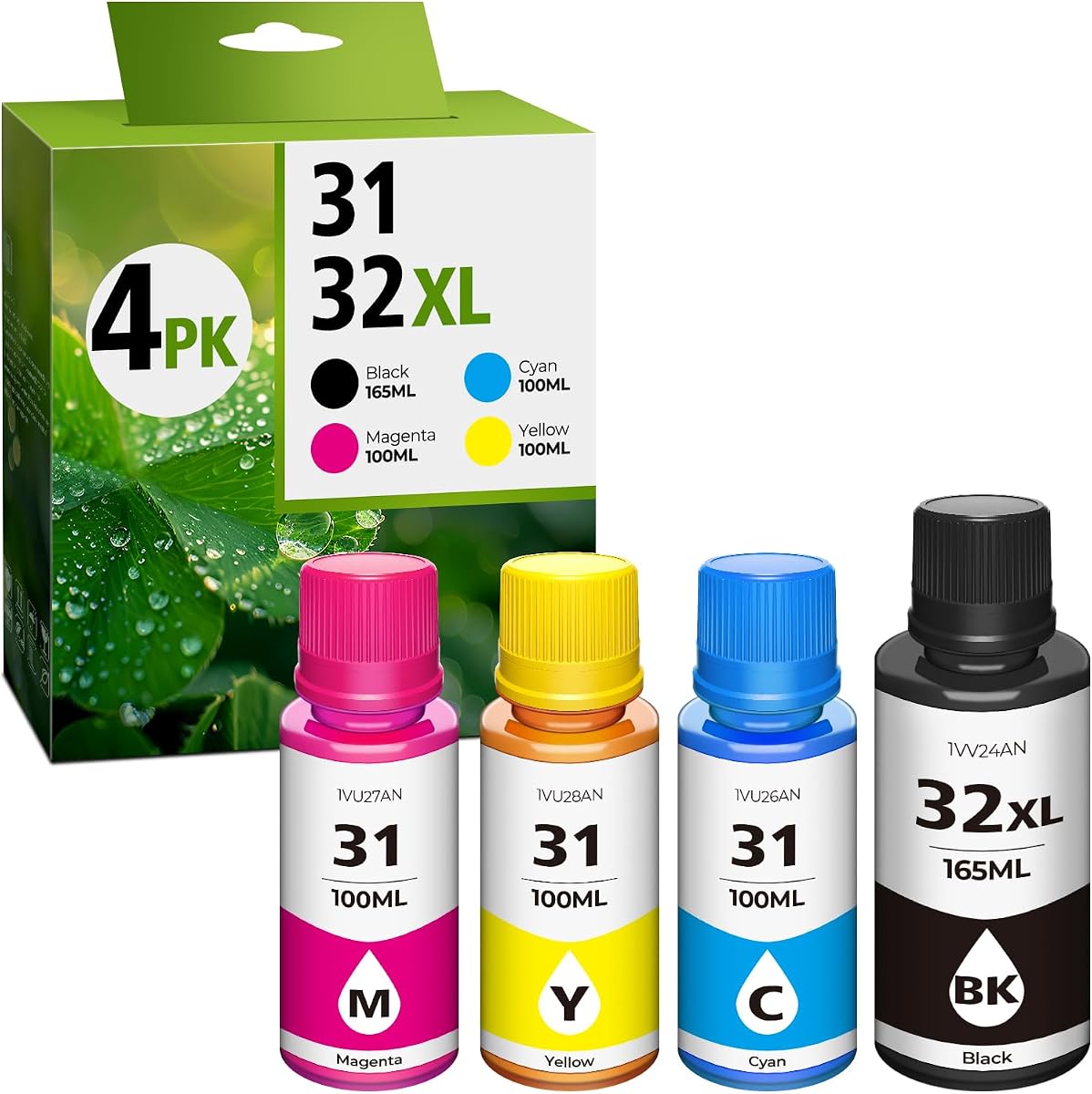
The 31 Ink 32XL Bottle Set offers a compatible alternative for users looking to reduce costs further. With a 4.4-star rating, it is praised for its high page yield and ease of refilling. This set is designed to work seamlessly with various HP Smart Tank printers, providing a reliable refill option.
We may earn a commission when you buy through this link, at no additional cost to you.
The 32XL black ink bottle has a yield of up to 9,500 pages, while color bottles offer 9,000 pages each. It is important to note these are dye inks and differ from OEM black pigment ink. This makes them perfect for color documents and general home printing needs effectively.
Users should clean printer heads before refilling to ensure optimal performance. Mixing with OEM ink can affect quality. Despite this, the value proposition is strong for those who print frequently and want to maximize their budget without sacrificing volume.
If you are looking for an affordable way to keep your printer running, this bottle set is a practical solution. It complements the tank printers by offering high capacity at a low cost.
The high yield page count reduces frequency of ink replacement providing exceptional value for your needs.
Designed for easy refilling ensuring seamless refills with minimal effort and no leakage.
We may earn a commission when you buy through this link, at no additional cost to you.
The Epson EcoTank ET-2980 is a strong color printing option with a 4.0-star rating. It offers enough ink to print up to 6,600 pages black and 5,500 color out of the box. Each replacement ink bottle set is equivalent to about 90 individual cartridges, ensuring less frequent replacements.
We may earn a commission when you buy through this link, at no additional cost to you.
The unique EcoFit bottles make refilling simple without worrying about the ink drying out. It allows you to print and scan from your smartphone or device with enhanced mobile printing. This model is perfect for home use where wireless convenience is key.
While it lacks auto duplex printing, the ease of use and ink capacity make up for it. The black design is sleek and fits well in any workspace. Users report consistent quality and reliability over time with this printer.
If you need a reliable color printer that keeps costs low, the Epson EcoTank ET-2980 is a great choice. It delivers on the promise of worry-free printing and ease of use.
The printer comes with enough ink to last up to 3 years for worry-free printing.
Print and scan from the convenience of your smart device with the Epson Smart Panel app.
We may earn a commission when you buy through this link, at no additional cost to you.
The Epson EcoTank ET-2800 is designed for reliability with a 4.0-star rating and Micro Piezo Heat-Free technology. It creates vivid detailed prints and documents thanks to efficient printing methods. Each ink bottle set is equivalent to about 90 individual cartridges, making replacement less frequent.
We may earn a commission when you buy through this link, at no additional cost to you.
The printer supports wireless color printing with up to 2 years of ink in the box. Its duty cycle is robust, making it suitable for home environments. You can print up to 4,500 pages black and 7,500 color, offering significant savings over cartridges.
While the display is basic, the core performance is solid. The lack of duplex printing is a trade-off for the lower price point. It is a reliable machine that handles everyday tasks effectively and supports green printing practices.
If you want a straightforward printer that just works and saves money, the Epson EcoTank ET-2800 is a solid pick. It is designed to reduce waste and frustration in home printing.
The Epson EcoTank ET-2800 creates vivid detailed prints and documents thanks to Micro Piezo Heat-Free Technology.
Print up to 4500 pages black and 7500 color to avoid frequent ink replacements.
We may earn a commission when you buy through this link, at no additional cost to you.
Selecting the right ink tank printer involves considering several factors to ensure it meets your specific printing needs and budget.
Ink capacity is a critical factor in ink tank printers. Look for models that include enough ink for at least two to three years. High page yields mean you spend less time refilling and more time printing.
Choose printers with large capacity tanks to ensure long-term savings on ink.
Print speed determines how quickly you get your documents. For home offices, a speed of 10 pages per minute or more is ideal. This ensures you do not wait too long for large jobs.
Prioritize models with faster ISO pages per minute for better productivity.
Wireless and mobile connectivity are essential for modern printing. Ensure the printer supports AirPrint or similar protocols to print from your phone or tablet easily. This adds flexibility to your printing workflow.
Select a printer with robust wireless features for seamless integration.
The quality of prints matters for both text and photos. Look for printers with high DPI resolution and technologies like Micro Piezo or thermal inkjet. These ensure sharp text and vibrant colors.
Check for models that support high-quality photo printing if you print images often.
A good ink tank printer should be easy to refill without spills. Features like mess-free refill systems or keyed bottles make this process simple. This reduces frustration and keeps your workspace clean.
Opt for printers with user-friendly refill designs to avoid mess.
Consider the total cost of ownership including the printer price and replacement ink. Ink tank printers generally cost less per page than cartridge models. Calculate potential savings over time to justify the initial investment.
Choose a printer that offers significant long-term savings on ink.
Features like automatic duplex printing or built-in scanners add value. These save paper and enhance productivity without extra equipment. Evaluate which features are necessary for your routine.
Prioritize scanners or duplex options if you need to copy or double-sided documents frequently.
Reputable brands like Epson, Canon, and HP offer reliable support and warranties. They also provide genuine ink that ensures optimal performance. Check reviews to gauge long-term reliability and customer service quality.
Buy from brands with strong support networks for peace of mind.
To use your ink tank printer effectively, start by setting up the device in a clean, dry area away from direct sunlight. Fill the ink bottles according to the manual, ensuring you match the colors to the correct tanks to avoid errors. Once primed, connect to your Wi-Fi network and install the recommended apps for easy mobile access.
Regular maintenance includes cleaning the printhead if you notice streaks or faded colors. Run diagnostic tests through the printer settings to ensure all nozzles are clear. If you print infrequently, make sure to print a test page every couple of weeks to prevent ink from drying out inside the system.
When refilling ink, handle bottles carefully and keep them upright to prevent leaks. Use genuine or high-quality compatible inks as recommended by the manufacturer to protect the printer warranty. Keeping the printer covered when not in use can also prevent dust accumulation on sensitive parts.
Yes, ink tank printers are generally better for high-volume printing. They offer significant cost savings because the cost per page is much lower. The ink lasts much longer than cartridges reducing waste.
Most ink tank printers come with enough ink to last years. You typically refill every one to two years depending on your usage. This reduces the hassle of frequent replacements significantly.
Yes, third party ink exists but manufacturers recommend genuine ink for warranty. Using non-genuine ink may void warranties or affect print quality. It is safest to use the original brand.
Yes, modern ink tank printers produce high-quality photo prints. They offer good color accuracy and detail for images. Some models support borderless printing for photo frames.
Setup involves filling tanks and connecting to Wi-Fi. It can take 15 to 20 minutes to prime the system. Once set up, daily use is very easy.
Ink tanks dry out slower than cartridges. However, printing a test page periodically helps prevent clogging. Cleaning the printhead can fix minor drying issues.
Epson, Canon, and HP are all reliable brands. They offer solid warranties and customer support. Choose based on your specific feature needs.
Most models support wireless printing from smartphones. You can use apps or AirPrint for easy mobile access. This allows printing documents or photos directly.
We have explored ten excellent ink tank printers that cater to various needs from budget to premium. The Epson EcoTank ET-2803 stands out for its balance of features and savings while the Canon MegaTank G3270 offers affordability.
When choosing a printer, prioritize ink capacity and connectivity to ensure it fits your workflow. Consider how much you print and whether you need features like duplex printing or photo quality.
Remember to check current availability and pricing as these details may change. Investing in the right printer now can save you money and frustration for years.