
GIGABYTE Radeon RX 9070 XT Gaming OC 16G
4.7Editor score
Powerful RX 9070 XT Core
16GB GDDR6 Memory
Advanced WINDFORCE Cooling
Explore our expert guide comparing the top flagship graphics cards for gaming and creation, featuring detailed specs and performance insights for October 2026.
Choosing the right flagship graphics card is crucial for high-performance gaming and professional creative work. These powerful GPUs deliver exceptional frame rates, realistic ray tracing, and AI-enhanced visuals for demanding applications.
Our team analyzed the latest models from top manufacturers, focusing on architecture, cooling efficiency, and real-world performance. We compared benchmarks, build quality, and value to create this comprehensive ranking for serious enthusiasts.
Each pick highlights unique strengths like AI acceleration, memory bandwidth, and thermal design. Note that availability and pricing fluctuate often, so verify current stock and deals before making your final purchase decision.
4.7Editor score

4.8Editor score

4.4Editor score
The following table provides a side-by-side comparison of all ten models ranked in this guide. It highlights key specifications like memory, architecture, and cooling designs to help you make an informed choice.





The ASUS TUF RTX 5070 Ti stands out as a top-tier choice for enthusiasts seeking high performance and reliability. With a rating of 4.8 stars, it delivers exceptional value through its Blackwell architecture and advanced cooling solutions.
We may earn a commission when you buy through this link, at no additional cost to you.
This card features military-grade components that ensure long-term durability under heavy workloads. The phase-change GPU thermal pad maintains optimal temperatures, while the protective PCB coating guards against environmental damage.
While it requires a minimum 850W PSU and has a substantial size, these trade-offs are justified by the performance gains. The Auto-Extreme manufacturing process further guarantees precision and consistency across every unit.
Gamers and creators who prioritize stability and thermal performance should strongly consider this model. It balances raw power with engineering excellence, making it a standout option in the current flagship market.
The phase-change thermal pad ensures consistent heat dissipation, outlasting traditional pastes for sustained performance.
Military-grade components and PCB coating protect against moisture and dust, extending the card's lifespan significantly.
We may earn a commission when you buy through this link, at no additional cost to you.
GIGABYTE GeForce RTX 5080 offers robust performance for 4K gaming and creative tasks. Its 16GB GDDR7 memory and PCIe 5.0 support ensure it stays relevant for years.
We may earn a commission when you buy through this link, at no additional cost to you.
The WINDFORCE cooling system maintains stable clocks during intensive sessions. Combined with DLSS 4, it delivers smooth visuals even in demanding titles.
However, it lacks some of the advanced thermal solutions found in competing models. Users looking for cutting-edge build features might find it slightly basic compared to premium tiers.
This card is ideal for gamers who want reliable high-end performance without extra bells and whistles. It represents a solid balance of specs and practical design.
The 256-bit GDDR7 interface provides ample bandwidth for 4K textures and complex rendering tasks.
PCIe 5.0 compatibility ensures the card can leverage next-generation motherboard capabilities effectively.
We may earn a commission when you buy through this link, at no additional cost to you.
The VIPERA RTX 4090 Founders Edition remains a powerhouse for enthusiasts seeking raw compute power. Its CUDA core count delivers unmatched performance in rendering and scientific simulations.
We may earn a commission when you buy through this link, at no additional cost to you.
Support for 8K HDR and DLSS 3 ensures compatibility with cutting-edge displays and AI upscaling tech. The third-generation RT cores provide realistic lighting and reflections.
Despite being a legacy model, it outperforms many newer mid-range cards. However, its power requirements are substantial, necessitating a robust PSU and efficient cooling.
This card is perfect for professionals needing extreme performance in rendering pipelines. It bridges the gap between high-end consumer gaming and workstation reliability.
With over 16k CUDA cores, this card accelerates heavy workloads significantly.
HDMI 2.1a enables high refresh rates at 8K resolution for immersive viewing.
We may earn a commission when you buy through this link, at no additional cost to you.
The ASUS TUF RTX 5080 OC takes durability seriously with its military-grade components. It delivers impressive overclocked performance suitable for intense gaming sessions.
We may earn a commission when you buy through this link, at no additional cost to you.
The phase-change thermal pad ensures the card stays cool under pressure. This design choice protects longevity compared to standard paste options.
Users should confirm case clearance due to its size. However, the included GPU bracket helps secure it properly in standard chassis setups.
Ideal for users wanting a balance of high performance and long-term reliability. It offers a premium feel with practical engineering choices.
Phase-change pads prevent thermal throttling over time better than traditional solutions.
GPU Tweak III allows easy monitoring and fine-tuning of fan speeds and clocks.
We may earn a commission when you buy through this link, at no additional cost to you.
This RX 9070 XT model offers impressive value with its 16GB memory. It competes well in rasterization scenarios without breaking the bank.
We may earn a commission when you buy through this link, at no additional cost to you.
The server-grade thermal gel ensures heat moves quickly away from the core. Hawk fans provide focused airflow to keep temperatures in check.
While it lacks some proprietary tech found in higher-end cards, it remains a strong performer. It fits well into systems requiring efficient cooling.
Perfect for gamers prioritizing raw speed over extra features. It delivers a reliable and straightforward experience for demanding titles.
Server-grade gel conducts heat away faster than standard pastes used in consumer cards.
Hawk fans direct air precisely across the fins for optimized heat dissipation.
We may earn a commission when you buy through this link, at no additional cost to you.
The ASUS Dual RTX 5060 Ti brings flagship features to a compact form factor. It fits well into smaller cases without sacrificing build quality.
We may earn a commission when you buy through this link, at no additional cost to you.
With dual BIOS options, users can toggle between performance and quiet modes easily. The ball bearings ensure the fans stay reliable over time.
Its memory configuration allows for smooth multitasking and large textures. However, it is better suited for 1080p or 1440p gaming than 4K.
Ideal for SFF builders needing power in a small package. It balances noise control and cooling efficiency effectively.
0dB technology stops fans during light loads to keep the system silent.
Dual ball bearings extend fan life significantly compared to standard sleeve options.
We may earn a commission when you buy through this link, at no additional cost to you.
The RTX 5090 offers a staggering 32GB of memory, making it perfect for heavy creative work. It handles massive datasets and complex scenes with ease.
We may earn a commission when you buy through this link, at no additional cost to you.
Its AI performance metrics are high, supporting advanced upscaling and generative tasks. The Auto-Extreme manufacturing ensures every component is reliable.
While expensive and large, it future-proofs your system against memory demands. The included bracket reduces strain on the PCIe slot during transport.
Best for professionals and enthusiasts who need unlimited memory headroom. It is the ultimate tool for content creation and simulation.
With 772 AI TOPS, this card excels in generative AI and machine learning tasks.
The included bracket protects the PCB from bending under the weight of the GPU.
We may earn a commission when you buy through this link, at no additional cost to you.
ASUS Prime models focus on functionality and clean aesthetics. The RX 9070 XT here maintains strong performance without excessive styling.
We may earn a commission when you buy through this link, at no additional cost to you.
Phase-change thermal pads help lower temperatures for better stability. The Axial-tech fans increase downward pressure to maximize airflow efficiency.
It supports high boost clocks that help in competitive gaming scenarios. The dual BIOS switch provides flexibility for different usage scenarios.
This card fits builds where looks matter but subtle design is key. It delivers strong value for gamers who prefer minimalism.
Lower operating temperatures translate directly to sustained clock speeds and longer hardware life.
Axial-tech fans are engineered to push more air per revolution than standard fans.
We may earn a commission when you buy through this link, at no additional cost to you.
The RTX 5070 strikes a balance between cost and performance for most users. It handles modern titles well at high settings.
We may earn a commission when you buy through this link, at no additional cost to you.
Military-grade components ensure it survives long-term use without degradation. The phase-change thermal pad keeps it cool under load.
While it has less VRAM than top models, 12GB is sufficient for most current games. The GPU bracket adds an extra layer of physical security.
Perfect for mid-range builds aiming for high refresh rate 1440p gaming. It offers a reliable and durable experience for regular play.
Military-grade parts resist heat and voltage fluctuations better than standard components.
Advanced thermal pads reduce hot spots, ensuring even heat distribution across the die.
We may earn a commission when you buy through this link, at no additional cost to you.
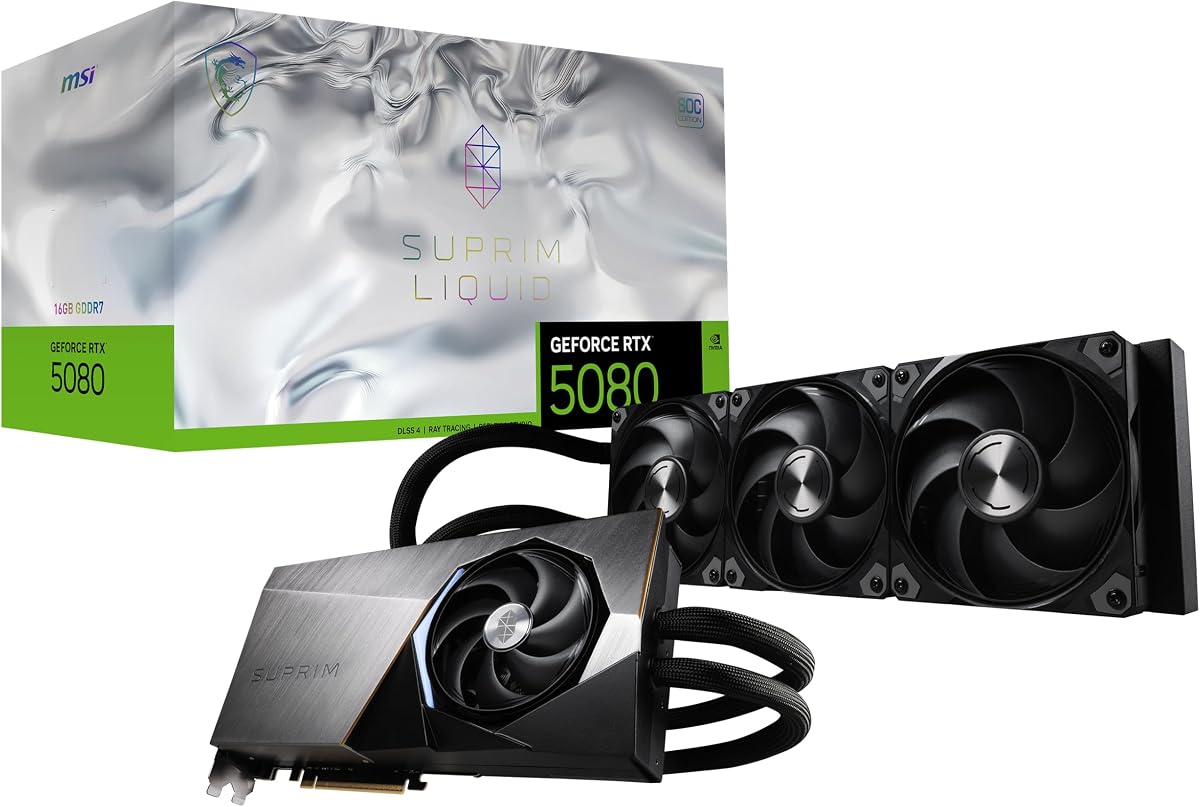
MSI's liquid-cooled solution offers maximum performance potential for the RTX 5080. The liquid loop keeps the GPU remarkably cool.
We may earn a commission when you buy through this link, at no additional cost to you.
With support for HDMI 2.1b and DisplayPort 2.1a, it connects to the latest monitors easily. High clock speeds ensure smooth frame delivery.
However, liquid cooling adds complexity to installation and maintenance. Users should be comfortable with handling extra components.
Ideal for enthusiasts who want every bit of performance from their rig. It represents the pinnacle of consumer graphics cooling tech.
Liquid cooling reduces thermal noise and allows for higher sustained boost clocks.
The wide range of output options supports multiple displays and latest display standards.
We may earn a commission when you buy through this link, at no additional cost to you.
Selecting a flagship graphics card involves balancing performance needs with budget and system constraints. Consider these factors to find the perfect match.
The underlying architecture, such as Blackwell or Ada, dictates how efficiently the card processes data. Newer architectures offer better ray tracing and AI features while consuming less power.
Look for the latest generation chips to ensure longevity and support for upcoming gaming technologies.
Modern games and creative apps require significant VRAM to store textures and assets. 16GB or more is recommended for high-resolution gaming and video editing.
High-speed GDDR7 memory ensures that data transfers do not bottleneck the GPU during intense scenes.
Effective cooling keeps the GPU from throttling under load. Look for models with phase-change thermal pads or advanced fan designs.
Choose air cooling for simplicity or liquid cooling for maximum overclocking potential.
High-performance cards need substantial wattage. Ensure your power supply meets the minimum recommendations to avoid instability.
Check for the correct connector types, such as 12V-2×6, to ensure safe connections.
Flagship cards often require significant case space. Measure your case clearance before purchasing to avoid fit issues.
Multi-slot designs offer better airflow but may block other ports in tight chassis.
Materials like military-grade components protect the card from physical and environmental stress.
Robust PCBs and protective coatings extend the lifespan of your investment significantly.
Modern ports like HDMI 2.1a and DisplayPort 2.1a support high refresh rates and resolutions.
Ensure the card has enough outputs for your multi-monitor setup or VR headset.
Intuitive software allows you to tweak performance and monitor temperatures easily.
Tools that support GPU tuning help maximize the potential of your hardware.
Proper installation is key to avoiding hardware issues. Ensure the card is firmly seated in the PCIe slot and the power cables are secure.
Regularly update your drivers to maintain compatibility with new games and applications. This also helps fix known bugs and improves performance.
Keep your system clean by dusting the fans and vents periodically. Good airflow prevents overheating and extends the card's life.
The ASUS TUF RTX 5090 and RTX 5080 models offer the best balance of VRAM and raw power for 4K. Their high memory bandwidth handles textures effortlessly. For pure performance, the RTX 5090 is the top choice. However, the RTX 5080 provides excellent value for most users. Both support the latest display standards effectively.
Many flagship models recommend at least 850W of power. The new 12V-2×6 connectors are standard on recent cards. Check your PSU wattage and connector type before installing. Upgrading your PSU ensures stability and longevity. A weak PSU can cause crashes under load.
GDDR7 offers higher speeds and efficiency than previous generations. This means faster loading and smoother frame delivery. It reduces bottlenecks in high-resolution scenarios. Modern games benefit from the increased bandwidth significantly. This technology keeps your system future-proof.
Liquid-cooled models like the MSI SUPRIM Liquid SOC offer better thermal performance. They allow for higher sustained clocks during long sessions. However, they add complexity to your system build. They are worth it if you push your hardware limits. Air cooling is often sufficient for standard use.
Look for cards with high VRAM counts and strong CUDA core performance. These specs help in rendering and video editing tasks. AI acceleration features like DLSS 4 also boost workflow efficiency. Ensure the card supports color accuracy standards. Stability is key for professional applications.
Most modern cases accommodate multi-slot designs but check your manual. Some flagship cards exceed 300mm in length. Ensure you have enough room for airflow and other components. Use a GPU bracket to prevent sagging. Clearance is critical to avoid physical damage.
We've ranked the top models based on performance, durability, and features. The ASUS TUF RTX 5070 Ti stands out for its balance of build and power.
Consider your specific needs when choosing, whether it is VRAM for creative work or raw speed for gaming. Prioritize cooling and power requirements to avoid compatibility issues.
Prices and availability change rapidly in the hardware market. Always check current listings and ensure you have the latest system info before buying.