
Selore USB C Docking Station Dual Monitor
4.4Editor score
100W PD charging input
Dual HDMI 4K@60Hz capability
Includes USB-C and USB-A ports
This guide compares the top 10 docking stations with 2 HDMI ports for multi-monitor setups, evaluating connectivity, power delivery, and compatibility.
Choosing the right docking station with 2 HDMI ports is essential for maximizing productivity in modern workspaces. These devices allow you to connect multiple monitors, peripherals, and network cables through a single laptop port. Whether you are working from home or in an office, the right hub transforms your laptop into a powerful desktop workstation.
We have evaluated ten top-rated models based on their port selection, video output capabilities, and power delivery features. Each product offers unique benefits for different user needs, from budget-friendly options to premium all-in-one solutions. Our comparison focuses on real-world performance, compatibility with various operating systems, and build quality.
Each pick in this guide highlights specific strengths such as dual 4K support, fast charging, and extensive connectivity options. Note that product availability and pricing can change frequently due to market demand and seasonal sales. Always verify current specifications before making a purchase to ensure the device meets your specific requirements.
4.4Editor score

4.5Editor score

4.5Editor score
The following table provides a side-by-side comparison of the ten selected docking stations. It highlights key specifications such as port count, video resolution support, and power delivery wattage to help you make an informed decision.


The Anker Laptop Docking Station Dual Monitor stands out as a top choice for professionals needing reliable multi-screen setups. With a rating of 4.5 stars, it offers a robust 8-in-1 expansion solution that simplifies workspace connectivity. This hub enables users to connect two 4K displays alongside essential peripherals like drives and network cables.
We may earn a commission when you buy through this link, at no additional cost to you.
Its massive expansion capabilities include two HDMI ports that support 4K@30Hz on dual displays, making it ideal for productivity tasks. The included USB-C PD charging port provides up to 85W pass-through charging, ensuring your laptop stays powered during heavy use. Additionally, the built-in Ethernet port offers stable internet connectivity which is crucial for remote work environments.
While it excels in performance, users on macOS should note that it supports mirroring only rather than extended desktop mode on external monitors. This limitation is common with MST technology on Apple systems but may restrict flexibility for Mac users requiring distinct screens. Overall, the trade-off is acceptable for the stable dual HDMI performance it delivers on Windows.
This docking station is best suited for Windows laptop users who need a compact yet powerful hub for daily workflows. The 18-month warranty and friendly customer service add significant value to the purchase. It effectively turns a slim laptop into a full desktop workstation without requiring complex cabling or multiple adapters.
Stream or mirror content to two devices with 4K@30Hz support via both HDMI ports for seamless multitasking.
Compatible with USB-C Power Delivery to provide high-speed pass-through charging up to 85W for sustained performance.
We may earn a commission when you buy through this link, at no additional cost to you.
The Acer 13-in-1 Laptop Docking Station is a robust solution for users requiring extensive connectivity and triple monitor support. Rated 4.5 stars, this premium hub allows you to build a powerful command center using two HDMI ports and one DisplayPort. It is particularly valuable for professionals managing complex financial charts or code across multiple screens.
We may earn a commission when you buy through this link, at no additional cost to you.
It comes with a 110W power adapter that delivers 100W to your laptop via the USB-C PD host port. This ensures your device remains charged even under heavy workloads while running multiple external displays. The all-in-one aluminum body dissipates heat efficiently, maintaining peak performance during prolonged usage without overheating or throttling.
One important consideration is that macOS users can only mirror displays across connected screens due to system limitations. Windows users benefit from MST technology to extend their desktop across three independent screens. While the price is higher than basic hubs, the included power adapter and security slot justify the investment for office environments.
This docking station is ideal for advanced users who need a clutter-free workspace with maximum connectivity options. The integrated security slot allows you to lock the dock and laptop to your desk for physical safety. It successfully consolidates networking, storage, audio, and power into a single sleek unit for enhanced productivity.
Build a powerful command center with three independent screens via 2x HDMI and 1x DisplayPort for better multitasking.
The included 110W adapter provides 100W charging power to keep your laptop powered during heavy multi-monitor workloads.
We may earn a commission when you buy through this link, at no additional cost to you.
The Selore USB C Docking Station Dual Monitor offers excellent value for budget-conscious users seeking high-quality dual-screen support. With a rating of 4.4 stars, this 8-in-1 hub provides dual 4K@60Hz HDMI ports which is a strong feature for its price. It transforms your laptop into a versatile workstation capable of supporting both home and office environments effectively.
We may earn a commission when you buy through this link, at no additional cost to you.
Its advanced intelligent technology ensures temperature control and stable performance during extended use. The dual HDMI ports support MST mode under Windows to extend two monitors simultaneously with crisp visuals. Additionally, the 100W power delivery port allows for fast charging input although the package does not include a wall charger for immediate use.
Users should note that this adapter does not support dual-screen extension on macOS and limits external displays to mirroring mode. This is a standard constraint for many hubs using MST technology with Apple systems. However, for Windows users, the fast data transfer speeds of up to 5Gbps across USB ports provide smooth file movement.
This docking station is highly recommended for students or home office users looking for an affordable yet powerful dual monitor setup. It includes an SD/microSD card slot for easy photo and video browsing from cameras. The plug-and-play compatibility with Thunderbolt and full-featured USB-C ports makes it a convenient upgrade for existing laptops.
Transform your laptop with dual 4K@60Hz HDMI ports for effective multitasking and expanded workspace versatility.
Features a 100W PD charging port and 5Gbps USB data transfer speeds for efficient workflow and charging.
We may earn a commission when you buy through this link, at no additional cost to you.
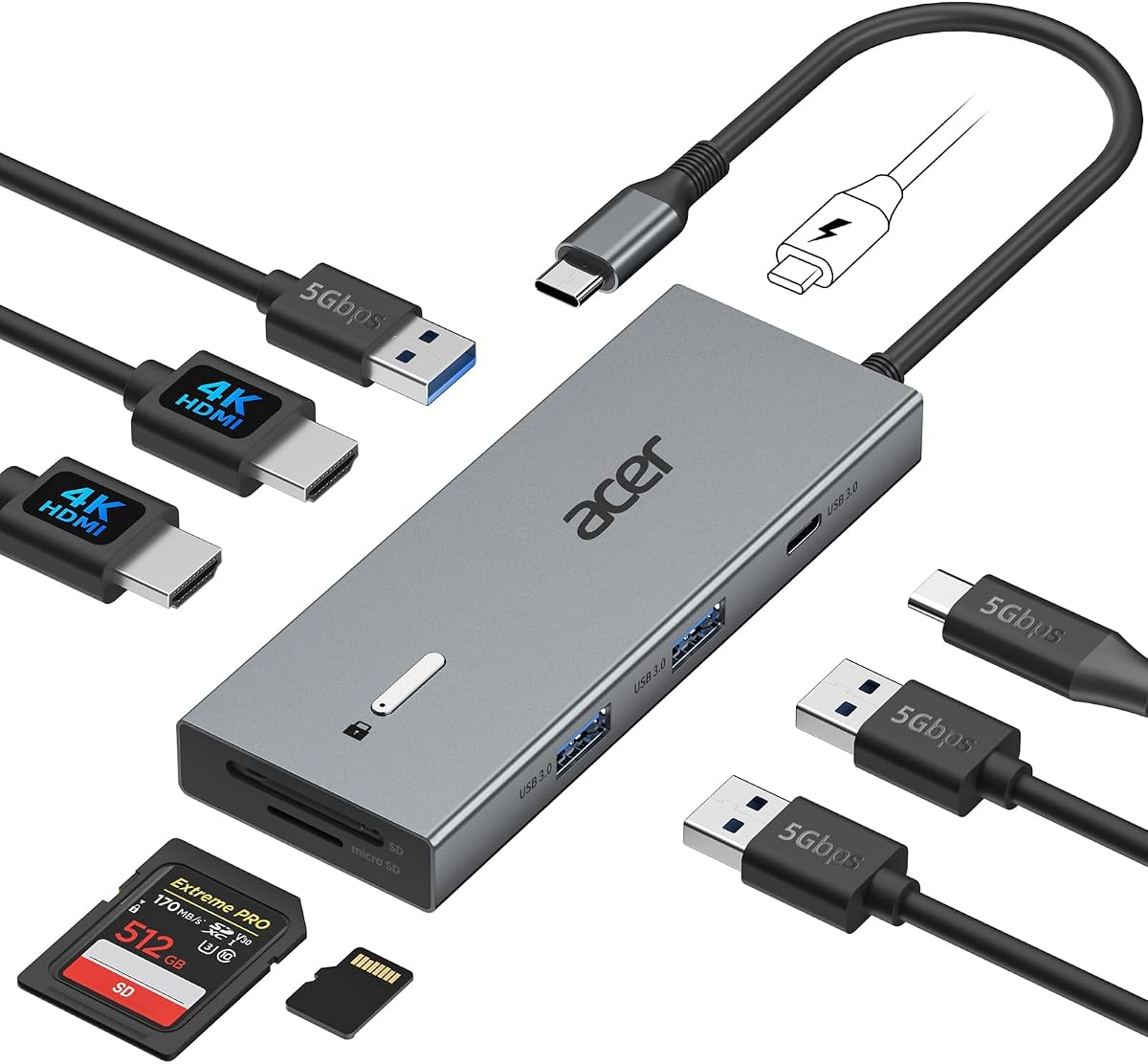
The Acer USB-C Docking Station Dual Monitor provides a compact solution with thoughtful design details like a built-in cable. Rated 4.2 stars, this 9-in-1 dock simplifies connectivity with 2 HDMI ports supporting 4K@60Hz resolution. It is designed for laptops with full-featured USB-C ports enabling display output and charging through a single connection point.
We may earn a commission when you buy through this link, at no additional cost to you.
Its standout feature is the dedicated lock button that secures devices with a single click for Windows or a three-second press for Mac. This adds a layer of privacy and physical security especially useful in public spaces or offices. The aluminum alloy body helps dissipate heat effectively while maintaining a sleek professional appearance on any desk.
The built-in cable length of 0.65 feet keeps the setup tidy but may limit flexibility if your laptop ports are hard to reach. Users must ensure their devices support DisplayPort Alt Mode for video output to function correctly. Power delivery works up to 100W input but requires a separate wall adapter to activate charging fully.
This docking station is best for users prioritizing convenience and security alongside dual monitor capabilities. It offers fast data transfer through USB-A and USB-C ports alongside SD card access. The comprehensive compatibility with Dell, Lenovo, and Surface devices ensures it fits well into various modern workstation configurations.
Dedicated lock button turns off screens instantly to protect sensitive information from prying eyes at any time.
Supports dual monitors via 2 HDMI ports with stunning 4K@60Hz resolution for clear and sharp extended displays.
We may earn a commission when you buy through this link, at no additional cost to you.
The Dell D3100 USB 3.0 Docking Station serves as a reliable option for laptops with traditional USB-A ports needing triple display support. Rated 4.2 stars, it offers two HDMI ports and one DisplayPort for vibrant high-resolution video streaming. It is particularly suitable for business users who require extended connectivity without Thunderbolt or USB-C infrastructure.
We may earn a commission when you buy through this link, at no additional cost to you.
Its enhanced connectivity includes three superspeed USB 3.0 ports and one RJ-45 network port for reliable wired internet. The included 65W power adapter ensures your laptop receives sufficient power for basic tasks while connected to multiple screens. It supports a wide range of Windows operating systems including XP through 10 providing legacy system support.
However the design relies on USB-A rather than the more modern USB-C standard which may not suit newer ultrabooks. Users must ensure their hardware has available USB-A ports for data and power connections to function. The package includes an HDMI to DVI cable for added flexibility when connecting older monitors or projectors.
This docking station is ideal for offices with older Dell Latitude or Inspiron devices that lack USB-C ports. It allows seamless integration into a desktop workflow with audio convenience via a 3.5mm headphone input. It is a solid choice for stable performance and wide multimedia connectivity on traditional PC hardware.
Supports 1 x DisplayPort and 2 x HDMI outputs to elevate viewing experience across multiple screens.
Designed to work seamlessly with various Windows versions from XP to 10 for broad compatibility.
We may earn a commission when you buy through this link, at no additional cost to you.
The Anker 7-in-1 USB-C Hub is designed for multitaskers who prioritize portability and speed over maximum resolution. With a rating of 4.2 stars, it features dual HDMI outputs capable of 1080p@60Hz resolution suitable for standard productivity tasks. This hub offers blazing-fast 10Gbps data transfer to reduce times and boost work efficiency significantly.
We may earn a commission when you buy through this link, at no additional cost to you.
Its 100W input capacity allows for 85W output to your laptop ensuring it stays charged while in use. The hub supports USB-C USB4 and Thunderbolt connections making it compatible with a wide range of modern devices including MacBook and Windows laptops. It simplifies workflow by consolidating essential ports into a compact unit.
While it lacks an Ethernet port which limits wired network options it excels in data throughput and display extension. Users seeking 4K resolution may find this limitation restrictive but 1080p is often sufficient for daily office work. The 18-month warranty adds confidence in the product durability for long-term use.
This hub is best for professionals who travel frequently and need a lightweight dual monitor solution. It allows you to extend your workspace across two screens effectively without adding significant weight to your bag. It is an excellent choice for those who value speed and reliability in a portable package.
Reduce transfer times dramatically with a 10Gbps port that moves large files and boosts work productivity.
Extend your workspace across two screens with 1080p@60Hz resolution ideal for enhancing multitasking capabilities.
We may earn a commission when you buy through this link, at no additional cost to you.
The MOKiN USB C Docking Station Dual Monitor is a versatile solution tailored for Dell HP and Lenovo laptops. Rated 4.3 stars, it features a complete 13-in-1 dock solution with 2 HDMI ports and multiple USB-A and USB-C options. This hub provides blazing-fast data transfer speeds and stable high-performance network connections for seamless daily operations.
We may earn a commission when you buy through this link, at no additional cost to you.
Its privacy protection lock button allows you to turn off screens instantly protecting sensitive information at any moment. This feature is particularly useful for shared workspaces or when stepping away from a computer in public areas. The dedicated USB-C Power Delivery port delivers up to 100W to power your laptop efficiently while the hub is in use.
Users should note that this device requires a Thunderbolt 3/4 or full-featured USB-C port to function properly. The package does not include a wall charger so you must have a compatible adapter available for charging. Despite this minor inconvenience the high number of USB ports offers substantial connectivity options for various peripherals.
This docking station is ideal for users needing extensive peripheral connections alongside dual high-definition monitors. It ensures your laptop stays charged efficiently while moving files quickly via 5Gbps ports. The combination of privacy security and high power charging makes it a robust choice for professional and home office settings.
Short-press to turn off your screens and protect sensitive information at any time instantly.
Complement wireless with a stable 1000Mbps RJ45 network port for seamless video calls and large downloads.
We may earn a commission when you buy through this link, at no additional cost to you.
The Selore USB C Docking Station offers extensive connectivity with options for triple 4K displays and an 8K DP port. Rated 4.5 stars, this 10-in-1 hub allows you to extend your workspace across three independent monitors via HDMI and DP. It is perfect for trading coding and design where screen real estate is critical for productivity.
We may earn a commission when you buy through this link, at no additional cost to you.
It includes a dedicated smart button that lets you cycle through display modes or turn off all monitors instantly. This adds convenience for energy saving and quick switching between single and multi-screen setups. A Gigabit Ethernet port ensures you get rock-solid lag-free internet crucial for video conferences and large file transfers.
Windows users benefit from MST technology to drive independent screens but macOS users can only mirror content on this device. The aluminum chassis helps dissipate heat effectively during extended multi-monitor use. A 100W PD input is recommended for stable output so ensure your charger meets these requirements.
This docking station is best for power users who need maximum screen flexibility and robust connectivity. It works with laptops equipped with Thunderbolt or full-featured USB-C ports to unleash quad-monitor productivity. The combination of VGA HDMI and DP ensures compatibility with almost any monitor or projector you might use.
Click to turn off or wake up connected monitors instantly and cycle modes for energy efficiency.
Extend your workspace across three independent 4K monitors with DP1.4 for clarity on demand.
We may earn a commission when you buy through this link, at no additional cost to you.
The Anker Laptop Docking Station 13-in-1 turns your laptop into a full desktop workstation with extensive port variety. Rated 4.0 stars, it features 2 HDMI ports DisplayPort and three USB-C ports for versatile connectivity. This hub allows you to charge your laptop at 85W and phone at 18W simultaneously using the included adapter.
We may earn a commission when you buy through this link, at no additional cost to you.
Its vertical compact design saves valuable desk space while maintaining stability during use. The hub supports extended triple displays on Windows for expanded multitasking or single 4K output for crisp visuals. It also offers file transfer speeds up to 10Gbps and SD card reading capabilities for a power-user workflow.
The included 135W power adapter ensures desktop-grade power delivery right out of the box without extra purchases. While it is heavier due to the integrated power brick it provides reliable charging for demanding workloads. Windows users can fully utilize MST for three monitors but Mac users are limited to mirror mode.
This docking station is ideal for home office professionals seeking a complete desktop replacement solution. It connects via a single cable to handle all your peripherals including audio Ethernet and SD storage. The 18-month warranty and trusted brand reputation make it a secure choice for upgrading your workspace setup.
Includes a 135W power adapter to charge laptop at 85W and phone at 18W simultaneously.
Run up to 3 external monitors at 1080p@60Hz for expanded multitasking via Windows MST technology.
We may earn a commission when you buy through this link, at no additional cost to you.
The last entry in this comparison is currently marked as unavailable with no detailed product information provided. It is important to verify listings before purchase as sometimes product pages change or items go out of stock. Always check the manufacturer website or alternative sellers for current specs if you are interested in specific models.
We may earn a commission when you buy through this link, at no additional cost to you.
In some cases older docking stations may be discontinued or replaced by newer versions with updated features. This placeholder serves as a reminder that inventory and availability can vary significantly over time. We recommend focusing on the nine detailed options above which have confirmed availability and comprehensive performance data.
Choosing a reliable model ensures you receive the expected performance and support for your workflow needs. If you encounter unavailable listings try searching by ASIN or brand name to find direct replacements. Keeping an eye on product pages will help you catch any updates or restocks immediately.
Always verify current specifications before making a purchase to ensure the device meets your specific requirements and needs. The guide focuses on proven models with strong user feedback and consistent quality standards. We suggest reviewing the top picks for the most reliable experience in your workspace setup.
Always verify listings before purchase as product pages change or items may go out of stock.
Keep an eye on product pages to catch updates or restocks for discontinued items immediately.
We may earn a commission when you buy through this link, at no additional cost to you.
Selecting the right docking station involves evaluating several technical factors to ensure it meets your specific workflow needs.
When choosing a docking station with 2 HDMI ports it is crucial to check the maximum resolution and refresh rate supported. Many modern hubs offer 4K at 60Hz which provides smoother visuals and sharper text for detailed work. Ensure that both HDMI ports can output the desired resolution simultaneously without compromising performance.
Look for docks that support HDMI 2.0 or higher to unlock full 4K capabilities. This ensures your monitors display the clarity and speed necessary for modern applications.
Power Delivery is a key feature that allows your docking station to charge your laptop while in use. Aim for a hub that supports at least 65W to 100W input to keep your laptop powered during intensive tasks. Check if the included power adapter meets these requirements or if you need to purchase one separately.
Verify the docking station supports USB-C Power Delivery standards to ensure fast and safe charging. This feature helps you maintain productivity without needing to keep your laptop connected to its original charger.
Different operating systems handle multi-monitor setups differently so compatibility is a major factor in your decision. Windows typically supports Multi-Stream Transport allowing extended desktops on two screens but macOS often limits to mirroring. Always check manufacturer notes regarding support for your specific OS to avoid display limitations.
Ensure the docking station explicitly lists your operating system as compatible to guarantee full functionality. This prevents surprises such as limited screen extension modes on Mac laptops.
A good docking station should offer more than just video ports to create a true workspace hub. Look for additional USB ports for peripherals like mice keyboards and external drives. Ethernet ports provide stable internet connections which are essential for remote work and large file transfers.
Consider hubs that include SD card readers and audio jacks for comprehensive connectivity. This reduces the need for separate adapters and keeps your desk tidy and organized.
The physical build quality of the docking station affects its durability and performance over time. Aluminum bodies are common and effective for dissipating heat which prevents throttling during long usage sessions. Consider whether you need a portable compact model or a stationary desktop unit based on your work habits.
A robust design ensures the ports remain reliable even with frequent plugging and unplugging. Choose a size that fits your travel bag if you move between locations regularly.
For users who transfer large files frequently data transfer speeds are a critical performance factor. Look for USB ports that support at least USB 3.0 speeds which offer 5Gbps for quick file movement. Some modern docks provide USB-C ports with 10Gbps speeds for even faster data handling.
Verify the specifications of all USB ports to ensure they meet your speed requirements. Fast transfer speeds improve productivity and reduce wait times when moving data to external storage.
Reputable brands offer warranties that protect your investment against defects or performance issues. A standard warranty period for docking stations is around 18 months to three years depending on the manufacturer. Reliable customer support ensures that any technical difficulties are resolved quickly without prolonged downtime.
Check the terms of the warranty to understand what is covered and how to claim service. A strong support network adds value to the purchase and ensures peace of mind.
While price is a factor it is essential to evaluate the overall value provided by the docking station. Cheaper models may lack critical features like high-resolution output or fast charging which impacts long-term utility. Investing slightly more in a premium model often yields better durability and performance over time.
Compare features across different price points to find the sweet spot for your needs. A balanced choice ensures you get the best performance without overspending on unnecessary features.
To start using your docking station connect the USB-C cable to your laptop and the other end to the hub. Ensure that your laptop supports DisplayPort Alt Mode to enable video output on the connected monitors. Once connected the system should automatically recognize the displays and allow you to arrange them in display settings.
Always use a compatible power adapter that meets the recommended wattage to ensure stable charging. If you plan to connect multiple high-resolution monitors verify your laptop GPU supports the combined resolution. This prevents performance drops or flickering on the screens during use.
To maintain your docking station keep it in a well-ventilated area to prevent overheating. Clean the ports regularly with a dry cloth to remove dust that may interfere with connections. Avoid forcing cables into ports to protect the internal pins from damage over time.
Yes most docking stations support two 4K monitors but refresh rates may vary between 30Hz and 60Hz. Check the specific HDMI version to ensure both displays run at 60Hz for smooth visuals. Some models may limit dual 4K to 30Hz if bandwidth is shared across ports.
Most docking stations with HDMI ports mirror the display on macOS due to system limitations. Extended desktop mode across multiple HDMI monitors is typically only available on Windows systems. Always verify macOS compatibility details before purchasing if extended screens are required.
Some models come with a power adapter while others require you to provide a compatible USB-C charger. Check the product specifications to see if an adapter is included in the box. For full power delivery a 100W wall charger is usually recommended regardless of the dock included.
Your laptop must have a Thunderbolt 3/4 or full-featured USB-C port with DisplayPort Alt Mode. A standard USB port that only supports data or charging will not output video signals. Always check your laptop specifications to ensure the port supports video before buying a dock.
Yes these docking stations include USB ports for mice keyboards and external drives alongside the HDMI outputs. This allows you to build a complete desktop setup with minimal cables. Ensure the total bandwidth of connected devices does not exceed the USB controller limits.
Most USB-C docking stations work with ChromeOS but support for multi-monitor setups may vary. Check manufacturer documentation to confirm compatibility with Chromebook models before purchase. Some models explicitly list ChromeOS as supported for full multi-display functionality.
Choosing the right docking station with 2 HDMI ports can significantly enhance your productivity and workspace organization. The top picks in this guide offer a range of options from budget-friendly hubs to premium solutions with triple display support. Evaluating these features against your specific needs will lead to the best decision for your workflow.
Prioritize compatibility with your laptop and operating system to ensure the dock functions as expected without limitations. Power delivery and build quality are also critical factors that impact long-term reliability and performance. A well-chosen hub transforms your laptop into a powerful desktop replacement capable of handling demanding tasks.
Always verify current availability and pricing before making a purchase as these can change frequently. Prices change due to market demand and seasonal sales so checking the latest offers is advisable. We recommend reviewing the detailed specs to ensure the model matches your technical requirements.