
Cooling Station and Stand for PS5/Slim/Pro
4.5Editor score
Auto Control Fan Speed Mode
9 RGB Honeycomb Lighting Effects
2.5 Hour Fast Charging Support
This guide compares the top 10 Cooling Stand for PS5 Console models for October 2026, evaluating cooling performance, charging speed, and storage features to
Gaming on the PlayStation 5 delivers stunning visuals but generates significant heat during long sessions. A quality Cooling Stand for PS5 Console helps manage thermal output to keep performance steady and prevent overheating issues from affecting your gameplay experience.
We evaluated ten top-rated models based on fan efficiency, controller charging speed, build quality, and overall design compatibility. Each option was assessed for its ability to protect your investment while keeping your entertainment area organized and tidy for daily use.
Every pick highlights key strengths like auto fan control or RGB lighting to match your setup style. Please note that availability and pricing change frequently so check current listings before making your final decision on this essential gaming accessory.
4.5Editor score
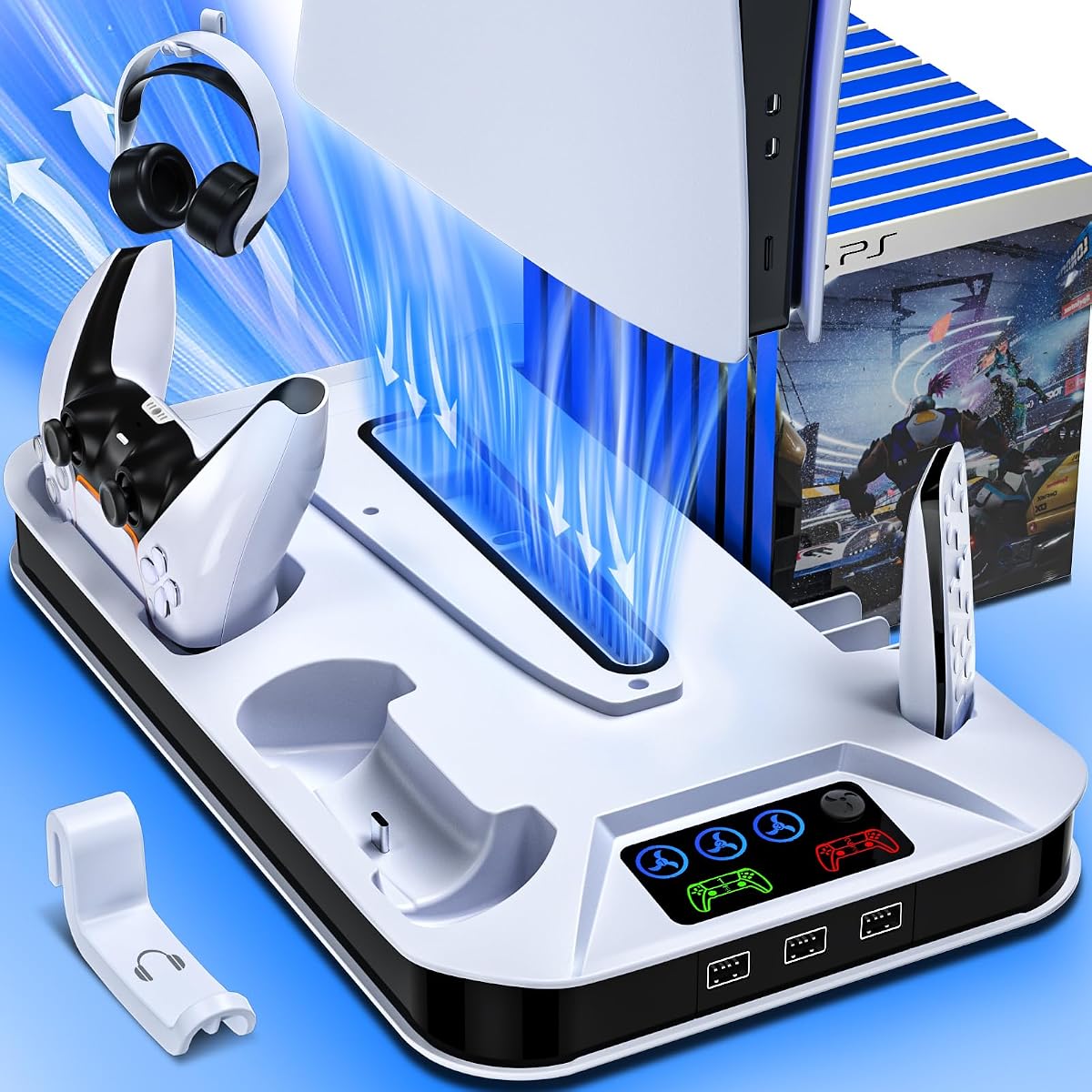
4.4Editor score

4.5Editor score
The following table provides a side-by-side comparison of all ten selected models to highlight key specifications and unique features that differentiate each cooling solution for your PlayStation 5 system.


This Cooling Stand for PS5 Console ranks first for its comprehensive feature set and reliable cooling performance. It offers three speed settings for the turbo fan and includes dual charging docks for controllers with clear LED status indicators.
We may earn a commission when you buy through this link, at no additional cost to you.
The design supports all PS5 models including Slim and Pro versions with a safety screw to lock the console securely. Extra USB hubs allow you to charge headsets and other devices without needing additional power adapters for convenience.
While it does not support Edge controllers directly you can use the USB ports for other accessories. The panel adapter must be removed for Slim digital versions but the rest of the setup is straightforward for most users.
If you need an all-in-one solution that keeps your console cool and organized this is the top recommendation. Its balance of cooling efficiency and storage makes it ideal for serious gamers who play for long hours.
The turbo fan dissipates hot air from the bottom of the console to prevent overheating during intense gaming sessions.
Fast charging docks let you power two controllers simultaneously in about three hours while showing status via LED lights.
We may earn a commission when you buy through this link, at no additional cost to you.
This horizontal model offers a unique alternative to vertical stands with a scalable design that fits every PS5 generation. It includes EVA foam for digital editions and features a touch switch for fan control with three adjustable speeds.
We may earn a commission when you buy through this link, at no additional cost to you.
One of its standout features is full compatibility with Edge controllers thanks to the up-and-down push design of the charging dock. This makes it versatile for users who own specialized controllers beyond the standard DualSense unit.
Installation is quick without tools as you simply place the foam and secure the screws before connecting power. The integrated storage helps keep your area tidy by holding the console and controllers in one consolidated unit.
Choose this if you prefer a horizontal layout or own Edge controllers that other stands might not support well. It delivers solid cooling and charging performance in a compact footprint that saves desk space.
The charging dock accepts Edge controllers with a push design that ensures a secure fit for consistent power delivery.
Holding the console horizontally allows for a lower profile that fits better on shelves with height restrictions.
We may earn a commission when you buy through this link, at no additional cost to you.
This model stands out with an intelligent temperature probe that automatically adjusts fan speed based on console heat. It offers both manual and automatic modes so you can choose how much control you want over cooling performance.
We may earn a commission when you buy through this link, at no additional cost to you.
The RGB lighting adds a vibrant atmosphere with nine different effects that can be adjusted for brightness and mode. A memory function remembers your last fan setting so you do not have to reconfigure it after restarts.
The movable USB port allows flexibility when positioning controllers for charging though it may require careful alignment. Charging is fast at two and a half hours and indicators show status clearly with red and green lights.
If you value smart features and customizable lighting this cooling station provides excellent value. The automatic mode ensures efficient cooling without constant manual input which is great for long gaming marathons.
A built-in probe detects heat levels and shifts fan speed automatically to maintain optimal operating temperatures.
Nine RGB modes let you match the stand to your room theme with single or multi-color breathing effects.
We may earn a commission when you buy through this link, at no additional cost to you.
This model emphasizes quiet operation with a low-noise turbo fan that cools effectively without distracting sounds during gameplay. It includes non-slip pads and a safety screw to keep the console stable and secure on any surface.
We may earn a commission when you buy through this link, at no additional cost to you.
Protection is a priority with a smart chip that stops charging at 80 percent to prevent battery overcharging. This extends controller life and safety when you charge overnight or during rest mode sessions.
Design aesthetics match the original console with a clean white finish and streamlined look. The headset holder and media remote slot help keep accessories organized so everything stays accessible within reach.
Choose this if noise level is a concern or you want extra safety for your accessories. Its reliable cooling and thoughtful design make it a strong contender for daily use in any home setup.
The turbo fan is engineered to minimize operational noise while maintaining strong airflow for effective cooling.
Smart chip technology stops charging early to protect controllers from overheating and overvoltage risks.
We may earn a commission when you buy through this link, at no additional cost to you.
Rysker offers a solid cooling solution that works with both standard and Edge controllers which is a key advantage. A safety screw ensures the console stays firmly locked in place to prevent accidental knocks during intense gameplay.
We may earn a commission when you buy through this link, at no additional cost to you.
Fan settings include a memory function that recalls your last preference after restart so you do not have to reset it. The media remote slot keeps your remote within easy reach while the USB ports allow charging for other gear.
Power options are flexible as it can draw from a USB HUB or other sources via the built-in cable. This reduces the need for extra wall adapters and simplifies your cable management on the desk or shelf.
If you own Edge controllers this stand is one of the few that supports them without issues. It balances functionality and simplicity well making it a reliable choice for dedicated PS5 users who want dependable cooling.
The charging dock accepts Edge controllers alongside standard ones for broader compatibility with your existing gear.
Built-in cable options allow connection to USB HUBs reducing clutter from external power adapters.
We may earn a commission when you buy through this link, at no additional cost to you.
This model delivers excellent value by combining auto temperature control with vibrant RGB lighting at a competitive price. The intelligent fan adjusts speed based on heat levels and remembers your last setting for convenience.
We may earn a commission when you buy through this link, at no additional cost to you.
The honeycomb lighting system offers nine modes with single and multi-color options to match your room decor. Charging is quick at two and a half hours for two controllers with red and blue LED status indicators.
While build materials are standard it handles daily cooling needs effectively without extra cost. The auto mode ensures heat stays managed so you can play for long periods without worrying about console performance issues.
If you are budget conscious but still want smart features this is a top pick. It balances cost and functionality well to provide reliable cooling and style for any PS5 setup.
Fan speed changes automatically based on console temperature to optimize cooling without manual input.
Nine honeycomb lighting modes let you personalize the look of your stand with various colors and patterns.
We may earn a commission when you buy through this link, at no additional cost to you.
Another horizontal option this model focuses on scalability to fit 2020 2023 and 2024 console versions. It uses EVA foam for digital editions and features a touch switch to control three fan speed settings.
We may earn a commission when you buy through this link, at no additional cost to you.
The charging dock works with standard and Edge controllers for broad compatibility. Setup takes minutes without tools since you just secure the foam and screws before connecting power for immediate use.
A storage note is that you must set USB power to always on for charging in Rest Mode. The compact footprint helps free up shelf space by combining console support and controller charging in one unit.
If you prefer horizontal placement and want Edge support this stand is worth considering. It provides reliable cooling and organization that adapts to different console generations without needing replacements.
Scalable design ensures compatibility with every PS5 model from the original to the latest Pro edition.
No-tool installation means you can have your console cooled and charged in just a few simple steps.
We may earn a commission when you buy through this link, at no additional cost to you.
This premium model offers advanced auto fan control with sensor data to adjust cooling precisely. It uses a Type-C cable for flexible power options and stops charging at 70 percent to protect controller battery health.
We may earn a commission when you buy through this link, at no additional cost to you.
Storage is comprehensive with a dedicated slot for game discs plus a headset stand and media remote holder. This keeps your area organized and ensures your favorite games stay within easy reach during sessions.
Smart chip protection prevents overcharging and overheating which extends accessory lifespan significantly. The auto fan runs quietly at low loads but powers up when the console gets hot for balanced performance.
If you want top-tier features and maximum organization this stand justifies the cost. It protects your console and accessories while keeping your entertainment area neat and fully functional.
Sensor-driven fan adjusts speed automatically to maintain ideal temperatures without manual intervention.
Dedicated disc slots and accessory holders keep your media and controllers organized in one place.
We may earn a commission when you buy through this link, at no additional cost to you.
This model prioritizes quiet operation with a silent turbo fan that cools without disrupting your audio. It includes a ring of RGB LEDs with multiple colors and modes to enhance your visual setup ambiance.
We may earn a commission when you buy through this link, at no additional cost to you.
You get two USB A hub ports to charge additional devices alongside the controller docks which adds versatility. A safety screw ensures the console stays secure while panel adapters for Slim and Pro versions come in the package.
The design is simple yet effective focusing on core cooling and charging needs. Charging is fast at three hours and indicators show status clearly with red and blue lights for easy monitoring.
If noise is a top priority this stand delivers excellent quiet performance. Its balanced feature set and RGB accents make it a great choice for users who value a serene gaming environment.
Silent turbo fan ensures effective cooling with minimal noise to keep gameplay immersive and distraction-free.
Ring RGB lighting offers multiple colors and modes to match your room lighting style and theme.
We may earn a commission when you buy through this link, at no additional cost to you.
This model features a clean design with concealed cables that reduce clutter for a tidy look. It includes three USB hubs and a headset holder so you can charge multiple devices from one central location.
We may earn a commission when you buy through this link, at no additional cost to you.
Security is ensured with sturdy screws that lock the console to the base for safety and balance. Charging two controllers takes about three hours with LED indicators showing status clearly for easy tracking.
Durability is a focus with sturdy materials built to withstand daily use without shaking or damage. A warranty and friendly customer service provide extra peace of mind for long-term satisfaction.
If you prioritize organization and cable management this stand is a solid choice. Its durable build and ample ports make it ideal for users with many accessories to keep charged and accessible.
Concealed cables keep wires hidden for a neater look and easier cleaning around your gaming area.
Sturdy materials and warranty support ensure the stand remains reliable through daily use and handling.
We may earn a commission when you buy through this link, at no additional cost to you.
Choosing the right Cooling Stand for PS5 Console depends on several factors including cooling method, controller compatibility, and additional features like storage or lighting.
Look for a turbo fan with adjustable speeds to manage heat during intense sessions. Auto mode fans are convenient as they adjust based on temperature which helps prevent overheating without manual input.
Adequate airflow ensures your console stays cool and extends its lifespan over time.
Check if the stand supports Edge controllers since many models only work with standard DualSense units. Dual charging docks let you power two controllers at once which is useful for multiplayer gaming.
Compatibility ensures you can charge all your accessories without needing extra chargers.
Ensure the stand fits your specific PS5 version whether standard Slim or Pro. Some designs include panel adapters or EVA foam to adapt to different shapes and sizes.
Correct fit prevents instability and protects the console from potential damage.
Extra USB ports allow you to charge headsets cameras or phones without extra cables. Three hubs are common and provide enough connectivity for most accessories.
Having built-in hubs reduces clutter and keeps your gaming area organized.
Sturdy materials and non-slip pads or screw locking systems keep the stand stable during use. Look for options with protective chips to prevent overcharging and short circuits.
Quality construction ensures longevity and safety for your console and accessories.
RGB lighting or matching white finishes can enhance your setup visually. Some stands offer multiple lighting modes to suit different preferences or themes.
Choose a design that complements your room style for a cohesive gaming environment.
Simple setup with no tools required saves time and effort when installing. Some designs include EVA foam or pre-attached panels to make alignment straightforward.
Easy installation means you can start using the stand right away without frustration.
Slots for discs headsets and remotes help keep all accessories within reach and tidy. Integrated storage reduces the need for separate organizers.
Effective storage keeps your area clean and ensures you can find items quickly.
Begin by placing the stand on a flat surface and attaching the panel adapter if needed for your model version. Align the console securely and use the safety screw to lock it in place for stability.
Connect the power cable to the USB port or wall adapter depending on the model instructions. Turn on the fan to select your preferred speed or activate auto mode to manage heat automatically.
Regularly clean dust from the fan and base to maintain airflow efficiency. Check connections periodically to ensure the console and accessories remain secure during use.
Using a third-party cooling stand generally does not void the console warranty as long as it does not cause physical damage. Avoid inserting foreign objects or forcing connectors that could harm internal ports.
Only select models explicitly mention Edge controller support so check the product details before purchasing. Most standard stands work only with DualSense units but some include adapters for Edge controllers.
Yes many models include an off option or allow you to use the fan only during active play. Some auto modes continue to run at low speeds to maintain optimal temperatures even when idle.
Most stands fully charge two controllers in about two to three hours using the included dock. LED indicators show when charging is complete so you know when to unplug them.
Some stands draw power directly from the console via USB while others require a separate wall adapter. Check the product description to see if an adapter is included or needed for your setup.
Many modern stands are designed to support the PS5 Pro with adjustable adapters. Verify compatibility in the product title to ensure it fits your specific console version before buying.
Use compressed air to blow dust out of the fan blades while the stand is off. Avoid touching internal components and unplug power before cleaning to prevent any electrical issues.
Check the power connection and ensure the device is turned on. Some models require a long press or specific button sequence to activate lighting modes so refer to the manual for details.
The top picks like the PS5/Slim/Pro Cooling Station offer comprehensive features including auto fans and USB hubs for serious gamers. Each model balances cooling power with design to keep your console running smoothly.
Prioritize compatibility with your console version and controller type to ensure proper fit and performance. Features like auto temperature control and safety chips add value for long-term usage.
Prices and availability may change so review current listings to find the best deal. Your choice should reflect your specific needs for cooling and organization in your gaming space.