
CyberPower CP1500PFCLCD PFC Sinewave UPS Battery Backup and Surge Protector
4.5Editor score
1500VA Pure Sine Wave Output
12 Outlets With USB Charging
Color LCD Management Panel
Discover the top battery backup for small office solutions that protect data and hardware from outages while ensuring uninterrupted workflow and network
Power outages can disrupt your small office operations instantly. A reliable battery backup ensures your critical devices stay online during unexpected interruptions. Choosing the right uninterruptible power supply protects your equipment and prevents costly data loss.
We analyzed ten top-rated models based on reliability, runtime, and surge protection features. Each unit offers unique benefits for workstations, networking gear, and peripherals. Our comparison highlights performance metrics that matter most for professional environments.
Every product review details specific capabilities and real-world applications for your setup. Prices fluctuate frequently so always verify current deals before purchasing. Investing in quality power protection safeguards your business continuity and peace of mind effectively.
4.5Editor score
4.9Editor score

4.5Editor score
This side-by-side comparison evaluates all ten units across key performance categories. We examine output types, outlet counts, warranty terms, and special features to help you decide which model fits your office power needs best.


This model leads our list with exceptional power quality and comprehensive protection features. It delivers a pure sine wave output that is critical for active power factor corrected supplies in modern workstations. The high VA rating ensures your office equipment gets enough backup power during outages.
We may earn a commission when you buy through this link, at no additional cost to you.
The color LCD panel provides real-time visibility into voltage levels and battery status. This proactive monitoring helps you identify potential power issues before they cause equipment damage or downtime. The included PowerPanel software adds remote management capabilities for IT oversight.
While the unit offers superior protection it comes at a higher price point than basic models. The weight is also significant so you need a stable desk or floor location. These factors are acceptable given the level of reliability and feature set provided.
This unit is ideal for small offices with high-end computers or sensitive telecom equipment. If you need pure sine wave power and extensive surge protection this is the top recommendation. It offers the best combination of performance and management tools available today.
Compatible with Active PFC power supplies found in modern computers. This ensures stable operation during battery backup modes without risking hardware damage.
Dual USB ports allow you to charge phones and tablets directly. This keeps essential communication devices powered during unexpected office interruptions.
We may earn a commission when you buy through this link, at no additional cost to you.
This UPS stands out with an impressive rating from users who value performance. It offers a high VA capacity suitable for office workstations and routers. The simulated sine wave output works well for most standard office electronics effectively.
We may earn a commission when you buy through this link, at no additional cost to you.
Key strengths include extensive surge suppression and protection for network lines. This is vital for offices relying on broadband internet connections during power events. The dual USB ports offer convenient charging for mobile devices without extra adapters.
The simulated sine wave may not suit all sensitive electronics compared to pure wave units. However for general office use this trade-off provides significant cost savings. The efficiency features help reduce long-term energy costs effectively.
Choose this model if you need balanced performance with top-tier protection features. It suits small offices looking for reliable backup without premium pricing. The high user satisfaction score makes it a trusted choice for daily operations.
Protects against surges traveling through telephone and coax cables. This ensures your routers remain safe from electrical disturbances on data lines.
GreenPower Bypass Technology minimizes power consumption during normal operation. This reduces electricity usage and environmental impact over time.
We may earn a commission when you buy through this link, at no additional cost to you.
This unit is perfect for small setups needing basic surge and battery backup. It fits tight spaces and can be mounted on walls to save desk area. The setup is straightforward so you get protection without complex installation steps.
We may earn a commission when you buy through this link, at no additional cost to you.
The low wattage capacity makes it ideal for routers or single small peripherals. It provides essential protection against short power interruptions and voltage dips. The replaceable battery ensures long-term usability without replacing the whole unit.
It may not power high-end computers fully during extended outages. This limitation is expected for budget models focused on specific critical gear. The value proposition remains strong for entry-level office needs effectively.
Select this model if you have limited space and budget constraints. It protects essential networking gear and small electronics reliably. The wall-mount feature adds versatility for organized office environments.
VESA pattern keyhole slots enable easy wall mounting. This frees up valuable desk space in compact office setups.
Internal battery is designed for easy replacement over time. This extends the lifespan of the unit and reduces waste.
We may earn a commission when you buy through this link, at no additional cost to you.
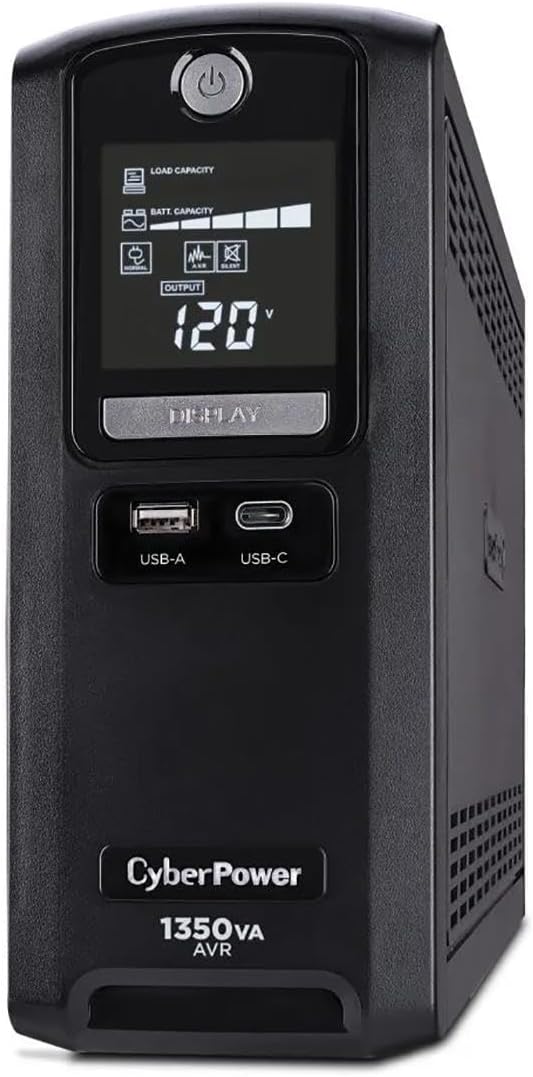
This unit combines intelligent LCD monitoring with substantial power capacity. It uses simulated sine wave technology to safeguard a range of electronics. The AVR system corrects minor voltage fluctuations without draining the battery unnecessarily.
We may earn a commission when you buy through this link, at no additional cost to you.
The color LCD panel shows detailed conditions clearly to prevent surprises. USB ports allow quick charging of mobile devices during downtime. The PowerPanel software gives you control over shutdowns and management settings remotely.
The simulated wave output may not support Active PFC computers as well as pure sine models. However it works for most standard office setups efficiently. The cost reflects the advanced display and management features included.
This is a strong option for offices needing clear monitoring and ample outlets. It suits those who prioritize visibility over pure sine wave capabilities. The balance of features makes it a versatile choice for general use.
Color display alerts users to issues before they impact equipment. Immediate feedback helps maintain system reliability and uptime.
AVR corrects low or high voltage automatically. This reduces unnecessary battery cycles and extends battery life.
We may earn a commission when you buy through this link, at no additional cost to you.
The Ecologic UPS features a unique Eco Mode that saves energy automatically. When the main PC sleeps or turns off it cuts power to connected peripherals. This reduces wasted electricity and lowers operating costs effectively.
We may earn a commission when you buy through this link, at no additional cost to you.
The LCD panel provides real-time status without needing extra software. The 12 outlets offer flexibility for multiple devices and chargers. It is a great balance between features and value for typical small offices.
The Eco Mode requires proper outlet selection to function correctly. This might take a bit of planning during initial setup. However once configured it helps maintain efficiency continuously.
Choose this model if energy efficiency and cost savings are priorities. It suits users who want automatic power management features. The mid-tier capacity handles standard office equipment without issues.
Automatically turns off power to peripherals when PC is off. This lowers energy usage and costs without manual intervention.
Protects connected devices from power spikes and surges. Essential for safeguarding data and hardware integrity.
We may earn a commission when you buy through this link, at no additional cost to you.
This slim UPS saves desk space while delivering solid power protection. It uses simulated sine wave to safeguard standard electronics and routers. The design accommodates bulky plugs with widely spaced outlets on the back.
We may earn a commission when you buy through this link, at no additional cost to you.
GreenPower technology ensures the system runs efficiently during normal operation. This helps keep power consumption low even when plugged in. The standby mode is fast to engage during sudden power drops.
The slim form factor limits internal battery size slightly. However for short outage events it provides enough time to save data. The design is ideal for shared workspaces with limited surface area.
Select this unit for small offices prioritizing space efficiency. It fits neatly under desks or in tight corners. The outlet spacing makes it easy to plug in large power adapters.
Compact chassis reduces footprint on work surfaces. This helps organize office areas more efficiently.
Outlets are spaced to fit large plug blocks easily. This avoids blocking adjacent sockets with bulky adapters.
We may earn a commission when you buy through this link, at no additional cost to you.
This unit adds data line protection to standard battery backup features. It shields modems and phones from surges traveling through copper lines. The intelligent LCD keeps you informed about power conditions constantly.
We may earn a commission when you buy through this link, at no additional cost to you.
The AVR function stabilizes voltage without battery use. This extends battery life by avoiding unnecessary switching. The 12 outlets cover most needs for workstations and networking gear.
While the simulated wave is not pure it works for most devices. The focus here is on comprehensive protection including data lines. This makes it a robust choice for connected office environments.
This is a smart pick if you rely on connected network gear. It balances display features with practical surge protection. The data line feature sets it apart from similar models.
Prevents surges from damaging electronics through phone lines. Essential for protecting routers and modems.
Shows detailed battery and power status visually. Helps users understand current operating conditions.
We may earn a commission when you buy through this link, at no additional cost to you.
This model is designed for quiet environments and small devices. It runs silently so it does not add noise to an office space. The mount tabs allow secure wall installation for better cable management.
We may earn a commission when you buy through this link, at no additional cost to you.
The outlet spacing supports larger adapters without overlap. LED lights give immediate feedback on power and battery status. It is simple to use and requires minimal setup time.
The 255W rating limits it to low-power peripherals only. This is a limitation if you need to power a desktop tower. However for routers it is a suitable entry option.
Choose this for quiet offices needing basic protection. It is excellent for wall mounting in tight spots. The silent feature is a nice touch for shared workspaces.
Remains silent during line and battery modes. Ideal for quiet work environments.
Allows secure installation on walls or desks. Saves valuable workspace surface area.
We may earn a commission when you buy through this link, at no additional cost to you.
APC is a recognized name in power protection. This unit offers a simple design with essential battery backup features. The USB port keeps phones charged even during power loss events.
We may earn a commission when you buy through this link, at no additional cost to you.
The battery replacement is easy without needing tools. This ensures the unit remains usable over the years. The LED indicators show status at a glance effectively.
Runtime is limited at high loads so check your needs. It suits smaller setups where quick shutdowns are needed. The outlet spacing allows for easy access to each socket.
This model suits users preferring a trusted brand name. The battery swap feature adds long-term value. It is a solid pick for home office setups.
Internal battery can be swapped in minutes. Reduces downtime and replacement costs.
Built-in 1.5A port works during outages. Keeps phones powered for essential calls.
We may earn a commission when you buy through this link, at no additional cost to you.
This is the most compact and affordable option in the lineup. It provides basic standby protection for very low wattage devices. The slim profile fits easily into tight spaces on desks.
We may earn a commission when you buy through this link, at no additional cost to you.
GreenPower technology reduces energy waste during operation. LED lights keep you aware of power conditions constantly. It is simple to set up for immediate use.
The 260W output limits use to routers or small electronics. It will not power a full computer system during an outage. This defines its niche for specific light duty tasks.
Select this if you need basic backup for networking gear. It is cost-effective for limited needs. The efficiency features help save on small power costs.
Slim design minimizes desk surface usage. Ideal for small workspaces.
Affordable option for basic protection needs. Good for light duty electronics.
We may earn a commission when you buy through this link, at no additional cost to you.
Selecting the right battery backup requires understanding your office power needs and device types.
VA and watt ratings determine how much equipment you can support. Calculate total wattage of devices you want to protect to find the right size.
Pure sine wave outputs are needed for Active PFC supplies. Simulated sine wave works for most standard electronics but check your device requirements.
Ensure you have enough backup outlets for all critical devices. Some units offer surge only outlets for non-critical items like monitors.
Runtime depends on load and battery health. Expect only a few minutes at full load to save work and shut down safely.
Look for high joule ratings to protect against voltage spikes. Data line protection is useful for routers and modems.
Check if the battery is user replaceable. This extends the unit's life and reduces long-term costs.
Consider desk space and placement options. Wall-mount models save surface area in cramped offices.
Review warranty terms and equipment guarantees. Strong support ensures you can rely on the unit for years.
Plug the UPS into a dedicated wall outlet and connect your devices to backup outlets. Turn it on and verify LED indicators show normal line power before use.
Test the unit every few months by simulating a power outage. Unplug the cord to ensure devices stay on and alarms sound correctly.
Keep the battery cool and dry to extend its life. Replace the battery every three to five years depending on usage frequency.
Determine the total wattage of your critical devices like computers and routers. Select a UPS with VA capacity that exceeds your total wattage needs. This ensures reliable protection without overloading the unit.
No most units offer only minutes at full load. They are designed for safe shutdowns not long-term operation. For hours of runtime use generators instead.
Check your power supply type. Active PFC supplies need pure sine wave to avoid damage. Standard supplies work fine with simulated sine wave outputs.
Test regularly and avoid overcharging. Keep it in a cool dry place. Replace the battery every few years to maintain performance and.
Surge outlets protect against spikes but have no backup power. Battery outlets provide power during outages. Prioritize essential gear for battery outlets.
Yes routers are ideal candidates for battery backup. This keeps internet connectivity alive during outages. Many units include ports designed for such devices.
Yes it protects against data loss and hardware damage. The cost is low compared to equipment repairs. It ensures business continuity during power failures.
We reviewed ten models balancing performance features and value for office use. The CyberPower CST135UC and CP1500PFCLCD lead in ratings and power quality respectively.
Prioritize capacity and waveform type to match your devices. Ensure the unit offers enough outlets for your setup and supports battery replacement.
Always verify current pricing and availability before buying. A good investment now prevents costly interruptions later.