
ASRock DeskMini X300 2.5G Series
4.2Editor score
Compact 1.92L form factor
Supports AM4 Ryzen CPUs
Triple display capability
This guide compares the top ten barebone PCs with AMD processors for performance, cooling, and expansion in October 2026.
Barebone PCs with AMD processors offer a unique blend of compact design and powerful performance. These systems allow users to customize memory and storage while benefiting from AMD's efficient architecture and integrated graphics capabilities.
We evaluated ten top models based on processing power, cooling efficiency, and port variety. Each system was analyzed for its ability to handle demanding tasks like video editing, gaming, and multitasking without compromising on size or noise.
Each pick highlights specific strengths and ideal use cases for different users. Please note that product availability and configurations may change over time, so verify current details before making your final purchasing decision.
4.2Editor score

4.0Editor score

3.1Editor score
The following table provides a side-by-side comparison of all ten models discussed in this guide to help you quickly identify the best fit for your needs.





The AOOSTAR MACO model stands out as a top-tier choice for those seeking maximum performance in a compact AMD barebone chassis. It features the latest Ryzen 7 PRO 8845HS processor with 8 cores and 16 threads, capable of reaching 5.1GHz turbo speeds. This system offers a balanced mix of raw power and connectivity options that cater to both creative professionals and gamers.
We may earn a commission when you buy through this link, at no additional cost to you.
Performance is delivered through the Radeon 780M graphics and support for up to 128GB of DDR5 RAM. The inclusion of an OCuLink port allows for low-latency external GPU connections which is rare in mini PCs. Furthermore, the dual 2.5G LAN ports and WiFi 6 ensure that network throughput is never a bottleneck for your workflow.
While the cooling system uses a VC heat spreader to manage thermals effectively, users should be aware that this is a barebone kit. You will need to source and install your own RAM, storage, and operating system to get it running. However, the build quality and future-proofing features make these extra steps worthwhile.
This system is ideal for users who want a high-performance mini PC that can handle 4K video editing and AAA gaming. The eco-friendly aluminum chassis and robust connectivity make it a reliable long-term investment for demanding desktop setups.
Dual USB4 ports and OCuLink provide unprecedented bandwidth for external storage and graphics solutions.
The VC heat spreader and turbo fans ensure stable performance even during prolonged high-load tasks.
We may earn a commission when you buy through this link, at no additional cost to you.
The GEM12+ brings premium features to a barebone configuration with a high user rating. It centers around the Ryzen 7 PRO 8845HS CPU which delivers excellent AI performance and AV1 decoding. The vapor chamber cooling system is a standout feature that keeps temperatures low under heavy loads.
We may earn a commission when you buy through this link, at no additional cost to you.
This unit supports four simultaneous 4K displays which is fantastic for multi-monitor setups in trading or creative work. The OCuLink port allows you to attach external GPUs with minimal performance loss compared to standard USB connections. Three BIOS modes let you fine-tune the balance between silence and performance.
One limitation is that the OCuLink port does not support hot-swapping so you must power off the device before connecting or disconnecting external devices. Additionally as with all barebone models you must purchase and install your own memory and storage to use the system.
If you need a reliable workstation that can handle extreme multi-tasking or professional graphics work this model is a strong candidate. The combination of cooling efficiency and display capability makes it a premium choice in the compact PC market.
The vapor chamber transfers heat quickly to the heat sink for even distribution and lower overall temperatures.
With HDMI 2.1 and USB4 supports you can drive up to four 4K screens simultaneously for immersive workflows.
We may earn a commission when you buy through this link, at no additional cost to you.
The GEM12+ PRO offers a blend of security and performance at a competitive price point. It retains the powerful 8845HS processor and adds a fingerprint recognition sensor for quick and secure access to your system. This is a unique feature for a mini PC that enhances usability.
We may earn a commission when you buy through this link, at no additional cost to you.
You can manage real-time system data like CPU and GPU stats using dedicated software which is helpful for monitoring stability during intensive tasks. The OCuLink port is still present for external graphics expansion and the dual M.2 slots give you ample room for high-speed storage.
Since this is a barebone system you will need to install your own operating system and peripherals. The lack of pre-installed software might be a hurdle for non-technical users but it also gives you full control over the configuration.
This model is perfect for home office users or gamers who want security features without sacrificing power. The ability to customize your display and manage thermal performance makes it a versatile option for various environments.
Built-in fingerprint recognition simplifies login and adds an extra layer of security for your device.
Dedicated software allows you to track system metrics and optimize performance in real time.
We may earn a commission when you buy through this link, at no additional cost to you.
The DeskMeet X300 is a robust barebone kit designed for users who prefer the flexibility of the AM4 platform. It supports Ryzen 5000 and older CPUs which means you have a wide range of affordable upgrade paths. The inclusion of a 500W power supply is significant for this category.
We may earn a commission when you buy through this link, at no additional cost to you.
It features a PCIe 3.0 x16 slot which allows for internal expansion cards that many ultra-compact mini PCs lack. This makes it more suitable for specialized workloads that might need additional capture cards or specialized networking hardware.
While the AM4 architecture is older it still provides very competent performance for general office tasks and light gaming. The system is designed to be compatible with existing AM4 components which can save you money if you are upgrading from a desktop.
This unit is recommended for those who need expandability and a reliable power solution in a compact form factor. It bridges the gap between a traditional desktop and a mini PC effectively offering practicality and power.
The PCIe 3.0 x16 slot allows for additional hardware cards that are rarely found in mini PCs.
A 500W power supply ensures you have enough headroom for CPU upgrades and expansion cards.
We may earn a commission when you buy through this link, at no additional cost to you.
The X1 Lite-255 is a versatile mini PC from MINISFORUM that offers strong connectivity options. It features a Ryzen 7 255 processor which provides efficient multi-threaded performance for daily workloads. The full-blood USB4 port offers high data speeds which is great for external storage.
We may earn a commission when you buy through this link, at no additional cost to you.
Triple display output capability allows you to connect three independent monitors using HDMI DP and USB4. This makes it a strong candidate for office setups or digital signage. The OCuLink port supports external GPU expansion but requires an adapter plate to be installed.
While the user rating is lower than other models the features are compelling for a mini PC. The PCM phase-change material in the CPU fan helps manage heat effectively ensuring consistent performance without excessive noise.
This model is suitable for users who need multiple display outputs and good connectivity in a small form factor. It handles everyday computing tasks smoothly and supports upgrades for future needs.
Connect up to three independent displays for a multi-screen collaborative work environment.
PCM phase-change material in the fan prevents heat buildup for smooth lag-free performance.
We may earn a commission when you buy through this link, at no additional cost to you.
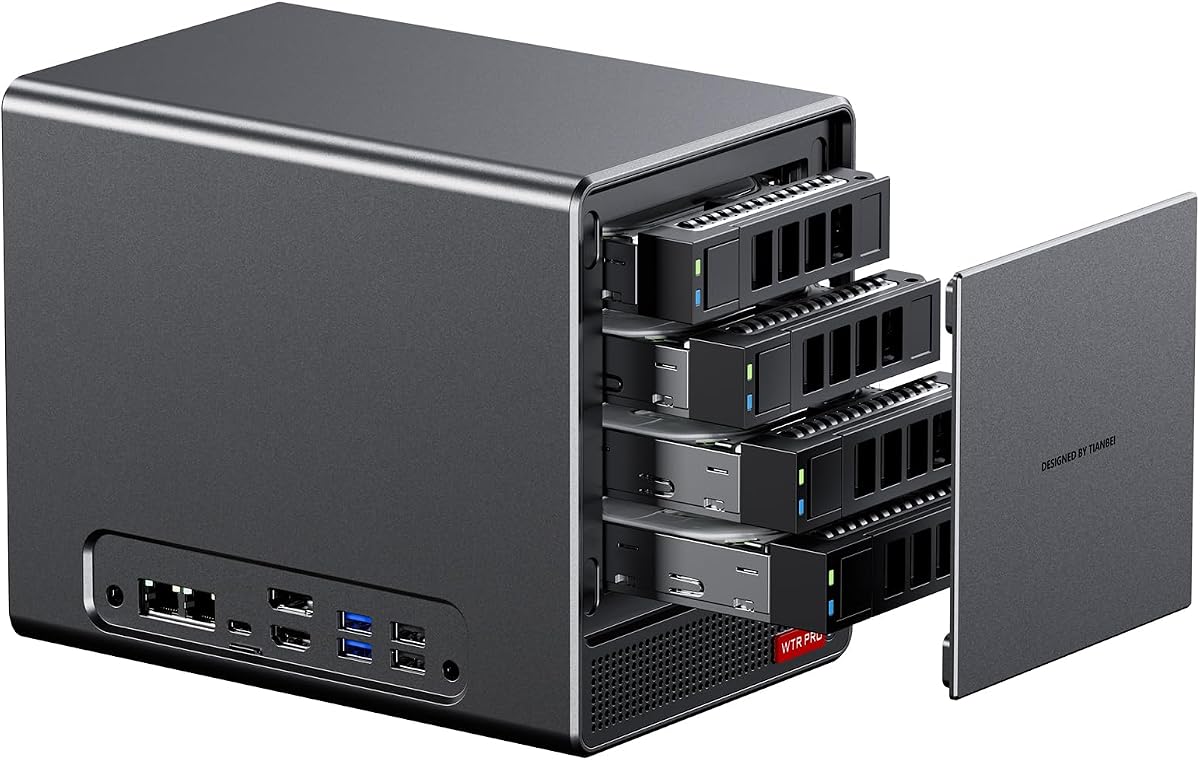
The WTR PRO is designed with a focus on storage capacity and low power consumption making it ideal for home server tasks. It features four bays for 3.5-inch hard drives plus two M.2 slots for SSD caching. This layout supports a total of up to 4x 22TB drives.
We may earn a commission when you buy through this link, at no additional cost to you.
Powered by the Ryzen 7 5825U it provides enough performance for running a soft router or network attached storage. The low power consumption of 15W to 25W makes it energy efficient for 24/7 operation. The through-the-wall construction helps dissipate heat while keeping noise down.
Although it lacks a dedicated GPU it excels in media playback and file transfer tasks. The dustproof design protects internal components but should be monitored to ensure it does not restrict airflow over time.
This unit is best for users building a DIY NAS or needing a quiet server for home use. The expandability and efficiency are its strongest selling points in the barebone market.
Four 3.5 SATA bays allow for massive storage capacity up to 4x 22TB drives.
Low power consumption between 15W and 25W is perfect for always-on server applications.
We may earn a commission when you buy through this link, at no additional cost to you.
The DeskMini X300 2.5G Series is one of the smallest barebone kits available with a volume of only 1.92 liters. It supports AM4 CPUs from the 5000 series down to the 2000 series giving you flexibility in processor choice. This compact design is perfect for tight desk spaces.
We may earn a commission when you buy through this link, at no additional cost to you.
It includes a 2.5G LAN port for fast wired connections which is essential for high-speed file transfers. Triple display support via HDMI DisplayPort and D-Sub allows for versatile monitor setups without extra dongles. Storage options include two M.2 slots and two 2.5-inch drive bays.
While it lacks the latest Zen 4 architecture it remains a practical choice for office use and home theater PCs. The ability to support RAID 0 or 1 configurations adds a layer of data redundancy for your storage drives.
This model is ideal for those who prioritize size and cost over cutting-edge CPU features. It offers a reliable foundation for a budget-friendly mini PC build with good connectivity.
At just 1.92 liters this chassis is among the smallest in the mini PC market.
2.5G LAN and triple display options ensure it fits well into modern network setups.
We may earn a commission when you buy through this link, at no additional cost to you.
The PN54 brings the latest Ryzen AI 300 Series processors to a mini PC chassis. This includes an XDNA2 NPU that delivers up to 50 TOPS of AI performance for dynamic computing tasks. It represents the next generation of AI capabilities in desktops.
We may earn a commission when you buy through this link, at no additional cost to you.
Connectivity is enhanced with Wi-Fi 7 and Bluetooth 5.4 providing ultra-fast wireless speeds. The chassis is ultra-thin at 0.6L and is designed for 24/7 reliable operation. A toolless design allows for effortless customization and access to internal components.
While the user rating is lower the technology inside is cutting edge. It is built for users who need the most advanced AI features and future-proof connectivity options available today.
This model is recommended for early adopters and businesses needing AI accelerated performance. Its durable eco-conscious design adds to its appeal as a long-term reliable computer.
The XDNA2 NPU provides up to 50 TOPS of AI performance for responsive computing.
Wi-Fi 7 ensures ultra-fast wireless speeds for high-bandwidth modern applications.
We may earn a commission when you buy through this link, at no additional cost to you.
This model expands on the WTR PRO concept with a 4+2 bay design allowing for up to 96TB of storage. It supports 4 SATA drives and 2 M.2 NVMe slots which is perfect for massive media libraries or server backups. The CPU is the Ryzen 7 5825U which balances power and efficiency.
We may earn a commission when you buy through this link, at no additional cost to you.
Virtualization support makes it suitable for running multiple operating systems simultaneously. The intelligent fan control adjusts speed based on load to ensure silent operation. Triple 4K display output allows you to monitor multiple tasks across different screens.
Linux users should note that SATA power management may cause speed reductions without specific configuration. However the system supports Windows and major Linux distributions for versatile deployment.
This is an excellent choice for home labs and small offices needing high capacity and performance. Its versatility allows it to function as a NAS router or media server effectively.
With 4+2 bays you can support up to 96TB of storage for extensive file needs.
Supports VT-X and VT-D technology enabling multiple operating systems to run simultaneously.
We may earn a commission when you buy through this link, at no additional cost to you.
The PN54-S1 offers a slightly different configuration with a focus on Wi-Fi 7 and tool-free upgrades. It supports the Ryzen 200 Series processors which are efficient for general office and multimedia tasks. The tool-free design allows quick access for component upgrades without hassle.
We may earn a commission when you buy through this link, at no additional cost to you.
Connectivity includes dual 2.5G LANs and dual DisplayPort for versatile setups. It can drive up to four 4K displays making it suitable for creative workflows. The chassis is slim at 34mm and built for reliable long-term operation.
While it uses older CPU series compared to the PN54 it still brings modern wireless standards to the table. The design is eco-conscious and durable ensuring it can withstand daily use in busy environments.
This model is ideal for users who want a balance of modern connectivity and affordability. It serves as a solid base for a customized mini PC setup without the highest cost.
Tool-free design allows quick access and easy component upgrades without hassle.
Immersive 4K visuals support up to four 4K displays for detailed work.
We may earn a commission when you buy through this link, at no additional cost to you.
Selecting the right barebone PC involves understanding your performance needs and budget constraints while considering the flexibility these systems offer.
Modern AMD Ryzen 7000 series processors offer significant performance gains over older AM4 platforms. When choosing between Zen 4 and Zen 3 chips consider your specific workload such as gaming versus server tasks. The newer architecture often includes integrated AI features which can accelerate specific applications.
Look for CPUs with higher core counts for multitasking and ensure they support DDR5 memory if you want future-proof speed.
Mini PCs generate heat in a small space so the cooling solution is vital for stability. Systems with vapor chambers or VC heat spreaders typically run quieter and cooler under load. Check the fan type and airflow design to ensure it can handle prolonged high-performance sessions.
A robust cooling system prevents thermal throttling which maintains consistent performance over long periods.
Connectivity options determine how many devices you can attach to your PC. Look for USB4 or Thunderbolt ports for high-speed data transfer and external GPU support. OCuLink is a standout feature for gamers who need low-latency graphics connections without the bulk of a desktop.
Prioritize models with multiple LAN ports and video outputs if you need a multi-monitor workstation or network redundancy.
Barebone systems let you choose your own RAM and storage sizes to match your needs. Ensure the system supports enough slots for future upgrades such as dual DDR5 DIMMs and multiple M.2 slots. This flexibility allows you to start small and expand as your storage demands grow.
Check the maximum supported RAM capacity and storage limits to ensure the chassis can hold the drives you require.
The build material affects durability and heat dissipation. Aluminum chassis are common because they dissipate heat effectively and feel more premium. Look for eco-conscious designs that use recycled materials without compromising on structural integrity.
A solid build quality ensures the device survives daily handling and protects internal components from physical damage.
Most barebone kits do not include an operating system so you will need to install one separately. Consider if you need a pre-installed Windows license or if you plan to use Linux for server applications. Having a complimentary Windows 11 Pro key can be a significant value add for business users.
Verify the system supports your preferred OS and check if there are any firmware updates required upon setup.
Identify your primary use case such as gaming home office or media server to narrow down choices. Servers benefit from low power consumption while gamers need GPU support and high clock speeds. Ensure the chosen model aligns with your daily tasks to avoid overpaying for unused features.
A tailored approach saves money and ensures the system performs well in your specific environment.
Reliable after-sales support is crucial for hardware investments. Look for brands that offer extended warranties and responsive customer service channels. A good support network helps resolve installation or compatibility issues quickly.
Check the manufacturer policy on replacement parts and repair options to ensure long-term peace of mind.
Begin by installing the compatible CPU and RAM into the slots as detailed in the manual. Ensure you apply thermal paste correctly and secure the cooling fan to prevent overheating during operation. Follow the guide to install your operating system from a USB drive or disk.
Regularly clean the vents and fans with compressed air to maintain airflow efficiency. Dust accumulation can block cooling paths leading to higher temperatures and reduced performance over time. Keep the device in a well-ventilated area away from direct heat sources.
Update the BIOS and drivers from the manufacturer website to ensure stability and performance. Check for firmware updates that may add new features or improve compatibility with hardware. Proper maintenance will extend the lifespan and reliability of your barebone system.
A barebone PC is a partially assembled computer that includes the motherboard case and power supply but lacks components like RAM storage and the operating system. This allows users to choose and install their own parts for a customized build.
Yes many modern AMD mini PCs with OCuLink or Thunderbolt ports support external GPUs. This feature is useful for gaming or graphics work that requires more power than integrated graphics provide.
Assembly is straightforward for most users as the components are designed for easy installation. Following the included manual ensures you place the CPU and RAM correctly without damaging the hardware.
Windows 11 and Linux distributions are widely supported on barebone AMD systems. Windows is common for general use while Linux is popular for server and development tasks.
Most models support up to 128GB or 64GB of DDR5 RAM depending on the specific motherboard. Check the product specs to confirm the maximum capacity supported by your chosen model.
Many of the NAS models in this guide are designed specifically for home servers. They offer multiple drive bays and low power consumption making them ideal for running storage and media services 24/7.
We have reviewed ten top barebone PCs with AMD processors that cater to a wide range of needs from budget office setups to high-performance gaming stations. Each model offers unique strengths in cooling connectivity and expandability to help you find the right fit.
When choosing prioritize the features that align with your daily tasks such as AI capabilities for creative work or massive storage for server applications. Understanding your requirements ensures you invest in a system that delivers value and longevity.
Please remember that product details and availability can change so verify current specifications and stock before purchasing. A well-chosen barebone PC provides a flexible and powerful foundation for your computing needs.