
Alienware 34 240Hz QD-OLED Curved Gaming Monitor – AW3425DW
4.5Editor score
QD-OLED panel technology
240Hz refresh rate speed
TrueBlack 400 certification
Finding the right display for immersive gameplay requires careful consideration of screen technology and performance metrics. A quality curved gaming monitor enhances your field of view and delivers stunning visuals that draw you into every virtual environment.
We evaluated ten top models based on resolution, refresh rates, panel types, and color accuracy. Our analysis focuses on real-world gaming performance and ergonomic design to ensure you get the most value for your investment.
Each pick highlights key strengths and ideal use cases for different types of gamers. Please note that product availability and pricing fluctuate frequently so checking current listings is recommended before making your final decision.
4.5Editor score

4.6Editor score

4.3Editor score
As an Amazon Associate we earn from qualifying purchases.
The following table provides a side-by-side comparison of all ten monitors evaluated in this guide allowing you to quickly identify key specifications and model differences at a glance.





The Alienware 34 Curved Gaming Monitor stands out as a top choice for enthusiasts seeking immersive visuals without sacrificing performance. It boasts a 34-inch WQHD display with an 180Hz refresh rate ensuring fluid gameplay across various genres.
We may earn a commission when you buy through this link, at no additional cost to you.
This model delivers vibrant colors covering 95% of the DCI-P3 spectrum making it ideal for both gaming and creative tasks. The 1500R curve enhances depth and focus while the 1ms response time minimizes motion blur during fast-paced action sequences.
Although it lacks the deep blacks of OLED panels its VESA DisplayHDR 400 certification ensures decent contrast for HDR content. The hardware-based low blue light solution protects your eyes during long sessions without compromising color integrity.
If you value reliable performance and a balanced feature set this monitor is an excellent investment. It suits competitive gamers and casual users alike who want a high-quality display for extended use.
The WQHD resolution and curved design create a captivating field of view that draws you into every game.
Advanced low blue light technology reduces strain allowing for marathon sessions without compromising visual quality.
We may earn a commission when you buy through this link, at no additional cost to you.
For those seeking the pinnacle of visual fidelity the Alienware 34 240Hz QD-OLED Curved Gaming Monitor delivers exceptional results. Its QD-OLED technology offers a wide color spectrum and deep blacks that redefine immersion.
We may earn a commission when you buy through this link, at no additional cost to you.
The 240Hz refresh rate combined with a near-instant 0.03ms response time ensures buttery smooth motion perfect for competitive gaming. VESA DisplayHDR TrueBlack 400 certification provides outstanding contrast making dark scenes appear rich and detailed.
While the cost is higher than standard LCD models the visual payoff is immense. Gamers who prioritize color accuracy and speed will appreciate the seamless experience provided by this advanced panel technology.
This monitor is best suited for enthusiasts willing to invest in top-tier hardware. It transforms your gaming setup into a high-performance environment where every detail is rendered with precision.
Quantum Dot technology enhances color vibrancy delivering a cinematic experience that rivals professional displays.
The 240Hz refresh rate gives players a edge in fast-paced games by minimizing motion blur and lag.
We may earn a commission when you buy through this link, at no additional cost to you.
The Alienware AW3423DW offers a compelling entry into OLED gaming with its 175Hz refresh rate and stunning color depth. Its Quantum Dot OLED technology ensures vibrant visuals that stand out against traditional LCD panels.
We may earn a commission when you buy through this link, at no additional cost to you.
With a 0.1ms gray-to-gray response time this monitor handles fast motion effortlessly. The 1800R curve wraps around your vision providing an immersive experience for both gaming and media consumption.
While it may not reach the peak brightness of some competitors its infinite contrast ratio delivers deep blacks and rich details. It is a great option for those who want premium visuals without the highest price tag.
Gamers looking for a balance of performance and value will find this model highly satisfying. It delivers a high-quality experience that competes well with more expensive alternatives in the market.
Quantum Dot OLED provides superior color gamut and contrast enhancing the realism of every scene.
The 1800R curve matches human eye geometry reducing strain and improving focus during long sessions.
We may earn a commission when you buy through this link, at no additional cost to you.
The Alienware 120Hz UltraWide Gaming Monitor provides a reliable option for users seeking stable performance and rich color. Its WQHD resolution ensures sharp images while the anti-glare coating reduces reflections for better viewing.
We may earn a commission when you buy through this link, at no additional cost to you.
NVIDIA G-SYNC synchronization minimizes screen tearing making gameplay smoother even on mid-range systems. The 1900R curve enhances immersion without being overly aggressive for most desk setups.
Although the 120Hz refresh rate is slower than modern standards it remains sufficient for casual gamers. The Nano color technology covers a wide spectrum ensuring colors look true to life across different content.
This monitor is ideal for those who prioritize image quality and stability over ultra-high refresh rates. It offers a consistent experience that supports both gaming and productivity tasks effectively.
Synchronization with NVIDIA GPUs eliminates screen tearing ensuring a fluid visual experience.
The coating reduces glare allowing for clear viewing in brightly lit rooms.
We may earn a commission when you buy through this link, at no additional cost to you.
This bundle provides the AW3423DW monitor along with essential accessories like premium cables and a cleaning kit. It simplifies setup by ensuring you have everything needed for a high-performance gaming experience.
We may earn a commission when you buy through this link, at no additional cost to you.
The 175Hz refresh rate offers fluid motion while the QD-OLED panel delivers vibrant colors and deep blacks. Such features make it suitable for immersive gaming sessions that require visual precision.
While the total price is higher than buying the monitor alone the included accessories add practical value. This is convenient for users who prefer an all-in-one solution without sourcing extra items separately.
If you want a ready-to-use display with top-tier visuals this bundle is an excellent choice. It combines performance with practicality to enhance your overall gaming environment efficiently.
Included accessories streamline setup and reduce the need for additional purchases.
The QD-OLED panel ensures colors pop and details remain sharp during extended play.
We may earn a commission when you buy through this link, at no additional cost to you.
This bundle pairs the AW3423DW monitor with essential accessories including an HDMI cable and a headphone extender. It is designed to offer immediate connectivity and audio convenience for gamers.
We may earn a commission when you buy through this link, at no additional cost to you.
The QHD OLED panel provides a wide color range and fast response times for an immersive experience. Its 175Hz refresh rate ensures smooth performance during fast-paced gaming activities.
While the bundle includes useful items the overall value depends on your existing setup needs. It is a good option for users who prefer to have everything ready upon unboxing.
Gamers looking for convenience and solid performance will appreciate this pack. It combines a high-quality display with practical extras to simplify your gaming setup process.
All necessary cables are included allowing for quick installation without additional shopping.
The OLED technology ensures vibrant visuals and deep blacks that enhance gameplay.
We may earn a commission when you buy through this link, at no additional cost to you.
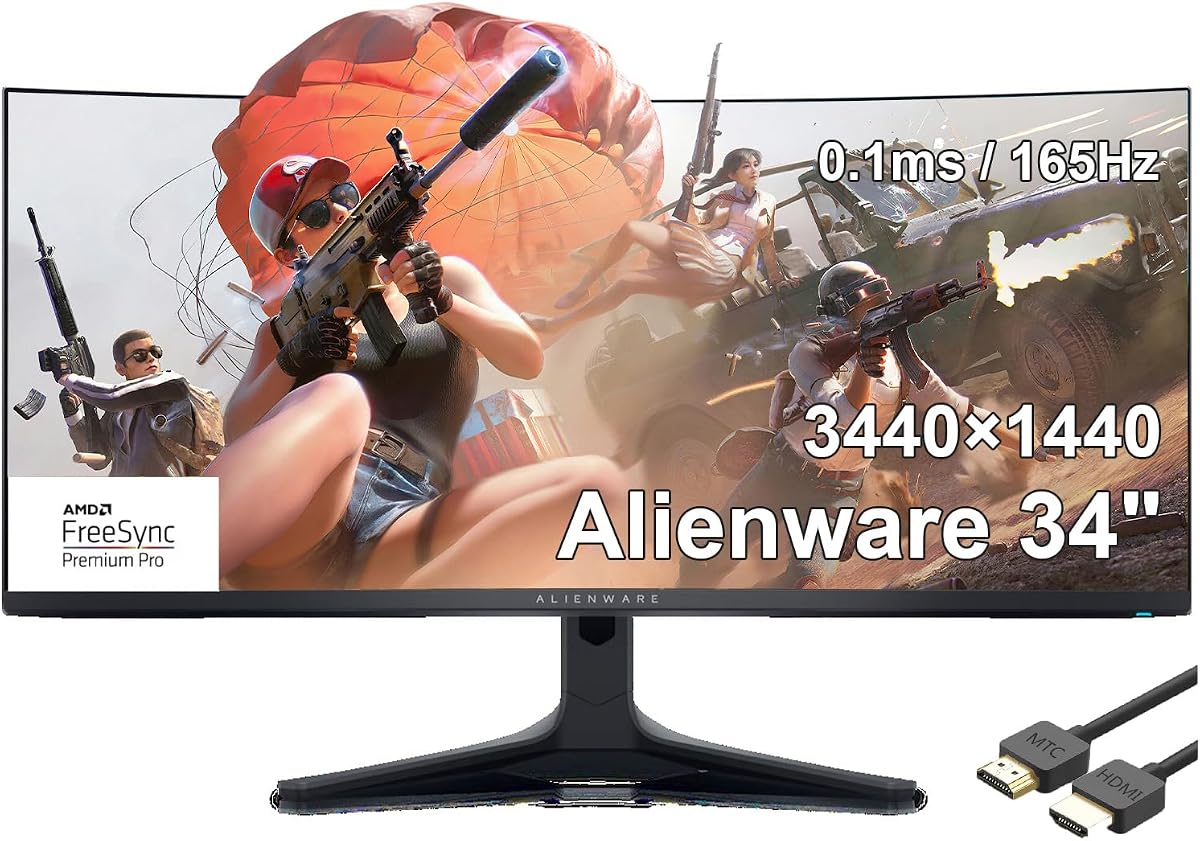
The AW3423DWF delivers a rapid 0.1ms response time ensuring minimal motion blur during intense gaming. Its 165Hz refresh rate provides a smooth visual experience that complements high-performance hardware.
We may earn a commission when you buy through this link, at no additional cost to you.
Equipped with AMD FreeSync Premium Pro this monitor reduces tearing and stuttering for stable gameplay. The QD-OLED panel enhances color depth making it ideal for games with rich graphical details.
While the rating may reflect external factors the technical specs are robust for competitive gaming. Users who prioritize speed and color accuracy will find this model highly capable.
This monitor is a strong candidate for those seeking an affordable OLED option. It balances performance and price effectively making it a versatile choice for modern setups.
The 0.1ms gray-to-gray time ensures clarity during fast motion and reduces ghosting.
FreeSync Premium Pro support eliminates tearing ensuring a consistent frame rate during play.
We may earn a commission when you buy through this link, at no additional cost to you.
The Alienware Aw3225Qf offers a stunning 4K resolution on a 32-inch screen delivering unmatched sharpness and detail. It combines QD-OLED technology with UltraHD capabilities for a visually striking experience.
We may earn a commission when you buy through this link, at no additional cost to you.
This monitor excels in content creation and high-fidelity gaming due to its pixel density. The QD-OLED panel ensures colors remain vibrant and accurate across all applications.
Its compact size makes it suitable for smaller desks while still providing a large viewing area. The 4K resolution requires powerful hardware but the visual payoff is substantial for demanding users.
If you need high resolution for professional work or immersive gaming this model fits the bill. It stands out as a premium choice for those who prioritize pixel clarity and color fidelity.
The UltraHD resolution provides crisp details that enhance both gaming and creative workflows.
Combining Quantum Dot and OLED delivers deep blacks and rich colors simultaneously.
We may earn a commission when you buy through this link, at no additional cost to you.
The AW2723DF bundle includes a 27-inch monitor capable of an overclocked 280Hz refresh rate. This makes it one of the fastest panels available for competitive gaming needs.
We may earn a commission when you buy through this link, at no additional cost to you.
Its 1440p resolution balances clarity and performance while maintaining a high refresh rate. The included accessories like HDMI cable and cleaning kit provide a complete solution out of the box.
The IPS panel covers 95% of the DCI-P3 spectrum ensuring vibrant colors during gameplay. A USB hub adds convenience for connecting peripherals directly to the monitor.
If you prioritize speed and connectivity options this bundle is a smart investment. It delivers ultra-smooth visuals and practical extras that enhance your overall gaming experience significantly.
An overclocked 280Hz refresh rate provides a competitive edge with minimal motion blur.
Included cables and a USB hub simplify setup and expand device connection options.
We may earn a commission when you buy through this link, at no additional cost to you.
The Samsung 40” Odyssey G7 offers a massive 40-inch screen with WUHD resolution for breathtaking realism. Its 1000R curve matches the natural curvature of the human eye enhancing immersion significantly.
We may earn a commission when you buy through this link, at no additional cost to you.
With an 180Hz refresh rate and 1ms response time this monitor handles fast motion smoothly. DisplayHDR 600 certification ensures bright and vivid images with excellent contrast.
While the size demands a larger desk it provides a truly cinematic gaming experience. The combination of speed and color quality makes it suitable for competitive and casual play alike.
If you seek a large display with high performance this monitor is a strong contender. It wraps around your vision creating an unparalleled sense of presence during gameplay.
The 40-inch screen and tight curve create a wrap-around effect that pulls you into games.
DisplayHDR 600 delivers bright highlights and deep shadows for a dynamic visual range.
We may earn a commission when you buy through this link, at no additional cost to you.
Selecting the right monitor involves understanding several key factors that impact visual quality and gaming performance.
Resolution determines the level of detail displayed on screen with WQHD and 4K offering sharper images than 1080p. Higher pixel density is crucial for text clarity and graphical fidelity especially in large screens.
Choose a resolution that matches your GPU capabilities to avoid performance bottlenecks.
Refresh rate measures how many times the screen updates per second affecting motion smoothness. Response time indicates how fast pixels change color impacting motion blur and ghosting effects during play.
Prioritize 144Hz or higher refresh rates and under 5ms response times for competitive gaming.
OLED panels offer deep blacks and high contrast but may have risks of burn-in over time. LCD panels like IPS or VA provide reliable brightness and lower costs but lack true black levels.
Choose OLED for media quality and IPS for brightness and color stability needs.
Curvature is measured in R values with lower numbers indicating a tighter bend. A 1000R to 1800R curve wraps around your field of view enhancing immersion and reducing neck strain.
Select a size between 32 to 40 inches for optimal comfort and desk fit.
Color accuracy ensures that what you see matches the source material which is vital for editing and design. A wide color gamut like DCI-P3 or Adobe RGB provides richer and more vibrant visuals in games.
Look for monitors with Delta E below 2 for professional-grade color precision.
High Dynamic Range (HDR) expands the range of brightness and colors on screen. VESA DisplayHDR certifications like 400 or 600 guarantee minimum brightness and contrast levels for HDR content.
Choose HDR 600 or higher for true HDR impact in supported games and media.
Modern monitors should offer DisplayPort and HDMI ports compatible with your latest graphics card standards. USB hubs and headphone jacks add convenience for connecting peripherals without reaching behind the computer.
Ensure ports support the resolution and refresh rate you plan to use.
An adjustable stand allows height tilt and swivel changes to reduce eye strain during long sessions. VESA mounting compatibility lets you use third-party arms if the included stand limits positioning.
Look for adjustable stands to maintain a healthy viewing posture over time.
Position the monitor at eye level and roughly two feet away to reduce neck strain and improve focus. Ensure the screen is tilted slightly upward to prevent glare from ambient lighting.
Adjust display settings using the onboard menu to match your content needs. Calibrate brightness and contrast for comfortable viewing and use Game Mode to optimize response times.
Clean the screen with a soft dry cloth regularly to remove dust and smudges. Avoid harsh chemicals and use dedicated LCD cleaners only when necessary to protect the coating.
Curved monitors offer a more immersive experience by wrapping the screen around your field of view. They can reduce eye strain during long sessions. But flat screens are generally better for productivity tasks requiring precise alignment.
For casual gaming 60Hz to 75Hz is often sufficient. Competitive gamers should aim for 144Hz or higher to minimize motion blur. Ensure your system can maintain high frame rates to utilize the refresh rate fully.
Most models support technologies like AMD FreeSync and NVIDIA G-SYNC. These features synchronize the refresh rate with the GPU to eliminate screen tearing. Check the specific model specs to confirm compatibility with your hardware.
OLED panels provide perfect blacks and infinite contrast enhancing HDR visuals. They offer faster response times than LCDs reducing motion blur. However they are more expensive and may require precautions to avoid burn-in.
Curved monitors can be used for design but flat screens offer more accurate spatial alignment. If you focus on color accuracy consider models with high DCI-P3 coverage. Ensure calibration tools are available for precise results.
Position the monitor at eye level and adjust brightness to match room lighting. Disable unnecessary background apps to maximize system performance. Use a quality HDMI or DisplayPort cable to support high resolutions and refresh rates.
Most manufacturers offer a standard three-year limited warranty covering defects. Some brands provide advanced replacements for dead pixels or panel issues. Check the product page for specific terms and register your device for support.
Yes many of these monitors support console inputs like HDMI 2.1. Ensure the model supports the resolution and refresh rate your console provides. Some monitors have special console modes to optimize settings for play.
The Alienware Curved Gaming Monitor lineup offers a range of options for different needs and budgets. Top picks include the AW3425DWM for balanced performance and the AW3425DW for premium OLED visuals.
When choosing prioritize features that matter most to you like refresh rate color accuracy and size. Ensure your hardware supports the resolution and refresh rate to avoid bottlenecks in performance.
Prices and availability change frequently so checking current listings ensures you get the best deal. Consider your desk space and usage patterns to finalize the right choice for your setup.