
FLASHFORGE Creator 5 Pro
4.0Editor score
Industrial multi-material printing
65C active heated chamber
Near-zero waste system
This guide compares the top 10 3D printers for figurines and models based on precision, speed, multi-color capability, and reliability for creators.
Choosing the right 3D printer for figurines and models requires balancing precision, speed, and material versatility. Whether you are creating miniature game pieces or detailed art pieces, the right machine transforms digital designs into tangible reality with remarkable accuracy and finish quality.
We evaluated ten leading 3D printers based on their print quality, ease of use, multi-color capabilities, and reliability. Our analysis focuses on models that excel at producing fine details essential for figurines while maintaining consistent performance for both beginners and professional creators alike.
Each pick highlights unique strengths like high-speed printing, automatic calibration, or advanced multi-material support. While pricing fluctuates over time, these models represent the current best options for bringing intricate 3D designs to life with exceptional detail and minimal setup hassles.
4.0Editor score

4.7Editor score

4.4Editor score
The following comparison table details key specifications across all ten top-rated 3D printers to help you choose the perfect model for your figurine and model printing needs.





The Bambu Lab A1 stands out as the top choice for 3D printing figurines and models in 2026. With a remarkable 4.7 star rating, it delivers high-speed precision and exceptional accuracy that ensures your detailed miniatures come to life perfectly every time.
We may earn a commission when you buy through this link, at no additional cost to you.
Its standout feature is the active flow rate compensation which actively adjusts flow based on real-time sensor data ensuring consistently smooth prints without ringing or ghosting. Combined with full-auto calibration the A1 removes the hassle of manual leveling so you can focus on creativity.
While the open frame design limits some advanced engineering filaments like ABS without enclosure, most hobbyists and artists will find it ideal for PLA and PETG. The AMS lite multi-color capability is accessible and reliable though purchasing it separately is an added cost to consider.
Whether you are a beginner looking for ease of use or a pro needing speed, the A1 delivers. Its quick swap nozzle and quiet operation make it a pleasure to own. We highly recommend the A1 for anyone seeking reliable, high-quality figurine prints.
With 10000 mm/s2 acceleration, the A1 prints fast while maintaining sharp details crucial for miniatures and intricate models.
Automated Z-offset and bed leveling ensure perfect first layers every time without manual intervention or guesswork.
We may earn a commission when you buy through this link, at no additional cost to you.
The FLASHFORGE Creator 5 Pro is the ultimate choice for professional creators who need industrial-grade capabilities. It features four independent toolheads that eliminate filament waste by swapping nozzles in seven seconds without flushing. This near-zero waste system makes multi-color printing cost-effective and fast.
We may earn a commission when you buy through this link, at no additional cost to you.
Its fully enclosed frame with active heating up to 65 degrees Celsius allows printing with robust materials like ABS and PC without warping. The CoreXY motion structure ensures stability at high speeds, preventing ghosting or mechanical vibrations that could ruin delicate figurine details.
Safety is prioritized with dual HEPA 13 and activated carbon filtration trapping ultrafine particles and fumes. While the price is higher, the operational savings from reduced waste and expanded material options quickly justify the investment for serious model makers and workshops.
If you need unmatched multi-material freedom and speed with minimal waste, the Creator 5 Pro is the best premium option. It simplifies complex workflows and delivers professional results with robust design freedom for advanced projects and functional prototypes.
Switch nozzles without flushing filament, drastically slashing material costs and reducing waste during multi-color prints.
The 65C heated chamber enables confident printing with engineering filaments like ABS and PC without warping issues.
We may earn a commission when you buy through this link, at no additional cost to you.
The FLASHFORGE AD5X offers impressive value with advanced features like IFS multi-color technology allowing four colors simultaneously. Rated 4.4 stars, it balances speed and affordability for hobbyists seeking vibrant, detailed models without breaking the bank. Its 600 mm/s speed accelerates production while maintaining solid accuracy.
We may earn a commission when you buy through this link, at no additional cost to you.
Fully automatic leveling ensures a perfectly leveled bed every time reducing failed prints and saving time. The high-temperature nozzle reaching 300 degrees Celsius enables versatile printing with various filaments including PLA ABS and PETG for broad project compatibility.
While the IFS setup may require initial learning, the capability to create vibrant 3D models easily makes it worthwhile. The large build volume provides ample space for bigger figurines or multiple small objects in one print run maximizing efficiency.
For creators needing multi-color capability at a budget price, the AD5X is the best choice. It simplifies complex prints and delivers high results fast. Ideal for artistic projects and rapid prototyping with minimal setup hassle.
Print vibrant multi-colored models with ease using the Independent Filament System for up to four colors.
Achieve fast prints at 600 mm/s with a nozzle capable of 300C for broad material compatibility.
We may earn a commission when you buy through this link, at no additional cost to you.
The Bambu Lab P2S Combo integrates the P2S printer with AMS 2 Pro for effortless multi-color and multi-material printing. With built-in filament drying up to 65C, it ensures spools stay ready for flawless prints. The adaptive airflow system balances cooling for crisp overhangs or chamber heat for engineering materials.
We may earn a commission when you buy through this link, at no additional cost to you.
Smart AI failure detection and quick-swap nozzles make printing stress-free and efficient. You can set up in 15 minutes and start creating. The unified workflow from design to finish ensures smooth operations whether you are a beginner or a professional.
While the Combo is pricier, the convenience of built-in drying and AI monitoring saves time and wasted material. It is perfect for creators who want reliable, high-quality results with minimal intervention. The ecosystem supports millions of models on MakerWorld.
For seamless multi-material workflows and advanced filament care, the P2S Combo is ideal. It delivers professional-grade ease and precision. Highly recommended for those seeking effortless, high-quality multi-color prints without manual drying hassles.
AMS 2 Pro keeps spools dry at up to 65C for flawless prints and reduced filament waste.
Automatically balances cooling and heat retention for crisp overhangs or engineering-grade material printing.
We may earn a commission when you buy through this link, at no additional cost to you.
The Bambu Lab P1S is a reliable enclosed 3D printer perfect for advanced filaments like ABS and ASA. Its 500 mm/s speed ensures you do not wait long for masterpieces. Automatic bed leveling simplifies setup, and the enclosed design improves print performance for engineering materials.
We may earn a commission when you buy through this link, at no additional cost to you.
Multi-color printing is supported via Bambu Lab AMS, bringing up to 16 colors to life. The printer is user-friendly and sets up in 15 minutes. Supported filaments cover most hobby needs including PETG and TPU making it versatile.
While AMS is separate, the P1S performance and enclosure justify the investment. It balances speed, reliability, and ease of use. For creators needing stable prints with engineering plastics, this model offers consistent results without frequent failures.
The P1S is a great all-rounder for enclosed printing needs. It delivers high-quality prints quickly and easily. Ideal for those who want reliable performance with advanced materials and optional multi-color capabilities.
Fully enclosed body ensures thermal stability for consistent printing with advanced filaments like ABS.
Print up to 500 mm/s with high acceleration to focus on creating not waiting for prints.
We may earn a commission when you buy through this link, at no additional cost to you.
The Snapmaker U1 features four independent toolheads with a 5-second tool changer for true multi-material printing without manual swaps. This reduces waste by up to 5X and speeds up multi-color printing significantly. It supports rigid and flexible materials water-soluble supports and engineering filaments in one print.
We may earn a commission when you buy through this link, at no additional cost to you.
Smart calibration ensures smooth, dimensionally accurate prints with minimal adjustment. The CoreXY motion system achieves 500 mm/s speeds across a 270x270x270 mm build volume. With Snapmaker Orca software and remote app control it simplifies every step from setup to finished print.
While the system is complex and pricier, the ability to switch materials seamlessly enables creative designs like articulated models or mixed-material parts. It is ideal for advanced creators needing flexibility. The one-year warranty adds peace of mind.
If you need functional parts with varied materials or colorful models without waste, the Snapmaker U1 is unmatched. It simplifies multi-material workflows and delivers reliable results. Highly recommended for professionals seeking design freedom.
Combine rigid, flexible, and soluble supports in one print without manual intervention or purging waste.
Automatic tool swapping reduces changes from 2 minutes to just 5 seconds for higher productivity.
We may earn a commission when you buy through this link, at no additional cost to you.
The Creality SPARKX i7 features CubeMe AI to turn portraits into unique 3D models in seconds, ideal for personalized figurines. With 50% less waste in multicolor printing, it is cost-effective and efficient. Smart AI detects failures like spaghetti issues and sends instant alerts to save prints.
We may earn a commission when you buy through this link, at no additional cost to you.
It arrives 95% pre-assembled so you can start printing in just five minutes. The large 260 mm build volume allows for detailed miniatures or larger objects. Night mode ensures ultra-quiet printing for peaceful overnight runs without disturbance.
While the AI requires software setup, it unlocks instant creativity without modeling skills. The quick-swap parts and RGB customization add convenience. For hobbyists wanting fast setup and AI features, this is a strong contender.
The SPARKX i7 is perfect for quick, creative projects with AI tools. It balances speed, quietness, and multicolor efficiency. Recommended for those seeking innovative features at a competitive price.
Upload a portrait and generate a custom 3D model in seconds with CubeMe AI creativity.
95% pre-assembled design starts printing in 5 minutes with silent night mode operation.
We may earn a commission when you buy through this link, at no additional cost to you.
The FLASHFORGE Adventurer 5M Pro reaches 600 mm/s speeds with a CoreXY frame and vibration compensation for smooth finishes. Its 3-second quick-swap nozzle allows effortless tool changes. The dual filtration system and enclosed chamber ensure a clean, odorless environment ideal for home or office use.
We may earn a commission when you buy through this link, at no additional cost to you.
With a 280C nozzle and 110C bed, it reliably prints ABS ASA and PETG-CF alongside standard PLA. A built-in camera and mobile control let you monitor progress remotely. Power loss recovery and filament detection further enhance reliability.
This printer balances speed and material versatility with a user-friendly touchscreen. While not the cheapest, its features suit creators needing quick changes and safety. The enclosed design makes it practical for varied settings.
For a fast, safe, and easy-to-use printer, the Adventurer 5M Pro delivers. It simplifies maintenance and supports engineering materials. Recommended for those wanting reliable performance with minimal fuss.
Replace nozzles in just 3 seconds for flexible printing without tools or downtime.
Dual filtration and enclosure trap fumes keeping workspace clean and odor-free.
We may earn a commission when you buy through this link, at no additional cost to you.
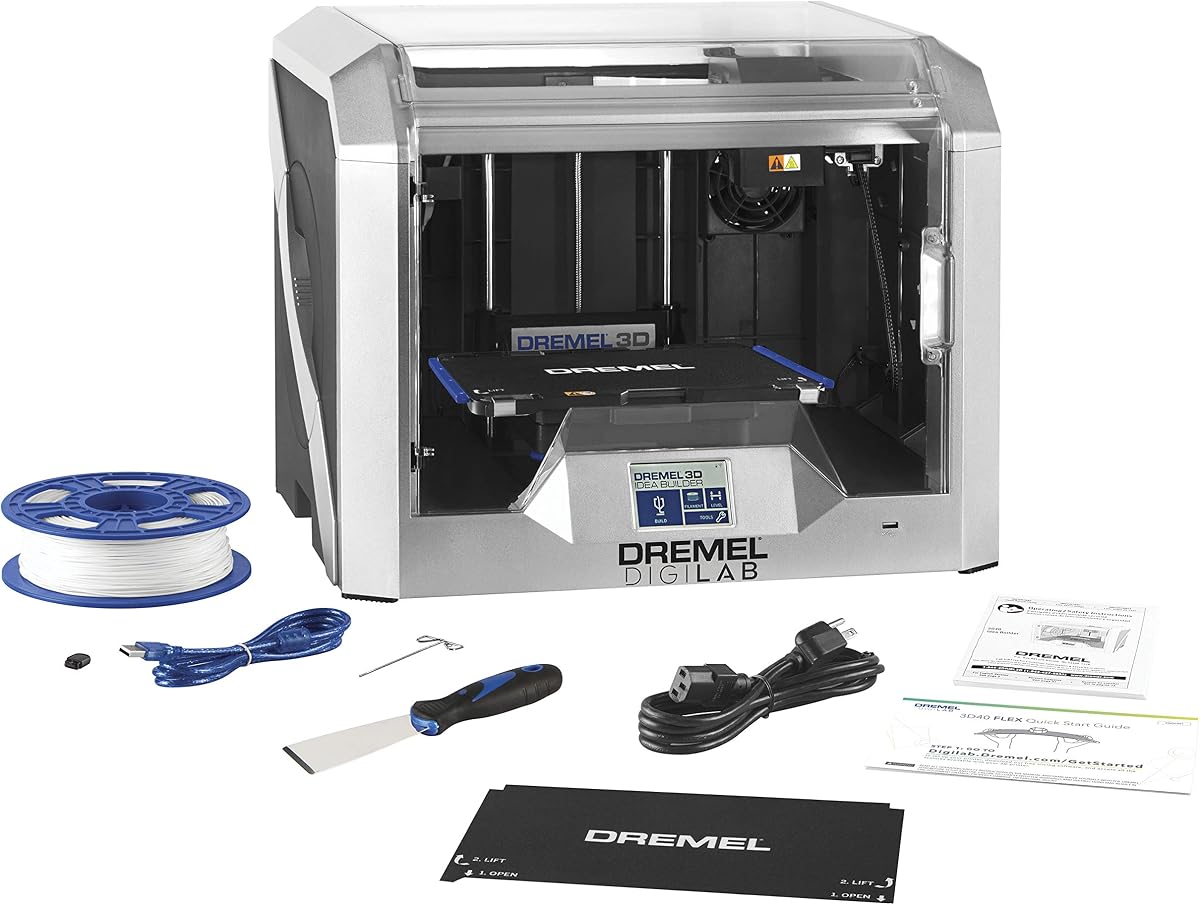
The Dremel 3D40 Flex is designed for reliability and ease of use with a flexible build plate that makes removing models a snap. Its automated 9-point leveling ensures successful printing every time. The direct drive extruder is clog-resistant and delivers smooth prints with 50 micron resolution.
We may earn a commission when you buy through this link, at no additional cost to you.
Setup is hassle-free and guided so you can start printing quickly. The fully enclosed housing is UL listed ensuring safety. Network-friendly features allow control from PC Mac Chromebook or iPad making it accessible in various environments.
Dremel's lifetime customer service and warranty offer unmatched support for beginners and pros alike. While not the fastest, its quality and ease of use stand out. It is an ideal choice for schools or home labs.
For those prioritizing reliability, safety, and support, the 3D40 Flex is perfect. It simplifies the printing process with intuitive features. Highly recommended for anyone seeking a trusted, user-friendly machine.
A flexible build plate with magnetic snap-on mechanism makes removing prints effortless without tools.
All-metal extruder heats to 230C and resists clogs for smooth, consistent printing.
We may earn a commission when you buy through this link, at no additional cost to you.
The Bambu Lab A1 Combo bundles the A1 with AMS Lite for accessible multi-color printing. It combines advanced features like active flow compensation and full auto calibration. Each print job is meticulously calibrated for Z-shift bed level and nozzle pressure ensuring consistent quality.
We may earn a commission when you buy through this link, at no additional cost to you.
The quick change nozzle swaps in seconds with a single clip. Active motor noise cancellation calibrates drive motors to reduce unwanted harshness. This setup delivers precision speed and versatility without manual calibration hassles.
While open frame limits some materials, most users will enjoy the smooth, detailed prints. The combo is ideal for enthusiasts seeking color flexibility out of the box. It is easy to use and reliable.
For a seamless multi-color experience with top-tier precision, the A1 Combo is recommended. It simplifies setup and delivers professional results. Highly recommended for anyone wanting reliable color printing.
AMS Lite makes 3D printing accessible and reliable bringing designs to life in vibrant detail.
High-resolution sensors compensate flow rate and calibrate multiple parameters for every job.
We may earn a commission when you buy through this link, at no additional cost to you.
Choosing the right 3D printer requires balancing precision, speed, and usability. This guide covers key factors to consider for printing high-quality figurines and models.
For figurines and models, print precision is crucial. Look for printers with fine layer resolution and features like active flow compensation or vibration control to ensure clean surfaces and sharp details on small features.
High speeds like 600 mm/s are great for prototyping but ensure the printer maintains accuracy. Faster printers often use vibration compensation or CoreXY motion to prevent ghosting and ringing that can ruin detailed models.
Multi-color printing adds life to figurines. Decide if you need built-in multi-color systems like AMS or independent toolheads. Ensure the system handles filament swaps smoothly without excessive waste or failed prints.
Choose a build volume that fits your projects. While large builds allow bigger models, smaller volumes often offer more consistent precision for miniatures. Ensure the dimensions align with typical figurine heights and widths.
Enclosed printers stabilize temperature for advanced materials like ABS. If you plan to use engineering filaments, an enclosure is essential. For PLA and PETG, open frames work well and are often quieter.
Automatic bed leveling and calibration save time and reduce failed prints. Look for systems that handle Z-offset and first layer setup automatically to focus more on design and less on tuning.
Enclosed systems with HEPA and activated carbon filters trap fumes and particles. If printing at home, safe air quality is vital. Dual filtration systems provide peace of mind for creators with kids or pets.
Prices vary widely. Determine your budget and prioritize features that matter most. Often, mid-range printers offer the best balance of speed, precision, and reliability for most hobbyists.
Start by loading filament carefully and ensuring the bed is clean. Use auto-leveling features if available. Choose the right slicer settings for high detail such as slower speeds and thin layers.
Maintain your printer by regularly cleaning the nozzle and checking belts. Replace nozzles when worn to ensure smooth extrusion. Keep firmware updated for performance improvements and bug fixes.
Monitor prints using cameras or app notifications to catch issues early. Store filament in dry places to prevent moisture damage. Proper care ensures consistent quality and extends your printer's lifespan.
The Bambu Lab A1 excels for detailed miniatures due to its high acceleration and active flow compensation. It delivers crisp edges and smooth surfaces essential for figurines.
Yes, printers like the Bambu Lab P2S Combo or Flashforge AD5X support multi-color prints. These models integrate multi-filament systems for vibrant designs.
PLA is ideal for most figurines due to easy printing and good detail. For durable parts, PETG or ABS work well but require enclosed printers for best results.
Many models support speeds up to 600 mm/s. However, for high detail, slower speeds like 60 mm/s ensure better surface quality on complex figurines.
Most modern printers like Bambu Lab and Flashforge feature automatic leveling. This removes manual adjustments and ensures consistent prints every time.
Enclosed printers maintain stable temperatures reducing warping for larger models. They are ideal for advanced materials like ABS and ASA.
The Flashforge AD5X offers great value with multi-color support and fast speeds. It is cost-effective for hobbyists seeking quality without premium pricing.
Clean the nozzle, check belts, and store filament properly. Regular updates and lubrication keep performance optimal and prevent common issues.
The Bambu Lab A1 stands out as the overall best choice for precision and ease of use. The Flashforge Creator 5 Pro is ideal for professionals needing industrial capabilities. For budget seekers, the Flashforge AD5X offers excellent multi-color value.
When choosing, prioritize features like multi-color support, speed, and ease of calibration. Your specific needs for size, material, and budget should guide the final selection. Consider future upgrades as well.
Prices and availability change frequently, so verify current options on official stores. Investing in the right printer ensures consistent quality for your favorite figurine and model projects.