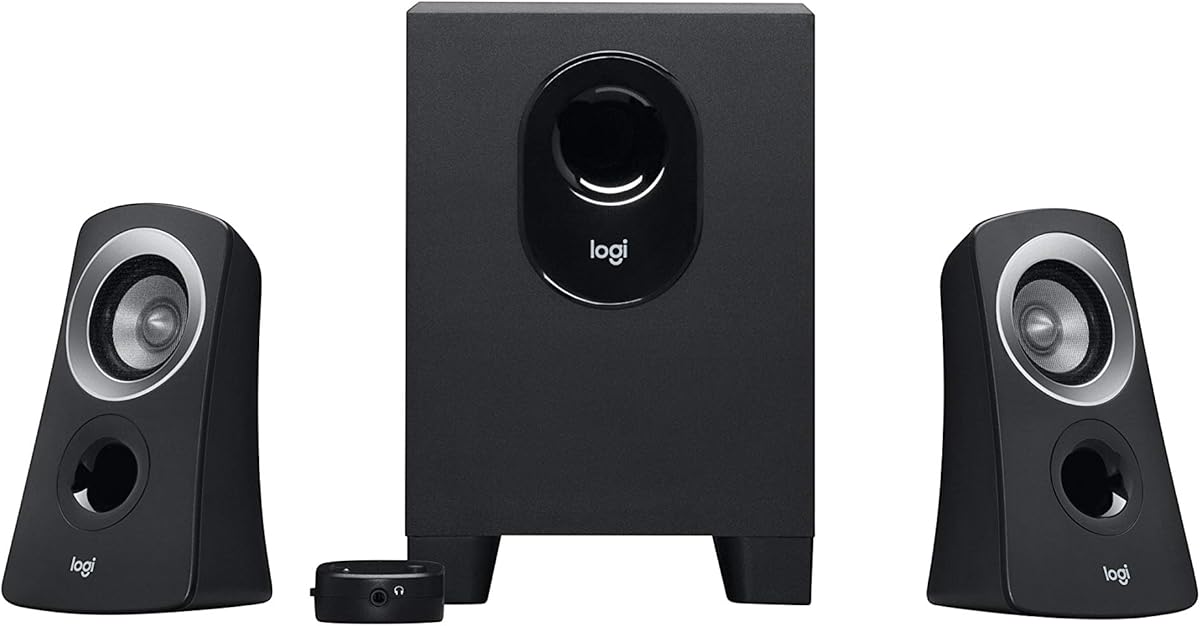
Logitech Z313
4.4Editor score
25W RMS Output
Compact Subwoofer
Easy Control Pod
This guide compares the best 2.1 channel desktop speakers for gaming, music, and movies based on sound quality, power, and connectivity features.
Finding the right audio setup can transform your daily computing experience into something truly immersive and enjoyable. A 2.1 channel desktop speaker system offers a balanced blend of clear mids, crisp highs, and deep bass from a dedicated subwoofer. These systems are designed to fill your workspace with rich sound without taking up excessive desk space or requiring complex calibration.
We have evaluated ten top-rated models based on power output, driver quality, connectivity options, and overall user satisfaction. Our analysis includes systems ranging from budget-friendly options to premium THX-certified units. Each product was reviewed for its ability to deliver clear dialogue, punchy bass, and reliable performance across music, movies, and gaming scenarios.
Each pick below highlights key strengths and potential trade-offs to help you match a system to your specific needs and budget. While we focus on performance and features, remember that prices can fluctuate over time. We recommend checking current availability and deals before making your final decision to ensure you get the best value possible.
4.4Editor score

4.5Editor score
4.2Editor score
This side-by-side comparison highlights the key specifications and unique features of each selected 2.1 channel desktop speaker system. Use this table to quickly identify which model matches your power needs and connectivity requirements.


The Klipsch ProMedia 2.1 THX Certified System stands out as a legendary choice for desktop audio. With a 4.5 rating from users, it delivers an immersive experience that rivals much larger setups. Its THX certification ensures that sound meets high industry standards for clarity and fidelity.
We may earn a commission when you buy through this link, at no additional cost to you.
This system pairs Klipsch MicroTractrix Horn technology with a robust 6.5-inch subwoofer to produce crisp highs and deep bass. The 200 watts of peak power means you can fill a room without distortion. It is perfect for gamers and movie enthusiasts who need precise audio cues.
While the system offers excellent sound, it does require significant desk and floor space due to the subwoofer size. The price is higher than average options, but the performance justifies the investment for audiophiles. It remains a top choice for those prioritizing quality over compact design.
If you want reliable, high-fidelity audio that will last for years, this system is the best pick. It connects easily to PCs and consoles via 3.5mm input. Its plug-and-play setup makes it accessible for all users.
THX certification guarantees that the audio output meets specific standards for dynamic range and distortion.
This technology controls sound dispersion to deliver more accurate highs and mids to your ears.
We may earn a commission when you buy through this link, at no additional cost to you.
The Logitech Z313 offers exceptional value for users seeking reliable audio without breaking the bank. With a 4.4 rating, it is a popular choice for home offices and dorm rooms. The system includes a compact subwoofer and easy-to-use control pod.
We may earn a commission when you buy through this link, at no additional cost to you.
It delivers 25 watts RMS output, which is sufficient for small to medium rooms. The sound is balanced with clear vocals and punchy bass. Its space-saving design fits easily under desks where larger systems might clutter the area.
The trade-off is lower power compared to premium models, so it may not fill large spaces. The controls are basic but functional for daily use. This system is best for casual listening and general multimedia consumption.
For budget-conscious buyers, this model provides the essentials of a 2.1 setup. It connects to any device with a headphone jack. It is a practical solution for students and remote workers.
The subwoofer is designed to save space while still delivering low-end frequencies.
A convenient pod allows quick adjustments to volume and power status.
We may earn a commission when you buy through this link, at no additional cost to you.
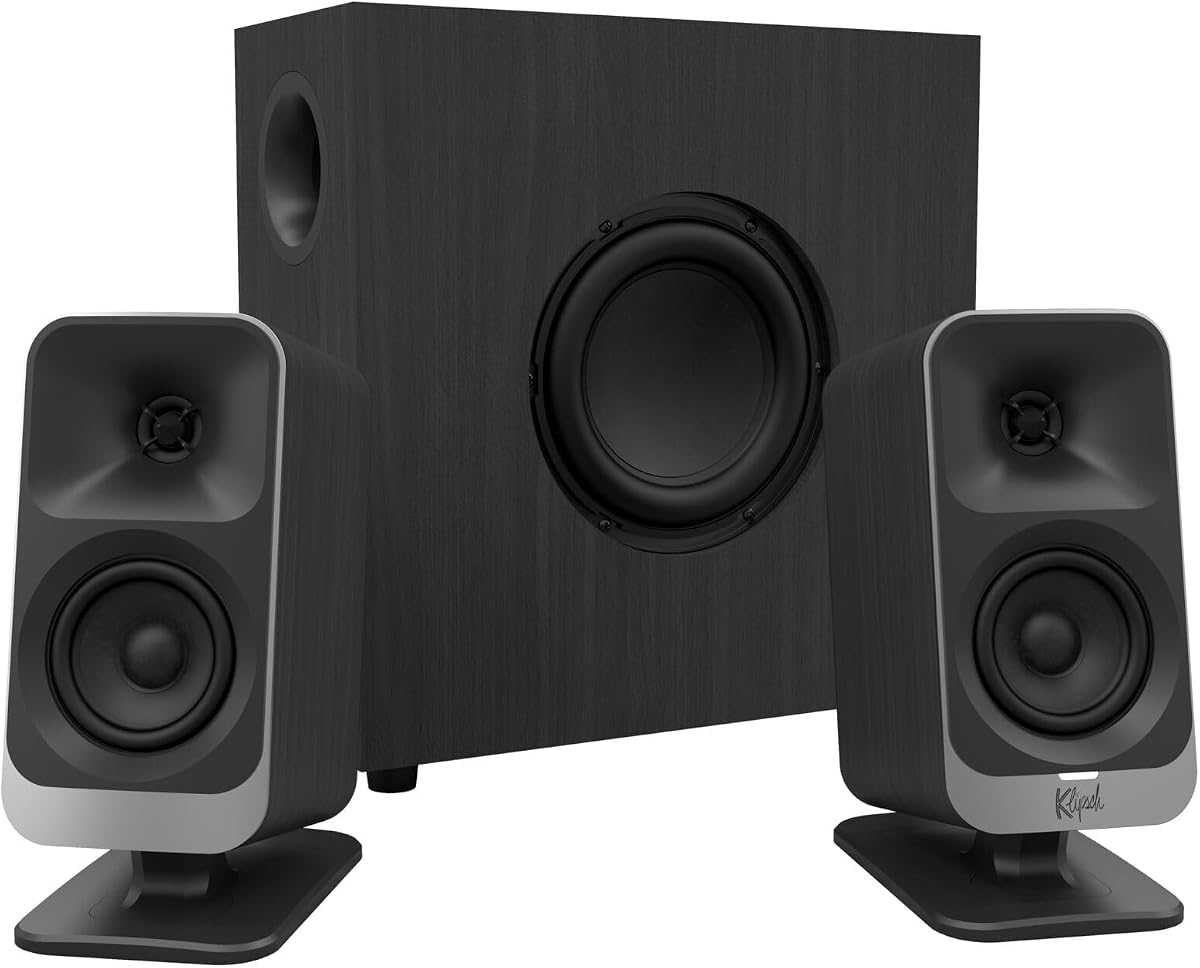
The Klipsch ProMedia Lumina 2.1 brings a modern twist to a classic design. With a 4.2 rating, it appeals to gamers and creators who value aesthetics. It features built-in RGB lighting and a low-profile subwoofer.
We may earn a commission when you buy through this link, at no additional cost to you.
This system connects via USB-C, AUX, and Bluetooth 5.3 for versatile use. You can customize EQ and lighting through the Klipsch Control app. The sound delivers big bass in a small footprint, ideal for tidy desks.
Its high price and app dependency may be drawbacks for some users. The lighting effects add visual appeal but require setup. It is best for those who want a cohesive, stylish desktop setup.
This model is a worthy successor to the original ProMedia. It offers premium connectivity and customization. Consider it if you prioritize design and smart features.
The app allows precise command over EQ and lighting modes like night mode.
The subwoofer is designed to sit under desks without taking up floor space.
We may earn a commission when you buy through this link, at no additional cost to you.
The Logitech Z623 is a powerhouse for home entertainment setups. Its 4.6 rating reflects its ability to fill large rooms with studio-quality audio. It is THX certified and delivers 400 watts peak power.
We may earn a commission when you buy through this link, at no additional cost to you.
This system supports multiple devices via RCA and 3.5mm inputs. It includes two satellite speakers and a 130W subwoofer. The sound is robust enough for movies and immersive gaming sessions.
However, it requires significant space and only offers wired connections. The size may be too large for small desks. It is ideal for dedicated entertainment spaces.
Buy this if you need raw power and high-quality sound. It connects to consoles, TVs, and computers easily. It remains a top performer for home theaters.
Peak power ensures high volume without distortion in large environments.
Multiple input types allow easy connection to various media devices.
We may earn a commission when you buy through this link, at no additional cost to you.
The Creative Pebble X Plus offers versatile connectivity options in a sleek package. With a 4.2 rating, it combines USB-C digital audio, Bluetooth 5.3, and analog input. It also features customizable RGB lighting.
We may earn a commission when you buy through this link, at no additional cost to you.
It delivers punchy bass via a compact subwoofer. You can increase power with a PD adapter for better performance. This system is great for modern setups needing wireless and wired options.
The USB adapter is not included which may add cost. Sound quality is good but not exceptional. It is best for users wanting aesthetics and flexibility.
This system modernizes the desktop audio experience. It fits well with laptops and tablets. Choose it for style and connection variety.
Supports digital USB-C, Bluetooth, and 3.5mm AUX for maximum compatibility.
Customizable lighting adds a vibrant visual element to your desk.
We may earn a commission when you buy through this link, at no additional cost to you.
The Bluedee Computer Speakers deliver clear, balanced sound with DSP tuning. They have a 4.4 rating for their comfortable audio suitable for long sessions. The system includes a dedicated subwoofer for deep bass.
We may earn a commission when you buy through this link, at no additional cost to you.
Bluetooth 5.4 ensures stable wireless connections. The single knob controls volume, play, and lighting effects. It connects via USB-C or 3.5mm for easy setup. The design is desk-friendly and stylish.
Build quality feels standard but functional. It is best for everyday work and entertainment. The RGB adds a nice touch without being distracting.
This system is a great all-in-one solution for desktops. It offers responsive support and a reliable experience. Choose it for clear sound and simple controls.
Digital signal processing reduces distortion for smoother and clearer audio.
A single dial controls volume, lighting, and playback for simplicity.
We may earn a commission when you buy through this link, at no additional cost to you.
The Cyber Acoustics CA-3090 is an entry-level system for basic needs. With a 3.9 rating, it provides adequate sound for casual use. It features flat panel speakers and a side-firing subwoofer.
We may earn a commission when you buy through this link, at no additional cost to you.
The control pod allows easy volume adjustments. It fits well in small spaces. The 9W RMS output is low but functional for background noise. It is a budget-friendly option for workspaces.
Audio lacks detail compared to higher-end models. It is not for audiophiles but works for office tasks. Its simple design is its main selling point.
Choose this for basic audio at a low cost. It connects to any PC easily. It is suitable for students and light use.
Speakers are slim to reduce desk clutter and fit tight spaces.
A dedicated pod simplifies turning speakers on and adjusting volume.
We may earn a commission when you buy through this link, at no additional cost to you.
The Creative Pebble Plus is designed for convenience with USB power. With a 4.3 rating, it eliminates the need for a wall socket. It uses 45-degree elevated drivers for better sound staging.
We may earn a commission when you buy through this link, at no additional cost to you.
The 4-inch down-firing subwoofer adds depth to audio. You can activate High Gain Mode for more power with an external adapter. It fits laptops and desktops well without cords.
Power is limited compared to AC systems. Sound is clear but not loud. It is ideal for laptops and small desks.
This model is great for portable setups. It is easy to set up and move. Choose it for simple USB-powered audio.
Powered via USB ports removes the need for extra power adapters.
Drivers are angled to direct sound straight to your listening position.
We may earn a commission when you buy through this link, at no additional cost to you.
The Cyber Acoustics CA-3610 offers solid mid-range performance. With a 4.2 rating, it delivers 62W peak power and strong bass. The titanium drivers provide crisp highs and warm mids.
We may earn a commission when you buy through this link, at no additional cost to you.
It includes a headphone jack for private listening. The control pod makes adjustments easy. It is versatile for music, movies, and gaming. The subwoofer is down-firing for better bass.
Build quality is average but functional. It requires desk space for the sub. It is a good value for the power level.
This system works well for general entertainment. It connects to PCs and tablets easily. Choose it for reliable sound at a reasonable price.
Titanium material ensures durable and clear high-frequency performance.
A built-in jack allows private listening without unplugging cables.
We may earn a commission when you buy through this link, at no additional cost to you.
The Logitech Z407 features a unique wireless control dial for easy adjustments. With a 4.3 rating, it delivers immersive sound with 80W peak power. You can connect multiple devices via Bluetooth and inputs.
We may earn a commission when you buy through this link, at no additional cost to you.
The dial allows control over volume and bass wirelessly. Speakers can be oriented vertically or horizontally. The subwoofer adds depth with digital signal processing. It suits media rooms and gaming setups.
Setup might take time to pair devices. It is more expensive than basic models. It is best for convenience and quality.
This system offers premium control options. It connects to phones and PCs easily. Choose it for a seamless wireless experience.
A remote dial lets you adjust sound settings from across the room.
Satellites can be laid vertically or horizontally to fit your space.
We may earn a commission when you buy through this link, at no additional cost to you.
Selecting the right 2.1 channel desktop speakers requires understanding your audio needs and the technical features that impact performance.
Power output measured in RMS and peak watts indicates how loud your speakers can get. Look for at least 20W RMS for clear sound in a medium room. Higher wattage ensures less distortion at high volumes.
Prioritize RMS power for consistent performance over peak ratings.
A larger subwoofer typically provides deeper bass response. 5-inch subs are compact while 6.5-inch or larger offer more impact. Ensure your space can accommodate the size.
Choose a subwoofer that balances bass quality with available desk or floor space.
Check for inputs like 3.5mm, USB, or RCA. Bluetooth adds wireless convenience but may introduce latency for gaming. Ensure your devices match the available ports.
Select connectivity that matches your devices to avoid adapter issues.
Look for speaker systems with THX certification or DSP tuning for better fidelity. Tweeters should deliver clear highs without harshness. Midrange drivers ensure voice clarity.
Read reviews focusing on audio clarity and balance before purchasing.
Compact systems suit small desks while larger setups fill rooms. Consider RGB lighting or matte finishes to match your style. Ensure cables are manageable.
Measure your desk to ensure the speakers fit comfortably.
Physical control pods or dials make adjustments easier than software. Some systems offer wireless remotes for convenience. Look for separate bass controls.
Prioritize intuitive controls for daily use.
Durable plastics or wood cabinets affect sound resonance and longevity. Check reviews for issues with rattling or fragile parts. Quality construction ensures longevity.
Invest in solid build quality for a long-term solution.
Prices range widely from budget models to premium units. Set a budget that allows for the power and features you need. Do not compromise essential audio quality.
Find a balance between cost and essential performance features.
Start by placing the subwoofer on a solid surface like the floor or a sturdy desk. Keep it away from walls to prevent muddy bass. Ensure the satellite speakers are angled towards your ears.
Connect the system using the recommended cables. If using USB power, ensure your port supports enough current. For Bluetooth, pair in system settings and set as the default output.
Clean the speakers with a dry cloth to remove dust. Avoid harsh chemicals on grilles. Adjust volume levels gradually to avoid sudden loud bursts. Store the system carefully when moving.
2.1 systems add a dedicated subwoofer for deeper bass which enhances movies and games. 2.0 systems lack this low-end but may be compact. Choose 2.1 for immersive audio experiences.
Most desktop speakers have built-in amplifiers so a DAC is optional. For high-resolution audio a DAC improves clarity. Check your PC output quality before adding a DAC.
Yes 2.1 speakers deliver excellent directional cues and immersive sound for games. Look for low latency models if using wireless. The subwoofer adds impact to explosions.
RMS indicates continuous power while peak is short bursts. RMS is more accurate for real performance. Look at RMS for daily audio needs.
Use wired connections for latency-sensitive tasks like gaming. Ensure the Bluetooth driver is updated. Adjust buffer settings if available.
THX certification ensures high standards for audio quality and distortion. It is ideal for movies and music. Budget systems may lack this but still perform well.
The Klipsch ProMedia 2.1 THX, Logitech Z313, and Klipsch ProMedia Lumina lead the pack for quality budget and features. Each offers distinct benefits depending on your setup size and needs.
Prioritize power output and connectivity options to match your devices. Consider the physical size to ensure it fits your workspace comfortably without clutter.
Prices and availability can change so verify current listings before purchasing. Use the comparison table to make an informed decision quickly.