
TP-Link ER605
4.4Editor score
Five Gigabit Ports
USB WAN Port Support
Secure VPN Connections
This guide compares the top ten load balancing routers for businesses and advanced home networks, evaluating performance, security, and multi WAN capabilities
Finding the right load balancing router is crucial for maintaining stable internet connections across multiple networks. These devices intelligently distribute traffic across available WAN links to maximize bandwidth and ensure continuous uptime for your business or home lab setup.
We evaluated ten leading models based on port flexibility, security features, VPN support, and ease of management. Our analysis focuses on how each router handles multi WAN scenarios, failover capabilities, and overall network performance under heavy load conditions.
Each pick highlights specific strengths like budget value, professional features, or enterprise scalability. Please note that product availability and pricing may change frequently, so verify current details before making your final purchasing decision online.
4.4Editor score

4.7Editor score

4.0Editor score
This side by side comparison highlights key specifications across all ten models to help you quickly identify the best fit for your network infrastructure and performance requirements.


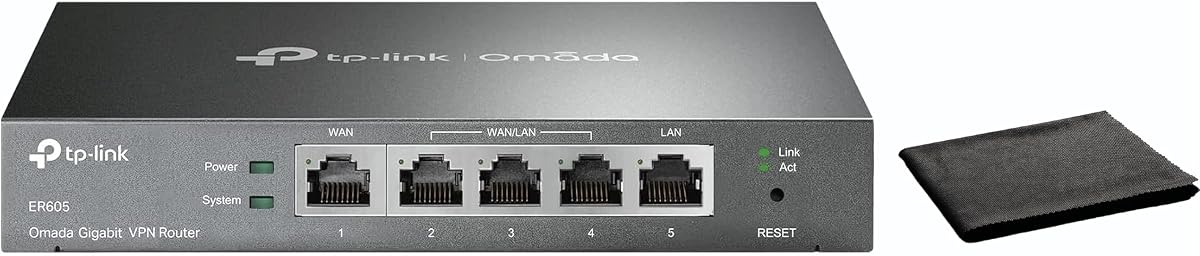

The TP-Link ER605 stands out as a top budget choice for load balancing with its solid performance and essential features. It earned a 4.4 rating for its ability to manage multiple connections efficiently without breaking the bank for small offices.
We may earn a commission when you buy through this link, at no additional cost to you.
This router offers five gigabit ports that allow up to three WAN connections to optimize bandwidth usage seamlessly. Its advanced firewall policies and VPN support up to twenty connections make it a secure option for protecting network data.
While it lacks some advanced customization options found in pricier models, the ER605 covers most basic business needs effectively. The USB WAN port provides a valuable backup option for mobile broadband when primary lines fail unexpectedly.
Small businesses seeking cost effective multi WAN reliability will find this device an ideal starting point. Its balance of port flexibility and security features justifies the investment for maintaining continuous internet access.
Intelligent load balancing ensures traffic is spread across available connections to prevent bottlenecks and improve overall speed.
Multiple VPN protocols allow employees to connect safely from remote locations while keeping sensitive data encrypted.
We may earn a commission when you buy through this link, at no additional cost to you.
The ER7206 targets professional environments needing robust network handling and high client support. With a 4.5 rating, it delivers advanced features like SDN integration and extensive VPN capabilities for complex setups.
We may earn a commission when you buy through this link, at no additional cost to you.
This model supports up to seven hundred clients and integrates smoothly with Omada SDN for centralized control across sites. Its flexible port configuration allows four WAN connections to optimize bandwidth usage efficiently without congestion.
Though it costs more than basic models, the ER7206 offers scalable solutions for growing networks needing centralized management. Cloud access simplifies remote administration, making it easier to monitor performance from anywhere at any time.
Medium to large businesses requiring high capacity and centralized control will appreciate this router’s advanced toolset. Its reliability and flexibility make it a solid long term investment for expanding network infrastructure.
Software defined networking allows centralized management of gateways, access points, and switches through a single interface.
Supporting up to 150,000 associated devices ensures the router handles dense client environments without performance drops.
We may earn a commission when you buy through this link, at no additional cost to you.
The Cudy R700 offers enterprise control through full OpenWRT support and multi WAN continuity for critical operations. It received a 4.4 rating for its ability to keep networks online with automatic failover when connections drop.
We may earn a commission when you buy through this link, at no additional cost to you.
Users can connect up to five ISPs with traffic instantly rerouting to maintain uptime during disruptions. Its VPN suite includes WireGuard, OpenVPN, and IPsec for secure site-to-site tunnels and remote access capabilities.
While the OpenWRT customization requires technical knowledge, it unlocks advanced firewall rules and QoS policies for tailored network performance. Web GUI and cloud monitoring tools simplify daily management for remote or on site administrators.
IT professionals and advanced home lab users benefit most from the R700’s flexibility and robust security. Its ability to support multiple ISPs ensures reliable internet access even when individual links experience failures unexpectedly.
Automatic failover keeps your business online by instantly switching to backup connections when primary lines fail.
OpenWRT support enables VLAN segmentation and custom policies for precise traffic management and network security.
We may earn a commission when you buy through this link, at no additional cost to you.
The Route10 delivers high-performance 10 gigabit routing for advanced home and enterprise networks needing top throughput. With a 4.0 rating, it leverages a Qualcomm quad-core processor to ensure consistent multi-gigabit speeds without bottlenecks.
We may earn a commission when you buy through this link, at no additional cost to you.
Its integrated PoE Plus output powers compatible access points directly through Ethernet cables to reduce external adapter needs. Real-time monitoring provides live stats on bandwidth usage and traffic flow for quick issue identification and optimization.
Although it comes at a premium price, the Route10’s hardware acceleration and 10G capabilities suit high-bandwidth workloads effectively. Multi-WAN failover and VPN support ensure secure and reliable connections for distributed business environments and remote sites.
Network administrators prioritizing raw performance and wired scalability will find this router a powerful choice. Its seamless ecosystem integration with Alta Labs switches simplifies centralized management and monitoring across complex setups.
Quad-core Qualcomm acceleration ensures fast packet processing for consistent performance under heavy multi-gigabit loads.
Built-in PoE Plus allows direct power to access points and edge devices through Ethernet cables alone.
We may earn a commission when you buy through this link, at no additional cost to you.
The Omada ER7412 excels with multi-gigabit ports and support for up to eleven WAN ports for high utilization rates. It earned a 4.5 rating for its comprehensive security features including DPI, IDS, and extensive VPN options.
We may earn a commission when you buy through this link, at no additional cost to you.
This router allows load balancing across multiple lines to maximize bandwidth usage efficiently for demanding network environments. Its security stack includes DoS/DDoS protection and URL filtering to shield networks from malicious traffic and attacks.
While full features rely on Omada integration, the ER7412 provides robust performance and flexibility for growing businesses. The high number of WAN ports enables advanced failover and traffic distribution strategies for critical connectivity.
Organizations needing deep packet inspection and multi-gigabit capabilities will value this device’s security and throughput. Its design supports secure remote access and site-to-site tunnels essential for modern distributed network infrastructures.
Load balancing across up to eleven WAN ports increases broadband utilization to maximize available internet speed.
DPI and IDS protection analyze traffic patterns to block threats before they reach internal network devices.
We may earn a commission when you buy through this link, at no additional cost to you.
The TL-R470T+ offers a compact and cost-effective solution for small offices needing basic multi-WAN capabilities. With a 4.2 rating, it provides four WAN ports with load balancing to maximize bandwidth and backup capabilities efficiently.
We may earn a commission when you buy through this link, at no additional cost to you.
This router marshals bandwidth resources to specific clients based on application needs to ensure critical services get priority. Its smaller case design fits easily in space-constrained environments like retail counters or small workspaces.
While it lacks gigabit speeds, the device delivers reliable management features like PPPoE server support and IP MAC binding. DDNS facilitates remote management via domain names without requiring static public IP addresses for the network.
Small offices or internet cafes seeking affordable failover and client management will find this model practical. Its focus on essential security and bandwidth control makes it suitable for budget-conscious deployments needing basic redundancy.
Extensive client accounts and PPPoE server support help administrators manage network access and bandwidth allocation.
The smaller case allows flexible installation in tight spaces without sacrificing multi WAN connectivity options.
We may earn a commission when you buy through this link, at no additional cost to you.
The TL-R480T+ provides a straightforward five-port solution with configurable WAN/LAN ports for basic load balancing needs. It received a 4.2 rating for its simplicity in distributing traffic across multiple broadband connections effectively.
We may earn a commission when you buy through this link, at no additional cost to you.
Three configurable ports allow users to assign connections flexibly to suit different network topologies or redundancy goals. Its primary focus remains on balancing broadband traffic to ensure continuous availability for small network setups.
While it lacks advanced management tools, the router offers essential connectivity for environments not requiring deep customization. Its design prioritizes ease of use over complex feature sets for entry-level multi-WAN deployments.
Users needing an uncomplicated router for balancing two or three internet lines should consider this model. Its basic functionality covers fundamental requirements for maintaining internet access through multiple ISP connections reliably.
Three configurable WAN/LAN ports provide flexibility to tailor connections to specific network layout needs.
The core load balancing function spreads traffic across links to prevent single points of failure.
We may earn a commission when you buy through this link, at no additional cost to you.
The ER-605 focuses on intuitive management and dual WAN load balancing for small to medium businesses. It earned a 4.3 rating for its ease of setup and centralized cloud monitoring capabilities for real-time status.
We may earn a commission when you buy through this link, at no additional cost to you.
Intelligent bandwidth management ensures critical applications perform well by prioritizing traffic through QoS settings. Its dual WAN ports enable seamless failover and load balancing to maintain connectivity when one link fails.
While it supports fewer WAN connections than other models, the ER-605 simplifies deployment with cloud access and app integration. The compact design fits various environments, making it versatile for offices and remote work setups.
Businesses prioritizing easy setup and cloud visibility will find this router a user-friendly choice. Its balance of security and bandwidth optimization meets core needs for reliable internet access across multiple lines.
QoS settings prioritize critical application traffic to ensure performance remains stable under heavy load.
Centralized cloud monitoring allows administrators to check network status and configure settings remotely.
We may earn a commission when you buy through this link, at no additional cost to you.
The EdgeRouter 4 delivers highly rated reliability with a fanless design suitable for quiet office or rack environments. With a 4.6 rating, it features three gigabit ports and one SFP port for flexible network connectivity options.
We may earn a commission when you buy through this link, at no additional cost to you.
Its compact design supports desk, wall, or rack mounting to fit various physical setup requirements seamlessly. Low power consumption of 13 watts ensures energy efficiency during continuous operation without excessive heat generation.
While it lacks native load balancing features out of the box, experienced users can leverage it for advanced routing tasks. Its flexibility makes it a versatile component for custom network infrastructures needing robust wired connections.
IT professionals managing controlled environments benefit from its silent operation and mounting versatility. The router provides a stable foundation for building custom WAN configurations using external tools or additional devices.
The fanless design reduces noise and maintenance while ensuring reliable performance in temperature controlled spaces.
Multiple mounting options allow placement on desks, walls, or racks to suit any physical network setup.
We may earn a commission when you buy through this link, at no additional cost to you.
The Omada Fusion 2.5G earns our Editor's Choice with its touchscreen interface and five 2.5G ports for rapid troubleshooting. It achieved a 4.7 rating for combining high performance with intuitive on-site management tools for network admins.
We may earn a commission when you buy through this link, at no additional cost to you.
A quad-core CPU ensures lightning-fast processing to handle multiple WAN loads without lag or connectivity slowdowns. Bluetooth setup and batch adoption simplify deployment across multiple Omada devices in minutes instead of hours.
Touchscreen health scores and real-time traffic insights reduce laptop dependency during on-site maintenance and repairs. License-free cloud access allows remote management of all features without recurring subscription fees or barriers.
Organizations prioritizing easy deployment and fast on-site diagnostics will find this router unmatched in usability. Its speed and management tools offer a modern approach to maintaining robust wired VPN networks efficiently.
Touchscreen health scores and alerts enable quick diagnostics without needing external tools or laptops on-site.
Bluetooth setup and batch adoption streamline initial configuration for Omada network devices saving significant time.
We may earn a commission when you buy through this link, at no additional cost to you.
Selecting the right load balancing router requires evaluating your network size, bandwidth needs, and specific security or management requirements.
Evaluate the number of WAN and LAN ports available to ensure compatibility with your existing ISP lines and devices. Some routers support up to eleven WAN connections while others offer only two or three for basic redundancy.
Choose a model with sufficient ports to accommodate current needs and potential future expansion without requiring additional hardware.
Consider the router's throughput capacity and port speeds to handle your total internet bandwidth without bottlenecks. High-speed models support 2.5G or 10G ports for modern multi-gigabit ISP connections effectively.
Ensure the device can process traffic at speeds matching your ISP plan to maintain optimal performance under load.
Look for intelligent load balancing that distributes traffic evenly or prioritizes critical applications based on QoS settings. Advanced models support policy-based routing and per-connection load balancing for fine-grained control.
Select a router that offers the level of traffic distribution control your specific business or home needs.
Check for built-in firewalls, DoS protection, and VPN capabilities to secure your network perimeter against threats. Models often include IP/MAC filtering, DPI, and IDS for enhanced protection beyond basic routing.
Prioritize a router with security features aligned with your threat model and compliance requirements for safety.
Assess the ease of configuration through web GUI, mobile apps, or cloud portals for remote monitoring. Some models offer touchscreen interfaces or Bluetooth setup to simplify deployment for IT staff.
Choose a management system that matches your team's expertise and preferred workflow for ongoing maintenance.
Ensure the router supports automatic failover to maintain uptime if a primary connection drops unexpectedly. Look for instant rerouting and health checks to detect and switch to backup links seamlessly.
Select a device that guarantees minimal downtime during ISP outages to keep critical services running smoothly.
Verify supported VPN protocols such as IPsec, OpenVPN, or WireGuard for secure remote and site-to-site access. The number of concurrent tunnel connections matters for businesses with multiple remote users.
Ensure the router provides the necessary VPN features and scalability for your secure communication needs.
Consider whether the router integrates with a broader network ecosystem for centralized control of switches and APs. SDN platforms enable unified management across multiple sites with cloud options for remote access.
Choose a model that can grow with your infrastructure and supports future network expansions effectively.
Start by connecting each WAN port to a separate ISP modem or line using Ethernet cables. Configure the interface to recognize each connection type such as DHCP, PPPoE, or static IP according to your provider.
Set up failover rules to define which connection serves as primary and how traffic redistributes when failures occur. Enable QoS policies to prioritize critical applications like VoIP or video conferencing over less urgent traffic.
Regularly monitor bandwidth usage and system logs through the management portal to detect potential issues early. Keep firmware updated and restart the device occasionally to clear memory and maintain stable performance over time.
Load balancing distributes network traffic across multiple internet connections to maximize bandwidth and ensure continuous uptime. If one connection drops, the router reroutes data to others preventing service interruptions. This technique is vital for businesses needing reliable internet without single points of failure.
The number of WAN ports depends on your redundancy goals and ISP availability. Most small businesses need two to four connections for failover and speed aggregation. Check your current ISP count and consider future expansion when selecting a router.
Most dedicated load balancing routers do not broadcast WiFi and require separate access points for wireless coverage. These models focus on wired routing performance and security features. You can pair them with dedicated APs for complete network coverage.
Yes, many models support USB WAN ports to connect 4G or 3G modems for failover. This ensures internet access even when primary fixed lines fail or experience prolonged outages. Check compatibility lists before purchasing compatible modems.
Firewalls, DoS protection, and IP/MAC filtering protect your network from external threats and unauthorized access. VPN support secures remote connections while DPI and IDS monitor traffic for malicious activity. Choose a router with a comprehensive suite for robust protection.
Cloud management simplifies remote monitoring and configuration especially for multi-site deployments. It allows access from anywhere without needing local network access. While optional, it saves time and streamlines troubleshooting for busy IT teams.
Our top picks highlight the TP-Link ER605 for budget needs, Omada Fusion 2.5G for intuitive management, and Alta Labs Route10 for premium performance. Each offers distinct strengths tailored to different network sizes and operational requirements.
Prioritize port flexibility, security features, and failover capabilities based on your specific continuity needs. Ensure the model supports your ISP connection types and future growth plans for long-term value and scalability.
Prices and availability change frequently so verify current details before purchasing to confirm specifications meet your needs. Investing in the right router ensures reliable internet access and peace of mind for your business operations.