
Zunate External Optical Drive Enclosure
Compatible with 9mm slim drives
Plug and play no drivers needed
Integrated Type C and USB 3.0
This comprehensive guide compares the top external optical drive enclosures for 2026, helping you choose the right USB 3.0 or Type C solution for your SATA
Finding the right external optical drive enclosure can transform an old internal drive into a versatile external tool. Whether you need to read discs, install software, or backup data, a quality enclosure ensures stable performance and durability for your hardware needs.
We evaluated ten top-rated models based on compatibility, build quality, and ease of use. Our comparison covers both slim laptop drives and standard desktop units, ensuring you find a match for your specific SATA optical drive and connectivity requirements today.
Each pick highlights key features like USB 3.0 speeds, aluminum casings, and tool-free designs. Prices fluctuate frequently, so check current listings before buying. This guide helps you navigate the options to secure the best value for your external storage setup.
4.6Editor score

4.6Editor score
This side-by-side comparison highlights the key specifications and features of each enclosure to help you quickly identify the best match for your drive type and usage scenario.




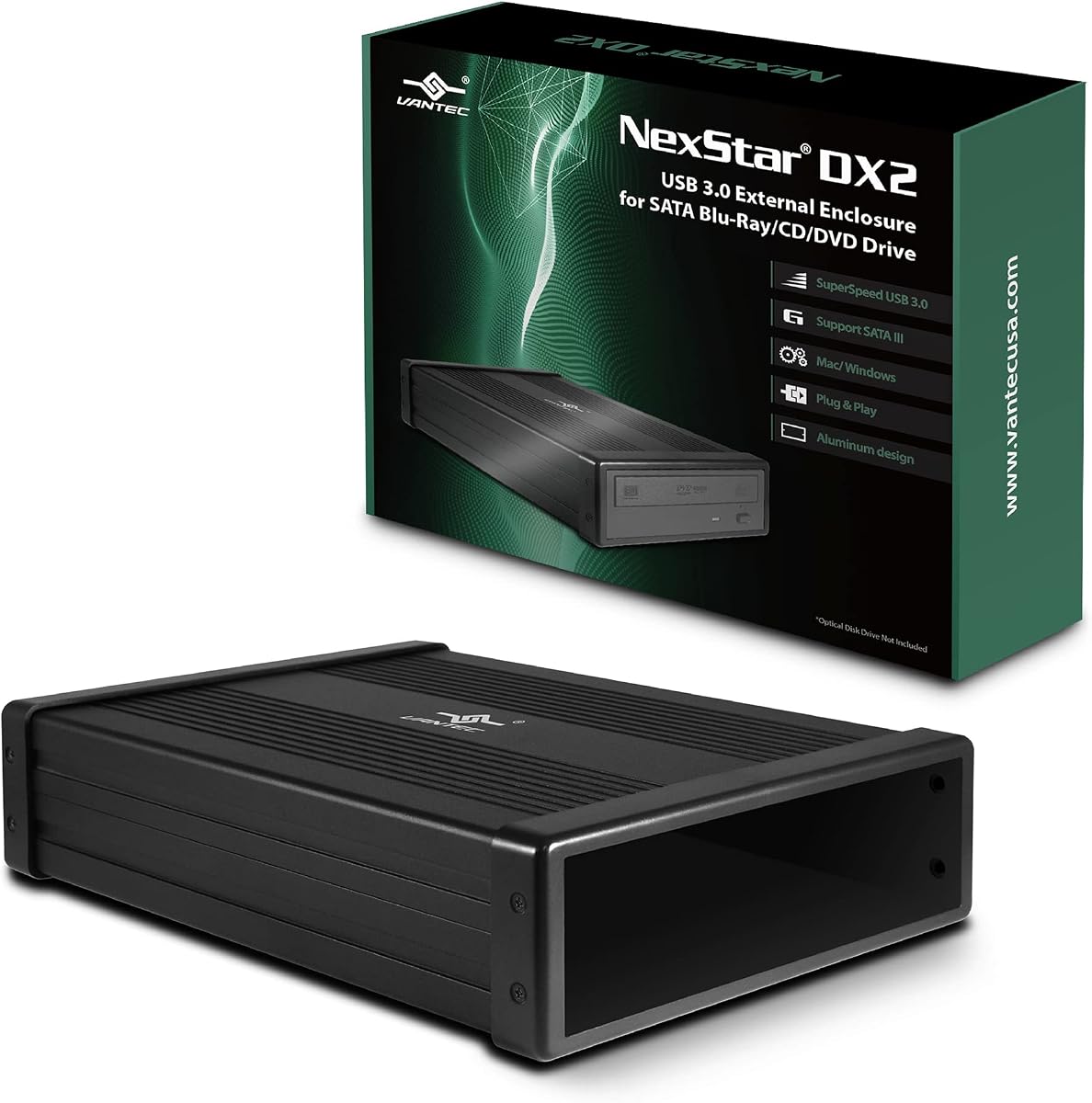
The NexStar DX2 is a top-rated external optical drive enclosure designed for 5.25 inch Blu-Ray, CD, and DVD SATA drives. With a rating of 4.6 stars, it stands out for its ability to fit any depth optical drive up to 185mm, making it incredibly versatile for various drive models.
We may earn a commission when you buy through this link, at no additional cost to you.
Its second generation design features an aluminum alloy casing that reduces noise and vibration during operation. The enclosure supports USB 3.0 speeds for smooth read/write performance and includes a hot swappable feature for systems equipped with USB ports. It also comes with a 12V 3A AC adapter to ensure stable power for any optical drive.
While the enclosure is robust, it does not include the optical drive itself, so you must source that separately. Additionally, it requires an AC adapter for power which may limit portability compared to bus-powered slim enclosures. These trade-offs are acceptable given the high compatibility and stable performance it offers.
This enclosure is ideal for users who need to repurpose standard desktop optical drives or convert them into a storage device with an optional bracket. It is best for home offices or setups where drive depth varies and reliable performance is a priority over extreme portability.
The flexible SATA cable internally connects to any type of SATA optical or storage drive without being limited by the position of your drive SATA interface.
The aluminum alloy casing not only protects the drive but also dampens vibration to ensure quieter and more stable operation during heavy use.
We may earn a commission when you buy through this link, at no additional cost to you.
This 5.25 enclosure offers a solid balance of performance and affordability for standard optical drives. With a 4.4 star rating, users appreciate its ability to fit drive depths up to 171mm and its plug and play functionality that requires no additional drivers for setup.
We may earn a commission when you buy through this link, at no additional cost to you.
The aluminum alloy casing is designed to reduce heat noise and vibration ensuring the drive stays cool during extended use. It supports USB 3.0 ports for transfer speeds that are 10 times faster than USB 2.0 making it efficient for moving large files or burning discs quickly.
One limitation is that it only supports SATA protocol interfaces and not IDE which may limit compatibility with older drives. Also the optical drive is not included so you must purchase it separately. These constraints are minor for most modern users seeking a reliable external solution.
Buyers looking for a straightforward upgrade for their desktop optical drives will find this enclosure a practical choice. It suits those who need a durable housing with fast USB connectivity and do not require IDE support or included drive hardware.
With USB 3.0 output interface this DVD case equips allows transferring 1G files in 3 to 5 seconds which is significantly faster than USB 2.0 standards.
The plug and play design provides the greatest convenience for users who want to set up their external drive quickly without technical hassle.
We may earn a commission when you buy through this link, at no additional cost to you.
The Zunate enclosure is an affordable option tailored for 9mm ultra slim Serial ATA CD DVD BD drives found in most laptops. It offers plug and play functionality without needing external power or drivers making it simple to use across various operating systems.
We may earn a commission when you buy through this link, at no additional cost to you.
Its slim and portable design features a premium brushed material that resists scratches and looks stylish. The integrated Type C and USB 3.0 cable can be folded inside the enclosure for convenient storage and the woven data cable ensures stable data transfer with minimal interference.
While it is a budget pick the lack of explicit user ratings may make buyers cautious. Additionally some users might miss an explicit eject button if discs get stuck though the product supports standard OS detection. These issues are manageable for cost conscious buyers.
This enclosure is perfect for users wanting to convert a laptop drive into an external tool without spending much. It suits those who prioritize portability and compatibility with slim drives over heavy duty features or extensive user reviews.
It supports Windows Vista 7 8.1 10 and OS X systems ensuring broad compatibility for both PC and Mac users without needing extra software.
Equipped with a woven data cable this enclosure offers excellent anti interference capabilities and minimizes signal loss for reliable data transfer.
We may earn a commission when you buy through this link, at no additional cost to you.
The JOTEC enclosure stands out for its dual cable support with both USB 3.0 and Type C options for desktops and laptops. It is built with a premium aluminum alloy that dissipates heat well preventing overheating during long disc reading or burning sessions.
We may earn a commission when you buy through this link, at no additional cost to you.
Designed for 12.7mm thick SATA DVD-RW drives it includes 4 bottom non-slip feet for stable operation. The driver-free plug-and-play design works across Windows Linux and Mac OS making it a versatile choice for mixed device environments.
While it lacks user ratings in the data the product description notes a specific fit for 9.5mm optical drives which may confuse some buyers. Also it does not include the drive itself requiring separate purchase. These are minor details to verify before ordering.
This model is best for users who need dual connectivity options and heat management for prolonged use. It is ideal for those working with thicker drives or who value aluminum construction and broad OS compatibility in their external drive setup.
Comes with two data cables one USB 3.0 and one Type-C cable making it compatible with desktops and laptops for multiple-scene use.
Premium aluminum-alloy enclosure delivers excellent heat dissipation to prevent overheating for stable long-time operation with power-saving sleep mode.
We may earn a commission when you buy through this link, at no additional cost to you.
The Tbest enclosure supports both 12.7mm and 9.5mm DVD RW drives with blazing USB 3.0 speeds up to 5Gbps. It uses the INIC3609 chipset solution which enables automatic sleep mode for energy efficiency and broad device compatibility across multiple operating systems.
We may earn a commission when you buy through this link, at no additional cost to you.
Full backward compatibility with USB 2.0 connections ensures it works with older laptops or PCs. The seamless support for SATA I and SATA II interface standards makes it versatile for various internal drives users might want to externalize for better access.
However the rating of 3.4 suggests some users have encountered issues which could be related to build quality or connection stability. Buyers should weigh this against the low price and feature set before purchasing for critical tasks that require consistent performance.
This enclosure is suitable for users on a tight budget who need flexibility in drive size and OS support. It works well for casual use like reading discs or occasional backups rather than heavy daily operations or professional environments.
Designed to accommodate both 12.7mm and 9.5mm DVD RW drives for flexible installation options depending on your laptop or desktop drive type.
Features INIC3609 chipset solution with automatic sleep mode for broad device compatibility and energy efficiency during idle periods.
We may earn a commission when you buy through this link, at no additional cost to you.
The Vantec CB-ST00U3 NexStar Adapter is a high-rated solution optimized for any speed SATA I/II/III ODD/HDD/SSD. With a 4.6 star rating it supports UASP for added speed on USB 3.0 and includes an anti-slip mat to dampen noise and protect your drives.
We may earn a commission when you buy through this link, at no additional cost to you.
Its compact and lightweight design makes it easy to store and transport while the hot-swappable feature allows plug and play without rebooting. No drivers are needed for multiple OS which simplifies setup for users moving between different computers regularly.
Note that it uses a SATA to USB bridge controller which may limit some SATA drive commands depending on the drive model. Also if your drive needs more power than the included 12VDC 2A adapter you may need to buy a bigger one separately.
This adapter is perfect for power users who need reliability and speed for both optical and storage drives. It is best for those who value premium build quality and broad SATA compatibility over basic enclosure functions.
Supports UASP for added speed on the already Fast SuperSpeed USB 3.0 making data transfers more efficient than standard protocols.
Anti-slip mat to dampen noise and protect your drives ensuring stable operation and reducing wear on your hardware.
We may earn a commission when you buy through this link, at no additional cost to you.
This enclosure is designed for standard 5.25 inch optical drives and 3.5 inch hard drives using USB 2.0. It comes with a stable external power adapter ensuring dependable reading writing backup tasks software installs and movie playback for users with older systems.
We may earn a commission when you buy through this link, at no additional cost to you.
The lightweight aluminum housing helps reduce everyday wear while protecting the installed drive from bumps and scratches. The plug and play design helps you read discs or access stored files with ease and the package includes all necessary mounting accessories for quick setup.
A limitation is that USB 2.0 connection is slower compared to modern USB 3.0 standards and it does not support slim laptop drives. This may not suit those needing fast transfers or compact designs but it remains a solid choice for legacy desktop environments.
Buyers with older PCs who need a reliable enclosure for standard drives will find this model adequate. It is best for home offices or studies where speed is less critical than stability and ease of use.
Desktop optical drives need stable external power so this enclosure includes an adapter and power cable for dependable reading writing backup tasks software installs and movie playback.
Lightweight aluminum housing helps reduce everyday wear while protecting the installed drive from bumps and scratches ensuring long term durability.
We may earn a commission when you buy through this link, at no additional cost to you.
The Bewinner enclosure is designed to work with nearly all ultra-thin 9.5mm CD DVD and BD drives found in laptops. Its plug-and-play design ensures effortless setup without needing any additional drivers making it a versatile solution for most users wanting to convert internal drives.
We may earn a commission when you buy through this link, at no additional cost to you.
Crafted from brushed ABS material this lightweight and scratch-resistant enclosure offers both style and portability. The integrated Type C and USB 3.0 cable folds neatly for easy storage and on-the-go use ensuring you have a compact tool when traveling.
While the lack of user ratings makes it harder to judge real-world performance the build quality and features seem solid. Buyers should note that the optical drive is not included so you must source one separately before use.
This enclosure is ideal for users prioritizing portability and easy conversion of laptop drives. It suits those who want a stylish slim solution with stable data transfer speeds for occasional external use on the go.
This external optical drive enclosure is designed to work with nearly all ultra-thin 9.5mm CD DVD and BD drives with plug-and-play setup.
Crafted from brushed ABS material this lightweight and scratch-resistant enclosure offers both style and portability for daily or travel use.
We may earn a commission when you buy through this link, at no additional cost to you.
This enclosure is designed to work with 9mm ultra slim Serial ATA CD DVD BD drives commonly found in laptops. It offers plug and play detection requiring no additional drivers or external power supply making it easy to use across different systems.
We may earn a commission when you buy through this link, at no additional cost to you.
The slim lightweight construction with a premium brushed finish offers style and portability. A detachable cable with USB C and USB 3.0 connectors folds neatly into the bottom for convenient storage and travel ensuring you have a compact solution when on the go.
While there are no user ratings yet the product features suggest a focus on portability and stability. The built-in woven data cable minimizes signal loss and provides strong anti interference capability for reliable optical disc reading and writing tasks.
Buyers looking for a lightweight solution for slim laptop drives will find this a practical option. It suits those who want an affordable detachable design with fast transfer speeds for occasional external drive usage.
Designed to work with 9mm ultra slim Serial ATA CD DVD BD drives commonly found in laptops turning an internal drive into an external solution.
Built in woven data cable minimizes signal loss and provides strong anti interference capability supporting stable data transfer at up to 5Gbps.
We may earn a commission when you buy through this link, at no additional cost to you.
This enclosure offers a tool-free detachable design allowing you to swap your old internal drive in seconds. It connects via integrated USB 3.0 Type A or Type C cable and your computer instantly recognizes the drive with no additional drivers or external power adapter.
We may earn a commission when you buy through this link, at no additional cost to you.
Crafted from premium ABS material with a stylish brushed texture it resists scratches and fingerprints. A dedicated eject key ensures discs are always released smoothly preventing frustrating stuck-disc situations and the package includes all necessary mounting accessories for a hassle-free setup.
While user feedback is limited the features highlight convenience and durability. The reinforced woven cable reduces signal interference and ensures a reliable connection for burning discs watching movies or backing up files without interruption or data loss.
This practical upgrade extends the life of your existing optical drive and keeps your digital media accessible. It is best for users who want a quick and easy way to convert internal drives without tools or technical skills.
Swap your old internal drive in seconds with this tool-free external enclosure letting you turn a spare laptop CD DVD or Blu-ray drive into a fully functional external unit.
Connect via the integrated USB 3.0 Type A or Type C cable and your computer instantly recognizes the drive with no additional drivers or external power adapter.
We may earn a commission when you buy through this link, at no additional cost to you.
Choosing the right enclosure depends on your drive type speed needs and budget. This guide breaks down the key factors to consider before purchasing.
Ensure the enclosure matches your drive size whether 9mm 9.5mm 12.7mm or 5.25 inch. Check if it supports SATA or IDE interfaces since most modern units are SATA only. Verifying dimensions prevents purchase errors and ensures your drive fits snugly.
Always confirm the enclosure supports your specific drive depth before buying to avoid installation issues.
Look for USB 3.0 or Type C interfaces that support speeds up to 5Gbps for faster data transfers. USB 2.0 models are slower and may bottleneck performance when reading or burning discs. Higher speeds improve efficiency especially with large files or frequent use.
Prioritize USB 3.0 enclosures for better performance and future-proofing your setup.
Aluminum alloy enclosures dissipate heat better and reduce noise and vibration during operation compared to plastic. A sturdy build protects your drive from bumps and scratches ensuring long term reliability. Consider brushed finishes for scratch resistance and style.
Choose metal casings for durability and better thermal management during heavy use.
Slim drives may work with bus power while desktop drives usually need external AC adapters. Check if the enclosure includes the necessary power cable and adapter to avoid extra purchases. Stable power ensures reliable reading and writing without errors.
Verify if your drive needs external power and ensure the package includes the adapter.
Hot swappable enclosures allow you to change drives without rebooting the system. This feature enhances convenience and efficiency in data transfer processes especially for users with multiple drives. Look for explicit mentions of hot swap support.
Hot swappable support offers greater flexibility for frequent drive changes.
Driverless setups save time and avoid compatibility issues across different operating systems. Most modern enclosures work out of the box with Windows Mac and Linux. This ensures immediate recognition when plugged in.
Choose plug and play models for hassle-free installation without driver downloads.
Slim and portable enclosures with integrated cables fold neatly for easy storage and travel. Lightweight designs make it convenient to carry the drive on business trips or to different workspaces. Look for detachable panels for quick installation.
Consider compact designs with foldable cables if you need to travel with your drive.
Balance the cost against features like build quality speed and compatibility. Budget options may lack some features but still serve casual users well. Invest more if you need premium materials or specific connectivity options.
Compare features across price points to find the best value for your needs.
Install your internal optical drive by opening the enclosure panel and sliding it in securely. If needed use the included screws or mounting accessories to keep the drive from moving inside. Ensure the SATA cable is connected properly before closing the panel.
Connect the enclosure to your computer using the provided USB or Type C cable. If your drive requires external power plug in the AC adapter before connecting to the USB port. Wait for your operating system to recognize the drive automatically.
To maintain performance keep the enclosure in a cool dry place and avoid exposing it to dust or liquid. Use the eject key before removing discs to prevent jamming and clean the exterior with a dry soft cloth regularly.
Not all drives fit every enclosure. You must match the drive size like 9mm 9.5mm 12.7mm or 5.25 inch and ensure it uses the correct interface such as SATA. Always check the enclosure specifications before purchase to avoid compatibility issues.
Most modern enclosures are plug and play and do not require manual driver installation. They should be recognized automatically by Windows Mac and Linux when connected via USB. However specific rare models might need drivers listed on the product page.
Slim laptop drives often run on bus power but desktop drives usually need an external AC adapter. Check your drive power requirements and ensure the enclosure includes or supports the needed adapter to avoid connection errors.
Aluminum enclosures dissipate heat better and reduce noise and vibration during operation. They also offer better protection against physical damage. Plastic options are lighter and cheaper but may struggle with cooling under heavy use.
Some enclosures designed for 5.25 inch drives can support 3.5 inch hard drives with optional mounting brackets. Slim 9mm or 9.5mm enclosures typically work only with optical drives. Verify product details to confirm support for your drive type.
USB 3.0 supports faster data transfer speeds up to 5Gbps compared to USB 2.0. It is more suitable for frequent use or large file transfers. USB 2.0 is compatible but may bottleneck performance during disc reading or burning.
The NexStar DX2 leads our list with its versatile depth compatibility and robust aluminum build. For budget conscious buyers the Zunate offers solid performance for slim drives without breaking the bank. The Vantec adapter stands out for users needing premium SATA support and speed optimization.
Prioritize the enclosure features that match your specific drive size and power needs to ensure smooth operation. Whether you value portability build quality or speed there is an option here to suit different requirements and setups.
Remember that prices fluctuate so check current listings before finalizing your purchase. These enclosures extend the life of your existing drives keeping your media accessible for years to come.