
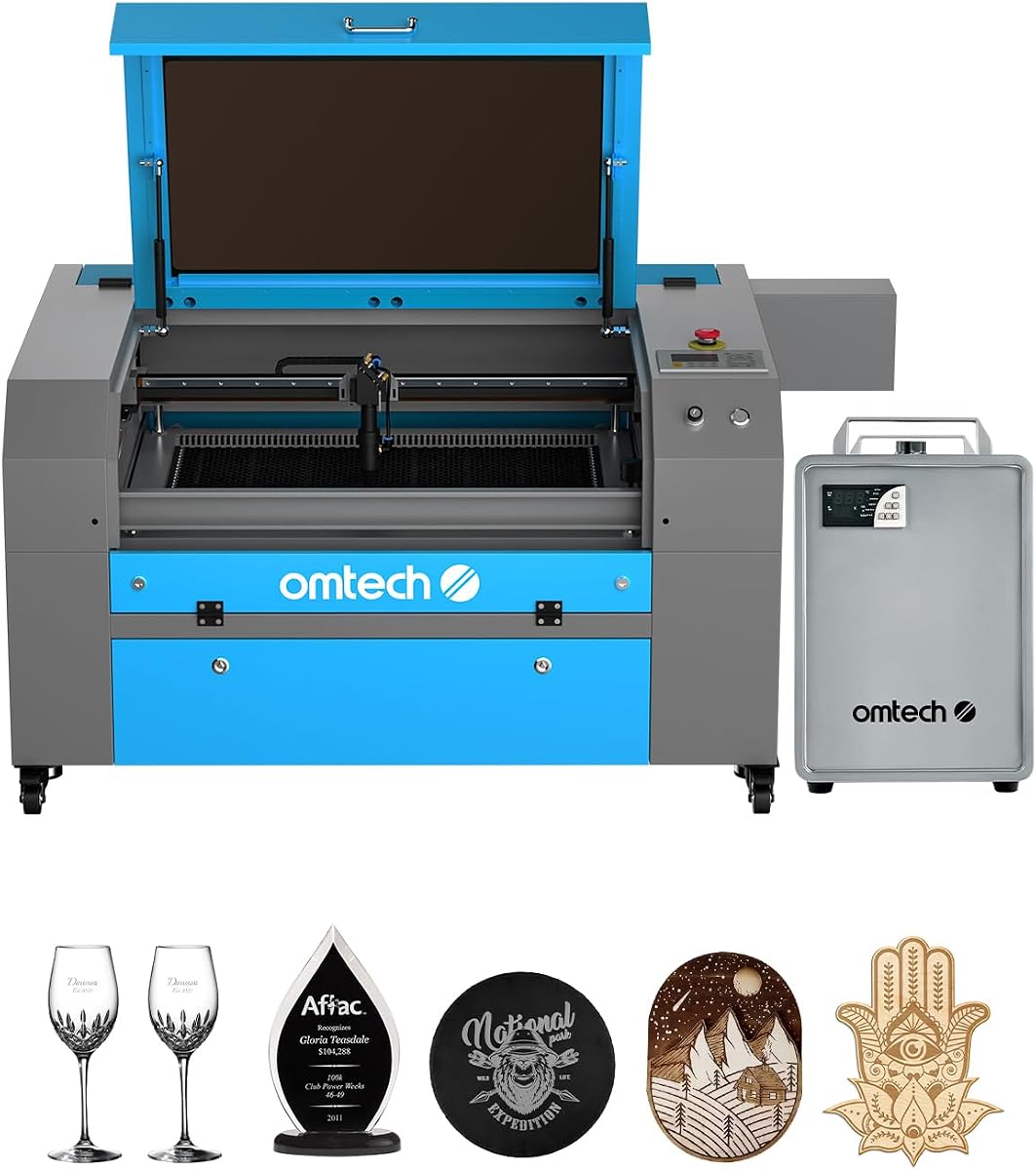
OMTech K40+ 45W Desktop CO2 Laser Engraver & Cutter
4.4Editor score
Powerful 45W laser performance
High-speed engraving capability
Integrated air assist system
This guide compares the top CO2 laser cutters for precision cutting and engraving across budgets, features, and performance in October 2026.
CO2 laser cutters have transformed how makers and professionals create intricate designs. These machines offer precision and speed for cutting non-metallic materials with ease. Choosing the right model depends on your specific needs and workspace requirements.
We evaluated ten leading CO2 laser cutters based on power, speed, safety, and ease of use. Our analysis covers desktop and industrial options to help you find the perfect fit. Each product was reviewed for its unique capabilities and user feedback.
Every pick includes detailed insights into performance, software compatibility, and build quality. Prices vary by configuration and included accessories. Always verify current pricing and availability before making your final purchase decision for your project.
4.4Editor score

4.5Editor score

5.0Editor score
Explore our side-by-side comparison of the top CO2 laser cutters available this month. This table highlights key specifications and features to help you quickly identify the best model for your needs.



The xTool P3 stands out as a top-tier option with its 80W power and intelligent automation. This machine delivers exceptional results for industrial-grade cutting and engraving tasks.
We may earn a commission when you buy through this link, at no additional cost to you.
Its revolutionary ACS system integrates LiDAR ranging for perfect autofocus and dual HD cameras for precise positioning. This ensures professional results from the start of your project.
While the price is higher than entry-level models, the efficiency gains and safety features justify the investment. The large workspace allows for complex projects without material constraints.
Professionals seeking reliable performance and minimal setup time should consider this model. It offers end-user production potential with seamless integration of conveyor feeders and rotary engraving.
The ACS system simplifies operation by automating setup and ensuring precise alignment without manual intervention.
Class 1 safety and multi-layered protection systems ensure safe operation for all users.
We may earn a commission when you buy through this link, at no additional cost to you.
This OMTech model offers excellent value for DIY makers and small businesses on a budget. It delivers solid performance with 45W power for various materials.
We may earn a commission when you buy through this link, at no additional cost to you.
The enhanced power boosts cutting speed and depth compared to older models. Integrated air assist reduces fire risk and protects the lens during high-power jobs.
While the workspace is compact, it supports both standard and irregular materials efficiently. The detachable base allows for engraving on cylindrical objects with optional rotary.
Anyone starting in laser engraving will find this machine easy to use and supported by expert assistance. It balances cost and capability for personal and commercial projects.
Upgraded 45W power increases cutting speed and depth for professional results at a lower price.
Compatible with LightBurn and LaserGRBL for seamless control and precise execution.
We may earn a commission when you buy through this link, at no additional cost to you.
The OMTech Pro delivers industrial-grade performance with 130W power and a massive workspace. It is ideal for professionals handling large-scale projects regularly.
We may earn a commission when you buy through this link, at no additional cost to you.
Servo motors and upgraded ball-bearing guide rails enable precise and rapid engraving. The built-in chiller maintains optimal temperatures for extended sessions.
While the price is significant, the capacity for high-volume production makes it a smart investment. Four-way pass-through doors simplify handling larger materials.
If you need top-tier speed and capacity for industrial tasks, this model excels. It offers advanced features like touchscreen control and flame-retardant windows for safety.
High power and large workspace allow for cutting thick materials and massive projects efficiently.
WiFi connectivity and touchscreen provide user-friendly operation and remote monitoring options.
We may earn a commission when you buy through this link, at no additional cost to you.
VEVOR offers a spacious 100W machine with 24×35 inches of workspace for various projects. It supports over 1000 non-metallic materials with precision cutting.
We may earn a commission when you buy through this link, at no additional cost to you.
The digital control panel works with popular software like LightBurn and CorelDRAW. This allows effortless file transfers via USB or network cables.
Transparent windows with eye protection enable safe monitoring of engraving progress. Intelligent laser head ensures smooth incisions without burr.
Ideal for those needing a balance of workspace and power at a mid-range price. It supports diverse applications from crafting to commercial production needs.
Generous 24×35 inch workspace accommodates large projects without multiple setups.
Intuitive digital panel ensures easy file management and precise execution.
We may earn a commission when you buy through this link, at no additional cost to you.
This OMTech Maker provides reliable commercial performance with 90W power and a chiller. It ensures effective cooling for extended engraving sessions.
We may earn a commission when you buy through this link, at no additional cost to you.
The honeycomb and aluminum blade beds support various projects efficiently. Four-way pass-through doors accommodate larger and longer items with ease.
Enhanced safety features like flame retardant windows provide lasting protection. Air assist ensures clean engraving by removing smoke and dust.
Great for users needing consistent performance without premium costs. It offers a balanced solution for small businesses and serious hobbyists.
Bundled water chiller extends tube lifespan and maintains optimal operating temperatures.
Cover interlocks and flame retardant materials protect users from potential hazards.
We may earn a commission when you buy through this link, at no additional cost to you.
This bundle includes essential tools for immediate use with 60W power. Autofocus eliminates manual adjustments, making it easier for beginners.
We may earn a commission when you buy through this link, at no additional cost to you.
Workbeds adjust automatically for the right focal distance. This simplifies setup and reduces time spent on trial and error.
The bundled LightBurn software provides intuitive navigation for your work. It helps users quickly get from design to finished product.
Perfect for those seeking an easy entry into laser engraving. It offers convenience and safety for a variety of creative projects.
Autofocus technology saves time and ensures consistent results without manual tweaking.
Included LightBurn software offers a professional interface for precise control.
We may earn a commission when you buy through this link, at no additional cost to you.
This standard desktop model supports various materials with 45W power. It is compact yet capable for many DIY and commercial projects.
We may earn a commission when you buy through this link, at no additional cost to you.
Integrated air assist auto-adjusts airflow to protect the lens and reduce fire risk. Safety features include door interlocks and emergency stop function.
Local demos and global support ensure personalized care wherever you are. Software compatibility with LightBurn and LaserGRBL adds flexibility.
Ideal for users needing a reliable machine with strong support. It offers a practical solution for limited spaces.
Global support team provides expert assistance and technical guidance as needed.
Multiple safety features ensure secure operation and prevent accidents.
We may earn a commission when you buy through this link, at no additional cost to you.
This model prioritizes speed with revolutionary engraving rates up to 39.4 inches per second. It is designed for efficiency in high-volume production.
We may earn a commission when you buy through this link, at no additional cost to you.
Autofocus technology simplifies setup for intricate designs and thick materials. The powerful air pump ensures clean cuts and reduced material burn.
Two-way pass-through doors handle larger items effortlessly. Comprehensive protection features prioritize safety during operation.
Best for businesses needing rapid turnaround without sacrificing quality. It offers a competitive edge with its performance capabilities.
High engraving rates significantly reduce project time and boost output.
Superior airflow reduces burn and ensures precise, clean results.
We may earn a commission when you buy through this link, at no additional cost to you.
With a 51×35 inch workspace, this model handles massive projects easily. The 130W power ensures deep engraving on various nonmetallic materials.
We may earn a commission when you buy through this link, at no additional cost to you.
Autofocus automatically finds the right focal distance for quick setup. Safety features like temperature alarms and cover protection are standard.
The 130W tube delivers up to 12,000 hours of usage for longevity. Pass-through doors make it easy to accommodate larger items.
Suitable for professionals requiring high capacity and precision. It offers impressive capability for extensive creative and commercial work.
Massive 51×35 inch area eliminates limitations for large scale projects.
High-performance tube ensures extended usage and consistent output over time.
We may earn a commission when you buy through this link, at no additional cost to you.
This entry-level option provides access to CO2 engraving at an accessible cost. It supports versatile materials with adjustable laser settings.
We may earn a commission when you buy through this link, at no additional cost to you.
The compact design fits easily on desks or workbenches for smaller workshops. Perfect for DIY enthusiasts exploring laser capabilities.
Safety features ensure secure operation for home users. It delivers solid performance for occasional commercial use.
Best for individuals or small businesses starting out. It offers a practical and affordable entry into the field.
Lower price point allows users to access laser engraving without large investments.
Adjustable settings optimize performance for wood, acrylic, and other non-metallic materials.
We may earn a commission when you buy through this link, at no additional cost to you.
Selecting the right CO2 laser cutter involves understanding key features and your project needs. This guide explains essential factors to consider before buying.
Laser power determines cutting depth and speed. Higher wattage like 100W to 130W enables thicker material cutting and faster processing times. Entry models at 45W are suitable for thin materials and basic engraving. Assess your primary materials to choose the appropriate power range.
Choose higher wattage for industrial production; lower wattage for hobby projects.
The workspace size limits material dimensions. Models range from compact 12×8 inches to large 51×35 inches. Ensure the bed accommodates your typical project sizes without multiple setups. Larger areas increase versatility for commercial needs but require more floor space.
Prioritize a workspace that matches your average project dimensions.
Engraving speed impacts production volume. Faster machines with speeds over 1000mm/s increase throughput significantly. Precision depends on guides and calibration systems. Look for features like LiDAR or autofocus for consistent accuracy.
Balance speed with precision based on your production requirements.
Safety is critical when working with high-power lasers. Class 1 machines are fully enclosed and safer than Class 2. Features like door interlocks, emergency stops, and air assist reduce risks. Always check compliance with safety standards.
Prioritize machines with comprehensive protection systems for safe operation.
Compatible software affects workflow efficiency. Support for LightBurn, LaserGRBL, and CAD tools ensures easy file management. User-friendly interfaces reduce learning curves and errors. Ensure the machine works with your existing design software.
Confirm software support matches your design tools for smooth operation.
Air assist systems remove debris and prevent burns. Water chillers maintain optimal temperatures for extended runs. These features protect the lens and improve cut quality. Ensure your machine has adequate ventilation and cooling capabilities.
Look for built-in cooling to maintain consistency during long sessions.
Initial price is just one part of total cost. Consider accessories like chiller, software, and maintenance. Higher-end models may save money long-term through efficiency. Balance upfront costs with expected usage and production goals.
Calculate total cost including maintenance and accessories before buying.
Reliable support helps resolve technical issues quickly. Check warranty periods and availability of local demos or training. Manufacturers offering 24/7 global support provide peace of mind. Ensure spare parts and consumables are accessible.
Choose brands with strong support networks for long-term reliability.
Always prepare materials correctly by ensuring they are dry and compatible with CO2 lasers. Clean the lens regularly to maintain focus and precision. Adjust power and speed settings based on material thickness and type.
Monitor engraving sessions closely for safety and quality control. Use the air assist to reduce smoke and prevent burning. Keep the workspace organized and free from flammable debris.
Schedule routine maintenance including checking mirrors, rails, and cooling systems. Replace the laser tube according to usage hours. Follow manufacturer guidelines for calibration to ensure accurate cutting.
Standard CO2 laser cutters are designed for non-metallic materials such as wood, acrylic, leather, and glass. Cutting metal usually requires a fiber laser or metal-specific CO2 setup. For general crafting, CO2 is ideal for plastics and organics.
Laser tubes typically last between 6,000 to 12,000 hours depending on usage. High-power tubes may degrade faster if used continuously at maximum settings. Monitor output power and replace when engraving quality declines.
Yes, CO2 lasers produce fumes that must be vented properly. Use an exhaust fan or air purifier designed for laser cutting. Ensure your workspace has fresh air circulation to prevent smoke buildup and maintain safety.
LightBurn is widely recommended for its intuitive interface and powerful features. LaserGRBL is another popular free option for simpler tasks. Ensure your machine is compatible with the software you choose for best results.
Water chillers are essential for extended engraving sessions to prevent overheating. They help maintain stable performance and extend tube lifespan. While some models include them, verify if your setup requires one separately.
Most modern machines feature automatic LiDAR autofocus or autofocus sensors. Simply place material on the bed and follow on-screen prompts. Manual machines require precise measurement of the focal length for best results.
CO2 lasers emit infrared light invisible to the naked eye. Always use glasses rated specifically for CO2 wavelengths to protect your eyes. Verify the optical density matches your machine's power output.
Clean cuts require proper air assist and optimal speed settings. Adjust parameters based on material type to minimize heat buildup. Regular lens cleaning and focus checks also help prevent burn marks.
Our review covers a range of CO2 laser cutters from budget-friendly desktop models to industrial-grade solutions. Each option offers unique strengths depending on your needs and workspace.
Prioritize power and safety features that match your production volume. Consider long-term costs like maintenance and accessories when making your decision.
Always verify current prices and availability before purchasing. The market changes frequently, so ensure you have the latest information for your specific project.