
ASRock DeskMini X300 2.5G Series
4.2Editor score
1.92L Form Factor
AM4 Socket Support
Triple Display Output
This guide compares the top ten barebone mini PC options available today for performance connectivity expandability and value for diverse computing needs.
Barebone mini PCs offer a compact foundation for building custom desktop systems without the bulk of traditional towers. These units provide essential components like processors and motherboards while leaving memory and storage to your choice.
We evaluated each model based on processor power, connectivity options, cooling efficiency, and expandability potential. Our analysis focuses on real-world usability for gaming, professional work, and home office environments across various budget points.
Each selection highlights specific strengths and limitations to help you match hardware capabilities to your workflow requirements. Note that availability and specifications may vary by region and supplier inventory at the time of purchase.
4.2Editor score

4.0Editor score

5.0Editor score
The following table presents a side-by-side comparison of the leading barebone mini PC models to highlight key specifications and connectivity options for informed decision making.




This AOOSTAR MACO mini PC stands out as a high-performance barebone solution designed for power users and gamers. Featuring the AMD Ryzen 7 PRO 8845HS processor with 8 cores and 16 threads, it delivers robust multitasking capabilities suitable for demanding professional workflows and entertainment. The integration of Radeon 780M graphics ensures smooth performance for light gaming and media consumption even without a discrete GPU. Its compact footprint makes it ideal for space-constrained setups while maintaining enterprise-grade cooling efficiency through VC heat spreader technology. Users seeking a future-proof foundation for high-end computing will find this model offers exceptional value in the barebone segment.
We may earn a commission when you buy through this link, at no additional cost to you.
The standout feature of this unit is its extensive connectivity suite tailored for expandability and speed. The OCuLink port provides a direct PCIe 4.0 x4 interface for external GPUs which is critical for gamers or creatives who need workstation-level graphical performance without compromising on portability. Dual USB4 ports support up to 40Gbps data transfer and 8K video output making it a powerhouse for multi-monitor configurations or high-speed data workflows. The inclusion of dual 2.5G LAN ports plus WiFi 6 ensures reliable and fast networking for office or home use. Upgradability is another strong suit with support for up to 128GB of DDR5 RAM and 16TB of M.2 storage allowing the system to evolve with your needs.
While the performance and connectivity are impressive there are considerations to keep in mind before purchase. As a barebone unit it requires the buyer to source and install RAM SSD and operating system separately which adds to the total cost and setup time. The chassis design is sleek and eco-friendly but users must ensure proper ventilation space to maximize cooling efficiency under heavy loads. Additionally the BIOS settings require some technical knowledge to adjust performance modes for optimal balance between noise and speed. These trade-offs are acceptable given the level of customization and power offered by the hardware components included in this package.
For tech enthusiasts professionals content creators and serious gamers this AOOSTAR MACO mini PC is the ideal choice. It bridges the gap between compact form factors and desktop-grade performance providing a versatile platform for diverse computing needs. If you prioritize expandability through OCuLink and require high-speed data transfer via USB4 this model should be at the top of your list. We recommend pairing it with high-end DDR5 memory and fast NVMe SSDs to fully leverage its architectural capabilities and ensure smooth long-term operation.
The dedicated OCuLink port bypasses standard USB bottlenecks enabling near-native external GPU performance for gaming and rendering tasks.
Constructed with 100% recycled aluminum the chassis utilizes VC heat spreaders to manage thermals effectively during intensive operations.
We may earn a commission when you buy through this link, at no additional cost to you.
The ASUS NUC 15 Pro Barebone Kit represents the pinnacle of compact computing reliability and advanced features. Powered by the latest Series 2 Intel Core Ultra 5 225H processor it offers AI-optimized power efficiency and integrated Intel Arc graphics that outperform many previous generations. This unit is engineered for those who demand top-tier build quality and future-proof connectivity options. The tool-less chassis design makes internal upgrades accessible without specialized tools ensuring that users can maintain or expand their system effortlessly. With a three-year warranty and rigorous MIL-STD-810H certification this model is built to withstand demanding environments while maintaining consistent performance.
We may earn a commission when you buy through this link, at no additional cost to you.
Connectivity is where this mini PC truly excels catering to modern workflows that demand speed and versatility. It features Intel Wi-Fi 7 which offers significantly faster transfer rates and improved signal stability compared to previous standards. The inclusion of Thunderbolt 4 ports enables connection to multiple 4K displays and high-speed external storage making it perfect for creative professionals. Additional features like Wi-Fi Proximity Sensing enhance user experience by automating connection tasks. The sync power-off feature improves energy efficiency by managing display power dynamically ensuring the system remains efficient during extended usage periods.
Despite its robust feature set there are practical limitations users should consider before making a purchase. As a barebone system it excludes RAM storage and operating system requiring additional investment and technical setup. The higher price point reflects its premium components but budget-conscious buyers might find better value in alternatives if they do not require Wi-Fi 7 or Thunderbolt 4. The compact design while convenient may limit airflow in tightly enclosed spaces so proper placement is essential for thermal management. These factors are trade-offs for the superior build quality and cutting-edge technology provided by this enterprise-grade device.
This ASUS NUC 15 Pro kit is highly recommended for professionals IT administrators and enthusiasts who need reliable high-performance mini PCs. Its combination of advanced AI processing capabilities future-ready connectivity and durable construction makes it a versatile solution for office or home deployments. If you prioritize long-term support and need to connect multiple high-resolution displays or external devices Thunderbolt 4 support makes this an excellent investment. We suggest pairing it with high-speed DDR5 memory and NVMe SSDs to maximize its potential and ensure a smooth premium user experience.
The Core Ultra 5 225H provides AI-optimized power delivering enhanced performance for multitasking and creative workflows.
MIL-STD-810H certification ensures durability in extreme conditions while eco-friendly packaging supports environmental responsibility.
We may earn a commission when you buy through this link, at no additional cost to you.
The ASRock DeskMini X300 2.5G Series offers an incredibly compact and affordable solution for building a custom mini PC. With a mere 1.92L volume this unit is one of the smallest options available making it ideal for home theater setups or tight office spaces. It supports a wide range of AMD AM4 Ryzen processors from 2000 to 5000 series giving users flexibility to choose performance levels that match their budget. The DDR4 memory slots support up to 128GB allowing for substantial upgrades even with older memory standards. This model is perfect for users who want to build a lightweight desktop without breaking the bank while retaining essential expandability options.
We may earn a commission when you buy through this link, at no additional cost to you.
Connectivity and display options remain robust despite the budget-friendly price point. The unit features triple display capability through HDMI DisplayPort and D-Sub enabling versatile multi-monitor setups for productivity or trading. Dual M.2 slots support NVMe SSDs ensuring fast boot times and data access. The inclusion of a 2.5G LAN port provides faster wired networking than standard Gigabit Ethernet suitable for file sharing or streaming tasks. A dedicated M.2 slot for Wi-Fi modules allows easy wireless upgrades if needed. These features ensure that even in a compact form factor the system remains functional for diverse use cases.
Potential buyers should be aware of some technical trade-offs inherent to this compact budget design. Since it uses DDR4 memory the bandwidth is lower compared to modern DDR5 standards which can limit performance in memory-intensive applications. The cooling system is basic so it relies on ambient airflow and may require careful placement to avoid thermal throttling under heavy loads. Additionally compatibility depends heavily on the specific AM4 CPU selected so checking the official CPU support list is crucial before purchase. These limitations are reasonable given the low cost but may not suit users with high-performance expectations.
For budget-conscious home users entry-level office workers and those with limited desk space this ASRock DeskMini X300 is an excellent choice. It provides a flexible foundation for assembling a functional mini PC that meets essential computing needs without unnecessary complexity or expense. If you already own compatible DDR4 memory or an AM4 processor you can save even more money by reusing existing hardware. We recommend pairing it with a fast NVMe SSD and a reliable processor to ensure a smooth user experience across daily tasks.
The 1.92L volume allows mounting behind monitors or placement in confined areas for discreet computing.
Support for multiple Ryzen series CPUs offers flexible upgrade paths and cost-effective component choices.
We may earn a commission when you buy through this link, at no additional cost to you.
The MINISFORUM X1 Lite-255 Mini PC Barebone delivers strong performance for its size using the AMD Ryzen 7 255 processor with 8 cores and 16 threads. This Zen 4 architecture ensures efficient multitasking and capable graphics performance via Radeon 780M integrated graphics. The unit supports dual DDR5 RAM slots allowing upgrades up to 128GB for heavy workloads. Its full-blood USB4 port offers 40Gbps transfer speeds ideal for external storage or display connections. Designed for versatility the X1 Lite supports triple 4K display output via HDMI DP and USB4 which is beneficial for professional workflows requiring multiple screens simultaneously.
We may earn a commission when you buy through this link, at no additional cost to you.
Expandability is a key strength of this model with dedicated OCulink ports for external GPU connections. This feature allows users to connect high-performance GPUs using an adapter plate to boost graphical capabilities beyond integrated limits. The system also includes dual M.2 2280 PCIe 4.0 slots for up to 8TB total storage capacity. Networking is handled by 2.5G LAN ports and Wi-Fi 6e ensuring fast wired and wireless connectivity. The chassis design incorporates PCM phase-change material for the CPU fan to maintain cool temperatures and ensure consistent performance during prolonged use.
However user feedback and technical considerations reveal some areas that may impact satisfaction. The OCulink functionality requires installing an adapter plate which adds complexity to the setup process and limits hot-swapping convenience. User ratings indicate mixed experiences likely due to software optimization or thermal management nuances under heavy loads. While the hardware specs are impressive the reliance on adapters for some features can be cumbersome for non-technical users. These factors suggest that careful planning for storage and GPU expansion is needed before purchase.
This MINISFORUM X1 Lite is best suited for users who want strong performance and external GPU support in a compact form factor. It is particularly useful for content creators and gamers who need flexible display options and fast data transfer. If you are comfortable with hardware assembly and adapter setups this unit provides a solid foundation for a powerful custom PC. We recommend ensuring compatibility of external GPU docks and sufficient DDR5 RAM to leverage its full potential.
OCulink port provides high-bandwidth external GPU connectivity for enhanced graphical performance.
PCM material and strategic airflow channels prevent heat buildup during extended operation.
We may earn a commission when you buy through this link, at no additional cost to you.
The ASRock DeskMeet X300 Mini PC Barebone Kit stands out for including a 500W 80+ Bronze power supply in the package which simplifies assembly. Designed around the AM4 socket it supports Ryzen 2000 to 5000 series CPUs giving users significant flexibility for performance upgrades. The inclusion of a PCIe 3.0 x16 slot allows for discrete graphics cards or other expansion cards enhancing its utility as a workstation. DDR4-3200MHz support with up to 128GB capacity ensures robust memory handling for multitasking tasks. This unit is ideal for users needing internal expansion capabilities without building a full-sized tower.
We may earn a commission when you buy through this link, at no additional cost to you.
Connectivity options include USB 3.2 Gen2 Type-C and multiple USB ports ensuring modern peripheral compatibility. The dual M.2 slots support ultra-fast storage configurations which are essential for OS and application speed. Display output supports DisplayPort HDMI and D-Sub allowing versatile monitor connections. The compact 8-liter size balances internal space with portability making it manageable for office or home environments. The robust design supports efficient heat dissipation even with added expansion cards which is critical for stable long-term operation.
Despite its advantages there are practical considerations to keep in mind. The reliance on DDR4 RAM means slightly lower memory bandwidth compared to newer standards. The physical size is larger than micro units which may not fit all ultra-compact desk setups. Users need to verify CPU cooler height compatibility as it supports up to 54mm height restrictors which can limit cooling options. These factors are manageable and acceptable given the value of included PSU and expansion flexibility.
This DeskMeet X300 is an excellent option for DIY enthusiasts small businesses and workstation users requiring internal GPU or card expansion. Its balance of power and convenience makes it a strong contender in the barebone category. We recommend pairing it with a compatible AM4 processor and DDR4 memory to maximize performance and utilize the included PSU effectively.
The included 500W PSU eliminates the need for separate power component purchases.
PCIe 3.0 x16 slot enables discrete GPU installation for advanced graphics needs.
We may earn a commission when you buy through this link, at no additional cost to you.
The AOOSTAR GEM12+ is a high-end barebone mini PC featuring the AMD Ryzen 7 PRO 8845HS processor with Radeon 780M graphics. It supports up to 128GB DDR5 RAM and offers dedicated OCuLink port for external GPU connectivity without consuming M.2 slots. The vapor chamber cooling system ensures efficient heat dissipation maintaining performance under high loads. Its rich interface set includes USB4 HDMI 2.1 and DP 1.4 supporting quad 4K display output. This unit targets gamers and professionals seeking top performance in a compact chassis with advanced thermal management.
We may earn a commission when you buy through this link, at no additional cost to you.
One of the key strengths is its dedicated OCuLink port which allows seamless connection of high-performance GPUs like RTX 4070/4080 with minimal latency. This ensures that external graphics performance remains near native compared to Thunderbolt alternatives. The system includes dual 2.5G LAN ports and WiFi 6 for robust networking capabilities suitable for enterprise or high-throughput home networks. Energy-saving VAT architecture reduces power consumption by 5-20% which helps lower operational costs and heat output. BIOS adjustable modes allow users to balance silent operation with performance modes based on workload demands.
Trade-offs include the higher cost relative to other mini PCs and the non-hot-swappable nature of the OCuLink port. Users must power off the device before connecting or disconnecting external GPUs which may inconvenience those needing frequent changes. The package excludes RAM and storage requiring additional purchases which increases total cost. These considerations are acceptable for users prioritizing top-tier graphical and computational performance in a mini form factor.
For power users and creators needing external GPU support and multi-monitor setups the GEM12+ is a compelling choice. Its combination of powerful CPU and dedicated expansion capabilities makes it stand out. We recommend selecting fast DDR5 RAM and high-capacity NVMe SSDs to fully utilize its performance potential.
Independent OCuLink channel ensures minimal performance loss for external graphics cards.
Vapor Chamber cooling transfers heat efficiently to prevent thermal throttling.
We may earn a commission when you buy through this link, at no additional cost to you.
The ASUS NUC 15 Pro Barebone Kit is designed for professional and enterprise environments needing reliable high-performance mini PCs. Powered by the Intel Core Ultra 7 255H processor it offers AI-optimized efficiency and powerful integrated graphics. Its tool-less chassis simplifies upgrades and maintenance while MIL-STD-810H certification ensures durability in challenging conditions. The unit features Thunderbolt 4 ports for high-speed data transfer and multi-display support. This model is a premium choice for users valuing build quality enterprise support and cutting-edge connectivity.
We may earn a commission when you buy through this link, at no additional cost to you.
Connectivity includes Wi-Fi 7 which delivers faster wireless speeds and lower latency than previous standards. Thunderbolt 4 ports enable connection to multiple 4K displays and fast storage making it suitable for creative workflows. The sync power-off feature improves energy efficiency by managing displays intelligently. With a 3-year warranty rigorous testing ensures the system remains reliable over years of use. This focus on reliability makes it ideal for business deployments where uptime is critical.
The premium price reflects its high-end components and durability which may be steep for casual users. As a barebone system RAM and storage must be purchased separately adding to total cost. The compact design may require careful ventilation planning to prevent overheating. Despite these factors the robustness and advanced features justify the investment for professional use.
This model is best for businesses IT teams and professionals needing dependable high-performance mini PCs. If you prioritize durability Thunderbolt 4 and future-proof Wi-Fi 7 connectivity this is a strong option. Pair it with high-speed DDR5 memory to maximize its potential and ensure smooth operation.
Core Ultra 7 255H delivers AI-enhanced processing for demanding multitasking.
MIL-STD-810H certification and 3-year warranty ensure reliable operation.
We may earn a commission when you buy through this link, at no additional cost to you.
The AOOSTAR GEM12+ PRO is a mini gaming desktop featuring the AMD Ryzen 7 PRO 8845HS processor and integrated Radeon 780M graphics. It supports external GPU expansion via dedicated OCuLink port ensuring minimal performance loss when connected to high-end GPUs. A unique feature is its built-in fingerprint recognition simplifying secure access without passwords. The chassis includes a vapor chamber cooling system to maintain performance under heavy loads. This unit balances powerful performance with security features suitable for gaming and office use.
We may earn a commission when you buy through this link, at no additional cost to you.
Connectivity includes quad 4K support enabling multi-monitor setups for enhanced productivity or gaming. Rich ports include USB4 HDMI 2.1 and DP 1.4 ensuring compatibility with modern peripherals. The BIOS adjustable modes allow tuning between silent balanced and performance modes to suit noise preferences. Built-in WiFi 6 and Bluetooth 5.2 provide reliable wireless connections. Energy-saving VAT architecture reduces consumption enhancing overall efficiency.
Like similar units this model requires separate RAM and SSD purchases which can increase total cost. The OCuLink port does not support hot-swapping necessitating device power off for connection changes. The higher price point may be prohibitive for casual users but justifiable for those valuing security and performance. These trade-offs remain acceptable given the unique fingerprint feature and robust hardware.
This PRO edition is ideal for users prioritizing secure quick access and high-performance gaming or office computing. We recommend adding fast DDR5 RAM and NVMe SSDs to maximize its capabilities. It is particularly suited for environments where device security and graphical performance are paramount.
Fingerprint recognition enables quick and secure device access without typing passwords.
Vapor chamber and CPU fan ensure stable performance during intensive sessions.
We may earn a commission when you buy through this link, at no additional cost to you.
The ASUS NUC 15 Pro Barebone Kit is engineered for users seeking advanced AI capabilities and reliable performance. Powered by the Intel Core Ultra 5 225H processor it delivers optimized power efficiency suitable for professional workflows. The tool-less chassis design simplifies maintenance and upgrades ensuring flexibility over time. Connectivity features include Wi-Fi 7 for faster wireless transfers and Thunderbolt 4 for high-speed data and display output. With rigorous MIL-STD-810H certification this unit is built to withstand demanding environments reliably.
We may earn a commission when you buy through this link, at no additional cost to you.
Superior connectivity options include integrated Bluetooth and Wi-Fi Proximity Sensing enhancing user experience. The sync power-off feature optimizes energy consumption by managing display power dynamically. The chassis is compact yet durable making it suitable for enterprise office or home deployment. Three-year warranty ensures long-term support and peace of mind. These attributes make it a top choice for professional environments valuing reliability.
The barebone nature requires users to install RAM storage and OS separately adding complexity. Higher price reflects premium build quality but may be a barrier for budget buyers. Careful placement is advised to ensure optimal airflow. These factors are acceptable for users prioritizing durability and advanced features.
This NUC 15 Pro is ideal for professionals and businesses needing dependable high-performance mini PCs with future-proof connectivity. We recommend pairing with high-speed DDR5 memory and fast NVMe SSDs to maximize performance.
Core Ultra 5 processor provides AI-enhanced multitasking and productivity.
MIL-STD-810H and eco-friendly packaging reflect commitment to sustainability and robustness.
We may earn a commission when you buy through this link, at no additional cost to you.
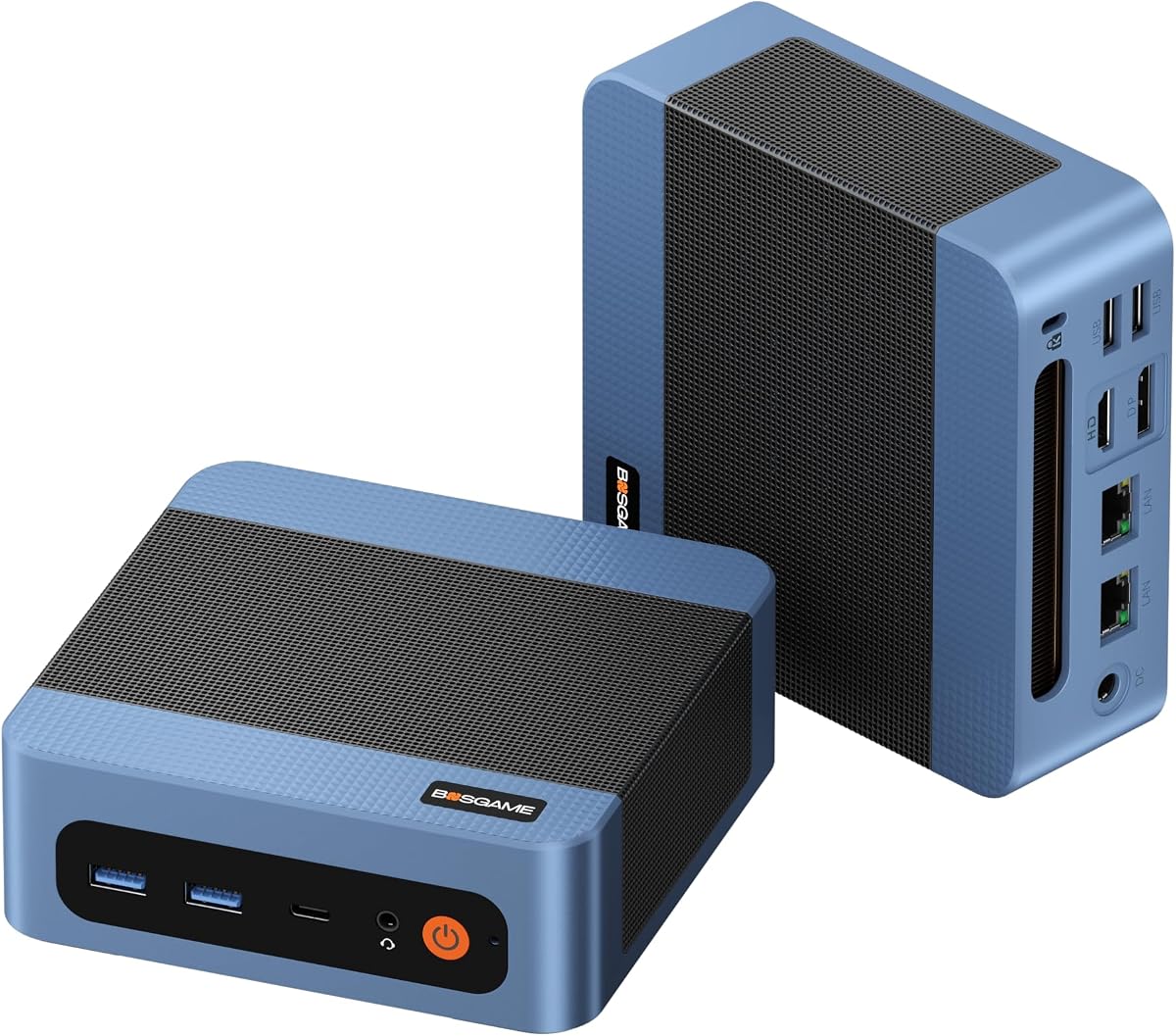
The BOSGAME E5 11 Pro Mini PC offers an affordable entry point into barebone computing with AMD Ryzen 3 5300U processor. It features dual 2.5G LAN ports enabling high-speed wired networking ideal for home labs or offices. Full-Function Type-C with PD 3.0 supports video output and power delivery for simplified connectivity. Pre-installed Windows 11 Pro system adds value eliminating initial setup effort. This unit suits basic office productivity and home entertainment tasks effectively.
We may earn a commission when you buy through this link, at no additional cost to you.
Connectivity includes triple 4K display support via HDMI DP and Type-C ports making multi-monitor setups possible. The design emphasizes silent operation with cooling under 25dB making it quiet for office environments. Expandability options include SODIMM slots supporting up to 64GB RAM plus dual M.2 slots for additional storage. These features provide flexibility for growing data and performance needs without large physical footprint.
The Ryzen 3 5300U limits heavy multitasking or demanding gaming compared to higher-end CPUs. RAM and storage are limited compared to premium models but sufficient for standard office use. The price reflects value but lacks advanced features like Thunderbolt or OCuLink. These trade-offs are acceptable for budget-focused users prioritizing connectivity.
This model is perfect for small businesses home offices and general users needing reliable connectivity and multi-screen capability. We recommend upgrading RAM and storage as needed to match workload requirements.
Dual LAN ports enable faster wired networking for file transfers and streaming.
Type-C supports video data and power delivery for simplified single-cable setups.
We may earn a commission when you buy through this link, at no additional cost to you.
Selecting the right barebone mini PC requires evaluating processor power connectivity options and expandability to match your computing needs.
The processor determines overall system speed and multitasking capability. Look for modern architectures such as AMD Ryzen 7000 series or Intel Core Ultra which offer improved efficiency and AI acceleration. Higher core counts benefit rendering multitasking and virtualization while single-core speed is important for gaming and responsive performance. Ensure the CPU supports your preferred operating system and software requirements for smooth operation.
Choose a processor that balances power and energy efficiency for your typical workload.
Barebone kits require you to add RAM and storage separately so verify the number and type of slots available. DDR5 RAM provides higher bandwidth but DDR4 is more cost-effective. Check maximum capacity supported to accommodate future needs. For storage confirm the number and generation of M.2 slots allowing fast NVMe SSD installation or support for SATA drives if needed. This flexibility helps tailor the system to your capacity and speed requirements.
Prioritize systems with multiple high-speed memory and storage slots to future-proof your build.
Rich port selection is crucial for connecting peripherals displays and external devices. Look for USB4 or Thunderbolt ports for fast data transfer and multi-display support. HDMI and DisplayPort options enable multiple monitor setups essential for productivity. Also consider the presence of OCuLink or dedicated external GPU ports if you plan to boost graphics performance later. Wired networking speeds like 2.5G LAN or Wi-Fi 7 ensure reliable and fast internet connectivity.
Ensure the mini PC has sufficient and modern ports to match your peripheral ecosystem.
Compact systems generate concentrated heat so effective cooling is essential to prevent throttling and maintain longevity. Vapor chamber and advanced heat pipe designs dissipate heat better than traditional fans. Check if the chassis design allows adequate airflow and consider noise levels under load. Proper cooling ensures stable performance during intensive tasks like rendering or gaming without overheating.
Choose models with robust thermal management to sustain peak performance safely.
Materials and build standards affect reliability especially for business or industrial use. Look for MIL-STD-810H certifications indicating rigorous testing for durability. Recycled materials and eco-friendly designs reduce environmental impact without sacrificing performance. A sturdy chassis protects internal components and can improve heat dissipation. Consider warranty coverage as an indicator of manufacturer confidence in product quality.
Invest in units with certified durability and quality materials for long-term reliability.
Efficient power consumption reduces operating costs and heat output especially in always-on or high-performance scenarios. Modern processors with AI optimization and low TDP ratings are preferable. Some models offer adjustable power modes to balance performance and energy use. This helps keep power bills low while maintaining sufficient performance for daily tasks. Energy efficiency also contributes to quieter operation and smaller power supply requirements.
Select energy-efficient components and models to minimize power usage and heat.
Verify compatibility with existing components like RAM or GPUs if you plan to reuse them. Check BIOS support for future CPU generations to allow upgrades without replacing the motherboard. Ensure the case accommodates standard cooling solutions and expansion cards if needed. This compatibility ensures flexibility and cost savings when customizing or upgrading the system later.
Choose systems with broad component compatibility and upgrade paths to extend system life.
While barebone kits are often cheaper overall the final cost includes RAM storage and operating system. Compare total system cost rather than just the unit price to assess true value. Look for included accessories like mounting kits or power supplies which reduce additional expenses. Balance upfront cost with performance and longevity to ensure the best investment for your needs.
Evaluate total cost of ownership to ensure the best value for your computing investment.
Assemble your mini PC by installing compatible RAM and M.2 SSDs following manufacturer guidelines. Ensure all connections are secure before powering on for first time. Use VESA mounts if desired to save desk space and place the unit in a well-ventilated area to avoid overheating.
Install operating system drivers updates and essential software before regular use. Configure BIOS settings for performance or silent modes according to your needs. Keep firmware updated to benefit from security patches and performance improvements provided by the manufacturer.
Maintain your system by keeping vents clean and dust-free to ensure consistent cooling. Regularly backup data stored on SSDs to prevent loss during unexpected failures. Monitor system temperatures and performance periodically to detect early issues that may require maintenance or component replacement.
A barebone mini PC is a compact computer kit that includes essential components like the processor motherboard and case but excludes memory storage and operating system. Users install these missing parts themselves to customize performance and reduce initial cost. This approach offers flexibility for building tailored systems without purchasing prebuilt configurations.
No barebone kits do not include operating systems by default so users must install Windows or Linux separately. This allows choice of OS and saves cost but requires technical setup knowledge. Some sellers offer options to include OS key upon request.
CPU upgrades depend on socket type and BIOS support specific to each model. Some support multiple generations allowing future upgrades while others are fixed. Always check the manufacturer’s CPU support list before attempting upgrades to ensure compatibility.
Most modern mini PCs use DDR5 or DDR4 SO-DIMM modules depending on motherboard design. Check supported maximum capacity and speed for your model to ensure stability. Higher frequency memory improves performance but must match system specifications.
OCuLink provides direct PCIe bandwidth reducing latency and performance loss compared to USB4 or Thunderbolt. It is ideal for gamers and creatives needing high-performance graphics but requires an adapter plate and non-hot-swappable setup.
Storage capacity depends on number and type of M.2 or SATA slots available. Many models support up to 16TB total using dual M.2 SSDs. Verify compatibility and BIOS support for larger drives.
Yes particularly if they support OCuLink or Thunderbolt for external GPUs. Integrated graphics also handle light gaming well but high-end gaming requires external GPU connection for best performance.
This guide highlights the top barebone mini PCs available today offering strong performance expandability and connectivity. Our top picks balance advanced features like OCuLink and Wi-Fi 7 with reliable build quality for diverse needs.
Consider your primary use case whether gaming professional work or office tasks to prioritize specs like CPU power memory and ports. Investing in quality components ensures long-term usability and performance growth over time.
Remember to verify current availability and component compatibility before purchasing as inventory and specs may vary by region. Regularly check product pages for latest updates and deals to maximize value.