
AJAZZ AK029 Magnetic Switch One Handed Gaming Keyboard
4.5Editor score
Hall effect switches
8KHz polling rate
Compact ergonomic build
Explore our expert guide comparing the top left handed gaming keyboards for precision, ergonomics, and performance tailored to competitive gamers and profession
Left handed gaming keyboards offer a unique solution for players who prefer keeping their mouse on the right while controlling keys with the left hand. This specialized layout enhances comfort and efficiency during intense gaming sessions by reducing strain on dominant hands.
Our team evaluated ten top rated models based on build quality, switch technology, ergonomics, and customization options. We analyzed user feedback and technical specifications to ensure each recommendation delivers genuine value for diverse gaming styles and setups.
Each pick highlights specific strengths like magnetic switches, compact designs, or programmable keys to help you find your ideal match. Remember that product availability and features may change over time so verify details before making your final purchase decision today.
4.5Editor score

4.6Editor score

4.6Editor score
This side by side comparison highlights key differences across ten distinct models to help you quickly identify the best fit for your gaming needs and budget constraints.


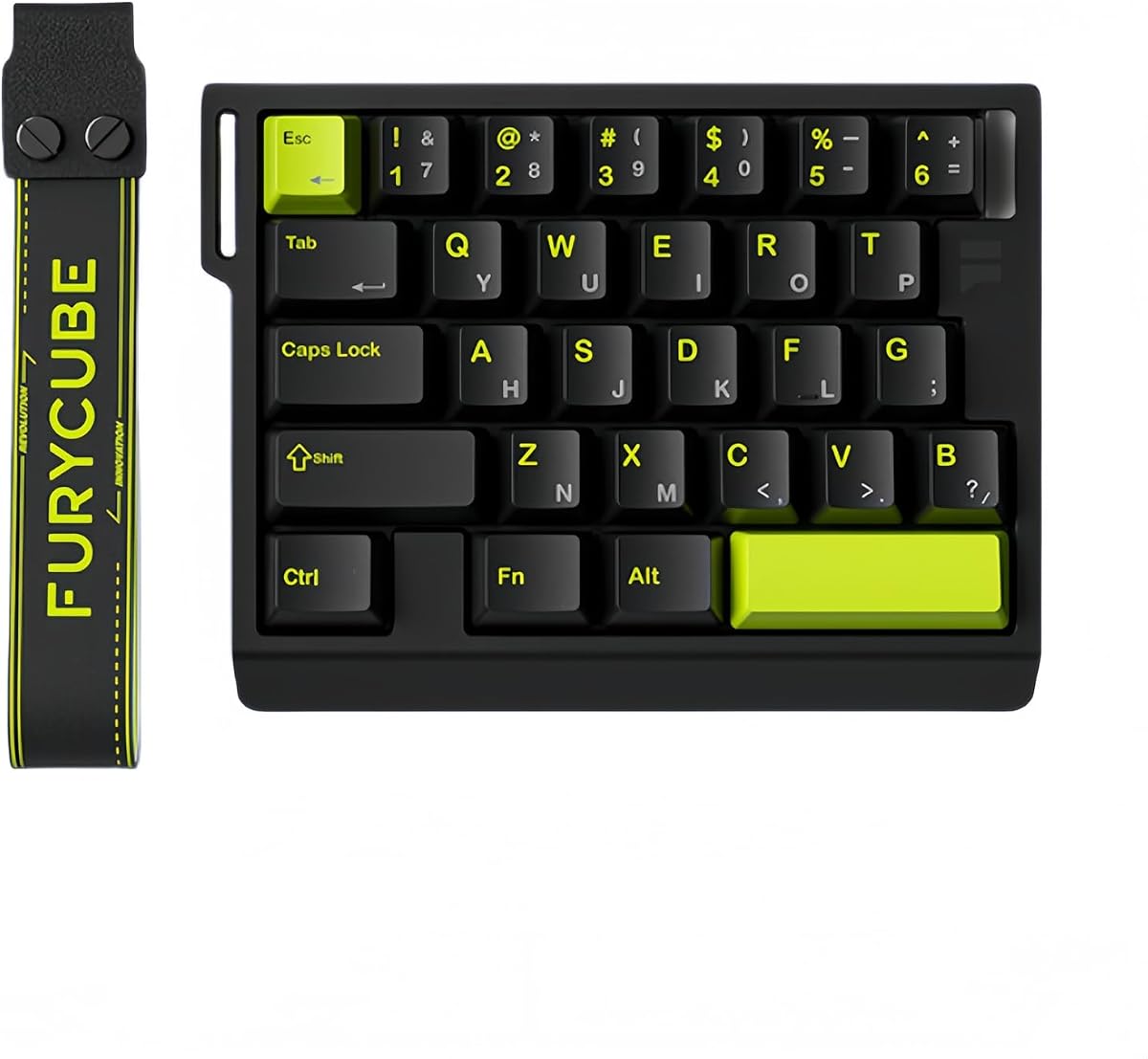

The RK ROYAL KLUDGE L98 stands out as a top tier choice for left handed gamers seeking full functionality without compromise. Its unique Southpaw layout relocates the numpad to the left freeing up ample space for mouse movement on the right side which is essential for competitive play.
We may earn a commission when you buy through this link, at no additional cost to you.
Built with a gasket structure and PBT keycaps this keyboard delivers a premium typing feel that reduces vibrations and enhances comfort during marathon sessions. The five layer sound dampening system ensures a satisfyingly smooth acoustic experience while the tri mode connectivity offers seamless switching between devices.
While the battery life is impressive with up to three hundred ten hours on standby users should note that the physical footprint is larger than mini keypads. The hot swappable PCB allows for extensive customization though initial setup might require some time to configure macros and RGB lighting to your preference.
We recommend this model for gamers who want a full size experience with ergonomic benefits tailored to left handed users. It balances performance features and build quality exceptionally well making it a reliable centerpiece for any serious gaming setup focused on precision and comfort.
Relocating the numpad to the left allows natural mouse usage on the right reducing hand strain and improving reaction times during intense matches.
The hot swappable design supports both three pin and five pin switches letting users tailor the tactile feedback to their specific gaming style without soldering.
We may earn a commission when you buy through this link, at no additional cost to you.
The RedThunder One Handed Gaming Keyboard offers an accessible entry point into one handed gaming setups without requiring a significant financial investment. With thirty five keys and anti-ghosting technology it handles most standard gaming inputs efficiently while the compact size saves valuable desk space.
We may earn a commission when you buy through this link, at no additional cost to you.
Users can record macros easily using function keys to automate complex sequences which is particularly useful for strategy games or tasks requiring repetitive inputs. The RGB lighting provides aesthetic customization with multiple modes though the effects are simpler compared to high end mechanical keyboards.
This model is best suited for casual gamers or those needing a secondary device for specific tasks rather than a primary input tool. The absence of drivers simplifies setup but limits deep customization options available in more advanced models like magnetic switch or keypad alternatives.
Ideal for students or budget conscious buyers this keypad delivers solid performance for its price. While it lacks premium features the straightforward design ensures reliability for everyday gaming sessions and light productivity tasks alike.
Recording macros is intuitive with dedicated function keys allowing players to bind complex commands quickly without needing external software or technical knowledge.
The portable mini form factor reduces clutter on the desk and the integrated wrist rest helps maintain comfort during extended periods of active gameplay.
We may earn a commission when you buy through this link, at no additional cost to you.
The AZERON Gaming Keypad Cyborg II redefines one handed gaming with its advanced Hall Effect thumbstick that eliminates drift and supports full analog movement in compatible titles. This level of control is unmatched by traditional keypads and appeals to enthusiasts seeking competitive edge in strategy or simulation games.
We may earn a commission when you buy through this link, at no additional cost to you.
Thirty programmable inputs allow extensive mapping options for actions macros or mouse functions ensuring every press counts. The 3D printed construction ensures durability while the dedicated software enables deep customization of sensitivity zones and lighting profiles to match personal play styles effectively.
While powerful this device requires time to master due to the unique interface and software settings. New users might find the adjustment period challenging but those willing to invest effort will gain significant advantages in precision and efficiency during gameplay.
We recommend this model for dedicated gamers who prioritize performance and unique features over simplicity. Its ability to replace standard keyboard functions entirely makes it a compelling choice for specialized gaming setups where traditional inputs fall short.
The Hall Effect thumbstick provides smooth variable speed control that mimics joystick precision allowing for finer adjustments than fixed digital keys can offer.
Advanced configuration tools let users fine tune sensitivity dead zones and lighting ensuring the device adapts to individual gaming habits rather than the opposite.
We may earn a commission when you buy through this link, at no additional cost to you.
The AZERON Keyzen combines the reliability of Cherry MX switches with a robust 3D printed design to deliver a top tier one handed gaming experience. Its adjustable ergonomics and modular construction ensure it adapts to various hand sizes and usage patterns for long term comfort.
We may earn a commission when you buy through this link, at no additional cost to you.
With thirty two mappable keys and a Hall Effect joystick users gain extensive control over game mechanics and macros. The uniform DSA keycaps provide a consistent feel across the layout which enhances accuracy during rapid input sequences typical of high intensity gaming.
This model represents a significant investment compared to standard keypads but the quality and customization justify the cost for serious enthusiasts. The software allows unlimited profile storage making it easy to switch between different games or workflows without manual reconfiguration each time.
Best suited for professional or highly engaged gamers who value precision and durability. The ergonomic design reduces fatigue significantly over long sessions and the upgradeable nature means the device evolves with your needs without requiring replacement.
Cherry MX switches ensure consistent actuation and durability over time providing a tactile response that enhances both typing and gaming performance.
Replaceable components allow for repairs or upgrades extending the device lifespan and letting users personalize the feel or look over time.
We may earn a commission when you buy through this link, at no additional cost to you.
The AJAZZ AK029 brings premium magnetic switch technology to a budget friendly package targeting competitive FPS gamers who need rapid trigger capabilities. Its Hall Effect switches provide zero dead zones and near instant resets that give a distinct advantage in fast paced shooters.
We may earn a commission when you buy through this link, at no additional cost to you.
Advanced SOCD and DKS technologies allow binding multiple actions to a single key streamlining complex movement patterns and strafing maneuvers. The compact twenty nine key layout maximizes desk space for mouse movement while the aluminum build ensures stability during intense sessions.
While it lacks wireless features the wired connection ensures consistent low latency performance critical for esports. The acoustic dampening layers deliver a satisfying sound profile that avoids the hollow clicks common in cheaper keypads making it comfortable for long term use.
This model is perfect for players seeking high performance features without breaking the bank. The combination of modern magnetic tech and durable construction makes it a standout value in the crowded one handed gaming keyboard market.
Rapid trigger functionality allows keys to reset instantly upon release enabling smoother strafing and quicker reaction times compared to standard mechanical switches.
The aluminum alloy plate adds weight and rigidity reducing movement on the desk during aggressive gaming actions and ensuring consistent key registration.
We may earn a commission when you buy through this link, at no additional cost to you.
This ergonomic left handed keyboard prioritizes health and comfort making it an excellent choice for business users or accountants who spend hours daily typing. The patented Natural_A keycap shape aims to reduce shoulder strain and improve posture significantly over standard flat layouts.
We may earn a commission when you buy through this link, at no additional cost to you.
Eight multimedia hotkeys provide quick access to volume controls or application shortcuts enhancing workflow efficiency. The design is specifically targeted at reducing repetitive strain injuries by positioning keys and supports to encourage a natural hand angle during use.
While not built for gaming this device excels in professional environments where comfort is a priority. Its simplicity and plug and play nature make it easy to deploy across different operating systems without complex driver installations or software setups.
Ideal for office professionals or anyone needing a dedicated left handed input solution for work. The focus on physical well-being ensures that long hours at the desk remain comfortable and productive without compromising health.
The ergonomic layout and special key shapes work together to minimize stress on wrists and shoulders preventing long term health issues associated with heavy typing.
Dedicated multimedia keys allow quick adjustments without leaving the workspace saving time and improving productivity during busy workdays.
We may earn a commission when you buy through this link, at no additional cost to you.
The Keychron C0 HE 8K features a browser based configurator that simplifies setup and updates by eliminating the need for bulky desktop software. This web based approach ensures cross platform compatibility and makes managing keymaps and RGB profiles straightforward for diverse users.
We may earn a commission when you buy through this link, at no additional cost to you.
Powered by Rapid Trigger Hall Effect switches it delivers high precision and speed essential for competitive play. The thirty five key layout covers essential commands efficiently allowing players to keep hands close while maximizing mouse movement freedom for accurate aim.
While the software convenience is a major plus it may lack some advanced features found in native apps. However for most users the flexibility and ease of access provided by this web interface outweigh minor limitations making it a practical choice for daily use.
Recommended for gamers and streamers who need versatile cross platform support. The combination of modern magnetic switches and user friendly customization tools makes it a strong contender in the mid range segment for one handed gaming devices.
Support for both Windows and macOS through a web interface ensures seamless transitions between systems without needing different software or drivers.
Browser based setup reduces download time and system resource usage allowing quick adjustments to key mappings whenever gameplay strategies change.
We may earn a commission when you buy through this link, at no additional cost to you.
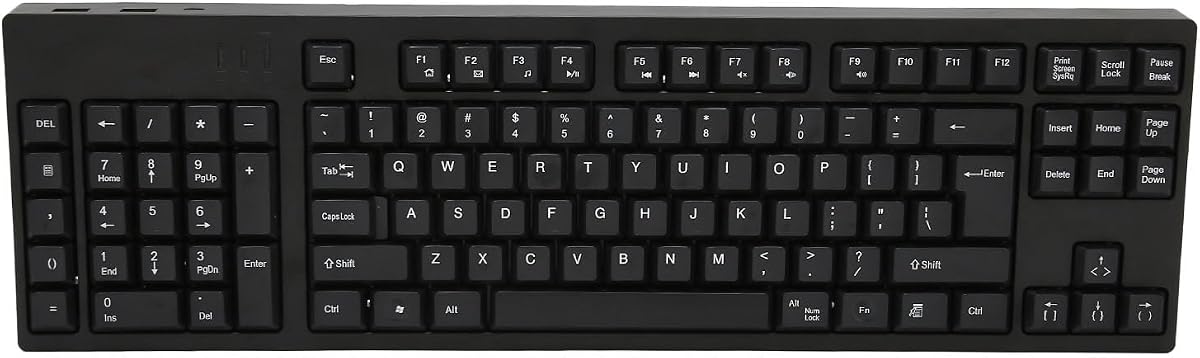
This full size left handed keyboard offers comprehensive input options with 109 keys that cater to complex data entry tasks. The ergonomic layout positions the numpad on the left allowing the right hand to manage mouse movements efficiently during business or accounting workflows.
We may earn a commission when you buy through this link, at no additional cost to you.
Two additional USB interfaces provide convenient connection points for other peripherals reducing the need for external hubs. The plug and play functionality ensures immediate usability without driver hassles which is beneficial for office environments with strict IT policies.
While it lacks gaming specific features like RGB lighting or mechanical switches the durable ABS material ensures reliable daily performance. Its design focuses on practicality and comfort making it a practical choice for professionals prioritizing productivity over gaming aesthetics.
Best suited for office staff or designers needing a complete left handed input experience. The high user rating indicates satisfaction with its build quality and ergonomic benefits which help mitigate fatigue during long work hours.
Having all standard keys ensures no shortcuts or features are missing which is critical for tasks involving frequent number crunching or complex command sequences.
Built in USB ports allow direct connection of mouse or flash drives reducing cable clutter and keeping workspaces organized for focused work.
We may earn a commission when you buy through this link, at no additional cost to you.
The FKZ M30HE provides granular control over actuation points enabling users to fine tune sensitivity for specific gaming scenarios. This adjustability allows for faster key resets and more consistent inputs which can provide a competitive edge in rhythm or shooter games.
We may earn a commission when you buy through this link, at no additional cost to you.
Thirty keys cover essential commands while the hot swappable design offers future proofing for switch customization. North facing LEDs improve RGB visibility by shining towards the user rather than upwards creating a cleaner aesthetic that highlights key legends effectively.
Software dependency is a minor drawback requiring configuration for full features but this allows deep customization for advanced users. The 8KHz polling rate ensures inputs register quickly keeping the device responsive during fast paced competitive matches where every millisecond counts.
Recommended for gamers who value precise control and customization over out of the box simplicity. It bridges the gap between consumer keyboards and pro gear offering flexibility that serious players appreciate during training or tournament play.
Adjustable travel distances mean users can set lighter actuations for quick taps or deeper settings for deliberate inputs adapting to different game requirements easily.
North facing LEDs illuminate the top of keycaps making lighting easier to read during dark gaming sessions and enhancing the overall visual appeal.
We may earn a commission when you buy through this link, at no additional cost to you.
This A4tech model targets users prioritizing health by featuring an ergonomic layout that reduces shoulder strain and promotes better posture during typing. Its patented design focuses on minimizing repetitive strain injuries making it a practical tool for office workers and accountants.
We may earn a commission when you buy through this link, at no additional cost to you.
Eight multimedia keys facilitate quick access to volume and media controls adding convenience to daily tasks. The keyboard is engineered to work smoothly with standard systems ensuring broad compatibility without complex drivers or software dependencies for users.
While it does not offer gaming specific enhancements the comfort improvements make it a valuable tool for long work sessions. Its simplicity ensures reliability and ease of use which appeals to those seeking functional solutions over flashy gaming aesthetics.
Ideal for professionals concerned with physical wellness and ergonomics. The dedicated focus on reducing strain ensures that prolonged computer use remains comfortable and sustainable over years without compromising on efficiency or standard functionality.
Designed to prevent RSI the ergonomic shape encourages natural hand positioning that reduces the risk of pain and fatigue from prolonged typing.
Standard keys and multimedia support cover daily needs efficiently allowing users to focus on work rather than adapting to unusual layouts.
We may earn a commission when you buy through this link, at no additional cost to you.
Selecting the right left handed keyboard requires evaluating switch types, ergonomics, and connectivity to match your gaming style and comfort needs.
Switch types determine tactile feel and responsiveness. Mechanical switches offer durability and distinct feedback while magnetic switches provide adjustable actuation and faster response times for competitive play.
Choose mechanical for classic feel or magnetic for precision tuning based on game requirements.
Left handed layouts vary from full keyboards with relocated numpads to compact keypads. Consider your mouse usage patterns to ensure the device reduces strain and maximizes desk space effectively.
Opt for designs that support natural wrist angles to prevent fatigue during long sessions.
Wireless models offer cable management convenience while wired ones provide stable low latency connections. Select based on whether you prioritize mobility or consistent performance during critical matches.
Prioritize wired connections for esports to avoid potential lag or interference issues.
Macro support and programmable keys enhance efficiency by automating complex commands. More programmable inputs allow greater flexibility for MMOs or productivity workflows alike.
Ensure the software is intuitive to map keys easily without frustration.
Materials like aluminum or high grade plastics impact durability and aesthetics. A sturdy frame ensures stability when pressing keys aggressively during intense gameplay.
Look for reinforced structures that resist flex and wear over time.
Higher polling rates ensure inputs are registered faster reducing perceived latency. This is crucial for competitive shooters where split second reactions matter.
Aim for at least 8KHz for the smoothest possible performance.
Lighting options help personalize your setup and improve visibility in dark environments. Per-key lighting offers more creativity than static modes for immersive setups.
Check if RGB software supports your operating system for full feature access.
Prices range from affordable compact keypads to premium mechanical devices. Determine which features are essential versus nice to have before making a purchase.
Balance cost with long term value by focusing on build quality and switch technology.
Start by installing any necessary drivers or software to access all customization features. This ensures you can set macros and adjust lighting properly.
Clean the keys regularly using compressed air to remove dust and debris that can interfere with key switches. Wipe the surface with a soft cloth to maintain hygiene.
Store the device in a dry place when not in use to prevent moisture damage. Avoid exposing cables to sharp edges that could cause internal wear.
Yes, right handed gamers can use left handed keyboards for ergonomic benefits. Many designs like the RK ROYAL KLUDGE L98 accommodate both hand preferences efficiently.
Hall Effect switches use magnets for actuation enabling adjustable sensitivity and rapid trigger. They provide faster response and less mechanical wear than traditional switches.
Some models like the Keychron C0 HE 8K support macOS out of the box. Others may require configuration but generally work via standard USB connections.
One handed keypads save desk space allowing wider mouse movement which improves accuracy in FPS games. They also reduce hand travel distance for faster reaction times.
Yes, magnetic switches offer adjustable actuation points and rapid trigger features that enhance competitive performance. They often last longer due to reduced mechanical friction.
Use compressed air to blow out dust between keys and a damp cloth to wipe surfaces. Avoid using harsh chemicals that might damage plastic or lighting.
Our top picks highlight diverse solutions from ergonomic office tools to high performance gaming keypads. Each model addresses specific needs like comfort precision or customization to enhance your setup.
Prioritize features that directly impact your play style such as switch type or layout design. Investing in quality ensures longevity and comfort during your most intense gaming sessions.
Always verify current product details and availability as manufacturers frequently update features. Check reliable sources for the latest offers and specifications before finalizing your purchase decision.