
VOYEE PC Controller
4.3Editor score
Wide Compatibility
Enhanced Triggers
Ergonomic Design
This guide compares the top 10 joysticks for Windows 11 to help you find the best flight stick or controller for your gaming setup and budget needs.
Finding the right joystick for Windows 11 can transform your flight simulation and gaming experience into something truly immersive. A quality controller offers precise inputs and ergonomic comfort during long sessions. This guide helps you navigate the options available today.
We evaluated ten top-rated joysticks based on compatibility, build quality, and feature sets. Our analysis focuses on models that work seamlessly with Windows 11 and popular flight simulators. Each product was reviewed for performance and user feedback.
Every pick highlights key strengths and potential limitations to ensure you make an informed decision. Prices and availability may change over time so check current listings before purchasing. Our goal is to simplify your search for the perfect control stick.
4.3Editor score

4.4Editor score

4.0Editor score
The following table provides a side-by-side comparison of all ten products reviewed in this guide. Each entry highlights essential specifications and links to detailed reviews so you can quickly identify the model that fits your specific requirements and preferences.






The Thrustmaster T.16000M FCS stands out as a top choice for Windows 11 users seeking precision flight control. It earns a 4.4 rating for its robust build and advanced sensor technology that ensures consistent performance over time.
We may earn a commission when you buy through this link, at no additional cost to you.
Its H.E.A.R.T technology eliminates drift and wear so you get reliable inputs during critical simulation moments. The ambidextrous design allows left or right handed customization with three removable components for a perfect fit.
While it does not support Xbox consoles this joystick excels on PC with 16 buttons featuring tactile braille style identification. The eight way hat switch and twist rudder provide comprehensive control for complex maneuvers.
This model is ideal for serious flight simulators who value accuracy and comfort. Its durability and software support make it a smart investment for anyone dedicated to immersive PC gaming experiences.
The H.E.A.R.T technology ensures high precision levels that do not degrade with extended use providing a consistent experience.
With removable components the joystick adapts to left or right handed users for maximum comfort during long sessions.
We may earn a commission when you buy through this link, at no additional cost to you.
The Thrustmaster T-Flight Hotas One delivers a realistic flight simulator experience suitable for both PC and Xbox. Its modular design allows the stick and throttle to function together or independently depending on your needs.
We may earn a commission when you buy through this link, at no additional cost to you.
Features include adjustable resistance and responsive triggers that enhance control during takeoff and combat maneuvers. The ergonomic layout ensures comfort while the plug and play connectivity simplifies installation for immediate use.
This model works well for beginners but has limited programmable inputs compared to higher end options. It also requires purchasing rudder pedals separately to complete the simulation setup fully.
Ideal for those seeking a balanced entry into flight simulation the Hotas One offers reliable performance. Its flexibility and cross platform compatibility make it a strong choice for diverse gaming environments.
The detachable throttle enables versatile setups for desktop or lap use accommodating different play spaces and comfort levels.
Seamless compatibility with Windows PC and Xbox Series X S allows players to switch between systems easily.
We may earn a commission when you buy through this link, at no additional cost to you.
The V-one Wired USB controller supports a wide range of systems including Windows 11 and Android devices. It offers vibration feedback and turbo functions that enhance gameplay across multiple genres.
We may earn a commission when you buy through this link, at no additional cost to you.
Designed for plug and play use it requires no drivers except on older Windows XP systems. The multi mode support for Xinput and Dinput ensures compatibility with various PC games.
Users may need to purchase an OTG adapter for Android connectivity depending on their device port. While affordable it lacks the advanced features found in specialized flight sticks.
This controller suits casual gamers who need flexibility across devices. Its broad compatibility and responsive design make it a practical choice for everyday gaming sessions.
Support for Windows and Android expands gaming possibilities across mobile and desktop environments.
Vibration feedback and turbo functions add depth to standard control setups for enhanced immersion.
We may earn a commission when you buy through this link, at no additional cost to you.
The Thrustmaster USB Joystick is an entry level option designed for basic flight control. It features a point of view button that enhances immersion without complex configurations.
We may earn a commission when you buy through this link, at no additional cost to you.
With three axes and four buttons plus a trigger it covers essential game mechanics. The ergonomic handle offers comfort for short gaming sessions.
It lacks advanced programmability which limits customization for experienced users. However its simplicity makes it accessible for casual players new to flight sims.
This model is best for those seeking a budget friendly controller. Its straightforward operation and solid build make it a good starting point.
The point of view button provides easy camera control for more engaging gameplay experiences.
An ergonomic design ensures comfort during extended use without complicated setup steps.
We may earn a commission when you buy through this link, at no additional cost to you.
The Microsoft Sidewinder Precision 2 offers a classic joystick experience with robust programmability. It includes sixteen programmable functions and a rotating handle for precise rudder control.
We may earn a commission when you buy through this link, at no additional cost to you.
Users can save game specific profiles directly to the device. The integrated throttle provides complete control from a single stick reducing hand movement.
As an older model it may lack modern connectivity or features. However its build quality and customization options remain appealing to simulation fans.
This joystick is recommended for users who value legacy support. Its ability to store profiles makes it useful for managing multiple game settings.
The rotating handle and throttle allow for nuanced inputs essential for realistic simulation.
Downloading commands into specific profiles streamlines gameplay transitions between titles.
We may earn a commission when you buy through this link, at no additional cost to you.
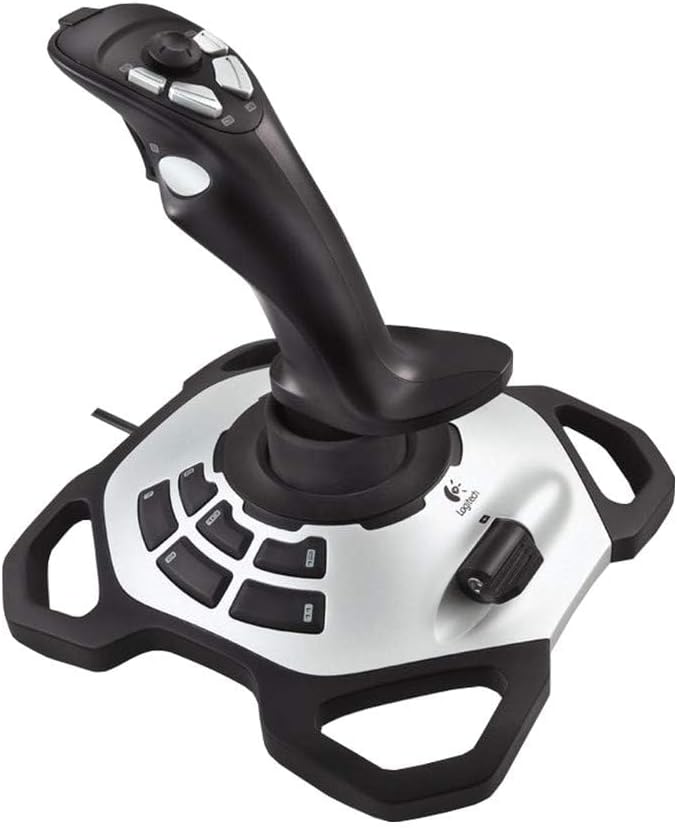
The Logitech Extreme 3D Pro is known for its durability and precision. It features a robust build that withstands intensive use while delivering accurate control.
We may earn a commission when you buy through this link, at no additional cost to you.
The USB connection ensures quick setup and compatibility with various flight simulators. Its ergonomic grip supports long sessions without fatigue.
It may lack advanced programmability found in higher end models. However its reliability and ease of use make it a practical choice for many.
This joystick is ideal for those seeking consistency. Its solid performance and straightforward design make it a recommended option for general gaming.
The durable construction ensures the joystick remains functional and reliable over years of use.
Simple connectivity and setup allow for immediate immersion into compatible games.
We may earn a commission when you buy through this link, at no additional cost to you.
The VOYEE PC Controller is an affordable option for gamers needing reliable inputs. It works with Windows 11 and Xbox 360 systems offering plug and play convenience.
We may earn a commission when you buy through this link, at no additional cost to you.
Upgraded triggers and sensitive buttons provide quick response times. The ergonomic contours fit comfortably in hand for extended play.
It may not suit FPS games but excels in casual and simulation genres. Its long cord allows flexibility in seating arrangements.
This controller is perfect for budget conscious buyers. Its comfort and compatibility offer excellent value for everyday gaming needs.
An accessible price point makes high quality gaming more achievable for general players.
Ergonomic contours support long sessions without causing hand strain or discomfort.
We may earn a commission when you buy through this link, at no additional cost to you.
The Thrustmaster SimTask FarmStick is designed specifically for Farming Simulator 25 on PC and Xbox. It offers precise control for operating heavy machinery without setup.
We may earn a commission when you buy through this link, at no additional cost to you.
Hall Effect sensors ensure accuracy and longevity. With up to thirty three programmable inputs it handles complex machinery functions effectively.
It requires a racing wheel for a full cockpit setup which adds cost. The niche focus limits broader simulation use.
Ideal for farming enthusiasts this joystick delivers immersive realism. Its specialized design ensures maximum utility for agricultural simulation gameplay.
Tailored for farming simulators it provides specialized controls for tractors and construction equipment.
Hall Effect sensors eliminate wear and drift for reliable operation over time.
We may earn a commission when you buy through this link, at no additional cost to you.
The Logitech G X56 H.O.T.A.S offers high-end precision for aspiring combat pilots. With over 189 programmable controls it covers all necessary surfaces for advanced simulation.
We may earn a commission when you buy through this link, at no additional cost to you.
RGB lighting allows visual customization to match your rig. The adjustable spring system tailors stick force for different aircraft needs.
Its complexity may overwhelm casual users. The cost and setup effort are significant trade-offs for full functionality.
This is best for serious VR flight simulators. Its level of control and customization is unmatched for dedicated pilots.
With 189 controls you can map every function to the device eliminating keyboard reliance.
RGB lighting and ergonomic placement ensure seamless control in virtual reality environments.
We may earn a commission when you buy through this link, at no additional cost to you.
The PXN 2113PRO delivers a realistic flying experience with vibration feedback. It features 12 programmable buttons and an 8-way hat switch for versatile control.
We may earn a commission when you buy through this link, at no additional cost to you.
The fixed base with suction cups stabilizes the stick during intense sessions. Users can adjust vibration strength to suit personal preference.
Setup requires attention to vibration settings which can be missed. Its compatibility is limited to PC so console gamers should look elsewhere.
This stick is ideal for PC flight sim enthusiasts. Its feature set and immersive feedback make it a strong contender for the price.
Four suction cups keep the joystick firmly in place preventing unwanted movement.
Driver software allows precise mapping of buttons to suit various game needs.
We may earn a commission when you buy through this link, at no additional cost to you.
Selecting the right joystick involves considering several key factors that affect performance and compatibility. This section outlines what to evaluate before making a purchase.
Ensure the joystick supports Windows 11 and your preferred games. Some devices are PC exclusive while others support consoles or multiplatform use.
Always verify system requirements to avoid connectivity issues after purchase.
Look for durable materials and sturdy construction. Flight sticks undergo heavy use and should maintain their integrity over time.
Higher quality builds reduce wear and ensure long term reliability.
Comfort during long sessions is critical. A well-designed handle reduces hand fatigue and allows precise movements.
Consider ambidextrous designs if you prefer left or right handed setups.
More buttons and axes mean more control options. Flight simulators often require complex mappings for realistic gameplay.
Select a model with enough inputs to cover your specific simulation needs.
Hall Effect sensors provide higher accuracy and longevity compared to traditional potentiometers. They eliminate drift and maintain precision over time.
This technology is essential for serious simulation enthusiasts.
Dedicated software simplifies mapping and calibration. Look for tools that allow saving profiles per game.
Robust software enhances usability and flexibility.
Features like vibration feedback and detachable throtes add value. These features enhance immersion and adaptability.
Choose features that align with your gameplay style.
Prices range from budget friendly to premium levels. Determine how much you are willing to invest based on your gaming intensity.
Higher cost does not always guarantee better experience but offers more features.
Begin by connecting the joystick to a USB port on your PC. Most devices require no drivers on Windows 11 but check manuals for exceptions.
Calibrate the controls through the Windows Game Controller settings or provided software. Test axes and buttons to ensure proper response.
Clean the joystick periodically using a soft dry cloth. Avoid liquids near the base to prevent damage to internal components.
Most modern joysticks are compatible with Windows 11. However some older models may require driver updates or third-party software for full functionality. Always check the manufacturer specifications before buying.
Not all PC joysticks work on Xbox. Only those explicitly marked as compatible will function correctly. Check the product description to confirm console support.
Hall Effect sensors use magnetic fields to detect position without physical contact. This prevents wear and drift common in traditional potentiometer sensors. It ensures long-term precision.
The number of buttons depends on the games you play. Basic games need fewer inputs while flight simulators often require 16 or more. Match the count to your control complexity needs.
Many Windows 11 joysticks are plug and play. However some may need drivers for advanced features. Check the product page for driver availability.
Vibration strength is often adjustable in software. Ensure it is enabled in the game settings and set to maximum. Some drivers have independent strength controls.
Flight sticks excel at flight simulation but can work for other genres. They may feel awkward for FPS games but some users prefer them for specific mechanics.
Use a microfiber cloth to wipe the surface. Avoid spraying liquid directly on the stick. Keep it away from dust and moisture for longevity.
The top picks in this guide cover various needs from budget to premium. Models like the T.16000M FCS and VOYEE Controller offer different balances of features and affordability.
Prioritize comfort and sensor technology for long term satisfaction. Ensure compatibility with your primary gaming platform to avoid setup issues.
Always check current prices and availability before purchasing. Prices change frequently so staying informed helps you secure the best deal available now.