
0.5 Inch Print Height Intelligent JC01
4.2Editor score
Ultra-light 390g drop-resistant design
Over 16 hours continuous operation
300-nozzle system for crisp output
Compare the top 10 handheld inkjet printers for portable marking, coding, and labeling on various surfaces with detailed specs and user ratings.
Handheld inkjet printers offer a portable solution for marking products, packages, and surfaces with precision. These devices allow users to print text, barcodes, and logos quickly without needing bulky equipment or complex setups for efficient workflow.
We compared ten top-rated models based on battery life, print quality, ink capacity, and ease of use. Our analysis covers diverse needs from small business labeling to industrial batch coding to help you find the right tool.
Each pick highlights specific strengths like fast-drying ink, touchscreen interfaces, or rugged design. Prices and availability can change frequently so please verify current details before purchasing to ensure you get the best value available today.
4.2Editor score

4.7Editor score
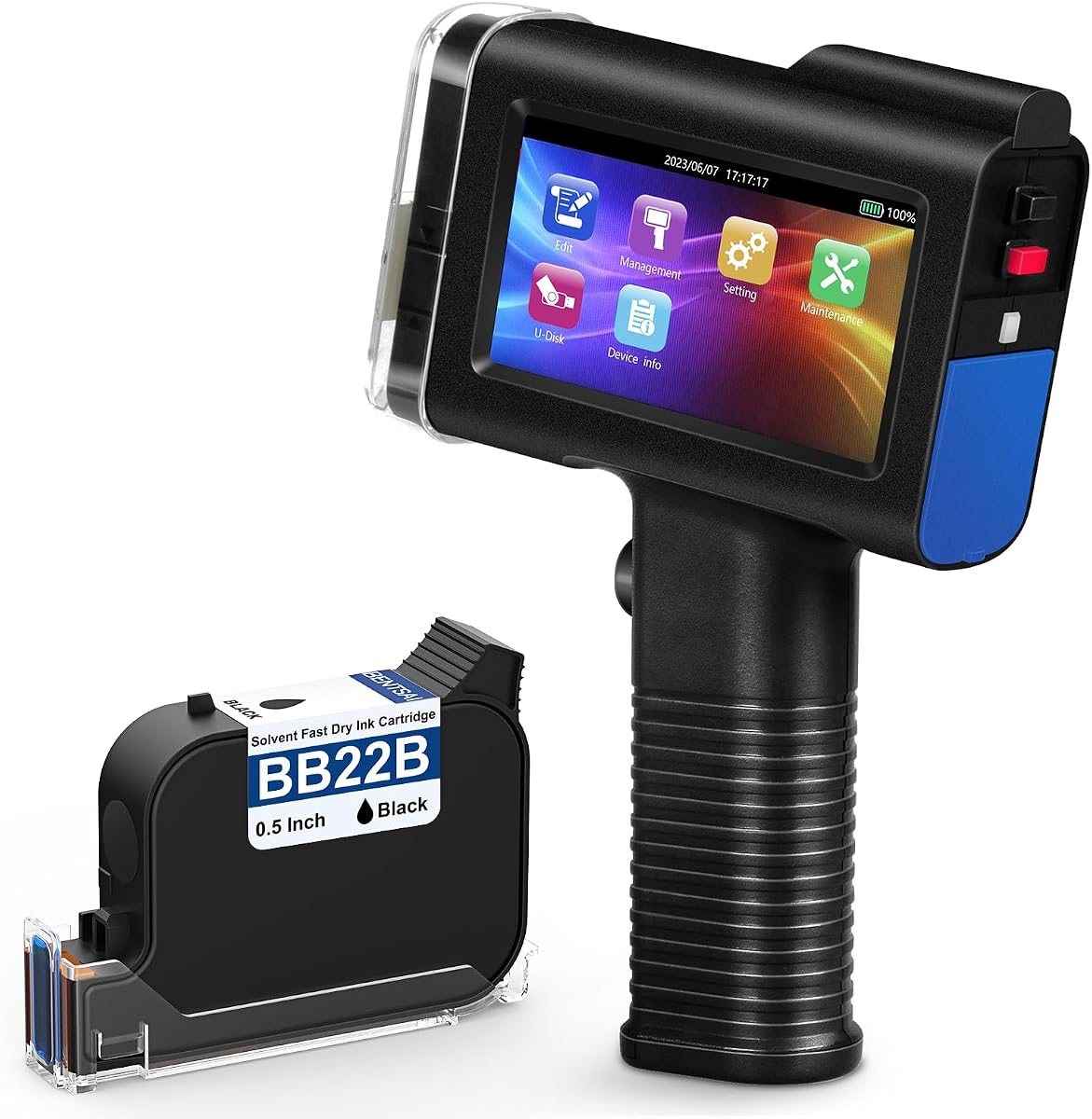
4.4Editor score
This side-by-side comparison highlights key specifications across all ten models to help you decide based on your specific marking needs and budget constraints for optimal performance.


This portable handheld inkjet printer stands out for its robust performance and user-friendly design. With a high rating and advanced features it is ideal for businesses needing reliable marking on various surfaces without downtime.
We may earn a commission when you buy through this link, at no additional cost to you.
The device features a large HD capacitive touchscreen that simplifies template creation and file import. Its 42ml ink cartridge dries in seconds ensuring waterproof marks on plastic metal and glass. The 16 hour battery life supports long shifts without recharging.
While the price point is premium the reliability and speed justify the investment for professional use. The only minor limitation is the proprietary ink cartridge which limits third-party options but ensures quality print consistency.
Buyers seeking a versatile and durable solution for batch coding should consider this model. It balances ease of use with industrial strength making it a top recommendation for packaging and logistics teams.
Create or edit templates directly on the touchscreen or import files via USB for instant logo and barcode printing.
Engineered with advanced power management and a leak proof ink cartridge for consistent performance in demanding environments.
We may earn a commission when you buy through this link, at no additional cost to you.
This JC01 model offers a budget friendly entry into professional handheld printing. It maintains essential features like long battery life and fast drying ink while keeping the overall package affordable for small businesses.
We may earn a commission when you buy through this link, at no additional cost to you.
Weighing just 390 grams it is designed for high pace environments where mobility matters. The 300 nozzle system ensures clear output on common surfaces like carton and metal. A protective case is included to prevent damage during transport.
The trade off is slightly lower resolution compared to high end units but it remains sufficient for standard batch codes and dates. Users should handle the nozzle with care to maintain print quality over time.
This unit is perfect for warehouses or retail environments needing basic marking without spending heavily. Its ease of use and portability make it a strong contender for those on a tight budget.
Redesigned to be ultra light with a wrist strap to prevent accidental drops during frequent use.
Comes with essential accessories and a protective suitcase ready for immediate deployment in production or shipping areas.
We may earn a commission when you buy through this link, at no additional cost to you.
This Bentsai model delivers high resolution printing suitable for detailed graphics and clear barcodes. Its rating reflects a balance of performance and reliability that appeals to professional operators needing consistent high quality marks.
We may earn a commission when you buy through this link, at no additional cost to you.
The device supports a maximum print height of half an inch and can be mounted on conveyor lines for automation. With a 42ml cartridge yielding two million characters it reduces downtime for refills. The touchscreen allows easy editing of complex templates.
The higher cost is justified by the durability and precision it offers in demanding production settings. While slightly heavier than portable mini units the trade-off is necessary for the stability required by conveyor systems.
Manufacturers looking for automated or high precision marking should prioritize this model. It provides the robustness needed for industrial environments while keeping operation simple for staff.
Can be mounted to a conveyor line to boost labeling efficiency and reduce manual handling efforts.
Prints at 600 DPI resolution ensuring logos and barcodes are sharp and scannable across all materials.
We may earn a commission when you buy through this link, at no additional cost to you.
This handheld printer offers exceptional versatility with an adjustable print height up to one inch. It is designed for users who need to print larger text or multiple lines without changing hardware configurations.
We may earn a commission when you buy through this link, at no additional cost to you.
The unique motherboard technology and 5 roller system provide smooth operation and reduced jams. Weighing 410 grams it is easy to handle during extended shifts. The interface supports various languages for diverse teams.
While it shares similar battery life to other models the mechanical design ensures greater stability on uneven surfaces. The only constraint is the ten line limit which may not suit extremely dense data requirements.
Teams requiring large markings or multi line info will find this useful. Its patented technology suggests a long term reliability that fits well into growing logistics operations.
Prints up to 1 inch height and 10 lines allowing for detailed product information on larger packaging.
The upgraded 5 roller system ensures smoother tracking on conveyor belts or manual lines.
We may earn a commission when you buy through this link, at no additional cost to you.
The Phezer P15 distinguishes itself by operating without any external computer or phone connection. It uses an independent system with a powerful quad core CPU ensuring smooth operation even in areas with poor connectivity.
We may earn a commission when you buy through this link, at no additional cost to you.
Users can choose from eight ink colors including white yellow and invisible options. The 4.3 inch touchscreen supports direct editing and allows for versatile data types from dates to barcodes. Its design fits many industrial surfaces.
The lack of app dependency is a major advantage for secure environments but the interface is less polished than high end models. Users should ensure proper cap usage to prevent ink drying on the nozzle.
This printer is ideal for businesses needing color coding or offline capability. Its reliability and flexibility make it a strong choice for diverse product lines requiring varied markings.
Offers up to 8 color options to differentiate products or warning labels easily on any surface.
Built-in storage and CPU eliminate the need for mobile apps or laptop synchronization.
We may earn a commission when you buy through this link, at no additional cost to you.
This MS-Z10 model offers flexible printing heights suitable for detailed work on small items or broader areas. It is a practical tool for warehousing and retail where quick and clear identification is necessary.
We may earn a commission when you buy through this link, at no additional cost to you.
The device supports various resolutions and import options via USB for convenient data updates. Its compact nature makes it easy to store in a suitcase for transport between job sites. Ink dries rapidly to prevent smearing.
While the ink is water resistant it may not be permanent on all surfaces which is a key consideration. The user interface is straightforward but less advanced than top tier competitors.
For users needing a simple and affordable marking solution this unit delivers. It is best for temporary or semi permanent labels where cost efficiency is prioritized over extreme durability.
Adjustable height allows for precise placement on small components or larger boxes.
Includes an exquisite suitcase packing to protect the device during travel.
We may earn a commission when you buy through this link, at no additional cost to you.
This model excels when large text or codes are required. With a one inch height capability it ensures visibility from a distance which is crucial in warehouses or on pallets.
We may earn a commission when you buy through this link, at no additional cost to you.
The infrared aiming assist helps improve positioning accuracy making setup easier for new users. Its battery life supports full shifts and the 42ml cartridge provides reliable output. The interface supports multiple languages for global use.
The added weight is a trade-off for the robust build and larger print area. Careful alignment is needed due to the larger nozzle size to avoid smudging on uneven surfaces.
Teams needing high visibility labels should consider this device. It balances size with performance to meet the needs of large scale inventory management.
Infrared technology helps align the print head for consistent placement on rough surfaces.
Capable of printing up to 1 inch text for clear identification on large containers.
We may earn a commission when you buy through this link, at no additional cost to you.
This XMINI model is one of the lightest options available making it comfortable for prolonged use. Its high rating reflects satisfaction with its portability and ease of handling for daily marking tasks.
We may earn a commission when you buy through this link, at no additional cost to you.
The resistive touchscreen is durable and works well in industrial conditions. It supports 360 degree printing on curved surfaces with a positioning plate. Users benefit from seven available ink colors for diverse labeling needs.
The smaller screen is less intuitive but offers robustness against impact and dust. Users should be aware of the need to calibrate the screen upon receipt for optimal responsiveness.
Individuals needing a portable tool for frequent checks or inventory updates will appreciate this. It is especially suited for small to medium businesses needing light duty marking.
Weighs just 0.54 pounds allowing for effortless transport and handheld operation anywhere.
With a positioner plate you can print smoothly on bottles and tubes without gaps.
We may earn a commission when you buy through this link, at no additional cost to you.
This mini handheld inkjet printer features a detachable handle that converts it to a compact form. It is perfect for tight spaces and quick tasks where full size units are too cumbersome.
We may earn a commission when you buy through this link, at no additional cost to you.
It prints on a variety of surfaces including corrugated cardboard and plastic. The quick dry formula ensures marks are waterproof and durable for warehouse conditions. A stylus is included to prevent accidental screen touches.
While excellent for quick inventory checks the 0.5 inch height limits its use for large text. The design focuses on agility rather than high volume throughput.
Retailers and warehouse staff needing quick identification marks will find this practical. It offers professional performance in a package that fits easily in a toolbox or pocket.
Detachable handle allows switching between handheld mode and compact mini mode instantly.
Dimensions of 4 by 4.7 inches make it truly pocket sized for mobility.
We may earn a commission when you buy through this link, at no additional cost to you.
This unit offers a straightforward approach to handheld printing with a focus on usability. It supports direct file uploads via USB making batch coding simple without complex setups.
We may earn a commission when you buy through this link, at no additional cost to you.
The ergonomic design includes a wrist strap to prevent drops during use. With a 16 hour battery life it supports full work shifts. The lightweight 390g body reduces fatigue during long periods of operation.
While it lacks advanced customization features it provides reliability for standard text and date printing. The interface is user friendly and supports twenty five languages for international teams.
Small businesses needing simple and efficient batch marking will find it valuable. It balances cost and performance effectively for daily labeling needs.
Supports direct USB data upload for efficient batch coding without extra software.
Lightweight body with an ergonomic grip and wrist strap for safe handling.
We may earn a commission when you buy through this link, at no additional cost to you.
Selecting the right handheld printer involves balancing your specific marking needs with technical capabilities and budget constraints.
Print height determines the size of your text or barcode and ranges from 0.03 inches to 1 inch depending on the model. Higher resolution like 600 DPI is needed for detailed graphics while standard codes often work with lower DPI settings.
Choose a height that matches your product size and ensure resolution is high enough for scanning reliability.
Battery life is critical for continuous shifts with most models offering around 16 hours on a single charge. Some units use rechargeable batteries while others may require external power or frequent recharging.
Look for devices with at least 16 hours of battery life to avoid workflow interruptions during peak hours.
Ink cartridges vary in volume and dry time with 42ml being common in many professional units. Quick drying ink ensures marks do not smear while waterproof formulations protect against moisture in storage areas.
Verify ink capacity and drying speed to match your printing volume and surface requirements.
Touchscreen interfaces allow direct editing of templates and support for multiple languages helps diverse teams. Some models offer file import via USB for logos and complex designs reducing setup time.
Prioritize intuitive controls and language support if you have multiple operators or complex data needs.
Industrial environments demand rugged builds with drop resistant designs and protective cases included in packages. Weight also matters as lighter units reduce operator fatigue during long shifts.
Select a unit with proven durability and ergonomic features to withstand daily industrial use.
Ensure the printer works on your specific surfaces such as metal glass or curved containers. Some models support conveyor line mounting for automation while others are strictly handheld for manual tasks.
Check material compatibility and mounting options to integrate smoothly with your existing workflow.
Start by charging the battery fully before first use and calibrate the screen if required for accurate touch response. Insert the ink cartridge carefully ensuring it is self locked to prevent leaks during operation.
Create your desired template on the device or import files via USB before printing. Use the positioning plate or infrared assist to align the print head with the surface for consistent placement.
After use cover the protective cap immediately to prevent ink from drying and blocking nozzles. Store the device in a cool dry place and clean the exterior regularly to maintain performance over time.
Most printers require proprietary cartridges to maintain quality and warranty. Using third party ink may void your warranty or cause nozzle clogging so check the manufacturer policy before switching.
Turn off the device and open the ink compartment. Release the lock clip remove the old cartridge and insert the new one until it clicks into place. Reset the ink counter in the settings menu.
They work on most porous and non porous materials including cardboard plastic metal glass and wood. For curved surfaces use the positioning plate to ensure even contact and consistent print quality.
A 42ml cartridge typically prints over one million characters depending on font size. If not used regularly cover the nozzle cap to prevent drying and extend cartridge life.
No many models operate independently with built-in processors and touchscreens. Some allow USB import for custom files but you do not need to connect to a PC for basic printing.
Most printers require dry surfaces for best adhesion but quick drying inks help. Avoid printing directly on wet surfaces unless the ink is specifically designed for that condition.
We reviewed ten top options ranging from budget friendly portable units to high resolution industrial models. Each offers unique strengths suited to different business needs and operational environments.
Prioritize battery life and ink capacity for high volume workflows while focusing on resolution for detailed branding. Ensure the device matches your surface types to avoid quality issues.
Remember to verify current pricing and availability before making a purchase decision. A well chosen printer will streamline your labeling process and improve product identification accuracy.