
HDMI Tester Portable High Definition Network Cable Tester Checker
4.4Editor score
Tests HDMI and Network cables
Portable main and remote unit
Battery or USB power options
This guide compares the top HDMI Signal Tester models for reliability and features to help professionals and enthusiasts choose the right tool for their needs.
Choosing the right HDMI Signal Tester is crucial for anyone working with modern video setups. These tools help diagnose connectivity issues quickly. A good tester ensures your cables and devices communicate effectively without signal loss.
We compared ten highly rated HDMI Signal Testers based on their features and user feedback. This list covers everything from basic cable checkers to advanced signal generators. Each option offers unique benefits for different user scenarios.
Each pick below shows key specs and real-world performance insights. You will find options for budget users and professionals alike. Please note that prices can change frequently so check current listings for the most up to date information.
4.4Editor score

4.5Editor score

4.5Editor score
The following table provides a side by side comparison of all ten HDMI Signal Testers featured in this guide. Review the specifications and ratings to find the best match for your specific testing requirements.


The Monoprice HDMI Signal Generator and Display Analyzer stands out as a versatile tool for video professionals. It holds a solid rating and offers a dual function as both a generator and emulator. This makes it ideal for setup scenarios.
We may earn a commission when you buy through this link, at no additional cost to you.
Its key strength lies in supporting high resolutions like 4K at 60Hz with various color formats. The DIP switches allow easy manual configuration without needing a computer. You can test specific HDCP versions to ensure compliance with modern displays.
While it lacks the advanced screen of premium units the practicality is undeniable. It provides essential test patterns that help isolate signal issues efficiently. For most calibration tasks the simplicity is a benefit rather than a drawback.
This unit is perfect for AV installers who need a reliable portable generator. It bridges the gap between basic testers and expensive analyzers. If you need accurate signal output without breaking the bank this is a strong recommendation.
Use the DIP switches to quickly set output resolutions without software. This ensures compatibility with legacy and modern displays.
Test HDCP 1.4 and 2.2 outputs to verify encryption handling. This prevents playback issues on protected content.
We may earn a commission when you buy through this link, at no additional cost to you.
The Parts Express HDMI Cable Signal Tester is designed for speed and simplicity. It earns high marks for its ability to diagnose common cable faults like color shifts. This makes it a staple for any tech toolkit.
We may earn a commission when you buy through this link, at no additional cost to you.
Its primary function is to check the integrity of the connection between devices. You simply plug the cables in and read the status lights. This helps you locate issues at either the source or display end of the system.
While it does not show video the focus on component status is effective. It saves time by pinpointing specific wire failures quickly. The compact size means it fits easily into a tool bag.
Buy this if you need a straightforward tool for cable health checks. It is ideal for home theater enthusiasts and AV techs who prioritize portability. It is a cost-effective solution for maintaining signal integrity.
The tester identifies causes like sparkle or missing pictures instantly. This speeds up troubleshooting during live events.
Place the tester at the source or display end for flexibility. This versatility ensures you can test in tight spaces.
We may earn a commission when you buy through this link, at no additional cost to you.
This HDMI and Network Cable Tester offers exceptional value for its low cost. It combines two essential tools in one compact package. Users appreciate the ability to check both HDMI and RJ45 cables with a single device.
We may earn a commission when you buy through this link, at no additional cost to you.
The main and remote unit design allows for testing installed cables easily. The remote unit stores on the side for convenience. It scans up to 19 wires to detect shorts or open circuits accurately.
Power flexibility is a major plus with this model. You can use an AAA battery or power it via USB. This ensures you are never left without power during a critical test.
For budget-conscious buyers this is the top choice. It provides reliable functionality without unnecessary complexity. It is perfect for home users and small businesses needing basic connectivity verification.
Switch between HDMI and network testing effortlessly. This dual functionality reduces the need for multiple tools.
Detach the remote unit for testing long or installed cables. This feature enhances usability in difficult locations.
We may earn a commission when you buy through this link, at no additional cost to you.
The STEREN Handheld HDMI Tester is a robust solution for professional installers. It features an integrated HD LCD screen so you can verify video without a TV. This standalone capability saves significant setup time on site.
We may earn a commission when you buy through this link, at no additional cost to you.
Its rugged construction ensures durability in demanding environments. The tempered glass screen resists scratches and shocks. It also provides audio and video assurance to confirm full system performance.
Battery life is impressive allowing several hours of continuous use. The multiple input output ports facilitate easy continuity checks. This unit is built to withstand daily professional use.
Invest in this if you need reliable verification without external screens. It combines testing and monitoring into one handheld device. The investment pays off in time saved during installations.
Verify video signal without needing a display monitor. This simplifies testing in locations without TVs.
Rugged housing protects against drops and scratches. This ensures longevity in field work conditions.
We may earn a commission when you buy through this link, at no additional cost to you.
This advanced HDMI Signal Generator is designed for high-end 8K setups. It supports up to 8K at 60Hz with HDR and wide color formats. This makes it essential for next-generation video system testing.
We may earn a commission when you buy through this link, at no additional cost to you.
With 64 resolutions and 33 patterns it offers comprehensive signal analysis. The portable design ensures you can bring it anywhere. It also handles advanced features like CEC and HDCP 2.3 verification.
While it is powerful the interface assumes some technical knowledge. Users should be familiar with HDMI standards to maximize its utility. The technical support provided is a bonus for complex setups.
Choose this if you work with cutting-edge AV installations. It provides the bandwidth and resolution needed for modern displays. It is a future-proof tool for serious professionals.
Test full 40Gbps bandwidth for high frame rate content. This ensures compatibility with next-gen consoles and TVs.
Use 33 test patterns for precise troubleshooting. This helps identify signal integrity issues effectively.
We may earn a commission when you buy through this link, at no additional cost to you.
This generator focuses on 4K UHD performance with 18Gbps bandwidth. It provides detailed video and audio source analysis for calibration. The ability to manage EDID helps resolve handshake issues.
We may earn a commission when you buy through this link, at no additional cost to you.
It supports scaling from 4K down to 1080p. This flexibility is useful for testing a wide range of displays. The tool ensures your source devices output correctly.
Compliance with HDCP standards is verified to prevent black screens. It tests cable bandwidth to ensure high data transfer rates. This is critical for high fidelity setups.
If you need reliable 4K analysis this is a solid choice. It bridges the gap between generation and analysis. Use it to validate professional AV installations.
Manage EDID to ensure proper device recognition. This prevents resolution mismatches and handshake failures.
Test cable bandwidth to confirm high speed transmission. This is essential for 4K signal integrity.
We may earn a commission when you buy through this link, at no additional cost to you.
This tester offers a practical solution for HDMI and RJ45 cables. It simplifies troubleshooting by covering both common types in one device. The auto shut down feature helps save battery life.
We may earn a commission when you buy through this link, at no additional cost to you.
You can choose between fast scan and full display modes. This flexibility allows you to see individual connections or the whole map. It is a useful tool for home networks.
The compact design makes it easy to carry in a pocket. While basic it performs its core functions reliably. It is a good backup tool for IT pros.
Buy this if you need a simple checker for multiple cable types. It provides quick answers without complex setup. It is a cost-effective addition to your toolkit.
Automatic shut down after ten minutes saves energy. This extends battery life for on the go use.
Choose scan or display modes for different needs. This allows flexibility in how you check connections.
We may earn a commission when you buy through this link, at no additional cost to you.
The Jonard Tools HDMI-100 is a reliable field tool for cable testing. Its detachable remote unit is perfect for testing installed cables. This is a great option for long distance checks.
We may earn a commission when you buy through this link, at no additional cost to you.
It supports both standard and Mini HDMI cables. You can test up to 500 meters with ease. The scan mode shows individual connection status for clarity.
While it uses a 9V battery it offers stable performance. The compact design fits well in a technician's bag. It handles common faults like shorts or open circuits.
Get this for robust field testing needs. It combines portability with useful testing modes. It is a dependable choice for home and AV installs.
Remote unit allows testing installed cables easily. This saves time by avoiding cable unplug cycles.
Test up to 500 meters effectively. This ensures signal integrity over long cable runs.
We may earn a commission when you buy through this link, at no additional cost to you.
The UT681 HDMI Cable Tester is a highly rated compact tool. It supports Micro HDMI and Mini HDMI alongside standard Type A. This broad compatibility makes it useful for diverse devices.
We may earn a commission when you buy through this link, at no additional cost to you.
Its LED zones clearly show faults like shorts or miswiring. You can quickly identify the problematic wire with ease. The lightweight design makes it easy to carry.
Battery management is smart with auto power off features. It includes a separate transceiver for field testing. This ensures efficient work for single operators.
Pick this for quick and efficient cable checks. It combines portability with effective fault detection. It is ideal for travelers and repair shops.
Supports Micro HDMI for portable devices. This expands its use to phones and cameras.
LED zones highlight faults clearly. This simplifies troubleshooting for beginners.
We may earn a commission when you buy through this link, at no additional cost to you.
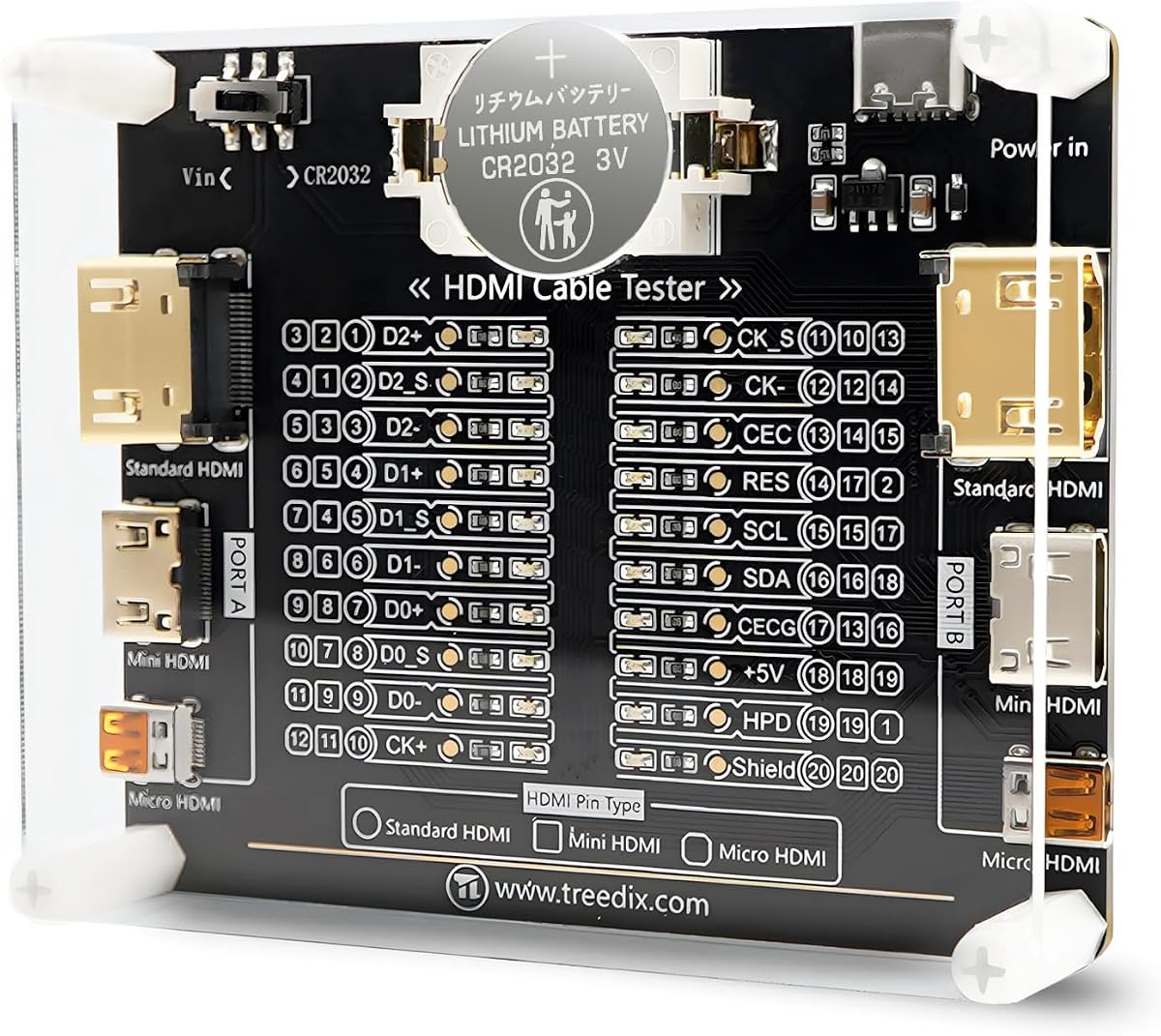
The Treedix Cable Tester Board provides a clear visual check. It uses 20 LED indicators to show each pin status. This transparency makes debugging HDMI cables easier.
We may earn a commission when you buy through this link, at no additional cost to you.
It supports Type A C and D interfaces. This covers most standard HDMI connectors used today. The housing protects the board and ensures safe testing.
Power options are flexible with battery or Vin input. Reverse connection protection adds a layer of safety. It is a practical solution for maintenance tasks.
Buy this for affordable pin level diagnostics. It is perfect for DIY repair projects. It ensures you know exactly which pin is faulty.
Each pin has an LED for clear status. This simplifies fault identification.
Prevents damage during power connection. This ensures safe testing for users.
We may earn a commission when you buy through this link, at no additional cost to you.
Selecting the right HDMI Signal Tester depends on your specific needs and budget. This guide breaks down key factors to help you make an informed decision.
Ensure the tester supports the resolution and features you need. Some units focus on cable continuity while others generate full video signals. Check if it handles 4K or 8K outputs.
Look for units that match your signal requirements.
For field work a portable design is essential. Consider size and weight if you travel often. Battery life also impacts usability on the job.
Choose a compact model with reliable power options.
Units with integrated screens allow for direct video verification. This saves time by removing the need for a monitor. However simple LED testers are lighter.
Decide if you need visual feedback or just connectivity checks.
Check if the tester supports Mini and Micro HDMI connectors. This flexibility ensures it works with all your devices. Some units also test network cables.
Select a model with versatile connection options.
Verify HDCP support to ensure compatibility with protected content. Modern setups require strict adherence to encryption standards. Testers with HDCP options are valuable for pros.
Prioritize units that support HDCP 2.2 or higher.
Durable construction ensures longevity in demanding environments. Look for rugged housings and resistant screens. Cheap plastic units may break easily in the field.
Invest in a solid device that withstands daily use.
Balance the cost with the features you require. Advanced generators cost more but save time on complex tasks. Basic testers are affordable but limited.
Choose a tool that justifies its price with utility.
Consider power sources like USB or disposable batteries. USB power adds convenience for on the go work. Ensure the tester allows flexible charging.
Select a model with versatile power capabilities.
Connect the tester to your HDMI source and display to check continuity. Most models will light up indicators if the connection is solid.
For advanced testers use the menu to set specific resolutions. This allows you to verify that the source matches the display settings.
Keep the device clean and store it in a protective case. Avoid exposing it to extreme temperatures or moisture to ensure longevity.
A tester checks existing signals for continuity and faults while a generator creates specific video patterns. Testers are simple continuity tools and generators provide active signal output.
Many advanced HDMI testers support 4K but basic ones may not. Check the specs to ensure it handles the resolution you need.
This could be due to a faulty cable or connection. Use a tester to verify the integrity of the cable and connector.
Yes if the tester supports Mini or Micro HDMI inputs. Many models include adapters for these connectors.
LED indicators show status while screens show actual video. Screens are better for verification but take up more space.
Test cables regularly or whenever you see visual issues. Regular checks prevent unexpected signal loss during use.
The right HDMI Signal Tester ensures your video setup is reliable and compliant. Our top picks cover various needs from budget to professional use.
Prioritize features like resolution support and portability when shopping. A good unit saves time by identifying issues quickly and accurately.
Check current listings for the latest prices and availability. Prices change frequently so always verify before making a purchase.