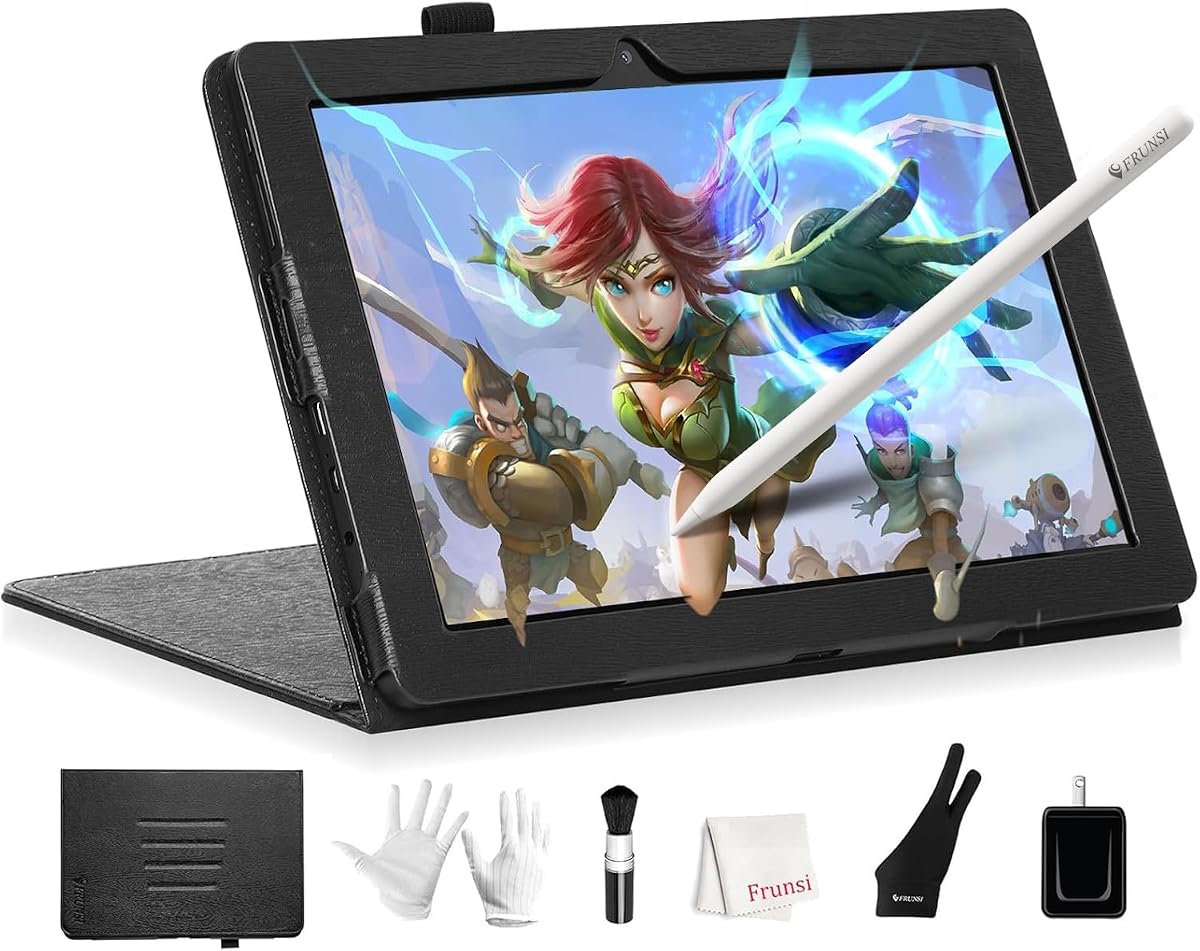
T8 Standalone Drawing Tablet
4.4Editor score
Android 13 operating system
4000mAh battery life
64GB expandable storage
Artists today need freedom from their desks to create anywhere. Standalone drawing tablets with no PC needed offer this mobility. They integrate screens, pens, and software into one device. This independence allows you to sketch in cafes, parks, or studios without wires.
We evaluated ten leading standalone tablets based on screen quality, pen performance, and battery life. Our analysis focused on devices that run apps independently without external hardware. We compared resolution, pressure sensitivity, and operating systems to find the most capable tools for digital creation.
Each pick below highlights specific strengths for different user needs and budgets. Prices and availability change frequently so verify details before purchasing. We include direct links to trusted retailers for your convenience and safety when buying creative gear online today.
4.4Editor score

4.2Editor score

4.6Editor score
As an Amazon Associate we earn from qualifying purchases.
This table provides a side-by-side comparison of all ten standalone tablets to help you quickly identify the right tool for your creative workflow.


The RubensTab T11 Pro is a dedicated standalone drawing tablet that removes the need for a computer entirely. It carries a strong user rating and offers an accessible entry point for those seeking portability. This device stands out by integrating a high resolution screen with a pressure sensitive pen in one unit.
We may earn a commission when you buy through this link, at no additional cost to you.
Its 10.1 inch Full HD IPS display delivers vibrant colors and sharp details for immersive drawing. The 5800mAh battery supports five hours of continuous use which is suitable for many daily sessions. Pre-installed professional grade apps allow immediate creative work without complex setup or downloads on arrival.
While the battery life is sufficient for most users some may need a power bank for longer travel days. The device relies on Wi-Fi for online resources which limits use in areas without internet access. These trade-offs are acceptable given the competitive price and the freedom from cables it provides.
This tablet is ideal for students hobbyists and professionals needing a portable solution for sketches and notes. It is also perfect for classroom work or meetings where carrying a laptop is inconvenient. We recommend it for anyone prioritizing simplicity and mobility over high end specifications.
The standalone design allows you to power on and start creating immediately without connecting to external devices.
Pre-installed professional grade drawing apps ensure beginners and experienced artists can dive right into their projects.
We may earn a commission when you buy through this link, at no additional cost to you.
The RubensTab T12 offers a generous twelve inch canvas for digital artists needing more space. It is designed to ignite creativity with premium software and robust performance capabilities. The high rating reflects user satisfaction with its immersive drawing experience and versatile use cases.
We may earn a commission when you buy through this link, at no additional cost to you.
Its fully laminated screen minimizes parallax for a seamless connection between the stylus and display. The device comes loaded with top tier apps like Sketchbook Krita and Infinite Painter to supercharge artistic endeavors. The anti-glare coating reduces reflections to enhance the visual experience during long sessions.
While the performance is smooth the higher price might be a consideration for budget conscious buyers. The lack of cellular connectivity means you must rely on Wi-Fi for internet access on the go. These factors are outweighed by the large screen and included accessories for serious creators.
This tablet is best for artists who require ample canvas space and advanced tools without a computer. It serves well as a creative hub for streaming videos or multitasking between tasks. We recommend it for those seeking a premium portable art studio experience.
The fully laminated screen reduces parallax and the anti-glare coating provides a natural paper-like feel.
A suite of premium software and four bonus items like a case and glove come included in the box.
We may earn a commission when you buy through this link, at no additional cost to you.
The HUION KAMVAS Slate 11 is an all in one standalone drawing tablet designed for artists on the go. It requires no computer connection and starts drawing right out of the box. This device balances performance and portability effectively with a high precision pen and powerful specs.
We may earn a commission when you buy through this link, at no additional cost to you.
Its 10.95 inch screen offers a high pixel density and a 90Hz refresh rate for smooth visuals. The full-laminated anti-glare screen minimizes parallax and provides a natural paper-like texture. The high-precision H-Pencil features pressure sensitivity and tilt recognition to bring a realistic writing experience.
While the device is powerful the absence of LTE connectivity limits true untethered internet access. The price point is higher than basic options but justified by the included premium software and build quality. These limitations are acceptable for users prioritizing drawing quality over mobile data.
This tablet is perfect for professional designers and illustrators needing reliable tools without wires. The included Clip Studio Paint membership adds significant value for serious artists. We recommend it for those wanting a smooth seamless creative experience anywhere.
The 90Hz refresh rate ensures smooth visuals with no lag for a seamless creation experience.
Pre-installed Clip Studio Paint and ibisPaint X memberships provide industry leading tools right away.
We may earn a commission when you buy through this link, at no additional cost to you.
The T8 Standalone Drawing Tablet is crafted for graphic designers needing a portable canvas. It delivers the power to handle heavy graphics programs without a computer. The device stands out with its exceptional battery life and lightweight form factor for on-the-move use.
We may earn a commission when you buy through this link, at no additional cost to you.
Running on Android 13 it offers a seamless and intuitive drawing experience with familiar apps. The 4000mAh battery ensures up to twenty hours of drawing keeping your creative flow uninterrupted. The MTK Quad-Core CPU handles demanding design applications with ease for a smooth workflow.
The smaller eight inch screen may limit complex projects but is ideal for quick sketches and notes. The basic processor is sufficient for drawing but might struggle with very high-end multitasking. These trade-offs make it a great budget option for students and travelers.
This tablet is best for artists needing a pocket friendly tool for constant creativity. It is perfect for capturing ideas anywhere without setup. We recommend it for budget conscious buyers seeking long battery life.
A 4000mAh battery ensures up to 20 hours of drawing to keep your creative flow uninterrupted.
Android 13 offers the flexibility of a desktop OS with powerful drawing functions in one unit.
We may earn a commission when you buy through this link, at no additional cost to you.
The PicassoTab 12 Standalone gives you a big immersive workspace for sketching without a laptop. It is designed for students and professionals needing a portable tablet for school projects. The large screen and powerful CPU ensure it handles drawing apps and multitasking effortlessly.
We may earn a commission when you buy through this link, at no additional cost to you.
The laminated display reduces parallax and enhances accuracy for a precise control. You get lifetime PRO upgrades for Concepts and VIP upgrades for Artixo tutorials in the box. This adds significant value and helps beginners get started with digital art creation immediately.
While the device is certified and reliable the price is higher than smaller alternatives. The lack of cellular support means Wi-Fi is required for online access. These factors are balanced by the generous storage and premium app inclusions.
This tablet is ideal for those needing a large screen for detailed work. It is perfect for school projects or home art. We recommend it for users valuing screen size and software value.
The large 12 inch standalone drawing tablet gives you a bigger more immersive workspace for sketching.
Six bonus items include lifetime PRO and VIP upgrades for drawing and tutorial apps.
We may earn a commission when you buy through this link, at no additional cost to you.
This 12-inch standalone tablet is a mobile studio ready right out of the box. It runs all your favorite drawing apps smoothly with high-end specs. The 4G LTE dual-SIM feature lets you call browse and share art anywhere without WiFi.
We may earn a commission when you buy through this link, at no additional cost to you.
The 16GB RAM and 256GB storage ensure zero lag even with many apps open. A true color canvas with 100 percent sRGB ensures vibrant accurate hues. The 4096-level stylus captures every stroke for a natural drawing feel.
The high price is justified by the cellular support and memory. It is heavy for travel but perfect for a stationary or studio desk setup. These factors make it a top choice for professional workflows.
This tablet is best for professionals needing power and connectivity. It is perfect for on-the-go creators needing limits. We recommend it for high-end users.
4G LTE dual-SIM lets you call browse and share art anywhere without WiFi needed.
Powered by Android 15 and 16GB RAM layers pile up apps multiply yet zero lag.
We may earn a commission when you buy through this link, at no additional cost to you.
The RubensTab T11 Pro stands out for its independent design allowing you to create anywhere. It features a stunning 10.1-inch Full HD IPS screen for vibrant colors and sharp details. This device is perfect for students needing a portable solution for creative projects.
We may earn a commission when you buy through this link, at no additional cost to you.
The 5800mAh battery provides up to five hours of continuous use. You can use a mobile power bank to extend battery life during travel. This makes it suitable for short creative sessions on the go.
While the battery life is good it might need recharging for long days. The lack of cellular connectivity restricts it to Wi-Fi zones. These trade-offs are acceptable for its price and portability.
This tablet is ideal for daily tasks and meetings. It is perfect for classroom work and note-taking. We recommend it for practical creative use.
Fully self-contained with no external device required simply power it on and start creating.
Not just for drawing use it for note-taking during company meetings or classroom lectures.
We may earn a commission when you buy through this link, at no additional cost to you.
The RubensTab T12 ignites your creative spark with a sleek 12-inch portable design. Its ultra-slim form factor and robust capabilities are designed to take your digital art to the next level. You gain access to top-tier drawing and animation apps immediately.
We may earn a commission when you buy through this link, at no additional cost to you.
The anti-glare coating reduces reflections offering a paper-like feel for a comfortable drawing. With 6GB of RAM and 128GB storage it provides plenty of room for art. The octa-core CPU ensures smooth performance for easy switching between tasks.
While the cost is higher the included accessories add significant value. The device lacks cellular data which means you need Wi-Fi for updates. These are minor issues for a dedicated creative device.
This tablet is best for professional artists and designers. It is perfect for animation and streaming. We recommend it for serious creators.
Tap into your full creative potential with a suite of premium software loaded on the device.
A fully laminated screen minimizes parallax and provides a seamless connection between stylus and display.
We may earn a commission when you buy through this link, at no additional cost to you.
The HUION KAMVAS Slate 11 combines a 10.95-inch screen with a 90Hz refresh rate. This ensures smooth visuals with no lag making images more vivid. The anti-fingerprint matte surface provides a natural paper-like texture for a comfortable feel.
We may earn a commission when you buy through this link, at no additional cost to you.
An 8000mAh large-capacity battery ensures you stay connected all day long. It also features cameras for capturing moments. You can download software from Google Play or use pre-installed ones to take notes.
While it is a powerful device the lack of cellular connectivity may limit travel use. The price is reasonable for the screen quality. These trade-offs are acceptable for the experience provided.
This tablet is perfect for illustrators and designers. It is ideal for long drawing sessions. We recommend it for quality seekers.
The 90Hz refresh rate ensures smooth visuals with no lag for a seamless creation experience.
The nano-etched anti-fingerprint matte surface significantly reduces glare and provides a natural paper-like texture.
We may earn a commission when you buy through this link, at no additional cost to you.
The T8 Standalone Drawing Tablet is your portable canvas crafted for the modern artist. It is designed for freedom and unchained by wires. The 1200×800 resolution display brings your art to life in rich colors.
We may earn a commission when you buy through this link, at no additional cost to you.
Equipped with a robust MTK quad-core CPU it handles demanding design applications with ease. The 4000mAh battery ensures up to 20 hours of drawing. This keeps your creative flow uninterrupted for long travel days.
While the screen is smaller it is sufficient for sketching and notes. The RAM is basic but fine for standard tasks. These factors make it a great lightweight option.
This tablet is best for students and hobbyists. It is perfect for quick creative bursts. We recommend it for portability.
A 4000mAh battery ensures up to 20 hours of drawing keeping your creative flow uninterrupted.
Comes with pre-installed drawing applications and comprehensive tutorials to help beginners get started immediately.
We may earn a commission when you buy through this link, at no additional cost to you.
Selecting the right standalone tablet involves considering several key factors to match your creative needs.
Screen size determines how much workspace you have for detailed sketches and illustrations. Larger screens like 12 inches offer more room while smaller ones are easier to carry. Look for Full HD resolution to ensure sharp details and vibrant colors.
Choose a screen size that balances your workspace needs with your portability requirements.
A quality stylus is essential for natural drawing strokes and lines. Look for tablets with at least 4096 pressure levels to capture subtle variations. Tilt support adds another dimension for shading and blending naturally.
Higher pressure sensitivity and tilt features ensure a more realistic drawing experience.
Since these tablets do not rely on a PC battery life is critical for extended work. Some models offer up to 20 hours of continuous use while others provide around five hours. Consider your typical session length when evaluating capacity.
Opt for a battery life that covers your longest expected creative sessions without recharging.
Apps and artwork files can take up significant space so ample storage is important. Look for devices with at least 64GB storage and expandable options. RAM should be at least 4GB to ensure smooth multitasking and app performance.
Select storage and RAM specs that support your software needs and file size.
Most standalone tablets run Android allowing you to install various drawing apps. Check for pre-installed software and support for Google Play. Some models offer memberships to professional apps which adds value.
Choose a tablet with an OS that supports your favorite drawing tools seamlessly.
Wi-Fi connectivity is standard for updates and cloud access. Some premium models offer 4G LTE for true on-the-go internet without hotspots. Consider if you need cellular data or if Wi-Fi suffices.
Decide on connectivity based on your internet access needs during travel.
A durable build ensures longevity especially if you travel frequently with the device. Accessories like cases gloves and screen protectors add value and protection. Check warranty terms and included bonuses before purchasing.
Look for quality certification and accessories that protect your investment during use.
Standalone tablets range widely in price based on specs and brand. Determine your budget and weigh it against the features offered. Higher priced models often include better screens and software.
Balance your budget against the features most critical for your creative workflow.
To begin using your standalone drawing tablet simply charge it fully and power it on. Navigate the initial setup to connect to Wi-Fi or cellular networks if available. Install your preferred drawing apps from the store and open them to start creating.
Keep your screen clean with a soft microfiber cloth to maintain clarity and touch sensitivity. Avoid pressing too hard on the screen to prevent scratches or damage to the glass. Use the included stylus carefully and store it securely when not in use.
Regularly update your operating system and apps to ensure optimal performance and security. Charge the battery fully if you plan to go on long trips without access to power. Use a protective case to guard against accidental drops and scratches while traveling.
Yes these standalone tablets are designed to function independently without any PC connection. They come with built-in operating systems and software that allow you to draw directly on the device. This makes them truly portable for creative work anywhere.
Most standalone tablets run Android and support apps from Google Play Store such as Autodesk Sketchbook and Krita. Many also come with pre-installed professional apps like Clip Studio Paint. Check compatibility lists before purchasing to ensure your favorites are supported.
Absolutely most standalone tablets support cloud storage services via their internet connection. You can save projects to Google Drive Dropbox or OneDrive to access them later on other devices. This ensures your work is safe and easily shareable with clients or friends.
Battery life varies by model ranging from five hours to up to twenty hours of continuous use. Larger screens and more intensive apps can drain the battery faster. Consider models with large batteries if you plan to work for extended periods without charging.
Many standalone tablets allow you to connect external accessories via Bluetooth or USB-C ports. This can be helpful for text input or navigation. Check the device specifications to confirm support for your preferred input devices before use.
Most reputable brands offer warranties ranging from one year to longer for their devices. These warranties typically cover manufacturing defects and hardware issues. Always check the specific warranty terms and support policies of the brand you choose.
Yes standalone tablets are versatile devices that support note-taking video streaming and web browsing. Their Android operating system allows for general productivity apps and media consumption. They serve well as multipurpose tools beyond just digital art creation.
Standalone tablets typically use active styluses with specific tips designed for their screens. Some brands offer replaceable tips with different textures for a more natural feel. Verify compatibility when purchasing replacement tips to ensure they work with your specific model.
We have reviewed ten top standalone drawing tablets that free you from the need for a computer. The T8 Standalone Drawing Tablet offers the best budget friendly entry with long battery life. The HUION KAMVAS Slate 11 stands out as the editor's choice for smooth performance.
Prioritize screen size and pressure sensitivity based on your specific creative needs. If portability is key the smaller models are ideal but larger screens offer more workspace for detail. Balance your budget with the features that matter most to your workflow.
Prices and availability can change so always check the current listings before buying. These devices represent a shift towards mobile creativity allowing you to create anywhere. We hope this guide helps you find the perfect tool for your artistic journey.