
4 Pack HDMI Dummy Plug 4K HDR
4.8Editor score
Affordable multi-pack option
Compatible with Windows and Linux
Status LED for connection check
This guide compares the top HDMI Dummy Plug options for headless setups, remote desktop, mining, and gaming to help you choose the best virtual display adapter.
Choosing the right HDMI dummy plug can transform your computer setup by enabling headless operation without sacrificing performance. These small devices trick your graphics card into thinking a monitor is connected, unlocking GPU acceleration for remote desktop sessions, cryptocurrency mining, and video rendering tasks.
We evaluated ten leading HDMI dummy plugs based on resolution support, build quality, compatibility, and ease of use. Our analysis focuses on devices that offer stable virtual displays across Windows, macOS, and Linux systems while maintaining heat dissipation and signal integrity during long runs.
Each pick below highlights specific strengths like 4K support, HDR compatibility, or multi-pack value for different user needs. Prices and availability can fluctuate, so verify current details on the product pages before making your final purchase decision.
4.8Editor score
4.6Editor score

The following table provides a side-by-side overview of the top ten HDMI dummy plugs available today. Compare key specifications like resolution support, pack quantity, and construction materials to find the model that fits your specific headless computing requirements.


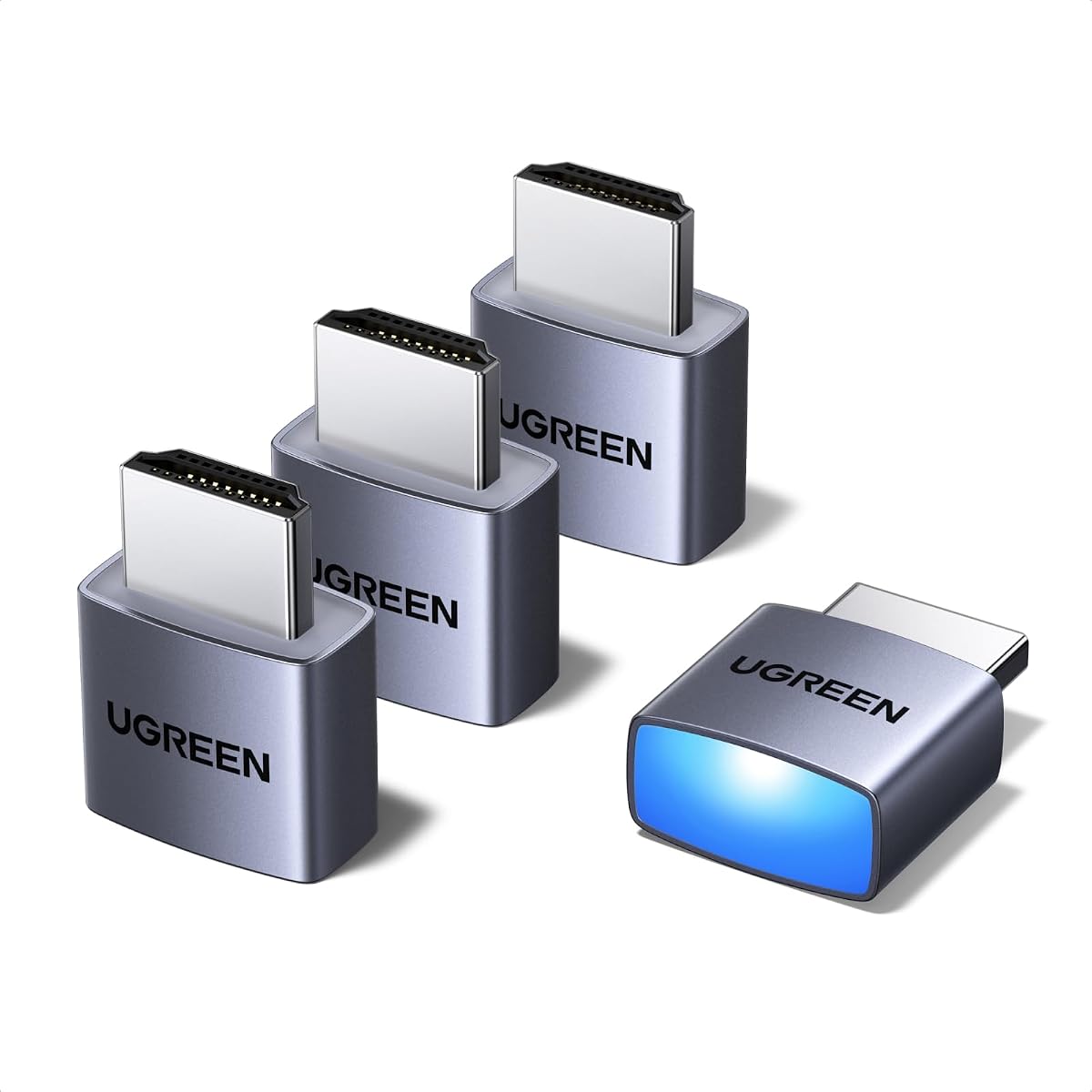
The UGREEN HDMI Dummy Plug stands out as a reliable solution for headless PC deployments with a solid 4.6 rating. It supports true 4K at 60Hz performance ensuring your GPU stays active for remote desktop or mining tasks without needing a physical monitor.
We may earn a commission when you buy through this link, at no additional cost to you.
Its aluminum shell design is a standout feature for heat dissipation which helps prevent overheating during intensive workloads. The integrated status LED gives you immediate visual feedback on connection status adding practical utility to the build.
While it requires an HDMI port this limitation is standard for this category. The device does not include a USB power cable so it draws power directly from the HDMI interface which works well for most setups but may limit placement options slightly.
If you need a durable virtual display emulator for servers or home labs this four pack offers great value. It is ideal for users managing multiple headless machines who want consistent performance across all units.
Supports 4K Ultra HD at 60Hz to keep GPU fully utilized for editing or mining.
Sturdy aluminum construction ensures long lasting use even during 24/7 operation.
We may earn a commission when you buy through this link, at no additional cost to you.
This four pack HDMI dummy plug delivers a high 4.8 rating making it a top budget pick for headless setups. It provides 4K at 60Hz virtual display support which is enough for most remote desktop and mining applications.
We may earn a commission when you buy through this link, at no additional cost to you.
The industrial grade durability with heat dissipating aluminum armor ensures these units can run continuously without failing. The built in status LED adds a small but useful touch for verifying connections quickly.
While it lacks advanced features like HDR or higher refresh rates it focuses on reliability and cost efficiency. This makes it perfect for users setting up multiple machines where individual cost matters more than premium specs.
Choose this if you need multiple units for a farm or home lab and want proven performance. It works seamlessly with Windows macOS and Linux making it versatile for mixed environments.
Provides four units for the price of one premium device saving money on bulk setups.
Aluminum armor resists overheating ensuring stability for 24/7 mining or server use.
We may earn a commission when you buy through this link, at no additional cost to you.
The DTech HDMI dummy plug is known for solving the specific Mac OS headless display issue making it a strong choice for Apple users. It comes in a three pack and supports high resolution up to 4K for virtual display tasks.
We may earn a commission when you buy through this link, at no additional cost to you.
Its gold plated dongle ensures stable digital signal transmission which helps maintain reliability during extended use. The compact design means it stays out of the way on your desk or server rack.
Unlike some competitors it does not have a status LED so you rely on system recognition to confirm it is working. This is a minor trade-off given its low cost and specific compatibility strengths.
If you run Mac Mini servers or need a headless adapter for OSX this is a solid pick. It is also great for users who want a straightforward plug and play solution without extra features.
Specifically addresses the headless display problem common in Mac OSX systems.
Gold plated interface ensures complete signal transmission for reliable performance.
We may earn a commission when you buy through this link, at no additional cost to you.
This headless ghost display emulator offers a simple set and forget approach for users who just need basic functionality. It works with any graphics card that has HDMI output and supports 1080p at 60Hz which covers many remote desktop needs.
We may earn a commission when you buy through this link, at no additional cost to you.
The ultra compact low profile design means it does not stick out from your device making it ideal for tight spaces. It requires no drivers or power cables which simplifies installation even further.
While it is limited to 1080p this is often sufficient for headless control tasks. It is a good option if you do not need 4K resolution and want a no-fuss adapter.
Consider this if you need a single reliable adapter for occasional use. Its universal compatibility makes it a safe choice for mixed hardware environments.
Works with any graphics card HDMI output and major operating systems.
No cables or configuration needed for true plug and play experience.
We may earn a commission when you buy through this link, at no additional cost to you.
This three pack offers a generous two year unconditional warranty which provides peace of mind for long-term setups. It supports 4K HDR virtual display and includes gold plated connectors for stable signal transmission.
We may earn a commission when you buy through this link, at no additional cost to you.
The hot swap capability allows you to connect or disconnect without restarting the system which adds flexibility for testing or switching ports. This makes it convenient for users who manage multiple devices regularly.
While the rating is slightly lower than some options the warranty strength balances this out well. It is a good choice for users who prioritize after-sales support over top-tier ratings.
If you need multiple adapters and want strong warranty coverage this is a smart buy. It works across Windows Mac and Linux for broad compatibility.
Two year unconditional warranty ensures support for long-term headless projects.
Supports hot swapping for flexible testing and device management.
We may earn a commission when you buy through this link, at no additional cost to you.
This five pack offers versatile rate support including 1080p at 240Hz which is useful for gaming or specific rendering tasks. It comes with a thicken aluminum shell for durability and full board copper pouring for signal stability.
We may earn a commission when you buy through this link, at no additional cost to you.
The HDR display emulator supports vivid output with peak brightness up to 1015 nits making it suitable for color sensitive preview tasks. This adds a layer of visual quality beyond standard adapters.
Since it is a newer product there are no user ratings yet so performance reliability is unproven by third parties. However the specs suggest a strong focus on high-performance systems.
If you need multiple units for a lab and want HDR support this is worth trying. The five pack price offers good value for testing purposes.
Supports up to 240Hz for smooth virtual display operations.
Full board copper pouring enhances signal stability and reduces interference.
We may earn a commission when you buy through this link, at no additional cost to you.
This new generation adapter supports HDMI 2.1 enabling 4K at 120Hz which is critical for high-refresh gaming and VR. It is designed for use with devices like Steam Deck and ROG Ally making it a premium choice for gamers.
We may earn a commission when you buy through this link, at no additional cost to you.
The gold plated fit-headless dongle ensures stable digital signal and allows HBCC to stay active on mining rigs. This is key for maintaining performance without a physical monitor attached.
Note that on Windows 11 the refresh rate may be limited to 60Hz due to system updates but remains fully functional on Windows 10. This nuance is important for gamers planning high frame rate setups.
If you need the highest resolution and refresh support this is the best option. It is more expensive but justifies the cost with advanced HDMI 2.1 features.
Supports 4K 120Hz for next-gen gaming and VR headsets.
Ideal for Steam Deck ROG Ally and main PC streaming setups.
We may earn a commission when you buy through this link, at no additional cost to you.
This eight pack is designed for large scale deployments like server farms or multi rig mining setups. It offers 4K HDR support and defaults to 1440p output which balances quality and performance well.
We may earn a commission when you buy through this link, at no additional cost to you.
The full board copper pouring enhances signal stability reducing interference during operation. Thicken aluminum shell provides durability for long-term 24/7 use in data center environments.
Since there are no ratings yet this is a newer product. It is suitable for bulk buyers who need many adapters and trust the specs provided.
If you need to outfit many machines this offers the best volume pricing. It is a practical choice for data center managers or serious hobbyists.
Eight units provide excellent value for large scale headless projects.
Full board copper pouring ensures stable signal with reduced interference.
We may earn a commission when you buy through this link, at no additional cost to you.
This five pack distinguishes itself with a default 2160p output which saves manual configuration steps. It includes 4K HDR support and features full board copper pouring for signal stability during tasks.
We may earn a commission when you buy through this link, at no additional cost to you.
The thicken aluminum shell ensures durability for continuous use. The design aims to provide vibrant realistic display simulation which helps with color accuracy for previews.
Like others in the new line there are no ratings yet so reliability is based on specs. It is a good choice for users wanting high default resolution out of the box.
If you need multiple adapters with high default resolution this is ideal. It works across Windows Mac and Linux for broad system support.
Defaults to 2160p for immediate high quality virtual display without setup.
HDR support ensures vivid output for color-sensitive applications.
We may earn a commission when you buy through this link, at no additional cost to you.
This adapter stands out by supporting 8K at 30Hz which is rare for dummy plugs. It also handles 4K at 120Hz and works well with 120fps Steam Link for cloud gaming applications.
We may earn a commission when you buy through this link, at no additional cost to you.
It uses gold plated fit-headless connectors to ensure stable signal and tricks the GPU into detecting a monitor. This allows HBCC to stay active for mining or high-performance tasks.
Note that it requires HDMI 2.1 ports to achieve high refresh rates. The price is higher reflecting its advanced capabilities compared to standard 1080p adapters.
If you need the highest resolution possible this is the best choice. It is suitable for enthusiasts and future-proof setups.
Rare support for 8K at 30Hz for ultra-high fidelity virtual displays.
Works with 120fps Steam Link for smooth cloud gaming experiences.
We may earn a commission when you buy through this link, at no additional cost to you.
Selecting the right HDMI dummy plug depends on your specific use case whether it is for remote desktop mining or gaming. This guide outlines the key factors to consider.
Check if the adapter supports the resolution you need such as 1080p 4K or higher. For gaming or detailed work look for 4K at 60Hz or higher capabilities.
Higher resolution support ensures your GPU stays active and unlocked for demanding tasks.
Refresh rates matter for smooth performance especially in gaming or VR setups. Adapters offering 120Hz or higher allow for fluid motion.
Choose a model that matches your monitor's max refresh rate for best results.
Buying multi-packs is cost effective if you have multiple devices. Consider how many headless PCs you plan to run before selecting.
Larger packs offer better value per unit for farm setups.
Look for aluminum shells that help dissipate heat during long sessions. Durability ensures reliability in servers or mining rigs.
Metal construction prevents overheating better than plastic alternatives.
Ensure the adapter works with your OS including Windows macOS or Linux. Some models specifically fix Mac OS headless issues.
Universal compatibility avoids driver headaches across different systems.
Check if the product includes a warranty for peace of mind. Longer coverage protects against early failures in critical setups.
Two year warranties are common for premium models.
Confirm the device has gold-plated HDMI connectors for stable signal. This ensures long term reliability and reduced interference.
Gold plating helps maintain signal integrity over time.
Be aware that OS updates may affect features like 120Hz on Windows 11. Verify current system limitations before buying for high refresh needs.
Check community reviews for specific OS limitations.
To use simply insert the dummy plug into your graphics card HDMI port. The system will recognize it as a monitor and allow remote desktop or GPU tasks without a physical screen.
Ensure your port is secure to prevent connection drops. The plug should fit snugly without extra tools or drivers required for setup.
Keep the adapter in a cool dry place when not in use. Periodically check the connection for dust or debris to maintain signal quality.
No it draws negligible power directly from the HDMI port. It consumes minimal energy and does not affect system power supply significantly.
Yes it is compatible with Windows 11. High refresh rates like 120Hz may be limited due to updates but basic functionality remains.
Yes it allows your GPU to stay active for mining tasks. It acts as a physical monitor enabling full GPU performance.
No it is plug and play and requires no drivers. Your OS will detect it automatically as a display device.
Yes but some models specifically address Mac OS headless issues. Check compatibility notes for Apple devices.
Yes it can simulate displays for VR headsets. It ensures the GPU stays active for VR rendering.
Many modern models support HDR. Check the specs for HDR compatibility if color quality is key.
Yes you can connect multiple to different ports if available. Each acts as an independent monitor output.
We highlighted the UGREEN 4 Pack as the top pick for its balance of 4K performance and build quality. It serves most users needing reliable virtual displays.
Budget buyers should consider the 4 Pack HDMI Dummy Plug 4K HDR for its low cost and high ratings. Premium gamers may prefer the HDMI 2.1 option for 120Hz support.
Prices and availability may change over time so check current listings before purchasing. This guide helps you make an informed choice for headless computing needs.