
YBING Keyboard Case for Samsung Galaxy Tab A11 Plus & Galaxy Tab A9 Plus
4.5Editor score
360 degree rotation
7-color rainbow backlight
Affordable value pricing
Find the best keyboard for Samsung A11 tablet with our expert guide comparing top magnetic cases, trackpads, and detachable designs for productivity.
Transform your Samsung Galaxy Tab A11 into a productivity powerhouse with the right keyboard accessory. These cases combine protection with typing comfort for work and study.
We compared ten top-rated options based on build quality, connectivity, battery life, and user feedback to help you find the perfect match for your needs.
Each pick highlights key features and pros to simplify your decision. Please note that availability and pricing may vary over time across different retailers.
4.5Editor score

4.3Editor score

4.6Editor score
This side-by-side comparison reviews every model listed to highlight unique features and technical specifications for informed decision making.



This Dexnor keyboard case transforms your tablet into a laptop quickly with a magnetic keyboard solution designed for 11 inch Galaxy Tab A11 Plus models.
We may earn a commission when you buy through this link, at no additional cost to you.
It features a built-in multi-touch trackpad that supports gestures for seamless document editing and web browsing without touching the screen.
The ultra-light design weighs just 1.36lbs and offers strong magnetic support though the screen sits directly on the base rather than floating.
Buyers seeking a portable solution with trackpad functionality will appreciate the long standby time and ergonomic 120 degree viewing angle.
The built-in multi-touch trackpad allows precise control and gestures for efficient workflow management and multitasking on your device.
Weighing only 1.36lbs the case is ideal for travel while maintaining strong magnetic attachment and protective qualities for daily use.
We may earn a commission when you buy through this link, at no additional cost to you.
TUNKARMOR offers a versatile keyboard case with a detachable magnetic keyboard that can be repositioned to suit your preferred setup and workflow needs.
We may earn a commission when you buy through this link, at no additional cost to you.
The case supports multiple viewing angles and includes a Pen holder while protecting the device with a honeycomb grid pattern for added durability.
Features like auto sleep wake help conserve energy while the detachable design allows you to use the tablet without the keyboard attached if desired.
This model is ideal for users who want the flexibility to adjust keyboard position and angle frequently during different tasks and environments.
The detachable magnetic keyboard can be moved or changed at any time to match your usual preferences and usage habits effectively.
Full edge coverage with honeycomb grid protection increases device lifespan by more than 30 percent while preventing overheating and damage.
We may earn a commission when you buy through this link, at no additional cost to you.
This keyboard case comes with a rechargeable Bluetooth mouse and a smart trackpad to enhance navigation precision and control for tablet multitasking.
We may earn a commission when you buy through this link, at no additional cost to you.
The keyboard features a detachable magnetic design with 7 color rainbow backlight and supports multiple operating systems for versatile compatibility across devices.
Users can enjoy a long battery life with Type-C charging and a convenient built-in stylus slot for secure storage during daily use and travel.
It suits those who prefer mouse navigation alongside keyboard typing for desktop-like functionality and efficient document editing on the go.
The included Bluetooth mouse and trackpad provide precise control for document editing and web browsing without needing to touch the screen.
Compatible with iOS Windows and Android systems this keyboard allows easy switching to match your specific device and usage needs easily.
We may earn a commission when you buy through this link, at no additional cost to you.
Soke provides a sleek keyboard case with a rechargeable wireless magnetic keyboard offering 7-color backlighting for comfortable typing in low light.
We may earn a commission when you buy through this link, at no additional cost to you.
The case supports two distinct viewing angles of 120 and 130 degrees and features auto sleep wake to protect battery life and usage time.
Compatibility extends to iOS Android and Windows systems allowing you to switch setups easily and reducing travel burden for multi-device users.
Choose this option if you value colorful backlighting and system flexibility along with reliable magnetic connection and battery-saving features.
Press the corresponding button to switch between 7 backlight colors for a comfortable typing experience even in dark or low light settings.
Support for iOS Android and Windows allows you to freely switch the system you need to provide convenience for diverse use scenarios.
We may earn a commission when you buy through this link, at no additional cost to you.
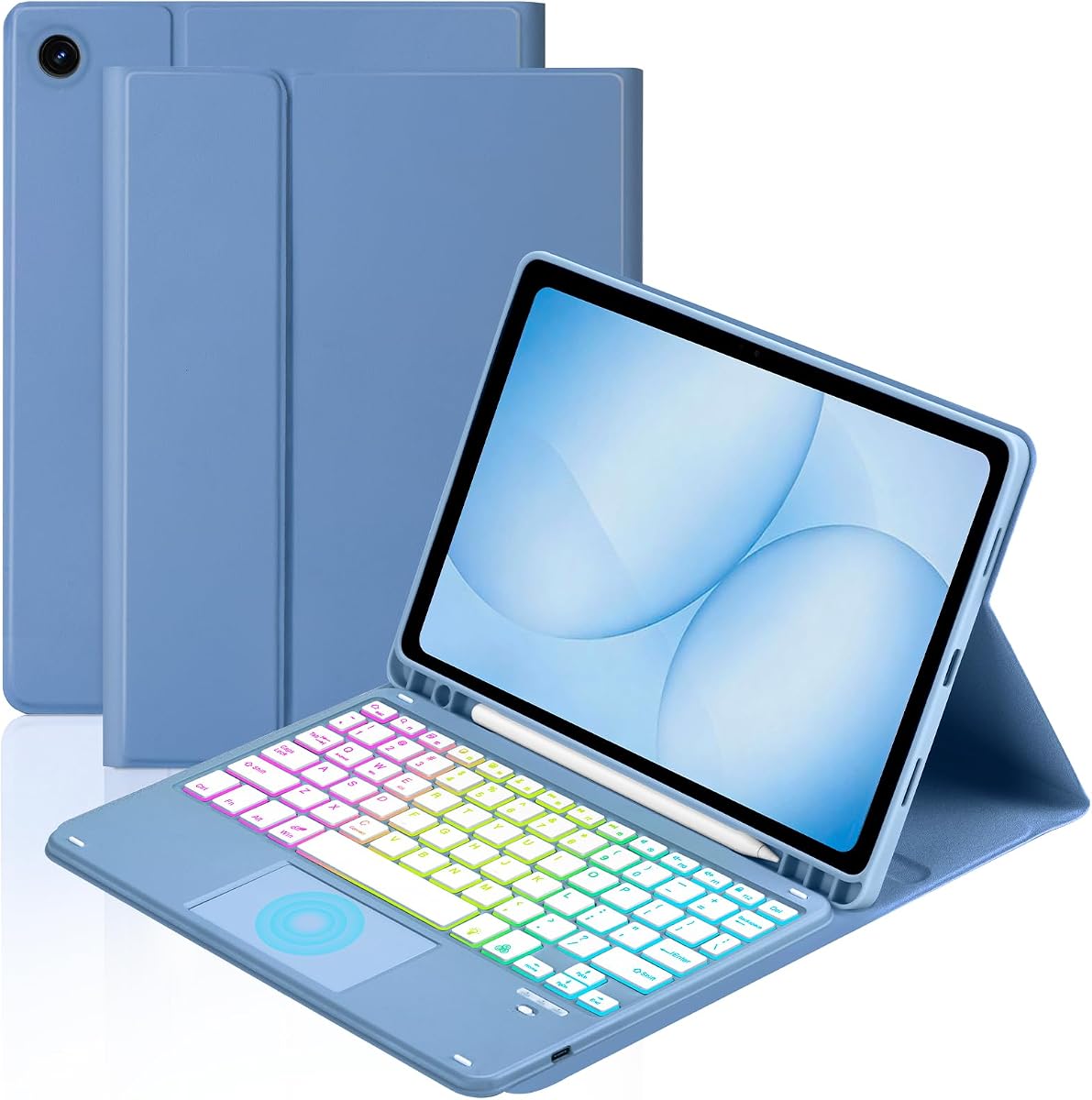
YBING offers an affordable keyboard case with a 360 degree rotatable stand and strong magnetic adsorption to secure the keyboard firmly to the case.
We may earn a commission when you buy through this link, at no additional cost to you.
The keyboard features 7 color rainbow backlight and shortcut function keys to quickly perform actions like copy paste or play pause while working.
With a rechargeable battery the keyboard can work for up to 80 hours with backlight off and includes a built-in pencil holder for convenience.
Budget-conscious buyers will find this model valuable for its durability and versatile rotation capabilities without sacrificing typing comfort or style.
The back cover rotates 360 degrees allowing horizontal or vertical placement for watching videos or reading at a comfortable viewing angle.
First row shortcut function keys provide quick access to common tasks like select all copy paste and pause play for improved efficiency.
We may earn a commission when you buy through this link, at no additional cost to you.
Harvopu provides a case with keyboard and wireless mouse offering 3-Level DPI adjustment for precise control during graphic editing and navigation tasks.
We may earn a commission when you buy through this link, at no additional cost to you.
The keyboard boasts high-endurance battery life with up to 180 hours of use per charge and a detachable multi-color backlight for flexible usage.
The protective case features stain-resistant and easy-clean materials that repel spills and protect against scratches and daily wear effectively.
This option is best for users needing desktop accuracy with a mouse and durable protection that remains stylish and practical for daily use.
The included wireless mouse features 3-Level DPI adjustment for instant sensitivity switching ideal for editing or fast-paced browsing needs.
Stain-resistant case materials actively repel and easily wipe clean from marks and spills to restore a like-new appearance quickly.
We may earn a commission when you buy through this link, at no additional cost to you.
TiMOVO offers a keyboard case compatible with the 2026 release featuring 7-color backlight with 3 brightness levels to suit dark or bright environments.
We may earn a commission when you buy through this link, at no additional cost to you.
The design includes anti-slide protection and multiple viewing angles to ensure a comfortable and pleasant experience during typing and reading tasks.
Battery life extends to over 90 hours with a 2-3 hour charge and the keyboard automatically enters hibernation state to save power.
Choose this model for reliable protection and efficient battery usage with the convenience of a detachable keyboard for simplified travel and storage.
3 levels of brightness combined with 7 vibrant colors make typing fun and easy regardless of your current lighting environment.
If unused for a long time the keyboard enters hibernation state to extend battery life and keep the setup ready when inspiration strikes.
We may earn a commission when you buy through this link, at no additional cost to you.
MePadKey features a smart touchpad supporting multi-touch functions including up to 4 finger gestures for advanced navigation and app control on your tablet.
We may earn a commission when you buy through this link, at no additional cost to you.
The keyboard includes 7-color rainbow backlight and multi-function keys to quickly execute tasks like copy paste and play pause while working.
Built-in magnets firmly adsorb the keyboard while anti-slip grooves allow angle adjustment for work reading drawing and entertainment comfortably.
This option is ideal for users who rely on gesture navigation and want a detachable keyboard setup with advanced touchpad functionality.
Support for 1 to 4 finger gestures enables actions like scrolling zooming switching applications and taking screenshots with swipes and clicks.
Anti-slip grooves allow the shell to be adjusted to a suitable angle for work reading drawing and entertainment in any environment.
We may earn a commission when you buy through this link, at no additional cost to you.
This MePadKey variant features a protective case that rotates 360 degrees with non-slip grooves to adjust work or entertainment angles for any case.
We may earn a commission when you buy through this link, at no additional cost to you.
The touchpad supports multi-finger gestures for efficient navigation and the first row of keys includes functional shortcuts to improve overall efficiency.
Compatibility with three systems allows switching by pressing FN keys while the keyboard includes a built-in rechargeable battery to avoid replacements.
Look for this model if you need full rotation capabilities and system switching with a touchpad to enhance your tablet workflow effectively.
The protective case can be rotated at 360 degrees with non-slip grooves to ensure work or entertainment in any angle you prefer.
Compatible with three systems allows you to switch system by pressing FN plus specific keys for quick convenience and flexibility.
We may earn a commission when you buy through this link, at no additional cost to you.
Supveco uses flexible silicone back and TPU cover with honeycomb grid pattern to protect against overheating and increase device lifespan by over 30 percent.
We may earn a commission when you buy through this link, at no additional cost to you.
The case features auto sleep wake function and magnetic detachable keyboard allowing you to reposition or remove the keyboard as needed easily.
Backlit keys offer seven colors with automatic color change and the battery requires 3.5 hours for full charge to maintain energy efficiency and low consumption.
Premium seekers will appreciate the durable materials and auto sleep wake features that combine with comfortable typing and visual enjoyment for daily use.
Inner honeycomb grid cushioning protects against overheating and increases device lifespan by more than 30 percent against shocks and scratches.
Seven colors available with automatic color change bring different visual enjoyment while allowing easy typing in dark environments safely.
We may earn a commission when you buy through this link, at no additional cost to you.
Selecting the right keyboard requires evaluating connection methods, protection levels, and additional features like touchpads or mice.
Always confirm your tablet model number before purchasing because these keyboard cases are designed specifically for Samsung Galaxy Tab A11 Plus and A9 Plus models like SM-X230 and SM-X210.
Check your tablet settings for model numbers starting with SM to ensure the case fits correctly and offers precise cutouts.
Look for magnetic wireless keyboards that connect via Bluetooth to offer freedom of movement and reliable input without cables.
A magnetic detachable design allows you to remove the keyboard when not needed for lighter carrying and flexible use.
Many cases include 7-color rainbow backlights that enhance typing in low-light conditions and add visual appeal.
Choose options with adjustable brightness or modes like breathing light to customize the look and conserve battery.
Some models include a built-in multi-touch trackpad or a separate wireless mouse to improve navigation and multitasking.
These features bring a laptop-like experience and help with precise cursor control on the tablet screen.
Full edge coverage with honeycomb grid or PU leather ensures protection against scratches, bumps, and drops.
Anti-slip grooves and sturdy buckles keep the tablet secure and maintain a solid grip during use.
Rechargeable keyboards typically offer battery life ranging from hours of active use to days of standby time.
Look for long life batteries that can work for many hours with the backlight off to maximize productivity.
An integrated stylus holder keeps your pen safe and accessible while preventing loss during travel or daily use.
Check that the holder is built-in and compatible with your existing pen for convenience.
Auto sleep wake functions use magnetic stripes to detect usage status and save battery life effectively.
This feature ensures your tablet wakes when opened and sleeps when closed for better power management.
Connect the keyboard by turning it on and pairing via Bluetooth if required or simply placing it on the magnetic base.
Clean the case gently with a damp cloth to remove dust and maintain the stain-resistant surface for long-term use.
Charge the keyboard periodically using the included Type-C cable to ensure it remains powered and ready for tasks.
These keyboard cases are designed specifically for Galaxy Tab A11 Plus and A9 Plus models. They will not work with other Samsung tablets due to size and shape differences.
The S Pen is not included. Some cases come with a built-in holder to store your pen securely but you must buy the pen separately.
Battery life varies by usage and backlight settings. Some models offer up to 180 hours of standby and 80 hours of use with backlight off.
Yes. Most keyboards are magnetically detachable so you can remove them and use the tablet independently with the case providing protection.
No. Some models include built-in multi-touch trackpads while others do not. Check the product details to confirm if a trackpad is included.
Many models include an auto sleep wake function using magnetic stripes to save battery. Check individual product specs to confirm this feature.
Several keyboards support Windows Android and iOS systems allowing you to switch between them using specific key combinations on the keyboard.
We have reviewed ten top options ranging from budget-friendly choices to premium builds with advanced features like touchpads and mice.
Prioritize compatibility and protection features while considering whether you need extra navigation tools like trackpads or mice.
Remember to check current availability and prices on our links to ensure you get the best deal for your chosen keyboard.