
Newmen GM326 Mechanical Keyboard
4.4Editor score
Affordable price
Hot swappable
Knob control
Discover the top 75 percent mechanical keyboards for gaming and work. This guide compares connectivity, sound, and build quality across ten top rated options
Finding the right 75 percent mechanical keyboard can transform your workspace. These compact layouts offer a balance between functionality and space saving design. Users get arrow keys and function rows without the bulk of full sized boards.
We evaluated ten models based on build quality, connectivity options, and typing feel. Each selection includes verified data from manufacturers and real user feedback. Our goal is to help you find a board that matches your specific needs.
Each pick below highlights key strengths and unique features. You will see detailed specs and honest pros and cons. Prices fluctuate often so check current listings before buying to ensure the best deal.
4.4Editor score

4.6Editor score

4.7Editor score
This side by side comparison covers all ten selected keyboards. Each row highlights core specs like connectivity, switch type, and unique features to help you compare quickly.




The AULA F75 Pro stands out as a top tier 75 percent mechanical keyboard. It boasts a 4.6 rating from users who appreciate its versatile connectivity. The keyboard combines style with performance offering a solid typing experience.
We may earn a commission when you buy through this link, at no additional cost to you.
Its tri mode connectivity allows seamless switching between Bluetooth 5.0 2.4GHz wireless and USB wired connections. This flexibility supports up to five devices making it ideal for multitaskers. The hot swappable base lets you customize switches without soldering.
While the software requires a Windows wired connection for full customization this is a minor trade-off. The pre lubricated stabilizers and switches provide a creamy sound that enthusiasts love. It is built to last with high quality materials throughout.
Buy this if you want a reliable all around keyboard for work and play. Its compact layout saves desk space while keeping essential keys. It is a strong choice for anyone seeking value and performance.
Connect up to five devices and switch easily using shortcuts or the side button.
Swap out switches for a personalized feel with the hot swappable PCB support.
We may earn a commission when you buy through this link, at no additional cost to you.
The RK ROYAL KLUDGE R75 offers a fantastic wireless experience for gamers and typists. It features a gasket mount design that reduces vibration and noise significantly. The cream switches are pre lubricated for a smooth quiet typing experience.
We may earn a commission when you buy through this link, at no additional cost to you.
This keyboard supports Bluetooth 5.1 2.4GHz wireless and USB-C wired connections. You can connect three devices at once which is great for switching between a PC and a tablet. The 4000mAh battery ensures you use it for over a week.
The CNC metal volume knob is programmable which adds extra utility to your setup. While it does not have as many light effects as some competitors it still offers over 20 RGB modes. The build quality is sturdy and reliable for daily use.
Choose this keyboard if you prioritize a quiet smooth typing feel without wires. Its gasket mount provides a premium tactile response. It is an excellent value for wireless gaming setups.
Five layers of sound absorbing material cushion keystrokes for a softer feel.
Switch between wireless Bluetooth 2.4GHz and wired modes instantly.
We may earn a commission when you buy through this link, at no additional cost to you.
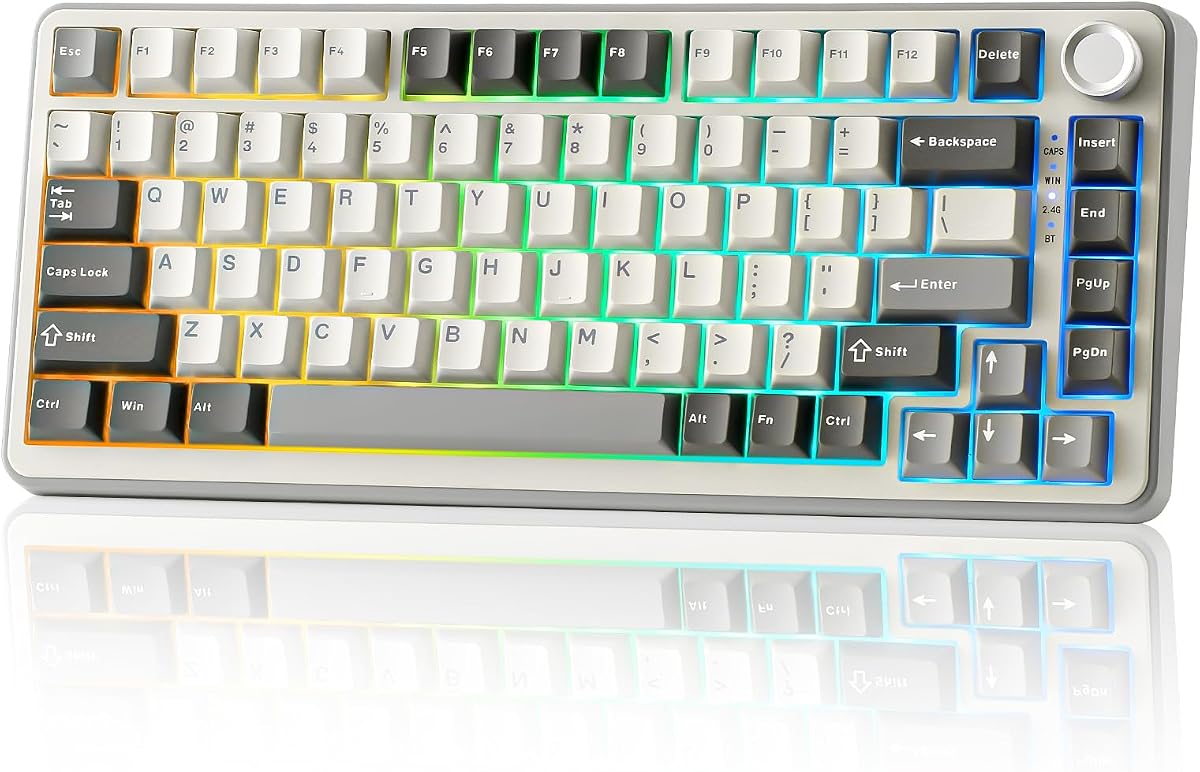
The Newmen GM326 is a perfect entry level option for those wanting a 75 percent mechanical keyboard. It delivers essential features like hot swapping and RGB lighting at a budget friendly price. The compact size makes it ideal for small desks.
We may earn a commission when you buy through this link, at no additional cost to you.
It features a multi function knob for quick volume control which is rare at this price point. The hot swappable design allows you to change switches if you want to upgrade later. The linear red switches provide smooth fast actuation for gaming.
While it lacks wireless connectivity and uses ABS keycaps it performs well for its cost. The detachable USB-C cable makes it easy to transport for travel or LAN parties. It supports Windows and Mac systems smoothly.
Buy this keyboard if you need a reliable budget gaming board with hot swap support. It offers great value for beginners. It is a solid foundation for future customizations.
The small mini size and detachable cable make it easy to carry around.
Rainbow LED backlighting offers six colors and twenty modes to personalize your look.
We may earn a commission when you buy through this link, at no additional cost to you.
This Retro Mechanical Keyboard stands out with its vintage look and modern internal tech. It combines a gasket mount design with five layers of padding for a soft quiet feel. The white jade switches are pre lubricated for a smooth action.
We may earn a commission when you buy through this link, at no additional cost to you.
The compact 75 percent layout saves desk space without sacrificing arrow keys or function rows. It is fully hot swappable allowing you to swap switches easily without soldering. The RGB lighting adds a vibrant touch to your setup.
While it is wired only this model excels in build quality and sound. The gasket mount helps reduce vibration and creates a premium typing experience. It is perfect for those who want a unique look on a budget.
Choose this keyboard if you appreciate retro aesthetics and a soft typing feel. It offers high value for the price. It is great for office work and casual gaming.
Five layer padding provides exceptional stability and comfort during long typing sessions.
The gasketed mount ensures a tight fit and reduces internal noise significantly.
We may earn a commission when you buy through this link, at no additional cost to you.
The MageGee 75% mechanical keyboard is designed for simplicity and space efficiency. It features red linear switches that are smooth and fast for gaming. The blue LED backlight creates a cool atmosphere without complex software setup.
We may earn a commission when you buy through this link, at no additional cost to you.
With 87 keys it retains arrow keys and F1-F12 functions while saving desk space. The metal panel adds durability to the build ensuring it lasts through daily use. It works instantly with Windows macOS and Linux systems.
While it lacks RGB and advanced features it is very reliable. The ABS keycaps are sturdy and the kickstands offer comfortable angles. It is a no fuss choice for those who prefer clean functionality over bells and whistles.
Buy this keyboard if you want a reliable compact board for work or gaming. Its simplicity makes it easy to use. It is a great starter mechanical keyboard.
The sturdy metal panel and double color mixed keycaps add interest and strength.
No drivers are needed just plug it in and start typing immediately.
We may earn a commission when you buy through this link, at no additional cost to you.
This 75 percent keyboard focuses on comfort and sound dampening with its gasket mount. It uses sound absorbing pads to reduce noise for a quiet office environment. The hot swappable sockets allow you to tailor the typing feel.
We may earn a commission when you buy through this link, at no additional cost to you.
PBT keycaps resist oil and wear maintaining a clean texture over time. The RGB lighting is customizable through software to match your style. Full key anti ghosting ensures every press is registered accurately.
While it does not offer wireless options the wired connection ensures stability. The gasket mount delivers a premium cushioned feel that is rare at this price. It is built for users who prioritize comfort and silence.
Choose this keyboard if you want a quiet stable typing experience. The premium materials make it a joy to use. It is great for office work.
Sound absorbing pads and gasket design reduce noise for a quiet typing experience.
Hot swappable sockets let you change switches easily without needing soldering skills.
We may earn a commission when you buy through this link, at no additional cost to you.
The Womier SK80 features a vibrant multimedia display that sets it apart from others. You can show custom GIFs connection system stats and more on the screen. The gasket mount design offers a soft responsive feel that users love.
We may earn a commission when you buy through this link, at no additional cost to you.
It includes premium hot swappable switches with south facing LEDs for better light diffusion. The software allows deep customization of RGB lighting and macros for gaming. The screen adds a unique interactive element to your desktop.
While the screen requires a wired connection for setup the visual appeal is worth it. The keycaps are well made and the overall build is solid. It is a premium choice for enthusiasts who want flair.
Buy this keyboard if you want style and substance combined. The screen and gasket mount make it stand out. It is a top pick for display lovers.
Visualize custom GIFs and system status directly on the upper right corner screen.
EVA positioning plate and bottom filling create a responsive immersive typing feel.
We may earn a commission when you buy through this link, at no additional cost to you.
The AULA S75 PRO brings a customizable LCD screen to a wireless keyboard. You can see battery status date and time at a glance on the screen. The tri mode connection supports Bluetooth 2.4GHz and wired USB-C seamlessly.
We may earn a commission when you buy through this link, at no additional cost to you.
It features a hot swappable base that supports 3-pin and 5-pin switches. The switches and stabilizers are pre lubricated for a smooth creamy sound. Side engraved PBT keycaps look stylish and last longer than standard ones.
While the screen needs a cable to set up it adds a modern touch. The five device connection is excellent for multitasking across platforms. It is a great balance of features and style.
Choose this keyboard if you want a display without paying premium prices. It is versatile and looks fantastic. It is a great choice for modern setups.
See battery status and time instantly on the interactive LCD interface.
Connect and switch between five devices easily with the side button.
We may earn a commission when you buy through this link, at no additional cost to you.
The Keychron K2 is designed specifically for Mac users but works well with Windows. It has a unique Mac layout with all necessary function keys included. The Super Red switches provide a responsive linear feel for typing.
We may earn a commission when you buy through this link, at no additional cost to you.
It connects via Bluetooth 5.1 or USB-C and supports up to three devices. The large 4000mAh battery lasts up to 72 hours of typing. White LED backlight is elegant and easy on the eyes at night.
While it does not have RGB the white lighting is classic. The build quality is high with a sturdy frame that feels reliable. It is perfect for those who use Apple devices daily.
Buy this keyboard if you are on a Mac and want reliability. It is a trusted brand for creative professionals. It offers a great typing experience.
Includes extra keycaps for both Windows and Mac operating systems for flexibility.
A 4000mAh battery provides up to 72 hours of typing on a single charge.
We may earn a commission when you buy through this link, at no additional cost to you.
The YUNZII B75 PRO offers a premium wireless experience with gasket mounting. It features five layer padding and a noise cancellation design for a quiet feel. The cocoa cream switches are pre lubricated for a smooth experience.
We may earn a commission when you buy through this link, at no additional cost to you.
It supports Bluetooth 2.4GHz and wired connections with a large 4000mAh battery. The hot swappable sockets let you change switches freely to suit your needs. It is compatible with both Windows and MacOS systems.
While it lacks a screen the build quality is excellent. The gasket mount provides a premium typing feel that rivals much more expensive boards. It is a great choice for wireless enthusiasts.
Choose this keyboard if you want a wireless custom experience. It delivers on sound and stability. It is a solid pick for any desk.
Bluetooth 2.4GHz and wired modes let you switch based on your current needs.
Five layer padding provides a solid typing feel with minimal vibration.
We may earn a commission when you buy through this link, at no additional cost to you.
Choosing the right keyboard depends on your specific needs for typing or gaming.
Some keyboards offer wired connections while others support Bluetooth or 2.4GHz wireless. Wired models ensure zero latency for gaming. Wireless models offer flexibility for cleaning and space.
Consider how many devices you need to switch between and whether cables are an issue.
Mechanical switches vary in feel. Linear switches are smooth and fast for gaming. Tactile switches offer a bump for typing feedback. Clicky switches are loud and distinct.
Check if the keyboard is hot swappable so you can change switches later.
Materials like aluminum or thick plastic improve stability. Gasket mount designs reduce vibration for a softer feel. Look for PBT keycaps which resist wear better than ABS.
A solid build ensures the keyboard lasts longer and feels premium.
A 75 percent layout saves space but keeps arrow keys and functions. This is ideal for desks where mouse movement matters. Ensure it fits your specific desk dimensions.
Compact sizes help reduce clutter without sacrificing essential keys.
Many keyboards need drivers to change lighting or macros. Check if software supports your operating system. Full key programmability helps for complex tasks and games.
Look for software that is easy to use on your specific OS.
Wireless keyboards depend on battery life. Large capacity batteries last longer. RGB lights reduce battery life so consider if you need them always on.
Choose a model with enough battery for your usage hours between charges.
Some keyboards include a volume knob for quick access. Others have a built-in screen for stats. These add convenience but may increase cost.
Decide if you want extra controls beyond standard keys.
Budget options exist but may lack features. Premium boards offer more customization and materials. Check the warranty period to protect your investment.
Balance features with price to find the best deal.
Place the keyboard on a flat stable surface to ensure comfort. Adjust the kickstands to a height that suits your wrists. Make sure cables are tucked away to avoid tripping.
Regularly clean dust from the keys with a compressed air canister. Remove keycaps occasionally to clean debris underneath. Wipe the surface with a damp cloth.
Update the drivers or software if updates are available. This ensures features work properly. If wireless disconnect, re-pair the Bluetooth connection to fix issues.
Yes it is worth it for most users because it saves desk space while keeping essential keys like arrows. This layout offers a balance that improves mouse movement and comfort.
Many of these models work with Mac but some require specific drivers. Always check if the product includes Mac compatible keycaps or software support before buying.
Most keyboards in this list are hot swappable so you can change switches without soldering. This allows you to customize the feel and sound later on.
Modern wireless connections like 2.4GHz are fast enough for gaming. They offer low latency and stable performance similar to wired keyboards for most games.
PBT keycaps are made from a durable plastic that resists oil and shine. They feel better and last longer than standard ABS keycaps found on cheaper keyboards.
Some keyboards work out of the box but drivers are needed for RGB or macros. If you want full customization check if the software supports your operating system.
We have reviewed ten great keyboards that offer unique benefits. The AULA F75 PRO leads as a top choice with versatile connectivity and smooth typing. It is a balanced pick for anyone.
If you want value consider the Newmen GM326 for its low price and features. For screen lovers the Womier SK80 brings a unique display to the table. Prioritize what you need most.
Remember that prices change so check current listings before buying. Your perfect keyboard depends on your desk and style. We hope this guide helps you find the right one.