
10Gb/s SFP+ Fiber Port Ethernet Adapter
4.3Editor score
Intel 82599ES Controller
Supports Windows and Linux
Dual Bracket Included
Discover the best fiber optic network interface cards for 2026. This guide compares top 10G, 25G, and dual-port adapters for servers, NAS, and desktops.
A fiber optic network interface card enables high-speed data transmission over long distances with minimal latency. These components are essential for modern servers, workstations, and networking environments requiring reliable connectivity.
We evaluated ten leading network cards based on chipset performance, port types, compatibility, and cooling design. Our selection covers options for enterprise data centers, home labs, and personal high-performance computing setups.
Each entry details key specs, real-world strengths, and potential limitations to help you match hardware to your needs. Prices and availability may fluctuate, so verify current listings before purchasing your ideal adapter.
4.3Editor score

5.0Editor score

4.9Editor score
Compare specifications across ten top-rated fiber optic network interface cards to find the perfect match for your server, NAS, or desktop computing needs.


The StarTech 2-Port GbE SFP Network Card stands out as the top choice for users needing reliable gigabit connectivity. Boasting a perfect five-star rating, this card uses the trusted Intel I350 chipset to deliver stable performance across Windows, Linux, and virtualization environments.
We may earn a commission when you buy through this link, at no additional cost to you.
Its unlocked SFP slots allow you to choose any MSA-compliant fiber or copper module, giving you the freedom to scale your network cost-effectively. The built-in heatsink ensures consistent thermal management, while features like VLAN tagging and jumbo frames enhance network efficiency.
While it lacks the raw speed of 10-gigabit alternatives, its stability and broad OS compatibility make it ideal for enterprise management tasks and legacy server upgrades. The only limitation is the lower throughput compared to modern high-speed standards.
Choose this card if you prioritize reliability and flexibility over maximum bandwidth. It is an excellent fit for system administrators managing servers or virtual hosts that require robust network segmentation and long-term stability.
Open SFP slots enable compatibility with a wide range of single-mode, multi-mode, and direct-attach modules.
Supports VLAN tagging, PXE boot, and SR-IOV for secure and efficient network virtualization.
We may earn a commission when you buy through this link, at no additional cost to you.
For budget-conscious builders needing high-speed connectivity, this adapter offers an accessible entry point into 10-gigabit networking. It delivers stable throughput for gaming, NAS storage, and virtualization tasks at a fraction of the cost of enterprise-grade cards.
We may earn a commission when you buy through this link, at no additional cost to you.
Powered by the reliable Intel 82599 controller, it supports advanced features like SR-IOV and Flow Director, ensuring efficient data handling. The card works seamlessly on most Windows Server versions and major Linux distributions, making it versatile for home labs.
However, users should note that driver installation is required for desktop Windows versions, and the passive heatsink may need additional airflow in quiet enclosures. These are minor trade-offs given the significant performance boost it provides.
If you need fast network speeds without breaking the bank, this adapter is an outstanding choice. It is perfect for upgrading older PCs or building a cost-effective storage server that requires reliable 10-gigabit connectivity.
Compatible with extensive Windows Server versions and popular Linux distributions including Ubuntu and Debian.
Uses PCIe x4 interface compatible with x4, x8, and x16 slots on standard motherboards.
We may earn a commission when you buy through this link, at no additional cost to you.
The Asus XG-C100F delivers blazing fast 10-gigabit speeds with a stylish and effective aluminum heatsink. Its sleek design and robust thermal management make it a reliable choice for high-performance computing environments where overheating could be a concern.
We may earn a commission when you buy through this link, at no additional cost to you.
Built-in Quality of Service technology automatically prioritizes bandwidth for gaming or important data streams, ensuring smooth performance even under heavy network loads. It supports both fiber optic and direct-attach copper connections for flexible deployment options.
While the heatsink is a standout feature, the card can still run warm during sustained high-throughput tasks. Users should ensure their case has adequate airflow to maintain optimal operating temperatures throughout extended usage.
This adapter is ideal for gamers and professionals who demand high-speed connections and stable thermal performance. Its blend of performance and design makes it a strong contender for desktop users upgrading their networking capabilities.
Sophisticated aluminum heatsink ensures cool performance during intense networking tasks and high speeds.
Built-in QoS boosts bandwidth for priority streams, reducing lag during competitive gaming sessions.
We may earn a commission when you buy through this link, at no additional cost to you.
The 10Gtek 10Gb PCI-E NIC offers robust performance backed by a three-year warranty and lifetime technical support. Featuring an original Intel controller, it delivers stable throughput suitable for data center environments and virtualization hosts needing reliable connections.
We may earn a commission when you buy through this link, at no additional cost to you.
Its single SFP+ port supports various modules, allowing users to connect to switches with different transceiver types. The inclusion of both full-height and low-profile brackets ensures easy installation in standard desktop cases or compact server chassis.
While it supports essential virtualization features, users on older Windows 11 builds may need specific driver configurations to ensure functionality. Additionally, the lack of backward compatibility with slower port speeds limits flexibility in mixed network environments.
For businesses seeking dependable enterprise-grade networking with strong after-sales support, this card is an excellent choice. It balances performance and reliability, making it suitable for servers and workstations requiring consistent 10-gigabit throughput.
High-quality original Intel controller ensures stable operation and broad server compatibility.
Includes both full-height and low-profile brackets for versatile mounting in any chassis size.
We may earn a commission when you buy through this link, at no additional cost to you.
This network card leverages the Realtek RTL8127 controller to deliver 10-gigabit speeds over a modern PCIe Gen4 x1 interface. Its ability to operate in any PCIe x1, x4, x8, or x16 slot makes installation flexible across a wide range of desktops and servers.
We may earn a commission when you buy through this link, at no additional cost to you.
Designed with stability in mind, it includes RealWoW technology for enhanced diagnostic functions and wake-up capabilities. Comprehensive protocol support, including VLAN tagging and flow control, ensures it adapts well to complex network configurations.
While it offers broad Windows and Linux support, it is limited to specific Linux kernel versions and does not support FreeBSD or ESXi systems. Users should verify their specific Linux kernel version to ensure full compatibility before purchasing.
Ideal for users looking to maximize PCIe slot utility while maintaining high speeds, this card is a solid choice. It is particularly well-suited for modern workstations needing a reliable, high-performance networking upgrade without slot constraints.
PCIe Gen4 x1 design allows full operation in x1, x4, x8, and x16 slots for versatile compatibility.
RealWoW technology provides advanced diagnostics to improve data transmission stability and wake-up functions.
We may earn a commission when you buy through this link, at no additional cost to you.
This adapter stands out by offering genuine Intel 82599EN silicon without vendor lock-in restrictions on the SFP+ cage. It supports third-party DAC and optical modules, allowing users to choose cost-effective cabling without rejection issues.
We may earn a commission when you buy through this link, at no additional cost to you.
It delivers plug-and-play compatibility with popular NAS systems like TrueNAS and Proxmox, eliminating driver hassles. The card maintains a steady 10-gigabit throughput suitable for large file transfers and virtual machine migrations.
The passive heatsink design means it runs warm by default, so ensuring proper airflow in your case is essential. While it lacks hot-swap capabilities, its stability and compatibility make it ideal for non-mobile storage and server environments.
If you need reliable storage networking without being tied to expensive branded optics, this card is a perfect solution. It provides enterprise-grade performance and flexibility for home labs, homelabs, and professional server setups.
Unlocked SFP+ cage accepts third-party transceivers, reducing long-term cabling costs significantly.
Plug and play on Proxmox, TrueNAS, and ESXi with no additional driver installation steps required.
We may earn a commission when you buy through this link, at no additional cost to you.
The CX4121A offers dual 25-gigabit ports, making it the most powerful option for high-throughput data center applications. With RDMA over RoCE support, it delivers ultra-low latency critical for virtualization and high-performance storage clusters.
We may earn a commission when you buy through this link, at no additional cost to you.
Powered by the Mellanox ConnectX-4 Lx controller, this card handles complex overlay networks like NVGRE and VXLAN with ease. It auto-negotiates PCIe lanes, ensuring seamless integration into systems ranging from x4 to x8 slots.
While its performance is top-tier, it requires a substantial PCIe x8 slot and specific 25-gigabit optics, which may add to the total cost. Users should verify their switch and cabling support 25G standards before committing.
Choose this card if you need maximum bandwidth for enterprise-level virtualization or database workloads. Its advanced features and dual ports provide future-proof scalability for demanding network architectures.
Remote Direct Memory Access reduces CPU overhead for faster data processing in virtualized environments.
Supports advanced NVGRE, VXLAN, and GENEVE protocols for flexible network virtualization.
We may earn a commission when you buy through this link, at no additional cost to you.
This card simplifies setup by including a multimode optical module directly in the package. Using the proven Intel 82599EN chip, it provides stable 10-gigabit connectivity with features like checksum offloading to reduce CPU usage during heavy traffic.
We may earn a commission when you buy through this link, at no additional cost to you.
The gold-plate fingers enhance contact reliability and prevent oxidation, ensuring a longer operational life. It adapts automatically to different transmission rates and supports both half and full duplex modes for diverse network configurations.
While the package includes essential components, the card is not compatible with legacy PCI slots and requires a PCIe x1 or higher slot. Users should verify their motherboard has adequate PCIe slots available before installing.
Ideal for users needing an all-in-one fiber solution, this card offers convenience and solid performance. It is best suited for small businesses or labs where quick deployment with included optics is a priority.
Includes a multimode optical module for immediate fiber connectivity without extra purchases.
Gold-plate fingers provide antioxidant protection and reliable electrical contact over time.
We may earn a commission when you buy through this link, at no additional cost to you.
The TP-Link TX401 brings 10-gigabit speeds over standard copper cabling, making it a convenient choice for users without fiber infrastructure. Its backward compatibility ensures it works seamlessly with existing 1G or 2.5G network switches.
We may earn a commission when you buy through this link, at no additional cost to you.
Includes a CAT6A cable to ensure optimal performance, and QoS technology prioritizes gaming traffic to avoid congestion. The low-profile bracket supports compact desktop cases, and the unit comes with a solid two-year warranty.
While it is excellent for copper environments, it may run warmer than fiber adapters due to electrical processing requirements. Additionally, you are limited by the physical constraints of twisted-pair cabling over longer distances.
Choose this adapter if you want a simple upgrade without installing fiber optics. It is perfect for gaming PCs and standard workstations where copper cabling is already in place.
10GBase-T technology allows direct connection to standard Ethernet switches without fiber transceivers.
Built-in QoS prioritizes network traffic to maintain smooth gaming performance during peak hours.
We may earn a commission when you buy through this link, at no additional cost to you.
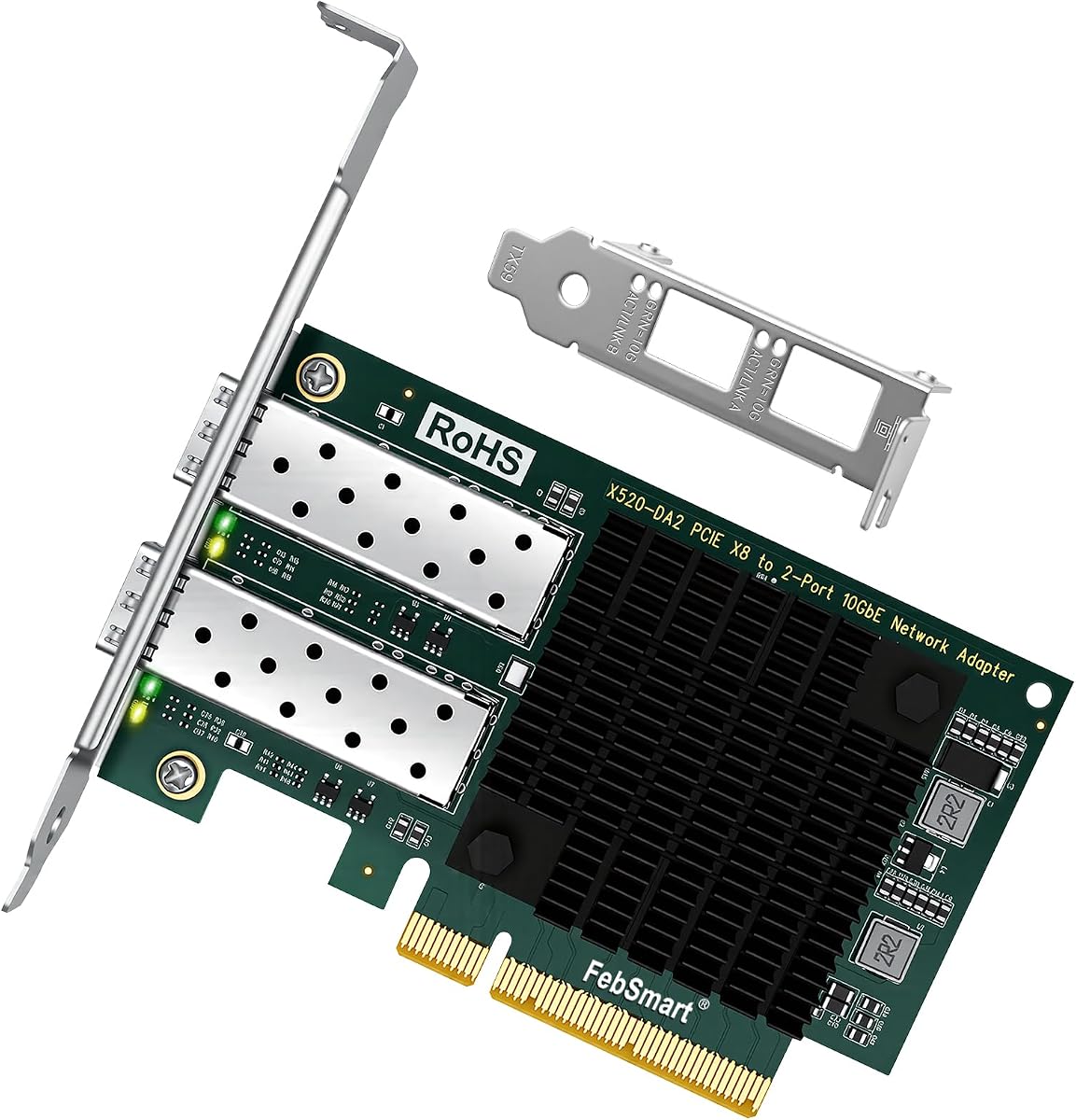
This dual-port adapter provides 10-gigabit connectivity on two channels, offering redundancy or aggregated bandwidth for demanding workloads. The Intel 82599ES controller ensures reliable performance across gaming, virtualization, and storage environments.
We may earn a commission when you buy through this link, at no additional cost to you.
It supports advanced protocols like iSCSI and FCoE, making it versatile for storage networking. Both full-height and low-profile brackets are included, ensuring compatibility with various chassis types and form factors.
The requirement for a PCIe x8 slot may limit installation on motherboards with fewer slots. Additionally, Windows desktop users must install drivers manually, though server OS versions often support it out of the box.
If you need robust connectivity for server or high-end desktop tasks, this dual-port solution is ideal. It is excellent for virtualized environments needing multiple high-speed network connections.
Two SFP+ ports allow for failover configurations or aggregated bandwidth for heavy traffic loads.
Supports FCoE and iSCSI for integrated storage and networking in unified server environments.
We may earn a commission when you buy through this link, at no additional cost to you.
Selecting the right fiber optic network interface card requires evaluating performance needs, physical constraints, and system compatibility to ensure reliable connectivity.
Assess whether you need 1G, 10G, or 25G speeds based on your server bandwidth needs. Faster speeds benefit large file transfers and virtualized environments, but cost more.
Choose 10G for most home labs and small businesses, and 25G only for specialized high-performance storage clusters.
Check your motherboard's PCIe slot type. Cards requiring PCIe x8 may not fit x4 or x1 slots, and older systems might not support PCIe Gen3 or Gen4 speeds.
Ensure your system supports the PCIe generation required by the network card for full bandwidth utilization.
Verify that the card includes drivers for your OS. Enterprise systems like Linux often support generic cards well, while Windows desktops may need manual installation.
Prioritize brands with active driver updates for your specific OS version to avoid compatibility issues.
Fiber cards often use passive heatsinks that can get warm under load. Ensure your case has enough airflow to prevent throttling during extended usage.
Select models with aluminum heatsinks if your build lacks active cooling near the PCIe slots.
Decide between SFP+ and SFP28 ports based on whether you need 10G or 25G speeds. SFP+ is cheaper and widely compatible, while SFP28 supports higher throughput.
Confirm your switch supports the chosen port type and fiber optic standard before purchasing.
For virtualized environments, choose cards supporting SR-IOV and VLAN tagging. These features allow efficient resource sharing between virtual machines.
Look for Intel controllers or Mellanox adapters if you run multiple VMs on a single host.
Check if your case requires a low-profile bracket. Small form factor PCs need compact adapters to fit inside narrow chassis.
Many cards ship with both full and low-profile brackets for installation flexibility.
Avoid cards that reject third-party transceivers. Open SFP cages allow you to use cheaper, branded modules without vendor restrictions.
Balance initial hardware costs with long-term optics expenses for the best total value.
Install the card into a compatible PCIe slot, ensuring it clicks securely into place. Connect the fiber optic cable or direct-attach copper cable carefully to avoid damaging the optical connectors.
Boot your system and install necessary drivers from the manufacturer's website. Check network settings to confirm that the OS recognizes the card and assigns a valid IP address.
Keep the card free of dust and monitor temperatures during heavy network usage. Regular updates to firmware and drivers help maintain stable performance and security over time.
Yes, fiber optic cards typically use LC connector cables or direct-attach copper (DAC) cables. Make sure your cables match the port type, such as SFP+ or SFP28, and the correct fiber mode.
Yes, most 10G cards auto-negotiate down to 1G speeds if connected to a Gigabit switch. This allows backward compatibility but does not provide full 10G performance.
SR-IOV stands for Single Root I/O Virtualization. It allows a physical network card to appear as multiple virtual devices, improving performance in virtualized environments by reducing CPU overhead.
Some older cards require manual driver installation for Windows 11. Check the manufacturer website for the latest drivers specifically listed for Windows 11 compatibility.
Many of these cards are natively supported by TrueNAS and Proxmox. Always check community forums to confirm driver compatibility before installing in a NAS environment.
Passive heatsinks work well in cases with good airflow. However, in tight or enclosed systems, adding a small fan or ensuring vertical orientation improves cooling efficiency.
Not directly. You need a fiber optic card for fiber cables and a copper card for Ethernet. Some combo cards exist, but they typically use separate interfaces for each medium.
Most enterprise-grade network interface cards last 5 to 7 years under normal use. Proper cooling and stable power supply extend their reliability and reduce failure risks.
We have reviewed ten top-rated fiber optic network interface cards ranging from budget 10G solutions to high-performance 25G dual-port adapters. Each option serves specific needs from home labs to enterprise server environments.
Prioritize compatibility with your existing infrastructure, such as PCIe slot availability and operating system support. Consider whether fiber or copper connectivity suits your distance and speed requirements before purchasing.
Current availability and deals change frequently, so double-check the latest product listings before you buy. The right adapter ensures your network stays fast, reliable, and ready for future growth.