
Universal for Hisense TV Remote Replacement
4.4Editor score
1 year full warranty included
Netflix and YouTube hotkeys
Compatible with many models
This guide compares ten top-rated Hisense TV replacement remotes to help you find the perfect match for your smart TV, Roku, or Google TV setup today.
Finding a reliable replacement remote for your Hisense TV can be frustrating when the original unit stops working or gets lost. You need a device that offers seamless control over your smart features without complicated setup procedures. This guide explores the best options available to restore full functionality to your entertainment system efficiently.
We have carefully evaluated ten distinct remote controls based on compatibility, build quality, and user feedback. Each product was selected to cover different Hisense TV series including Android, Google, and Roku models. Our analysis ensures you can choose a remote that fits your specific device needs and usage preferences accurately.
Each pick in this list highlights key features like voice control, shortcut buttons, and battery life. We include detailed specifications and pros and cons to help you make an informed decision quickly. Please note that prices and availability may change so check the latest offers before purchasing your new remote control.
4.4Editor score

4.5Editor score

4.2Editor score
The following table provides a side-by-side comparison of all ten selected remote controls to help you quickly identify the right model for your Hisense TV.


This universal remote is designed to work with a wide range of Hisense 4K ULED HD UHD Android Smart TVs. It boasts a rating of 4.5 stars based on user feedback and requires no programming to function properly.
We may earn a commission when you buy through this link, at no additional cost to you.
The standout quality of this remote is its plug and play functionality. Users simply need to insert batteries and the remote is ready to control their TV immediately. It features four quick launch buttons for instant access to favorite channels.
Honest trade-offs include the exclusion of batteries and the lack of compatibility with Hisense fire and Roku TVs. These limitations are acceptable given the affordable price and the ease of use for standard Hisense models.
This remote is ideal for users who want a reliable and simple replacement without dealing with complex setup codes. It is a strong choice for restoring control to your living room entertainment system quickly.
The remote works right out of the box after installing batteries so you do not need to search for setup codes.
Four dedicated quick-launch buttons allow you to jump to your preferred channels or apps with a single press.
We may earn a commission when you buy through this link, at no additional cost to you.
This remote is specifically tailored for Hisense Smart Google TV series and offers a budget friendly solution for lost or broken remotes. It has a 4.4 star rating from users and features six dedicated shortcut keys for popular streaming services.
We may earn a commission when you buy through this link, at no additional cost to you.
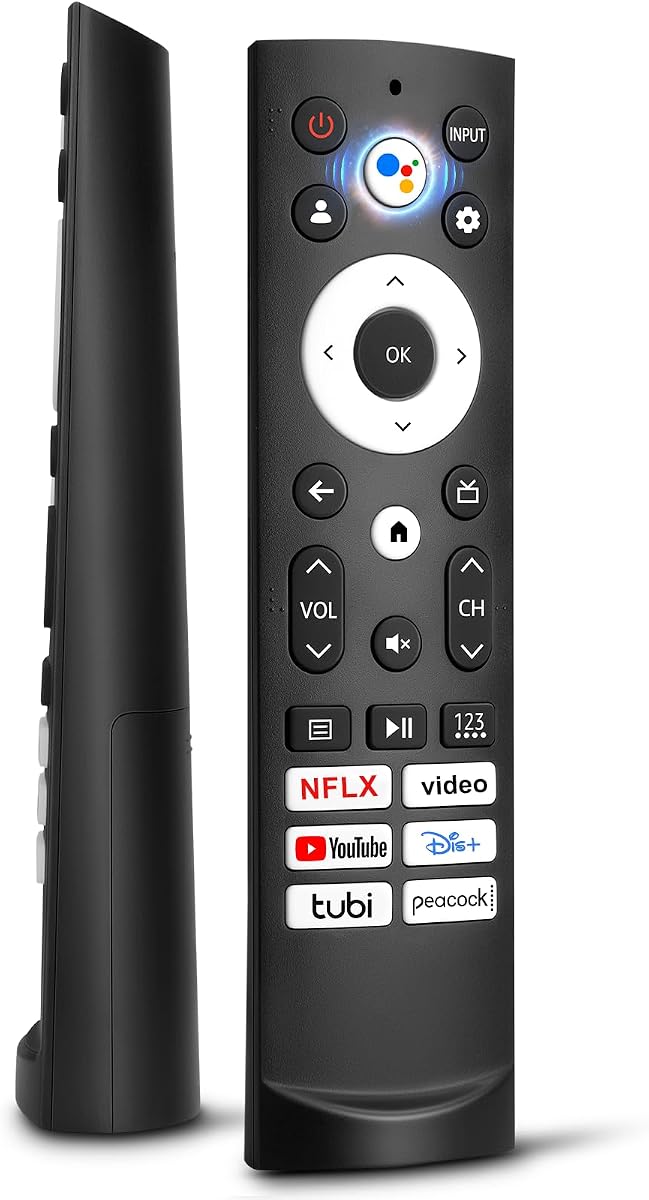
The key strengths include the inclusion of hotkeys for Netflix Prime Video YouTube Disney Tubi and Peacock. The design also features a narrow top and wide bottom making it easy to stand on a desktop to spot its position at a glance.
Trade-offs involve the exclusion of batteries and incompatibility with Chromecast remote controls. These are minor issues considering the price point and the convenience of having specific app shortcuts readily available on the device.
This option is perfect for budget conscious users who own a Hisense Google TV and want immediate access to their favorite apps without searching through menus. It provides essential functionality at a great value.
Six hotkeys provide instant access to top entertainment platforms to skip menus and jump directly to your content.
The shape allows the remote to stand upright on your desk making it easier to find when you need it.
We may earn a commission when you buy through this link, at no additional cost to you.
This remote offers excellent value by including a full one year warranty which is rare in this category. It is designed for most Hisense LCD LED HDTV Smart TVs and carries a 4.4 star rating from satisfied customers.
We may earn a commission when you buy through this link, at no additional cost to you.
The warranty provides peace of mind in case the unit fails or has issues within the first year. It features hotkeys for Netflix YouTube and Google Play allowing easy access to favorite shows in one click.
Users should note it is not compatible with Hisense Roku TVs or other audio video equipment like home theater systems. This limitation is clear from the product description but is acceptable for TV specific control needs.
Buyers looking for a cost effective solution with added protection should consider this remote. It delivers reliable performance and long term security for your Hisense TV setup at a very competitive price.
A full one year warranty ensures you are fully protected for an entire year against defects or failures.
Dedicated hotkeys for Netflix and Google Play make navigating your favorite apps faster and more convenient.
We may earn a commission when you buy through this link, at no additional cost to you.
This remote is designed specifically for Hisense Roku TV models without voice control features. It has an impressive rating of 4.7 stars and supports key series like H4030F1 and R6ER8F for reliable operation.
We may earn a commission when you buy through this link, at no additional cost to you.
The strength of this remote is its high compatibility with Hisense Roku TV models which can be hard to find replacements for. It uses infrared technology which ensures stable connection without pairing steps.
The lack of voice control might be a trade-off for users expecting smart features. However for basic navigation and control this remote delivers excellent performance and high user satisfaction compared to other IR options.
This is the ideal choice for owners of Hisense Roku TVs who want a simple reliable replacement. It covers the essential functions needed to control your entertainment system without unnecessary complexity.
Specifically supports Hisense Roku TV series to ensure it works where universal remotes might fail.
Uses standard infrared technology so you do not need to pair it with your TV to use it.
We may earn a commission when you buy through this link, at no additional cost to you.
This voice remote brings hands-free control to Hisense Google Smart TVs with a focus on high-end models like ULED and Mini-LED. It carries a 4.2 star rating and features a dedicated microphone button for voice commands.
We may earn a commission when you buy through this link, at no additional cost to you.
The standout feature is the ability to search content check information or control menus hands-free using the built-in voice assistant. This adds significant convenience for users who prefer speaking over typing.
Trade-offs include the requirement for your TV to have built-in voice assistant functionality. Also batteries are not included which is common but worth noting before purchasing this premium replacement option.
This remote is best suited for owners of newer Hisense TVs who want to leverage voice commands for easier navigation. It provides advanced control features that enhance the smart TV experience significantly.
Use the dedicated microphone button to search for content or control your TV without lifting a finger.
Engineered for reliable operation up to 50 feet so you can control your TV from anywhere in the room.
We may earn a commission when you buy through this link, at no additional cost to you.
This 2-pack offers a practical solution for households with multiple TVs or those who want a spare remote. It is compatible with Roku TVs from brands like Hisense TCL and Philips and has a rating of 4.3 stars.
We may earn a commission when you buy through this link, at no additional cost to you.
The value lies in getting two remotes for the price of one. This is useful for replacing a main unit and keeping a backup in another room for convenience.
Note that it is not compatible with Roku streaming media players like Express or Stick which is important to verify before buying. The buttons have been tested to support over 120000 clicks ensuring long durability.
This option is ideal for families or offices with multiple TVs where having extras is beneficial. It provides reliable control across several brands without needing to buy individual remotes for each device.
Get two remotes in one purchase to save money and have a backup available for other rooms.
Works with Roku TVs from multiple manufacturers including Hisense TCL Sharp and Insignia for broad compatibility.
We may earn a commission when you buy through this link, at no additional cost to you.
This remote is built to support a variety of Hisense Android and Google TV models including Laser TV series. It has a 4.4 star rating and offers a work right out of box experience without programming.
We may earn a commission when you buy through this link, at no additional cost to you.
The compatibility extends to Laser TV series which makes it a rare and useful option for owners of specific high-end Hisense displays. It includes shortcuts for Netflix YouTube and other apps for easy navigation.
Trade-offs include the absence of batteries and standard infrared technology which may have limitations compared to Bluetooth remotes. However for basic control it covers a wide range of models effectively.
This is a solid choice for users with Hisense Android or Laser TVs who need a quick replacement. It ensures you can continue using your device without delay or expensive original remote purchases.
Compatible with Android and Google TV series as well as Laser models to cover diverse Hisense product lines.
Six shortcut buttons provide instant access to popular media apps to simplify your daily viewing routine.
We may earn a commission when you buy through this link, at no additional cost to you.
This 2-pack stands out for its impressive 0.2 second response time making it one of the fastest remotes available. It is compatible with Hisense Google UHD and ULED Smart TVs and offers a 4.4 star rating.
We may earn a commission when you buy through this link, at no additional cost to you.
The speed of response enhances the viewing experience by reducing lag when changing channels or navigating menus. The two-pack format adds value for households that need multiple units.
Trade-offs involve the lack of voice control which some may expect from modern remotes. However the fast performance and durability make up for this for users focused on reliability and speed.
This product is excellent for users who prioritize quick response times and convenience. It delivers efficient stable usage for Hisense Google TV owners at a reasonable price with the added bonus of two units.
Achieve the fastest response time of 0.2 seconds for a seamless and lag free control experience.
Made with high quality ABS plastic and soft silicone buttons that are non-slip and comfortable to hold.
We may earn a commission when you buy through this link, at no additional cost to you.
This remote is designed for Hisense Smart TV models that do not require voice functionality. It has a 4.4 star rating and supports a wide range of Android smart TV models.
We may earn a commission when you buy through this link, at no additional cost to you.
The absence of voice features makes it simpler and more affordable. It includes six hotkeys for NFLX YouTube and other platforms to provide quick access to your favorite channels.
Trade-offs include the lack of voice search but this is often acceptable for users who prefer physical buttons. It is a solid choice for restoring basic control to your smart TV setup.
Buyers looking for a straightforward and budget friendly replacement should choose this remote. It works well out of the box with minimal setup required for most Hisense Android TV models.
Avoid complex voice setups with a straightforward button layout that focuses on essential functions.
One-click access to popular media apps like Netflix and YouTube to streamline your navigation experience.
We may earn a commission when you buy through this link, at no additional cost to you.
This remote offers voice control features at a competitive price point for Hisense Smart Google TV users. It has a 4.3 star rating and includes one-click shortcuts for popular media apps.
We may earn a commission when you buy through this link, at no additional cost to you.
The built-in intelligent voice assistant allows you to search and check schedules by voice adding a smart layer to your control. It also undergoes 100000 click testing to ensure stable performance over time.
Trade-offs involve a pairing process which takes a few steps to complete. Also batteries are not included but these are standard considerations for voice-enabled replacements in this category.
This product is ideal for users who want voice control without paying premium prices. It delivers a smart lifestyle upgrade with features like voice search and app shortcuts for convenient entertainment.
Built-in voice assistant allows you to search for shows and music hands-free for a smarter viewing experience.
Integrated shortcuts for Netflix and YouTube let you launch apps instantly without navigating complex menus.
We may earn a commission when you buy through this link, at no additional cost to you.
Selecting the right replacement remote involves understanding your TV model and desired features.
The most important factor is ensuring the remote matches your TV series whether it is Roku Google Android or LED. Verify the model number against the remote's compatibility list before purchasing to avoid returns.
Always check the product description to confirm your TV series is explicitly supported by the remote control.
Voice remotes allow you to search content and navigate menus using speech which is helpful for smart TVs. However they may require pairing or have specific system requirements that differ from standard IR remotes.
Decide if you need voice search or if standard buttons are sufficient for your daily viewing needs.
Many remotes include dedicated hotkeys for streaming services like Netflix and YouTube to save time. These buttons improve convenience by letting you launch apps instantly without using the menu system.
Look for remotes that support the specific apps you use most frequently in your household.
Quality remotes use ABS plastic and silicone buttons that can withstand daily use without breaking easily. Durability ensures the remote lasts longer and maintains responsiveness over time.
Check user reviews for mentions of button reliability and material strength before buying.
Most remotes require standard AAA batteries which are often sold separately. Understanding power needs helps you prepare for immediate use upon unboxing the new device.
Ensure you have spare batteries on hand to start using the remote right after installation.
The operating range indicates how far you can control the TV from the remote typically 35 to 50 feet. A wider range is beneficial for large living rooms or open spaces.
Choose a remote with a transmission distance that matches your seating distance from the screen.
Some remotes need no programming while others require pairing steps to connect to the TV. Simple setups save time but pairing remotes may offer more smart features.
Review the instructions to understand if you need to pair or simply insert batteries.
Some products include a one year warranty which provides protection against defects or malfunctions. This support can save money if the remote fails unexpectedly.
Prefer remotes that come with a warranty for added peace of mind.
To begin using your new remote insert two AAA batteries into the battery compartment matching the polarity symbols carefully. Point the remote toward the TV sensor and press any button to confirm it works.
If the remote requires pairing hold the designated buttons like Back and Home for a few seconds until the indicator light blinks. Wait for the TV to confirm successful pairing on the screen.
Keep the remote clean by wiping it with a dry cloth regularly to remove dust and oils. Store it in a safe place away from direct sunlight to prevent battery leakage and damage.
A standard Hisense remote will not work with a Hisense Roku TV unless specified. You need a remote designed specifically for Roku TV models to ensure compatibility with the operating system.
Some remotes need pairing while others work immediately with batteries. Check the product description to see if programming or Bluetooth pairing steps are required for your specific model.
Voice remotes offer convenience for searching but standard remotes are simpler and cheaper. Choose voice models if you prefer hands-free control otherwise standard remotes work well for basic navigation.
Most Hisense replacement remotes require two AAA batteries which are usually not included. Purchase fresh batteries to ensure proper operation when setting up your new remote.
Check your TV model number and compare it with the compatible list on the remote product page. Ensure the remote explicitly states support for your specific TV series before buying.
Yes universal remotes designed for Hisense work well if they match your TV type. Verify that they support the required TV technology like Roku Google or Android to function correctly.
Most replacement remotes are for TV control only and may not control sound bars. Check the product details to see if audio device support is included if you need it.
Some remotes offer a one year warranty while others may have shorter coverage. Review the product page details to understand the warranty terms before purchase.
The ten remotes reviewed cover a wide range of needs from budget IR options to voice-enabled smart controls. Whether you own a Roku Google or Android TV there is a suitable replacement for you.
Prioritize compatibility and essential features like shortcut buttons to ensure a seamless viewing experience. Voice remotes offer added convenience but standard ones work well for basic control.
Always verify your TV model and check current pricing before purchasing to get the best deal. These remotes provide reliable ways to restore full control to your entertainment setup.