
Harvopu Keyboard Case
4.4Editor score
7-color backlit keys
Detachable magnetic design
Long-life rechargeable battery
Finding the right keyboard case for your iPad Pro 13 M4 transforms your tablet into a powerful workstation. A good option offers comfort, durability, and seamless connectivity for work on the go.
We evaluated ten top-rated models based on typing experience, trackpad quality, build durability, and versatility. Each product was analyzed against key criteria to ensure accuracy and relevance for your needs.
Every pick highlights unique strengths and potential trade-offs to help you decide quickly. Keep in mind that pricing and availability may shift, so check current listings before finalizing your purchase decision.
4.4Editor score

4.3Editor score

3.7Editor score
As an Amazon Associate we earn from qualifying purchases.
This side-by-side comparison highlights the key specifications and unique features of each selected keyboard case to help you quickly identify the best fit for your workflow.



The Apple iPad Magic Keyboard stands out as the top recommendation for users seeking a premium typing experience. With a high rating and exceptional build quality, it delivers a laptop-like feel that few competitors match.
We may earn a commission when you buy through this link, at no additional cost to you.
Its glass trackpad features haptic feedback for precise cursor control and supports multi-touch gestures. The two-cantilever hinge allows smooth adjustments, while the function row adds versatile shortcuts for power users.
Although it comes with a premium price tag, the lack of separate charging needs for the keyboard offsets long-term costs. The USB-C pass-through ensures your iPad stays powered while you work.
This case is ideal for professionals who prioritize ergonomics and seamless integration. If you value a refined, stable typing experience, this is the definitive choice for your iPad Pro.
The glass trackpad offers haptic feedback for precision, mimicking a desktop experience without needing extra peripherals.
The cantilever hinge design lets you tilt the screen to any comfortable angle for typing or browsing.
We may earn a commission when you buy through this link, at no additional cost to you.
The ESR Multi-Mode Stand offers an excellent balance of features and affordability. It transforms your iPad into a productive workstation without breaking the bank, making it a top contender for budget-conscious buyers.
We may earn a commission when you buy through this link, at no additional cost to you.
Its quick-set magnetic stand allows you to switch between typing and browsing angles effortlessly. The detachable keyboard provides instant hands-on access, which is perfect for reading or drawing sessions.
While the trackpad is functional, it lacks the larger surface area found in premium models. However, the multi-touch support ensures smooth navigation for daily tasks like editing and app switching.
Buy this if you need a versatile, cost-effective solution for work and play. The combination of protection and productivity features makes it a smart purchase for students and casual users.
Ultra-strong magnets let you open the cantilever stand to your preferred angle instantly without fuss.
Remove the keyboard to use the iPad as a standalone tablet for reading or media consumption.
We may earn a commission when you buy through this link, at no additional cost to you.
Another ESR option, this Multi-Angle Stand variant earns a higher rating for its enhanced trackpad and flexibility. It focuses on user comfort and adaptability, making it a strong choice for varied workflows.
We may earn a commission when you buy through this link, at no additional cost to you.
The larger click-anywhere trackpad provides smoother control than many competitors, reducing frustration during complex navigation tasks. You can effortlessly switch between portrait and landscape modes to suit your task.
The detachable design allows you to use the single-case mode for gaming or drawing. The included pencil holder keeps your stylus secure, preventing slips and loss while on the move.
Ideal for creative professionals and students, this model delivers robust utility at a competitive price. Prioritize it if you need a responsive trackpad and versatile viewing modes.
The 65% larger surface area enables precise gestures and reduces accidental taps during typing.
Switch between portrait and landscape for better posture or media viewing without disconnecting the keyboard.
We may earn a commission when you buy through this link, at no additional cost to you.
The Typecase Edge blends premium features like vibrant backlighting and precise navigation. It is designed for users who want a modern, customizable feel without sacrificing portability.
We may earn a commission when you buy through this link, at no additional cost to you.
Its full-area trackpad supports various gestures for smooth app switching and editing. The floating cantilever design lets you adjust the screen angle effortlessly, fitting any ergonomic need.
While the 11-color backlight adds visual flair, it requires battery management. The instant wake and sleep functions help conserve power, but you may need to monitor usage closely.
This model suits users who value aesthetics and functionality equally. If customization and a sleek profile are priorities, the Typecase Edge delivers a unique experience for your iPad.
Adjust 11 backlight colors and 3 brightness levels to match your environment or mood.
The floating cantilever design allows effortless adjustment to your preferred viewing angle for typing.
We may earn a commission when you buy through this link, at no additional cost to you.
Logitech brings its proven expertise to the iPad with the Combo Touch. While it has mixed reviews, its Smart Connector and large trackpad offer a distinct advantage for specific workflows.
We may earn a commission when you buy through this link, at no additional cost to you.
The Smart Connector ensures instant connectivity without pairing or charging the keyboard separately. The large multi-touch trackpad provides an intuitive experience for those transitioning from a laptop setup.
However, the rating suggests some users find the design bulky or the value questionable. The kickstand is flexible, but the overall feel might not suit everyone seeking minimalism.
Opt for this if you prioritize reliable connectivity and a large trackpad over slimness. It remains a strong option for enterprise or heavy typing scenarios requiring stability.
Instant secure connectivity means no pairing hassles, as power comes directly from your iPad.
Find your perfect angle for typing, watching, or sketching without detaching the keyboard case.
We may earn a commission when you buy through this link, at no additional cost to you.
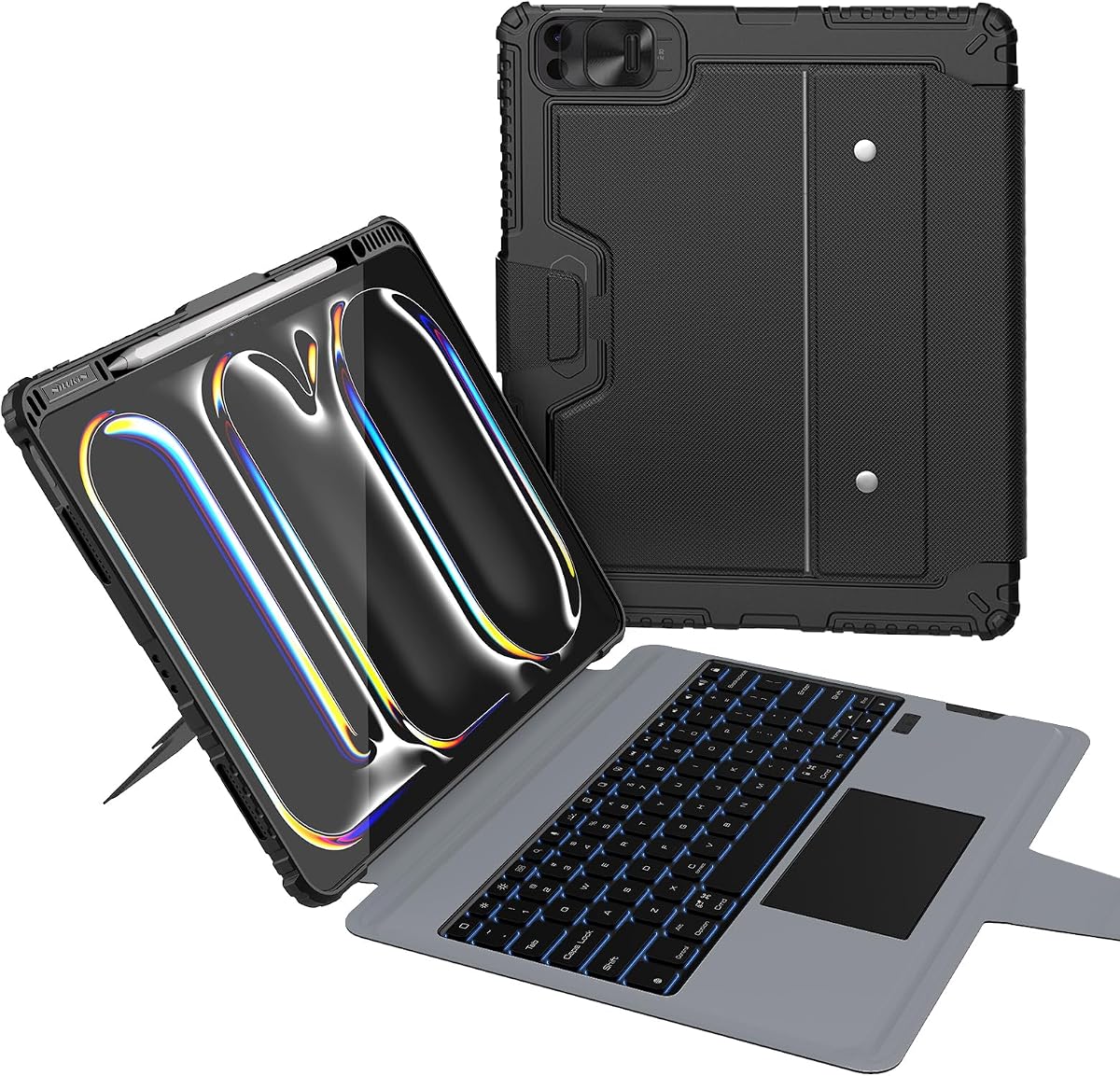
Harvopu delivers a budget-friendly solution with colorful customization. It is ideal for those who want a functional keyboard case without compromising on style or basic features.
We may earn a commission when you buy through this link, at no additional cost to you.
The 7-color backlight and 3 brightness levels ensure visibility in any setting. The keyboard is rechargeable, with a high-capacity battery that reduces frequent charging interruptions.
While the trackpad is functional, it may lack the precision of higher-end models. The stain-resistant material makes cleanup easy, a practical feature for daily users.
Choose this if you want a budget option that still offers robust features. The combination of brightness control and affordability makes it a standout for casual productivity.
Choose from 7 backlight colors to match your mood and adjust brightness for optimal viewing.
Stain-resistant PU material wipes clean easily, protecting your device from dirt and wear.
We may earn a commission when you buy through this link, at no additional cost to you.
The Typecase Edge+ focuses on flexibility and lightweight protection. Its detachable back case is thin, keeping the iPad portable while maintaining durability for daily transport.
We may earn a commission when you buy through this link, at no additional cost to you.
A wider hinge ensures stability, while the N54H magnets lock the keyboard securely. The dedicated shortcut row lets you control volume and brightness without touching the screen.
Though the weight is minimal, some users may find the back case less protective than rigid shells. The trackpad is larger than standard, aiding in precision tasks.
Best for travelers who need a slim profile and solid connectivity. The balance of weight and protection makes it a practical choice for commuters.
The detachable back case weighs only 110g, making it easy to carry without bulk.
Strong N54H magnets secure the keyboard firmly, preventing accidental detachment during use.
We may earn a commission when you buy through this link, at no additional cost to you.
With the highest rating in our review, this Wireless Keyboard Case wins on flexibility. The 360-degree rotating kickstand is unique, offering precise angle adjustments for any task.
We may earn a commission when you buy through this link, at no additional cost to you.
It features 7-color backlighting to enhance aesthetics while maintaining functionality. The wireless trackpad provides a smooth experience, though it lacks the size of larger models.
The transparent back highlights your iPad design, combining style with rugged protection. It ensures all ports remain accessible while guarding against drops and scratches effectively.
Ideal for users who need versatile angles and style. If you want a standout case that adapts to every situation, this model delivers the best versatility.
Lock the viewing angle freely for typing, drawing, or presentation with precise adjustment.
The transparent back showcases your device’s design while offering superior protection from drops.
We may earn a commission when you buy through this link, at no additional cost to you.
Nillkin focuses on durability with military-grade protection. If you work in harsh environments, this rugged case ensures your iPad survives drops while maintaining productivity.
We may earn a commission when you buy through this link, at no additional cost to you.
The 0-180-degree kickstand allows any angle from typing to drawing. The 1.4mm scissor keys offer real travel, making typing feel closer to a full laptop experience.
The sliding camera cover protects privacy, though it adds slight bulk. The battery lasts for weeks between charges, reducing maintenance needs for active users.
This is the top pick for fieldwork or travel in rough conditions. If you prioritize survival and tactile typing, the Nillkin case is unmatched.
Tested for drops up to 1.2 meters, offering robust protection against everyday accidents.
Adjust from 0 to 180 degrees to find the perfect angle for any task or view.
We may earn a commission when you buy through this link, at no additional cost to you.
TSQQST offers a futuristic look with a crystal-clear case. It is designed for those who want to showcase their iPad while protecting it from shocks and scratches.
We may earn a commission when you buy through this link, at no additional cost to you.
The 360-degree rotating stand ensures ergonomic comfort for any task. The glowing keyboard adds a sophisticated touch, making your setup look unique in low-light environments.
While the transparency may show dust, the shock-absorbent corners guard against drops. It is ideal for users who value aesthetics alongside standard protection and functionality.
Pick this if you want a stylish, durable case that stands out. It balances visual appeal with practical features for creative and casual users alike.
The transparent panel reveals intricate circuitry, adding a tech-inspired aesthetic to your device.
Switch between typing and streaming with a fluid rotating base for effortless multitasking.
We may earn a commission when you buy through this link, at no additional cost to you.
Selecting the right keyboard case involves balancing protection, ergonomics, and connectivity. Use these factors to narrow your options based on your specific workflow needs.
Look for a larger trackpad if you need precision cursor control. A glass or large touch surface supports multi-touch gestures effectively.
Prioritize models with responsive trackpads to avoid frustration during navigation.
Check key travel and mechanism. Scissor-switch keys provide better feedback than membrane styles for long sessions.
Opt for backlit keys if you often work in low-light environments.
Ensure the case matches your specific iPad Pro model number. Newer M4 and M5 devices require updated connectors.
Verify compatibility lists before purchasing to avoid fit issues.
Decide between Smart Connector and Bluetooth. Smart Connector offers instant power while Bluetooth needs charging.
Choose Smart Connector for reliability and battery savings.
Assess drop resistance and material durability. Rugged cases offer more shock absorption than thin ones.
Pick a design that guards against scratches and drops if you travel often.
Consider how much weight the case adds. Lighter cases are easier to carry daily.
Balance protection with portability to suit your commute.
Look for adjustable stands for ergonomic flexibility. A wide angle range allows for better posture.
Choose options with stable hinges to prevent wobble.
If using Bluetooth, check battery capacity and charging times. Long standby times reduce maintenance.
Prioritize models with quick charging features for convenience.
Attach the case securely to your iPad to ensure magnets align correctly. Verify all ports remain accessible before securing.
Clean the trackpad and keys with a soft cloth to remove dust. Avoid harsh chemicals to prevent damage to the finish.
Store the case in a cool place when not in use. Keep away from direct sunlight to avoid overheating internal electronics.
Yes, many keyboard cases support the M4 chip and newer models. Always check the product description for compatibility with the 2024 and 2025 releases before purchasing.
Trackpads significantly enhance navigation speed and cursor precision. They allow for multi-touch gestures that make complex tasks faster and more efficient than using the screen alone.
Press the pairing button on the keyboard and enter the iPad Bluetooth settings. Select the device name and wait for the confirmation to indicate a successful connection.
Double-check your iPad model number to ensure compatibility. If it does not fit, contact the seller immediately for a refund or exchange option.
Bluetooth models require periodic charging for the keyboard itself, but Smart Connector cases draw power from the iPad. Check the manual to determine your specific needs.
High-quality cases can last for years with proper care. Avoiding drops and cleaning regularly helps extend their lifespan and keeps the keyboard functioning smoothly.
Yes, most detachable cases allow you to remove the keyboard. This lets you use the iPad as a standalone tablet for reading or drawing.
We reviewed ten top keyboard cases, highlighting the Apple Magic Keyboard for premium quality and ESR for budget value.
Consider your need for portability versus protection to prioritize the right features for your daily workflow.
Prices fluctuate frequently, so verify current deals before buying to ensure you get the best value.