
Calibrite Display Plus HL
4.0Editor score
Measures up to 10000 nits
Advanced HL sensor for HDR
Includes PROFILER software suite
This guide compares the top colorimeter for monitor calibration tools to help photographers and creators achieve accurate color across displays.
Finding the right colorimeter for monitor calibration is essential for anyone who relies on precise color representation in their work. Whether you edit photos, grade video, or design graphics, accurate displays ensure your output matches your intent.
We evaluated ten leading calibration tools based on sensor accuracy, software features, ease of use, and compatibility with modern display technologies like OLED and Mini LED. Each product offers unique strengths for different workflow needs.
Each pick highlights specific capabilities and ideal use cases to help you choose confidently. Prices and availability change frequently, so verify details on the retailer site before purchasing your new calibration device today.
4.0Editor score

4.0Editor score

4.4Editor score
This side-by-side comparison highlights the core specifications and strengths of each calibration tool to help you find the best match for your display and workflow needs.



The Calibrite Display 123 is a straightforward colorimeter designed for creators who want reliable results without complexity. With a 4.0 rating from users, it delivers essential calibration features that ensure your monitor displays true colors consistently.
We may earn a commission when you buy through this link, at no additional cost to you.
Its standout quality is the guided software workflow that simplifies the entire process into three easy steps. The USB C connection ensures compatibility with modern laptops while the dual display support allows matching multiple screens for cohesive visual work.
Trade-offs include the lack of an ambient light sensor and advanced profiling options found in higher-end models. However, these limitations are acceptable for standard editing tasks where consistent color matching is the primary goal.
Photographers and designers seeking a budget-friendly yet dependable tool should consider this model. It provides the core functionality needed to trust your screen output without overwhelming you with unnecessary settings.
The guided workflow removes technical barriers allowing users to achieve professional results quickly and easily.
Matching two monitors ensures your color edits look the same across different screens in your workspace.
We may earn a commission when you buy through this link, at no additional cost to you.
The Calibrite Display Plus HL stands out as a premium choice for users working with high-brightness displays. Its advanced sensor measures up to 10000 nits making it ideal for HDR monitors and professional grading setups.
We may earn a commission when you buy through this link, at no additional cost to you.
This colorimeter delivers exceptional accuracy for challenging screens including OLED and Mini LED panels. The included PROFILER software provides deep control over white point gamma and contrast to suit professional workflows.
While the cost is higher than basic tools it justifies the price with specialized features for high-end displays. Users needing precise HDR calibration will find the investment worthwhile for their production needs.
Video editors and colorists working on super-bright displays should prioritize this model. It ensures your grading decisions remain consistent across different viewing environments.
The HL sensor handles extreme luminance ensuring accurate calibration for the latest HDR capable monitors.
Advanced software features allow detailed adjustments to meet broadcast standards and custom workflow needs.
We may earn a commission when you buy through this link, at no additional cost to you.
The Datacolor Spyder X Pro offers an accessible entry point for calibration with its lens-based color engine. Rated 4.4 by users it balances affordability with reliable performance suitable for photography and general creative work.
We may earn a commission when you buy through this link, at no additional cost to you.
Its quick calibration process takes just a minute or two reducing downtime while maintaining accuracy. The wizard workflow and predefined targets make it easy for first-time users to get professional results without prior knowledge.
Although it lacks some advanced features of newer models it remains a robust choice for standard displays. The SpyderProof feature lets you verify improvements visually ensuring confidence in your setup.
First-time users and those on a budget will find this tool ideal for getting started. It provides the essential accuracy needed to trust your editing work on a daily basis.
The wizard workflow simplifies calibration allowing anyone to achieve accurate color quickly.
SpyderProof lets you compare before and after results using your own images for immediate feedback.
We may earn a commission when you buy through this link, at no additional cost to you.
The Datacolor Spyder Monitor Calibrator introduces DevicePreview simulation to show how photos look on other devices. This unique feature helps creators ensure their edits translate well across various screens and platforms.
We may earn a commission when you buy through this link, at no additional cost to you.
With ambient light sensing the tool adjusts your display settings based on room conditions. This ensures consistent viewing quality throughout the day without manual tweaking of brightness and contrast levels.
Its speed is impressive requiring only about ninety seconds to establish a solid color starting point. The intuitive software supports all skill levels from novices to professionals seeking reliable consistency.
Creators who want to preview output accuracy should consider this model. It bridges the gap between your monitor and final consumption devices effectively.
DevicePreview helps you visualize how your images will appear on different devices before delivery.
Room light sensors help maintain ideal display settings as lighting conditions change during your work.
We may earn a commission when you buy through this link, at no additional cost to you.
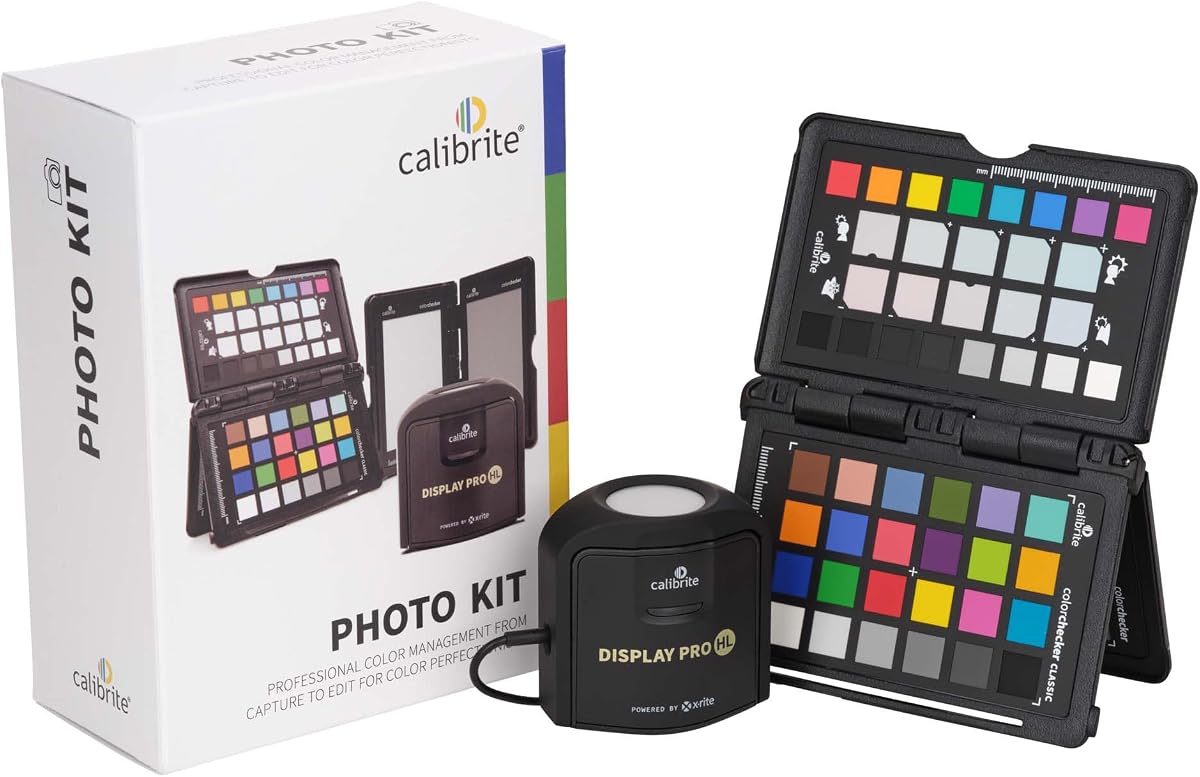
The Calibrite Photo Kit combines monitor calibration with camera profiling for a complete color workflow. With a 4.5 rating it appeals to photographers who want consistent results from capture to final edit.
We may earn a commission when you buy through this link, at no additional cost to you.
Including the Display Pro HL it handles high-brightness displays while the Passport 2 enables custom camera profiles. This dual capability reduces guesswork and ensures your edits match what you captured.
While the kit requires learning both tools it streamlines the entire editing process. Professionals who rely on color accuracy across multiple locations benefit significantly from this unified approach.
Photographers needing reliable color consistency should invest in this full kit. It provides all the essentials for a professional photography workflow.
Matching camera profiles to your calibrated monitor ensures your edits reflect the original capture.
Passport Photo 2 allows creating tailored profiles for your specific camera sensors and lenses.
We may earn a commission when you buy through this link, at no additional cost to you.
The Calibrite Creator Kit is tailored for hybrid shooters handling both photography and video production. With a perfect 5.0 rating it delivers consistent color control from set capture to post-production editing.
We may earn a commission when you buy through this link, at no additional cost to you.
It includes the Display 123 for monitor calibration alongside the Passport Video 2 for camera color management. This combination ensures your footage and stills maintain matching color across devices.
Travel shooters value the ability to match multiple cameras and displays on set. The exposure reference tools help maintain consistency even when lighting conditions shift quickly during filming.
Content creators needing a unified system should choose this kit. It simplifies the complexity of managing multiple devices in a single workflow.
One system handles both photo and video color needs saving time and reducing errors.
Use Passport Video 2 to ensure consistent white balance across multiple cameras on set.
We may earn a commission when you buy through this link, at no additional cost to you.
The Calibrite ColorChecker Display Pro offers powerful calibration with high repeatability across different displays. Its design includes a rotatable diffuser arm and tripod mount for versatile usage scenarios.
We may earn a commission when you buy through this link, at no additional cost to you.
It works well with both ccProfiler and i1Profiler software allowing flexible integration into existing workflows. The optical design ensures consistent results even when moving between different display types.
The built-in mount makes it ideal for projector profiling in venues where fixed setups are common. Users needing reliable results for mixed display environments will appreciate its versatility.
Professionals managing multiple display types should consider this tool. It balances robust features with practical portability for varied work settings.
High repeatability across display types ensures consistent results wherever you deploy the tool.
Integrated tripod mount makes projector calibration easy in larger venues or home theaters.
We may earn a commission when you buy through this link, at no additional cost to you.
The Datacolor Spyder5PRO is designed for serious photographers needing reliable color accuracy and print matching. With room light monitoring it optimizes brightness for shadow detail and highlights effectively.
We may earn a commission when you buy through this link, at no additional cost to you.
Calibration takes about five minutes with tools to evaluate before and after results using your own photos. The display analysis feature helps you compare multiple monitors ensuring consistent setups across your workspace.
While it is an older model it remains a trusted choice for users who prioritize print accuracy. The dedicated features for print-edit-print cycles reduce waste and improve workflow efficiency.
Users focused on print output and legacy workflows will find this tool valuable. It delivers the professional control needed for high-quality image production.
Monitoring ambient light helps you set optimal display brightness for accurate image editing.
Tools ensure your edited images match your printed output reducing waste and rework.
We may earn a commission when you buy through this link, at no additional cost to you.
The ASUS ProArt CaliControl combines color calibration with hardware monitor control and dial features. It supports hardware calibration up to 10000 nits suitable for high-end ASUS ProArt displays.
We may earn a commission when you buy through this link, at no additional cost to you.
Its integration with ASUS Dial and OSD control offers shortcuts for creative software navigation. The reversible USB-C connection simplifies setup and physical interaction with your monitor.
Despite its unique features user feedback suggests limitations in broader compatibility or ease of use. It is best suited for owners of ASUS displays who want hardware-level color management.
Users invested in the ASUS ecosystem should explore this tool for native features. It provides specific utilities that match the capabilities of compatible ProArt monitors.
Integrated control lets you adjust monitor settings directly during calibration without on-screen menus.
ASUS Dial shortcuts enable precise control of parameters in your favorite editing applications.
We may earn a commission when you buy through this link, at no additional cost to you.
The Datacolor Spyder4Pro was a professional standard featuring double-shielded filters and improved accuracy over prior generations. It uses a full-spectrum sensor to calibrate displays with greater precision and long-term stability.
We may earn a commission when you buy through this link, at no additional cost to you.
Its ReCAL re-calibration assistant makes it easy to compensate for changes over time. The automated brightness calibration ensures consistent output without needing manual adjustments frequently.
While it has higher specs than earlier models it may struggle with newer OLED or HDR displays. Still it remains a reference for stability and repeatable results in older environments.
Users needing a reliable legacy tool or those with specific older monitor needs may consider this. It represents a step forward in accuracy history but may not suit all current needs.
Double-shielded filters help maintain accuracy and consistency over extended usage periods.
ReCAL lets you update your display profile quickly as hardware changes over time.
We may earn a commission when you buy through this link, at no additional cost to you.
Choosing the right colorimeter depends on your display types, workflow needs, and budget. Consider these factors to find the best match.
Sensor accuracy determines how reliably your device measures light and color values. Look for tools with high precision sensors like HL technology for HDR or OLED panels to ensure your edits remain true.
Prioritize sensors rated for accurate color matching to maintain trust in your display output.
Ensure the colorimeter supports your specific display technology including OLED, Mini LED, or LCD. Modern tools should handle high brightness and HDR content without losing detail or contrast accuracy.
Check compatibility lists to avoid calibration issues with newer screen types.
Software guides the calibration process and offers profiling options like white point gamma and contrast. Look for intuitive workflows for beginners and advanced controls for professionals.
Choose software that supports your OS and allows saving shared presets for team consistency.
Ambient light sensors adjust display settings based on room lighting to maintain visual consistency. This feature helps you see accurate details regardless of changing daylight or artificial light.
Select tools with ambient monitoring if you work in varied lighting environments daily.
A guided workflow reduces the learning curve and speeds up calibration time. Tools with simple steps allow you to focus on content rather than technical settings.
Prioritize user-friendly interfaces if you need quick reliable results without extensive training.
If you use multiple monitors matching their color ensures consistent visuals across your workspace. Look for tools that allow profiling multiple screens simultaneously.
This feature saves time and avoids mismatched color when moving tasks between screens.
Price varies widely depending on sensor capabilities and software inclusions. Decide whether you need advanced HDR support or basic calibration for standard displays.
Balance your budget against the features that matter most to your specific workflow.
A compact and sturdy design protects the sensor during transport and daily use. Look for USB connections that match your laptop ports and include necessary adapters.
Consider portability if you move between locations or need to calibrate different machines.
Begin by installing the manufacturer's software on your computer and connecting the colorimeter via USB. Follow the on-screen instructions to set your preferred white point and brightness targets before starting calibration.
Place the device flat on your monitor screen ensuring no direct light shines on it during the process. Run the full calibration routine and wait until the software confirms successful profile creation.
Store your colorimeter in its protective case when not in use to prevent sensor damage. Recalibrate periodically every few months to account for screen aging and maintain consistent color.
Calibration ensures your display shows accurate colors matching your final output. This reduces guesswork and ensures prints or shared digital files look consistent across devices.
Most experts recommend recalibrating every one to three months. Frequent recalibration compensates for screen aging and environmental changes affecting color output.
Yes modern colorimeters support OLED and Mini LED technology. Check product specs to confirm compatibility with your specific panel type for best results.
Calibration adjusts your monitor settings while profiling creates a custom color map. Together they ensure accurate color management across your workflow.
Many tools support dual or multiple monitor calibration. This ensures consistent color across your entire workspace for better workflow efficiency.
Yes the colorimeter requires manufacturer software to guide the process and create profiles. Some tools include software in the purchase price while others require separate licenses.
The Calibrite Display 123 and Display Plus HL offer reliable options for general and advanced users. The Datacolor Spyder X Pro remains a solid budget pick for quick accurate calibration.
Prioritize sensor accuracy and display compatibility to ensure your edits look correct on screen. Choose tools with software that supports your workflow needs and operating system.
Always check current prices and availability before purchasing to get the best deal. Investing in the right colorimeter protects the quality of your creative work and professional deliverables.