
HP OfficeJet Pro 8125
3.9Editor score
Fast wireless printing
AI formatting optimization
Compact home design
Discover the top 10 AI Printers for home and office use in 2026. We compare features, speed, and smart capabilities to help you choose.
Modern printing has evolved beyond simple inkjet technology. Today, AI printers offer intelligent features that optimize layout, reduce waste, and enhance connectivity. These devices streamline workflows for professionals and creatives alike.
We evaluated ten leading models based on performance, ease of use, and smart integration. Our selection includes versatile all-in-one units and specialized machines designed for specific tasks like photo printing or 3D creation.
Each pick highlights unique strengths tailored to different needs. Whether you need speed, cost efficiency, or creative tools, this guide covers the essentials. Please note that pricing and availability may change over time.
3.9Editor score

4.2Editor score

4.7Editor score
This side-by-side comparison highlights the key specifications and capabilities of each selected model. Use this table to quickly identify which device aligns with your specific printing requirements.




The HP Envy 6155 stands out as a top choice for home users seeking quality prints. With a solid 4.2 rating, it delivers vibrant results using advanced color technology.
We may earn a commission when you buy through this link, at no additional cost to you.
Its standout feature is the True-to-Screen Tech, ensuring documents look as expected. The AI capability optimizes formatting to reduce wasted paper during email prints.
While the input tray is smaller than office models, it suits typical household needs. The intuitive touchscreen makes navigation simple for all ages in the family.
This printer is ideal for those prioritizing visual fidelity over raw speed. It balances performance and design effectively for everyday home printing tasks.
P3 technology ensures colors match your screen precisely for professional-looking photos and documents.
AI automatically removes ads or unwanted content when printing web pages to save paper.
We may earn a commission when you buy through this link, at no additional cost to you.
The HP OfficeJet Pro 8125 offers impressive speed for a budget-friendly home office device. It handles professional documents well with automatic two-sided printing capabilities.
We may earn a commission when you buy through this link, at no additional cost to you.
Its AI features optimize print layouts to prevent awkward cuts or wasted space. The included Auto Document Feeder helps manage multi-page tasks efficiently.
While it relies on specific cartridges, the Instant Ink trial helps manage costs initially. The touchscreen interface is responsive and easy to navigate.
Choose this if you need reliable document output without breaking the bank. It is a solid workhorse for small business needs.
The ADF allows scanning and copying of multi-page documents without manual page turning.
Instant Ink delivery service ensures you never run out during critical work hours.
We may earn a commission when you buy through this link, at no additional cost to you.
The Bambu Lab P2S Combo represents the cutting edge of AI-driven 3D printing technology. With a high 4.7 rating, it offers professional-grade speed and quality for creators.
We may earn a commission when you buy through this link, at no additional cost to you.
Its AI failure detection prevents wasted filament by spotting errors early. The adaptive airflow system ensures optimal cooling for various materials used.
While expensive, the multi-color AMS 2 Pro unlocks creative possibilities not found elsewhere. Setup is quick, taking only fifteen minutes to start.
This is the ultimate choice for makers wanting high-speed, complex prints. It transforms 3D design from hobby to professional workflow.
Prints up to 600 mm/s while maintaining sharp corners and consistent layer quality.
Switch between materials effortlessly for complex projects without manual intervention.
We may earn a commission when you buy through this link, at no additional cost to you.
The HP OfficeJet Pro 9135 is built for demanding office environments that require reliability. It handles high volumes with a large input capacity and fast speeds.
We may earn a commission when you buy through this link, at no additional cost to you.
Security is a key focus here with HP Wolf Pro Security to protect sensitive data. The single-pass scanning feature significantly boosts document processing efficiency.
Two large trays mean less frequent refilling during busy periods. The AI features help streamline email printing and document layout formatting.
Invest in this model for business settings requiring consistent high performance. It delivers security and speed for professional teams.
Built-in security tools help protect your network from cyber threats effectively.
Large paper trays reduce interruptions during busy printing sessions.
We may earn a commission when you buy through this link, at no additional cost to you.
The HP Smart Tank 7603 offers exceptional value for high-volume printing needs. It comes with enough ink for up to three years of operation right out of the box.
We may earn a commission when you buy through this link, at no additional cost to you.
The cartridge-free design eliminates the need for frequent replacements. Refilling is designed to be clean and straightforward for users.
While print speeds are moderate, the cost savings are significant over time. It supports fax and scanning tasks well for home offices.
This is the ideal choice for budget-conscious users printing frequently. It removes the hassle of traditional cartridge systems effectively.
Included ink allows years of printing without worrying about replacement costs.
Bottle refill system prevents spills and makes maintenance easy.
We may earn a commission when you buy through this link, at no additional cost to you.
The HP OfficeJet Pro 8139 stands out with an extended one-year Instant Ink trial. This makes it highly attractive for those wanting to test long-term savings.
We may earn a commission when you buy through this link, at no additional cost to you.
It balances professional features like faxing with home-friendly design. The AI features ensure your prints look clean and well-formatted.
The touchscreen and wireless options make it convenient for various devices. It handles documents quickly enough for daily needs.
Consider this for home offices needing extended trial benefits. It provides a reliable foundation for efficient printing.
One year of included ink allows you to experience full cost savings.
Fax and duplex printing support essential office workflows.
We may earn a commission when you buy through this link, at no additional cost to you.
This variant of the Smart Tank 7603 offers similar high-capacity features. It delivers reliable performance for home office needs with ample ink supply.
We may earn a commission when you buy through this link, at no additional cost to you.
The ability to print borderless photos is a nice touch for creative projects. Maintenance remains simple thanks to the bottle refill system.
It includes essential connectivity options for modern workflow integration. Fax and scanning functions add to its utility.
Pick this if you want proven ink tank reliability. It ensures consistent output without frequent interruptions.
Supports both documents and photos with professional borderless options.
High page yield means fewer replacements over the life of the device.
We may earn a commission when you buy through this link, at no additional cost to you.
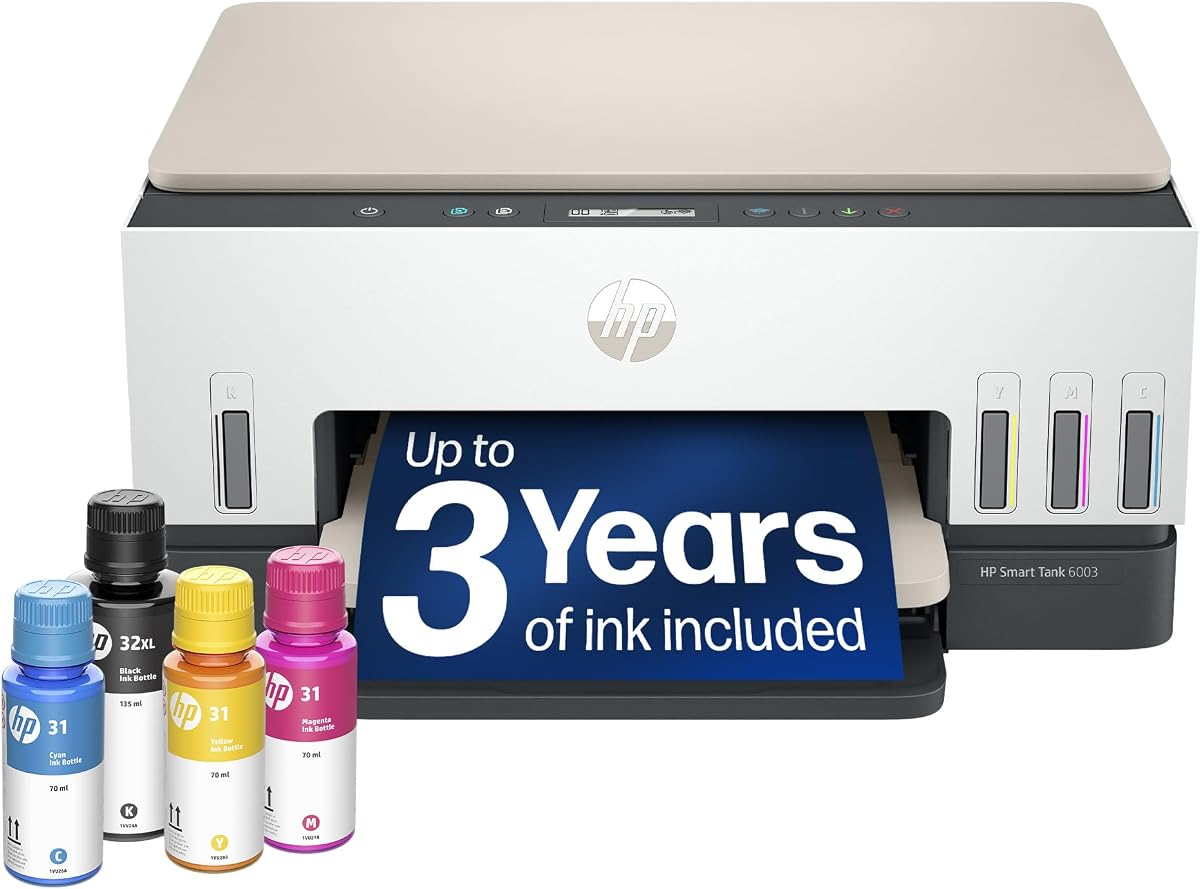
The HP Smart Tank 6003 is a streamlined option for home users. It focuses on essential printing and copying with high ink capacity included.
We may earn a commission when you buy through this link, at no additional cost to you.
Refilling is easy, ensuring no mess during maintenance. Wireless connectivity allows easy printing from phones or laptops.
While it lacks fax, it handles typical household tasks well. The borderless print feature helps with creative projects.
This is a great entry point for ink tank benefits. It keeps costs low while ensuring quality output.
Simple setup and refill process makes it suitable for all skill levels.
Connect via Wi-Fi to print directly from mobile devices effortlessly.
We may earn a commission when you buy through this link, at no additional cost to you.
The HP Smart Tank 5003 delivers solid reliability for household printing. It offers up to three years of ink and supports borderless printing for photos.
We may earn a commission when you buy through this link, at no additional cost to you.
Its design focuses on simplicity, making it easy to maintain. Wireless features ensure connectivity across all your devices.
While it does not fax, it handles documents well for general use. The cartridge-free system reduces ongoing expenses.
Choose this for dependable home performance and savings. It balances cost and convenience effectively.
Low-cost printing is the main priority of this reliable model.
Borderless printing allows full-bleed photos for projects.
We may earn a commission when you buy through this link, at no additional cost to you.
The Liene PixCut S1 brings AI creativity to custom sticker making. With precise cutting and high-resolution thermal printing, it creates professional results quickly.
We may earn a commission when you buy through this link, at no additional cost to you.
Its AI can extract subjects from photos to prepare stickers instantly. The app provides thousands of templates without any fees.
Durability is ensured with lamination during the printing process. Waterproof stickers are perfect for labels or gifts.
This is the top choice for DIY crafters. It simplifies sticker creation for creative projects.
AI tools help transform selfies into custom characters or stickers easily.
Thermal dye-sublimation ensures vibrant and durable color output.
We may earn a commission when you buy through this link, at no additional cost to you.
Selecting the right printer involves considering speed, connectivity, and specific features like AI optimization.
Speed matters if you have large documents to process. Look for models with higher ppm ratings for efficiency.
Prioritize faster speeds if productivity is key for your workflow.
Ensure the printer supports Wi-Fi and mobile apps for flexible use. Dual-band options reduce connection drops.
Choose wireless models to print from anywhere in your office.
AI tools can optimize layout and remove unwanted content automatically. These reduce waste and improve document quality.
Look for AI formatting if you print web pages or emails often.
Consider the cost of ink and availability of tank systems. These reduce long-term expenses significantly.
Tank models are best for high-volume printing to save money.
Business models often include security protocols to protect data. Avoid vulnerabilities with built-in protection.
Security features are essential for sensitive or private documents.
Higher tray capacities mean less frequent refilling during tasks. Check input tray size for your volume needs.
Opt for multiple trays if you handle diverse paper types.
Consider if you need fax, cutting, or 3D capabilities. Match the tool to your specific project requirements.
Select specialty printers if your work involves unique media types.
Always update your firmware to ensure AI features work correctly. Manufacturers release updates that improve performance.
Use genuine cartridges to prevent hardware damage or blocking issues. Avoid third-party chips that may cause problems.
Keep your printer in a clean, dust-free environment. Regular maintenance ensures consistent print quality.
AI capability usually refers to features that optimize layout, remove unwanted web content, or detect errors. It helps save ink and paper automatically.
Ink tanks are generally cheaper for high-volume printing. Cartridges are easier for low-volume users who prefer simplicity.
Most modern printers block non-original chips. Using unauthorized ink may void warranties or cause errors.
Yes, almost all models support smartphone printing via dedicated apps. You can scan or print from your phone easily.
If you print regularly, it can save money and prevent running out. Cancel anytime if your needs change.
Use the built-in maintenance menu for cleaning cycles. Run this if you see streaks or missing colors.
We have reviewed ten top models ranging from office all-in-ones to specialty 3D and sticker printers. The best choice depends on your specific workflow.
Prioritize speed and capacity if you work in a busy office. For home creatives, ink tanks or specialty tools may be better.
Remember to check current prices and availability before buying. Technology updates frequently so verify specs before purchase.