
Weilisi 10.2" Desk Ring Light with Stand
4.5Editor score
360 degree rotation
Desk clamp included
Adjustable height
Streaming and video conferencing demand professional lighting to ensure you look your best on camera. A good key light eliminates harsh shadows and provides even illumination across your face. Choosing the right model depends on your budget, desk space, and specific streaming needs.
We evaluated ten top-rated key lights based on brightness, color accuracy, ease of use, and build quality. Each product was selected for its ability to enhance video quality without breaking the bank. Our analysis covers everything from premium studio panels to compact desk solutions.
Each pick highlights key features and real-world performance to help you make an informed decision. Remember that availability and stock levels can change quickly during high demand periods. Always verify current details before purchasing to ensure the product meets your current setup requirements.
4.5Editor score

4.5Editor score
4.7Editor score
As an Amazon Associate we earn from qualifying purchases.
This side by side comparison highlights the most important specifications across all ten selected models to help you find the perfect match for your streaming setup needs.



The Elgato Key Light stands out as a top choice for streamers needing bright and reliable lighting. With a rating of 4.5 stars, users appreciate its 2800 lumens output that illuminates entire workspaces effectively. The opal glass face ensures balanced and glare-free diffusion suitable for any broadcast.
We may earn a commission when you buy through this link, at no additional cost to you.
Its Wi-Fi capability allows seamless control through a desktop app, letting you adjust color temperature from 2900K to 7000K. The 160 OSRAM LEDs provide impressive performance while running cool. This efficiency makes it ideal for long sessions without overheating risks.
While it is more expensive than other desk lights, the quality justifies the investment. The need for a specific clamp might be a minor drawback for some. However, the stability and control features make it a standout option for serious content creators.
This light is perfect for professional streamers who prioritize lighting quality and flexibility. If you need consistent and adjustable lighting without harsh shadows, this model delivers excellent results. It remains a top recommendation for high-quality streaming setups.
The opal glass face evenly diffuses light to prevent glare and ensure your face looks smooth on camera.
Control brightness and temperature via the desktop app for quick adjustments without interrupting your workflow.
We may earn a commission when you buy through this link, at no additional cost to you.
The Logitech Litra Glow offers a premium compact solution for streamers focused on quality. With a 4.5-star rating, it uses TrueSoft technology to deliver full-spectrum LED light that looks cinematic and natural. Its wide diffuser eliminates harsh shadows effectively.
We may earn a commission when you buy through this link, at no additional cost to you.
Safety standards ensure it is cleared for all-day streaming without overheating concerns. The 3-way monitor mount provides precise positioning on your desktop or laptop. You can fine-tune brightness and temperature via the G HUB app for quick access.
While not as powerful as large studio lights, its portability is a major strength. The USB power design means fewer cables and less clutter. Some users might find the monitor mount limits vertical flexibility but it is stable for most setups.
This light is ideal for creators who value natural looks and ease of use. It works great for video conferencing, gaming, and podcasting. If you want a plug-and-play option that looks good on camera, the Litra Glow is a strong choice.
Delivers balanced full-spectrum light that renders skin tones naturally for a professional look.
The 3-way monitor mount allows tilt, rotation, and height adjustments for optimal positioning.
We may earn a commission when you buy through this link, at no additional cost to you.
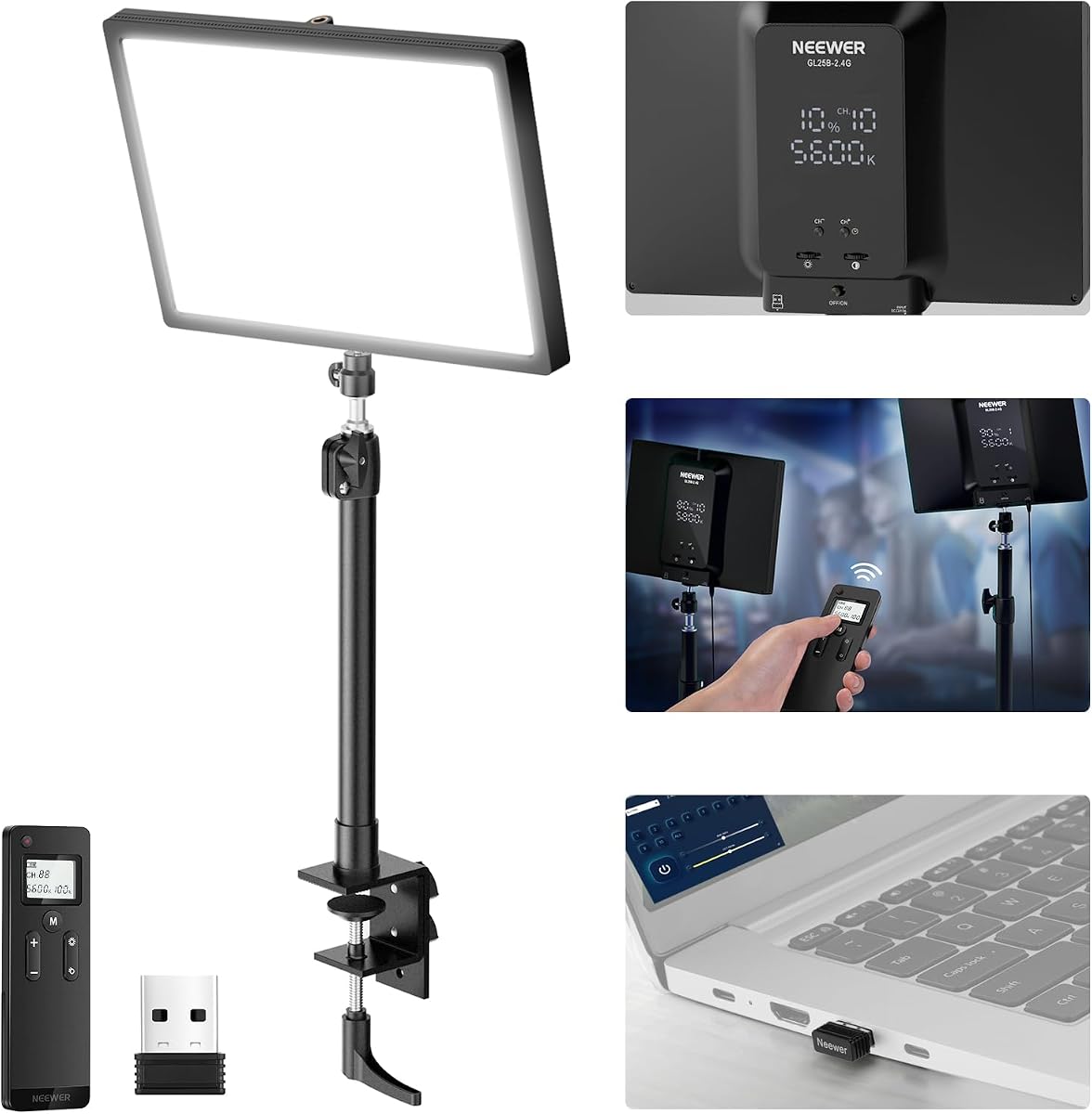
The NEEWER GL25B impresses with its high CRI of 98 plus and 25W output for professional results. Rated 4.7 stars, it delivers bright diffused illumination ideal for streaming and video recording. The 176 LEDs provide soft light without harsh shadows on your face.
We may earn a commission when you buy through this link, at no additional cost to you.
Control options include a 2.4G remote and a PC/Mac app for wireless management. The fanless cooling system ensures zero noise, maintaining an immersive experience. This feature is essential for high-quality audio recording during live broadcasts.
While the PC app requires initial setup, it offers robust control without internet needs. The 12.9 inch panel may require a decent desk space for placement. However, the edge emitting technology ensures even lighting coverage for your setup.
This light suits creators who need silent operation and precise color accuracy. It is excellent for TikTok, YouTube, and gaming content. If you prioritize quiet and accurate lighting, the GL25B is a premium choice worth considering.
The fanless design ensures zero noise performance for uninterrupted streaming and audio recording.
With CRI 98 plus, it renders colors naturally for professional video quality.
We may earn a commission when you buy through this link, at no additional cost to you.
The Elgato Key Light Air MK.2 offers a slim 15-inch panel with 2100 lumens for balanced lighting. Although it holds a 3.8-star rating, users value its edge-lit anti-glare illumination. The 256 LEDs ensure natural color rendering from 2900K to 7000K.
We may earn a commission when you buy through this link, at no additional cost to you.
It supports USB-C, PD 3.0+, and battery power for flexible setup options. The touch and app control allow easy adjustments. Integration with Stream Deck lets you automate lighting changes with a single keypress for efficiency.
Some users note that full output requires a specific adapter. The rating suggests mixed experiences with durability or setup. However, for those wanting Elgato ecosystem integration, it offers distinct advantages in automation and control.
This model is best for users already invested in the Elgato ecosystem. If you want a compact panel with smart features, it is a solid option. Check current reviews before purchasing to ensure it meets your quality expectations.
Power via USB-C, a PD 3.0+ adapter, or a battery bank for portability.
Automate your lighting settings with a single keypress using your Stream Deck.
We may earn a commission when you buy through this link, at no additional cost to you.
The Weilisi Ring Light provides excellent value for budget-conscious streamers. With a 4.5-star rating, it offers uniform diffused light that restores natural tones. The ring design prevents harsh shadows and enhances subject features effectively.
We may earn a commission when you buy through this link, at no additional cost to you.
Its 360-degree rotation and 180-degree head adjustment allow flexible positioning. The telescoping stand gives you height coverage to optimize your desk setup. A large metal C-clamp ensures stability and saves space on your workspace.
While it may not match the brightness of larger panels, it is sufficient for most home uses. The plastic build is sturdy but not premium. This makes it a reliable choice for entry-level creators or secondary lighting needs.
Ideal for podcasting, Zoom meetings, and casual streaming. If you want an affordable and versatile ring light, this model delivers. It fits well for those needing a simple upgrade to their webcam setup without breaking the bank.
Rotate 360 degrees and adjust the head 180 degrees for perfect lighting angles.
The metal C-clamp keeps your desk tidy while providing a stable mount.
We may earn a commission when you buy through this link, at no additional cost to you.
The NiceVeedi 2-Pack offers two 10-inch panels for versatile studio setups. Rated 4.4 stars, they provide stable 15W output with high CRI for accurate colors. The 2800K to 6500K range helps create different lighting atmospheres.
We may earn a commission when you buy through this link, at no additional cost to you.
Each light comes with a durable aluminum tripod stand for flexible placement. The compact panels are easy to carry and store. USB-C adapters allow power from phones or laptops for convenient portable use.
Note that wall chargers are not included in the package. This could be a minor inconvenience compared to other options. However, getting two lights allows for key and fill setups at a very competitive price.
Best for creators who need multiple light sources without spending too much. It works well for YouTube vlogs and photography. If you want to build a dual-light setup affordably, this kit is a practical choice.
Get two panels to create a complete key and fill lighting arrangement.
CRI 97 plus ensures precise color rendering for professional-looking video.
We may earn a commission when you buy through this link, at no additional cost to you.
This 2-pack kit features gooseneck tubes and flexible mounting for precise angles. With a 4.8-star rating, users love the flexibility and ease of use. The 118 LED beads deliver soft flicker-free light at 1080Lux for quality streaming.
We may earn a commission when you buy through this link, at no additional cost to you.
The LCD display clearly shows brightness and temperature settings. It has a memory function to recall your last settings instantly. The C-clamp desktop stand saves space and keeps the desk clean and tidy.
The gooseneck design allows for unique positioning that rigid arms cannot. However, the smaller panels may not be as bright as larger ones. This setup is perfect for close-up streaming and podcasting needs.
Great for streamers needing flexible lighting placement on a desk. If you value adjustable necks and LCD control, this is a top pick. It is a practical choice for compact setups requiring precise light direction.
Adjust the tube to multiple positions for optimal lighting angles on your desk.
Check brightness and color temperature clearly with the built-in display.
We may earn a commission when you buy through this link, at no additional cost to you.
The Godox ES45 uses an edge-lit OLED panel for glare-free illumination. Rated 4.4 stars, it reduces eye fatigue during long sessions. The magnetic remote attaches to the back and recharges automatically when not in use.
We may earn a commission when you buy through this link, at no additional cost to you.
You can control multiple lights via the Godox Light App or by setting channels. The soft light ensures smooth skin tones without harsh highlights. This is ideal for Twitch and YouTube streamers who need comfort.
While the price is higher, the unique remote feature is a major benefit. The design keeps cables hidden for a tidy workspace. Some users might find the clamp setup slightly complex initially.
Best for gamers and streamers prioritizing comfort and smart control. If you want an advanced remote system, this is the top pick. It offers a premium experience for those willing to invest in quality lighting.
Snap the remote onto the back to auto-charge without separate batteries.
The edge-lit OLED panel reduces eye fatigue for long streaming sessions.
We may earn a commission when you buy through this link, at no additional cost to you.
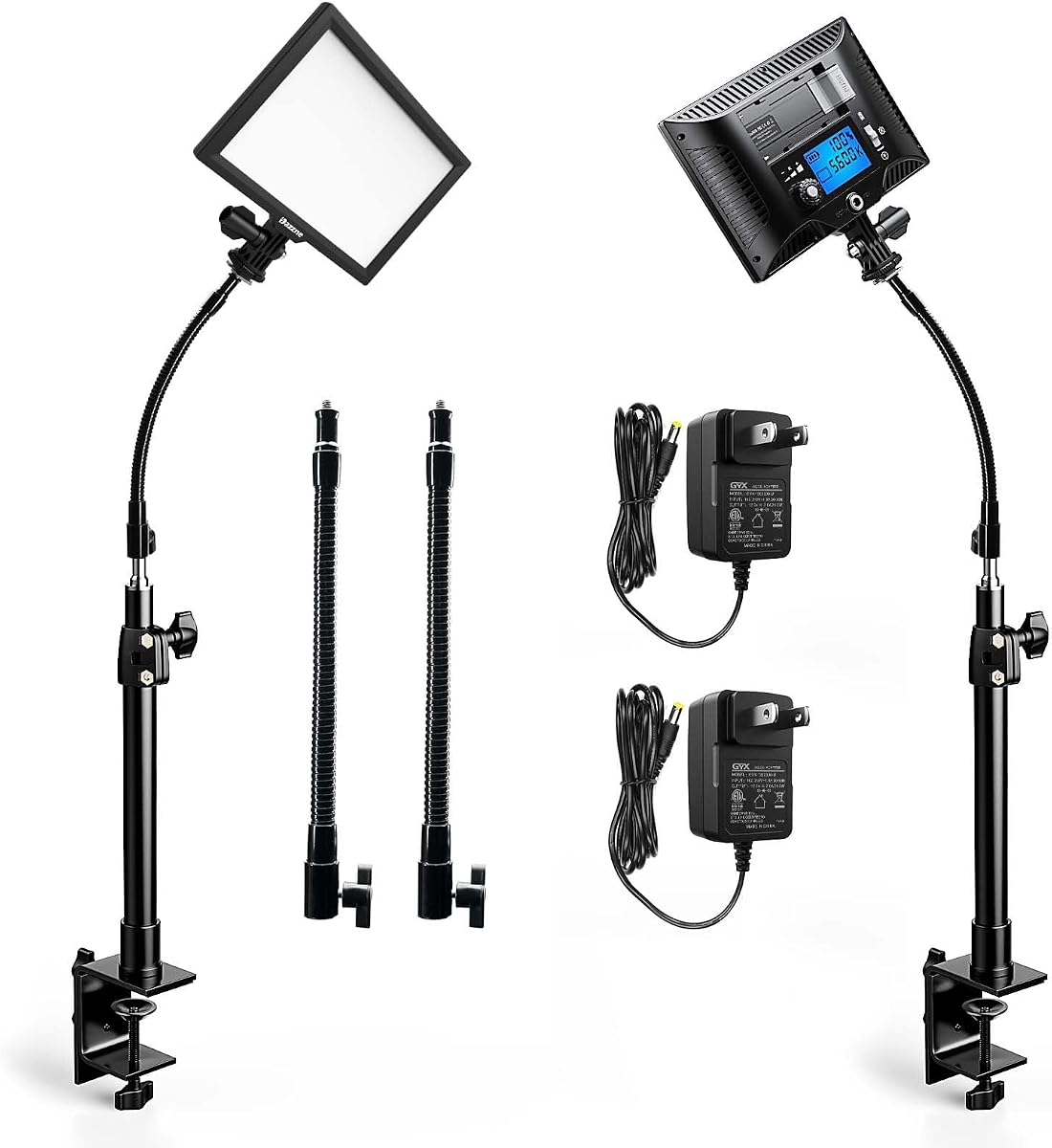
The Dazzne 2-pack provides two panel lights with gooseneck tubes. Rated 4.4 stars, it ensures flicker-free light with 118 high-quality LEDs. The LCD screen lets you check settings accurately for precise control.
We may earn a commission when you buy through this link, at no additional cost to you.
Each panel supports 1 percent to 100 percent dimming. The metal desktop bracket holds the light securely. It is suitable for creating professional setups for podcasts and streaming.
Note that the package does not include power adapters. You will need to source your own cables for operation. This is a small drawback compared to other complete kits available.
Best for those who already have adapters and want two lights. If you need flexible tube positioning and LCD control, this kit works well. It is a practical solution for multi-angle desk lighting.
Enjoy smooth continuous lighting that is gentle on your eyes.
The bracket allows 12.2 to 21.3 inch height adjustment for ideal placement.
We may earn a commission when you buy through this link, at no additional cost to you.
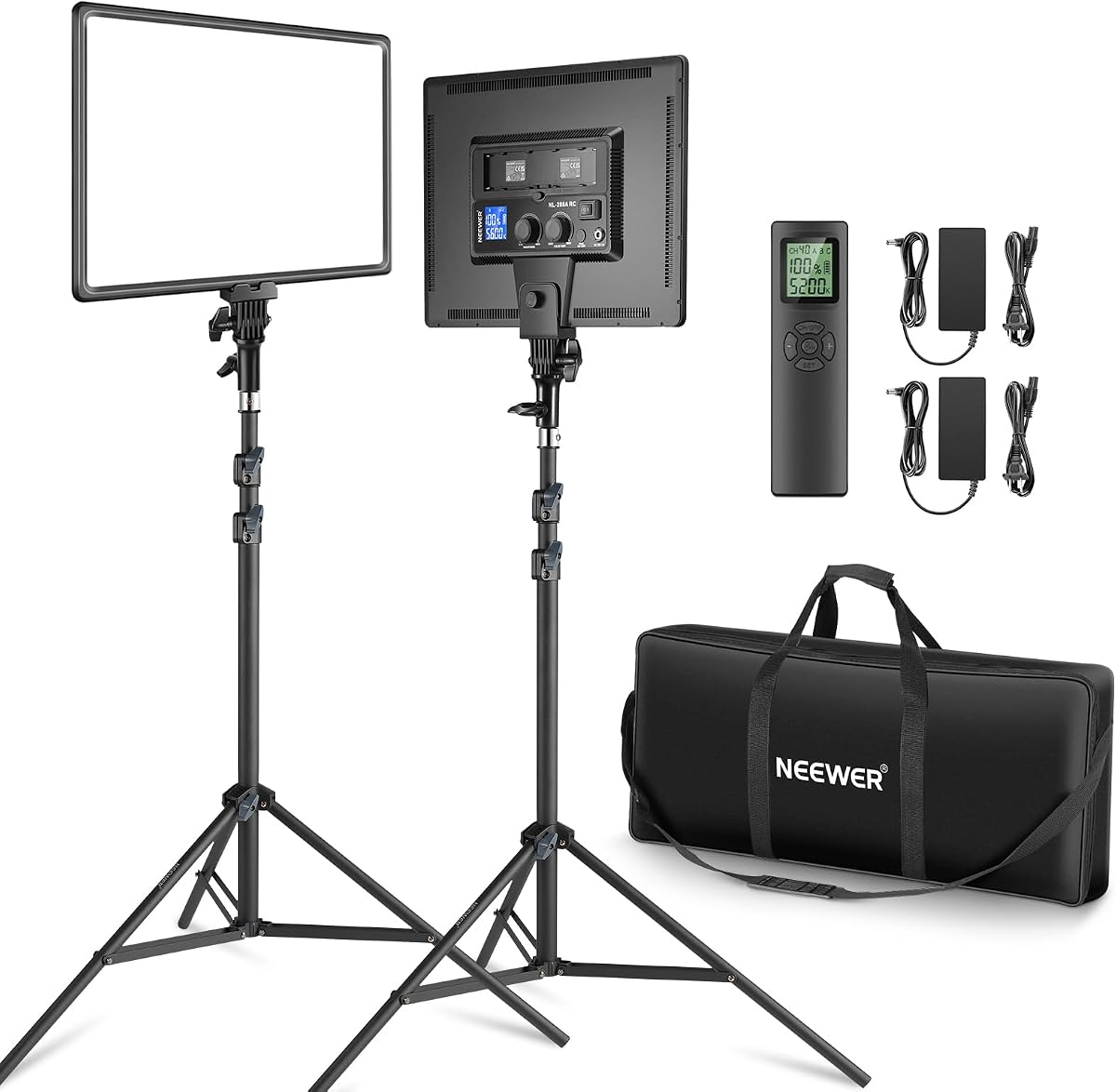
The Neewer 18-inch kit offers powerful 45W panels with 4800Lux output. Rated 4.6 stars, it is ideal for large setups and photography. The remote control allows switching between 40 channels for complex setups.
We may earn a commission when you buy through this link, at no additional cost to you.
It supports AC power and Sony NP-F batteries for portability. The 118 LEDs ensure high CRI 97 plus for natural colors. A carrying bag makes it easy to transport for on-location shoots.
Note that batteries must be bought separately to use the battery feature. The tripods are stable but may take up more space. This kit is perfect for creators needing professional-grade brightness.
Best for serious creators requiring high output and portability. If you need reliable light for studio and field use, this kit delivers. It is a strong choice for professional video and photography needs.
Power your panels with NP-F batteries for on-the-go shooting anywhere.
Control multiple lights together with the 2.4GHz remote system.
We may earn a commission when you buy through this link, at no additional cost to you.
Choosing the right key light involves understanding factors like brightness, color accuracy, and mounting options that suit your specific streaming needs.
Brightness is measured in lumens and determines how much light the panel can produce. Higher lumens like 2800 are suitable for larger rooms while lower brightness works for small desks. Always consider your room size before purchasing a specific model.
Look for models that offer adjustable dimming so you can reduce glare during night streams. Aim for at least 1000 lux at close distance for clear facial visibility.
Color temperature ranges from warm 2900K to cool 7000K. Streaming typically benefits from neutral daylight tones around 5000K to 6000K for skin accuracy. Ensure the light allows stepless adjustment to match your background lighting.
Models with bi-color settings give you flexibility to change mood without buying multiple bulbs. This feature is essential for creators who host different content types.
CRI indicates how accurately the light displays real colors. A high CRI of 95 or above ensures your clothes and props look natural on camera. Low CRI may result in washed-out or inaccurate skin tones.
Prioritize lights with CRI 97 plus for professional quality. This specification is often listed in the technical details of the product page.
Desk clamps save space while tripods offer height flexibility. Consider where your light will sit and if you have the desk depth for a clamp. Some models allow mounting on monitors which is great for laptops.
Ensure the mount can support the weight of the panel securely. A sturdy clamp prevents the light from falling during adjustments or accidental bumps.
Modern lights offer app control, remotes, or touch panels. Touch controls are convenient for quick adjustments during breaks. App control allows for saving presets which speeds up your setup routine.
Remote controls are useful for large setups where walking to the light is difficult. Check if the app supports Wi-Fi or requires physical proximity to work.
Most lights use USB-C or standard AC adapters. Battery-powered options allow for portability outside your home studio. Ensure the power source matches your available outlets or cables.
Dual power options are a plus if you want flexibility. Check if the power adapter is included to avoid extra costs.
Metal panels last longer than plastic ones and dissipate heat better. Look for models with efficient cooling systems to prevent overheating. A sturdy build ensures safety during long streaming sessions.
Review customer feedback for long-term durability. Quality components reduce the risk of early failure and warranty claims.
Prices vary significantly from budget rings to premium panels. Determine if you need just one light or a full two-pack kit. Higher cost often brings better durability and advanced features like app control.
Look for value packs if you need multiple lights. Balancing price and specs ensures you get the best results for your investment.
Position your light at eye level or slightly above to avoid harsh shadows under your eyes. Angle the light 45 degrees to your face for a flattering 3D effect.
Clean the diffuser panel with a soft dry cloth to prevent scratches. Avoid using liquid cleaners that could damage the surface or electronics.
Allow the light to cool down before unplugging if it was used for hours. Check all connections regularly to ensure safe operation and prevent loose contacts.
For most home setups, 2000 to 2800 lumens provides sufficient brightness. Ensure the light has a dimmer so you can reduce intensity if needed.
A key light improves face visibility and reduces shadows. It is highly recommended for professional appearances even on video calls.
Many key lights come with clamps for desk mounting. If your desk is thick, ensure the clamp fits properly.
Neutral white between 4500K and 5500K works best for most people. This range mimics daylight and keeps skin tones accurate.
LED lights generate very little heat compared to incandescent bulbs. Look for models with fanless cooling for silent operation.
Wi-Fi enabled models allow phone control via apps. Check the product specs to see if remote control is supported.
The Elgato Key Light and NEEWER GL25B stand out for their brightness and control features. The Weilisi Ring Light offers a budget-friendly alternative for casual creators.
Prioritize CRI and brightness to ensure your video looks professional. Matching the light to your room size and desk setup is equally important.
Always check current prices and availability before purchasing. Specifications and offers may vary so verify details on the official product page.