
KPXOS OSU3X Custom
3.4Editor score
Magnetic Switches Included
Adjustable Trigger Distance
RGB Backlighting Support
Discover the top keyboards for Geometry Dash players. This guide compares magnetic switches, rapid trigger tech, and compact designs to help you master every
Finding the right keyboard for Geometry Dash can transform your gaming experience from frustrating to flawless. Precision timing and rapid key presses are essential for navigating the intense obstacles found in this popular rhythm-based platformer. A high-performance keyboard ensures your inputs are registered instantly without any lag or missed beats.
We have analyzed ten top-rated models specifically suited for rhythm games and precision gaming. Our comparison focuses on critical features like magnetic switches, rapid trigger technology, and compact layouts. Each product was evaluated based on user feedback, technical specifications, and overall build quality to ensure reliability.
Each selection in this list highlights unique strengths that cater to different play styles and budgets. You will find detailed breakdowns of performance features and ergonomic designs to help you make an informed decision. Please note that pricing and availability may change frequently on retail platforms.
3.4Editor score
4.7Editor score

4.5Editor score
This side-by-side comparison highlights the key specifications of each keyboard to help you quickly identify the best fit for your needs and budget.





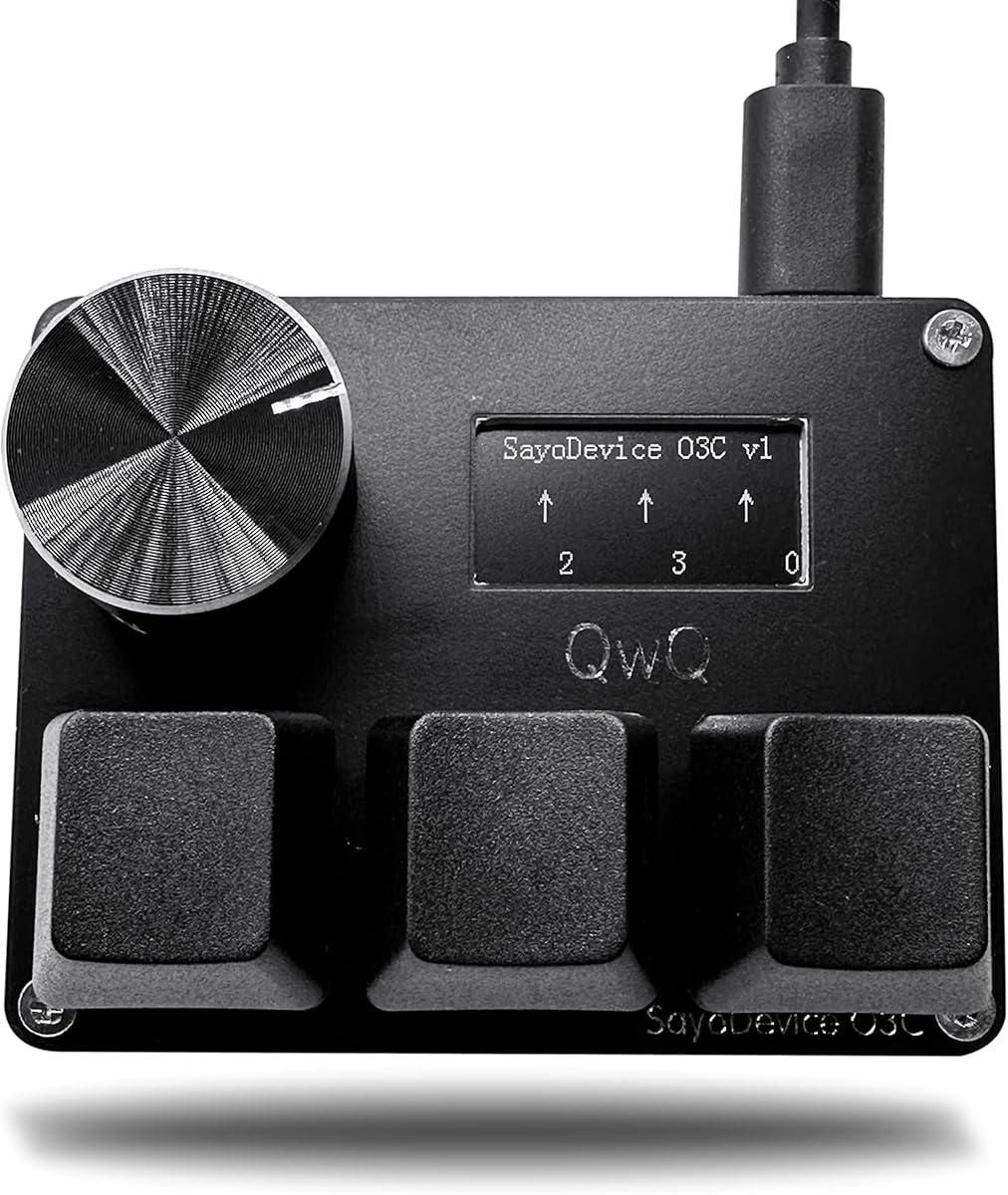
The BTXETUEL SayoDevice O3C stands out as a top contender for rhythm gaming enthusiasts. With a high rating from users, this keyboard delivers precision through its Hall magnetic linear switches. Its compact design ensures your inputs are registered instantly without lag.
We may earn a commission when you buy through this link, at no additional cost to you.
Key strengths include the ability to customize the screen and knob for specific tasks. This allows you to scroll through song lists or access macros efficiently. The high polling rate ensures that even the fastest levels in Geometry Dash are handled with ease.
While the keyboard requires calibration before first use, this is a minor trade-off for the performance gains. The need to adjust settings can ensure optimal operation. This process is straightforward and well-documented in the included guides.
This keyboard is ideal for players seeking a balance between performance and affordability. Whether you are a casual player or a competitive gamer, this device offers the precision needed to master challenging levels.
The Hall magnetic linear switches provide consistent actuation without physical contact, reducing wear and tear significantly.
Users can personalize the screen text and knob functions to streamline their workflow during gameplay sessions.
We may earn a commission when you buy through this link, at no additional cost to you.
The KPXOS OSU3X Custom offers an entry-level solution for those interested in magnetic switch technology. It provides essential features like rapid trigger support and calibration setup. This makes it accessible for users who want to try advanced inputs without a heavy investment.
We may earn a commission when you buy through this link, at no additional cost to you.
Its standout feature is the visual feedback display that shows key travel in real time. This helps players understand their input mechanics better. The adjustable trigger distance ensures that you can fine-tune the sensitivity to your preference.
Users should note that the build quality is basic compared to higher-end models. While functional, it may not withstand heavy daily use over long periods. However, for occasional gaming sessions, it remains a viable option.
This model is best suited for beginners or those on a tight budget. It allows you to experience the benefits of rapid trigger technology without spending a fortune on premium hardware.
The display provides real-time key travel data which helps players optimize their finger movements for better accuracy.
Compatible with various magnetic poles and switches allowing for independent calibration on each key for personalized settings.
We may earn a commission when you buy through this link, at no additional cost to you.
This version of the BTXETUEL SayoDevice O3C mirrors the features of the top pick with consistent reliability. Users appreciate the Hall magnetic switches for their speed and durability. It serves as a solid alternative when the primary model is out of stock.
We may earn a commission when you buy through this link, at no additional cost to you.
The customization options allow for a tailored experience including screen text and knob functions. This level of personalization ensures the keyboard fits your unique setup requirements. The high polling rate ensures that commands are transmitted without delay.
The primary consideration is the need for calibration before initial use. This step ensures optimal performance but requires some time and effort. Once configured, the keyboard operates smoothly for extended periods.
It is recommended for players looking for a proven design with strong user feedback. The consistent rating suggests that this model meets expectations for precision and reliability in rhythm games.
The 8000HZ polling rate ensures that every keystroke is captured instantly for precise timing in fast-paced games.
Users can set the knob for scrolling or other keys to streamline navigation through song lists or macro settings.
We may earn a commission when you buy through this link, at no additional cost to you.
The O3C Rapid Trigger Keyboard offers professional-grade magnetic switches designed for competitive gaming. Its custom trigger release settings allow for a wide range of actuation points. This flexibility helps players find the exact feel they need for Geometry Dash.
We may earn a commission when you buy through this link, at no additional cost to you.
The screen supports custom animations which adds a unique visual element to your setup. This feature enhances the overall gaming experience by keeping you engaged. The hot-swappable design means you can experiment with different switches easily.
One trade-off is the compact layout which may limit functionality for non-gaming tasks. Users should ensure they are comfortable with the reduced key count before purchasing. For gaming focused use cases this is rarely an issue.
This keyboard is best for players who want advanced control over their inputs. The ability to fine-tune trigger settings makes it a powerful tool for mastering difficult levels.
The switches are designed for professional gaming with rapid trigger technology that resets keys based on movement instead of fixed points.
The screen is capable of displaying custom animations which can be used to show game stats or aesthetic elements.
We may earn a commission when you buy through this link, at no additional cost to you.
The Aula WIN60 HE is a premium option offering 8000Hz polling for ultra-fast response times. Its magnetic switches are self-developed and provide consistent actuation without physical contact. This design ensures precision and reliability over long gaming sessions.
We may earn a commission when you buy through this link, at no additional cost to you.
The web-based driver allows for deep customization without bulky software downloads. You can remap keys and set RGB lighting directly from your browser. This streamlined approach simplifies the setup process significantly.
The 60 percent layout saves desk space but may require an adapter for some users. It is designed primarily for gaming and work where full keys are not needed. This trade-off is acceptable for those prioritizing performance.
This model is ideal for serious gamers who demand the highest level of performance. The combination of speed and customization makes it a top choice for competitive play.
The rapid trigger mode ensures lightning-fast response times with ultra-low RT step distance of just 0.02mm for precise control.
A powerful web-based driver allows you to remap keys and create macros without needing to install additional software on your computer.
We may earn a commission when you buy through this link, at no additional cost to you.
The RedThunder K95 brings wireless connectivity to the mix with triple mode options. It includes a TFT screen and CNC knob for added functionality. This keyboard supports both wired and wireless modes to suit different preferences.
We may earn a commission when you buy through this link, at no additional cost to you.
The gasket mount design provides a unique shock absorption experience. This results in a softer and more comfortable typing feel. The high capacity battery ensures long usage times even with RGB lighting active.
Wireless modes might introduce slight latency compared to wired connections. For precision games like Geometry Dash wired mode is often recommended. Users should weigh convenience against performance needs carefully.
This model suits users who want a versatile keyboard for multiple devices. The battery life and connectivity options make it a strong all-rounder for various tasks.
Seamlessly switch between different devices in Windows MacOS and BT modes using the flip switches on the top of the keyboard.
The gasket design has five-layer shock absorption allowing for a more even keystroke feel compared to top-mount designs.
We may earn a commission when you buy through this link, at no additional cost to you.
The NSYCA WIN68 HE features adjustable actuation from 0.01mm to 4.0mm for precise control. This rapid trigger technology dynamically resets keys based on movement ensuring faster response. It is built for high performance gaming scenarios.
We may earn a commission when you buy through this link, at no additional cost to you.
Advanced features like DKS and SOCD unlock new levels of control. You can fine-tune every key to match your specific playstyle. This level of customization is rare in this price range.
The web-based driver simplifies customization but requires internet access. Users without constant connectivity might find this inconvenient. However the interface is streamlined and easy to navigate for most users.
This keyboard is best for gamers who prioritize speed and customization. The high polling rate and fast actuation make it ideal for competitive environments.
Unlock advanced control with Dynamic Keystroke and Simultaneous Opposing Cardinal Directions for better input precision.
The premium gasket structure cushions every keystroke eliminating harsh vibrations for a refined acoustic sound experience.
We may earn a commission when you buy through this link, at no additional cost to you.
The AULA WIN68 HE offers an industry leading 8000Hz polling rate for fast response. It combines ultra-low latency with adjustable actuation points for precision. This makes it suitable for gamers and coders alike who need speed.
We may earn a commission when you buy through this link, at no additional cost to you.
Customization is handled via a professional web driver which avoids software downloads. You can adjust RT SOCD and DKS functions directly. This one-stop management simplifies the setup process significantly.
The driver support is limited to Windows systems which excludes Mac users. Those using Macs may find customization features limited. However for Windows users the experience is comprehensive and user-friendly.
This model is ideal for those who want fast trigger technology without wireless complexity. The compact design saves space while retaining essential keys for efficient gameplay.
The fast trigger keyboard ensures your commands take effect instantly giving you an edge in the game with ultra-low latency.
Customize RGB macros and actuation points directly through the web-based driver with no software installation required for Windows systems.
We may earn a commission when you buy through this link, at no additional cost to you.
The KPXOS OSU3X White provides an entry level experience with visual feedback. It includes rapid trigger support and adjustable trigger distance for customization. This allows you to tailor the keyboard to your preferences easily.
We may earn a commission when you buy through this link, at no additional cost to you.
The visual feedback display helps you understand key travel in real time. This feature enhances user interaction and can improve gameplay accuracy. However the build quality is basic compared to premium models.
Users should be aware of the lower ratings which may indicate inconsistencies. While it works for casual use it may lack durability for heavy use. It is best for those testing magnetic switch tech.
This model is suitable for budget-conscious players who want basic features. The white color option adds a stylish touch to any desk setup.
The 0.96 inch IPS color screen visualizes key travel and status in real time enhancing user interaction and feedback.
Personalize your startup screen and modify device name via software for a truly unique experience.
We may earn a commission when you buy through this link, at no additional cost to you.
The KPXOS OSU4X is a compact keypad designed for rhythm games like OSU and Geometry Dash. It includes magnetic switches and a customizable boot interface. This makes it a fun and functional addition to any gaming setup.
We may earn a commission when you buy through this link, at no additional cost to you.
The knob and screen can be set to any key for custom actions. You can use it to scroll through song lists efficiently. This feature enhances navigation and overall gameplay experience.
As a keypad it lacks a full keyboard layout. Users must rely on their main keyboard for typing or navigation outside of gaming. This limitation should be considered before purchase.
This model is best for those looking for a specialized gaming peripheral. The high-speed polling ensures that your inputs are registered accurately during intense sessions.
The first line of text on the main screen can be customized so users can modify the device name through the software.
The knob can be used to set any key such as scrolling to view the song list for easier navigation.
We may earn a commission when you buy through this link, at no additional cost to you.
Selecting the right keyboard requires understanding specific features that impact gameplay performance and comfort.
Magnetic switches are increasingly popular for their durability and precision. They use Hall effect sensors to detect key presses which reduces physical contact and wear. This technology allows for rapid trigger functionality which is essential for fast-paced games.
Prioritize models with Hall effect technology to ensure your inputs are captured accurately and without delay.
A high polling rate ensures that your keystrokes are sent to the computer frequently. 8000Hz polling rates are becoming standard in high-end gaming keyboards. This reduces latency and makes your actions feel more responsive during gameplay.
Look for a polling rate of at least 8000Hz to minimize input delay and improve reaction times.
The ability to adjust actuation points allows you to customize how deep you need to press a key. This feature can help prevent accidental key presses and improve precision. Some keyboards offer adjustable triggers down to 0.01mm for fine control.
Choose a keyboard that offers adjustable actuation to tailor sensitivity to your specific playstyle.
Compact layouts like 60% or keypads save desk space for better mouse movement. However they may lack function keys required for some applications. Consider how much space you have and if you need dedicated arrow keys or function rows.
Opt for a compact layout if you need more mouse room but ensure it has the essential keys for your workflow.
Software support determines how easy it is to customize keys and macros. Web-based drivers are convenient as they do not require installation. This ensures compatibility across different devices and operating systems.
Select a model with a user-friendly driver system to easily configure settings without technical difficulties.
Durable materials like PBT keycaps resist wear and shine over time. Gasket mounts can provide a more comfortable typing experience by reducing vibrations. These features contribute to the longevity of the keyboard.
Invest in keyboards with quality materials like PBT keycaps to ensure they withstand long-term use.
Prices vary significantly based on features and build quality. Budget models offer essential functionality but may lack advanced customization. Premium models provide better longevity and performance but cost more.
Assess your budget and prioritize features that matter most to your gameplay experience.
Calibrate your magnetic switches before first use to ensure optimal performance. Follow the instructions provided in the manual to adjust trigger points accurately.
Keep the keyboard clean by dusting it regularly. Avoid eating or drinking near the keyboard to prevent spills that could damage the switches.
Update firmware periodically to access new features and improvements. Check the manufacturer website for the latest updates to maintain performance.
A rapid trigger keyboard allows keys to reset immediately when released without needing to return to a fixed actuation point. This technology enables faster input cycles which is crucial for fast-paced games like Geometry Dash. It reduces the time between key presses leading to smoother gameplay.
Yes magnetic switches generally last longer because they do not rely on physical contact to register a press. This lack of friction reduces wear and tear significantly over time. They also offer consistent actuation throughout their lifespan compared to traditional mechanical switches.
Most keyboards work with Macs but driver support can vary. Some models have web-based drivers that are platform-independent. Check product details to confirm compatibility with macOS before purchasing to avoid issues.
Calibration ensures that the keyboard recognizes key presses correctly across the actuation range. It helps eliminate inconsistencies that might affect gameplay accuracy. Skipping this step could lead to missed inputs or unintended triggers.
Compact layouts save desk space allowing more room for mouse movement. This is beneficial for gamers who need precision aiming or movement. It also makes the keyboard more portable for travel or setups with limited desk space.
Polling rate determines how often the keyboard sends input data to the computer. Higher rates reduce latency ensuring your actions happen instantly. For competitive games high polling rates provide a noticeable performance edge.
Hot-swappable switches allow you to change switch types without soldering. This provides flexibility to experiment with different feels or replace faulty switches easily. It adds value if you want to customize or repair your keyboard later.
Yes these keyboards are compatible with popular rhythm game software like OSU and Geometry Dash. They support macro inputs which can be mapped to specific in-game commands. Always check game settings to configure keys correctly.
The BTXETUEL SayoDevice O3C and Aula WIN60 HE stand out for their precision and speed. These models offer advanced features like rapid trigger and customizable actuation points.
Prioritize polling rate and switch type to ensure your keyboard meets competitive standards. Adjusting actuation points can also significantly improve your comfort and accuracy.
Always verify current pricing and availability as these change frequently. Selecting the right keyboard can elevate your gameplay from casual to expert level.