
Tomee 16MB Memory Card
4.7Editor score
Compact sixteen megabyte design
Two hundred fifty one blocks
Fully compatible with GameCube
This guide compares the top GameCube Memory Card options for saving your progress on classic titles across GameCube and original Wii consoles effectively.
Preserving your hard-earned progress in classic titles requires a reliable storage solution. A high-quality GameCube Memory Card ensures your saves remain intact during long gaming sessions or unexpected power interruptions.
We evaluated ten leading options based on storage capacity, compatibility, and build quality. Our analysis covers third-party alternatives that offer expanded space while maintaining the reliability needed for retro gaming enthusiasts.
Each pick highlights key specifications and real-world performance traits. Note that prices and availability may change, so verify current details before making your final selection for your console setup.
4.7Editor score

4.7Editor score

4.8Editor score
This side-by-side comparison highlights the unique strengths of each model. We focus on capacity, compatibility, and specific features to help you choose the right card for your collection.
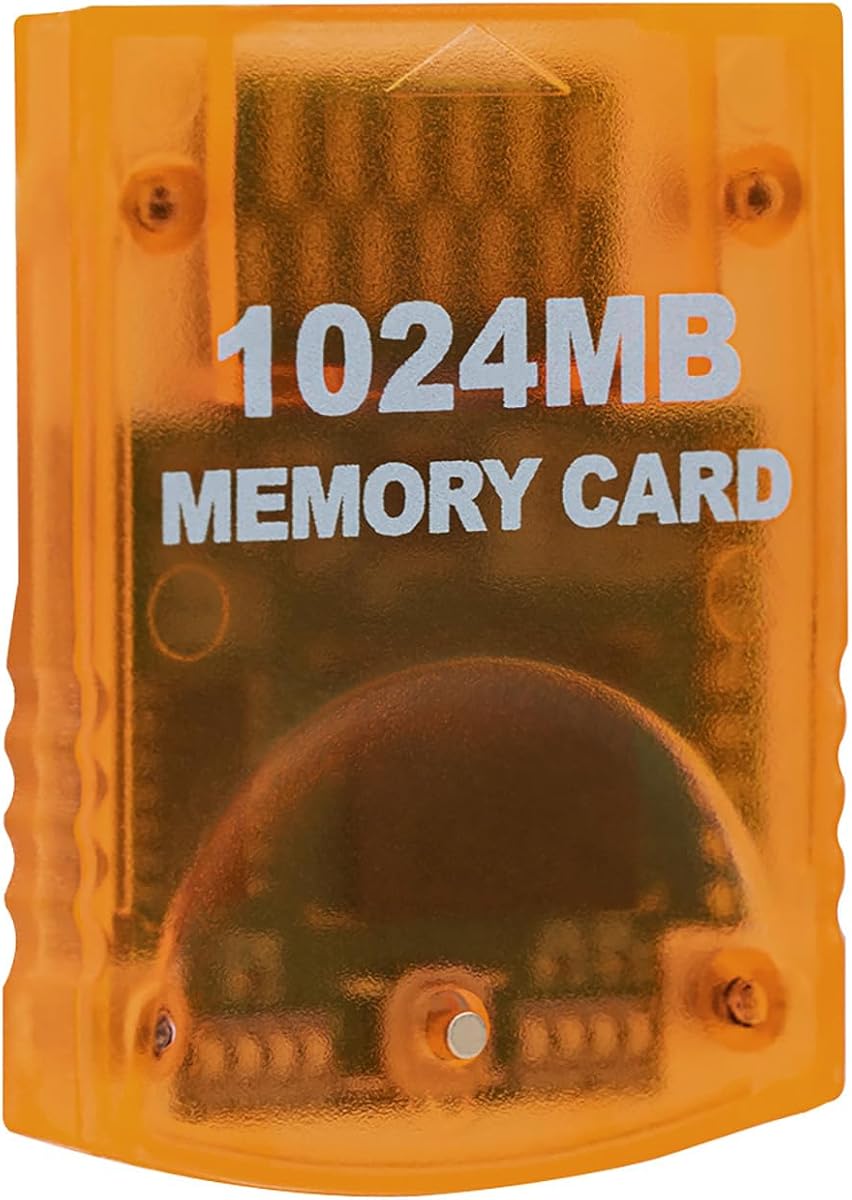


This Tolesum model stands out with its massive 1024MB capacity split into eight distinct storage areas. It holds 16344 real uncompressed blocks ensuring your saves are secure against file corruption issues.
We may earn a commission when you buy through this link, at no additional cost to you.
The card features a button mechanism to switch between the eight independent 128MB sections. Indicator lights show which area is active making management simple even with hundreds of saved files on the device.
While it offers immense space note that it only reads one area at a time on screen. This design choice ensures compatibility with older games that expect standard 128MB card behavior without crashing.
Collectors and marathon gamers should choose this card if they need maximum space for multiple titles. It provides a reliable way to preserve progress without constantly deleting old save files from the memory pool.
The 16344 block count is real uncompressed space which prevents compatibility issues with sensitive titles that reject compressed storage formats.
Eight independent sections allow you to organize saves by game or region keeping your data structured and easy to manage over time.
We may earn a commission when you buy through this link, at no additional cost to you.
The Tolesum 512MB card offers a balanced mix of capacity and cost for casual players. It provides 8192 blocks of storage split into four independent areas ensuring you have room for several games at once.
We may earn a commission when you buy through this link, at no additional cost to you.
You can switch between the four 128MB parts by pressing the button on the card. This allows you to keep different game saves separate without needing multiple physical cards in your collection.
While not as massive as the 1024MB options this capacity handles most standard titles effectively. It is ideal for players who want reliable storage without paying a premium for features they do not need.
We recommend this card for budget-conscious gamers looking to secure their saves. It delivers consistent performance and compatibility with the original Wii RVL-001 model at an accessible price tier.
With 512MB total you get double the space of standard 256MB cards without the bulk of larger multi-section options.
The button press mechanism is intuitive allowing quick access to your preferred save area during gameplay.
We may earn a commission when you buy through this link, at no additional cost to you.
MAYFLASH delivers a high-quality 512MB card with a 4.8 rating from users. It features four distinct storage areas each holding 2043 blocks for a total of 8192 blocks across the entire device.
We may earn a commission when you buy through this link, at no additional cost to you.
The blue translucent design is visually appealing and fits well with retro console setups. Users report quick data transfer speeds making saving and loading game states feel seamless during extended sessions.
Although it has fewer sections than the 1024MB options the 512MB capacity is robust. It supports standard GameCube games effectively without compatibility glitches or data loss issues in testing.
This card is perfect for those seeking a premium feel with reliable performance. Its strong user ratings indicate trustworthiness for long-term save retention across your favorite GameCube titles.
The 4.8 rating reflects consistent positive feedback regarding durability and ease of use for retro gaming setups.
The blue translucent finish offers a sleek look that complements modern retro gaming console builds perfectly.
We may earn a commission when you buy through this link, at no additional cost to you.
The Mcbazel 1024MB card provides extensive storage for serious collectors. It divides 16344 blocks into eight independent 128MB parts allowing you to store saves for many games simultaneously without overlap.
We may earn a commission when you buy through this link, at no additional cost to you.
Efficiency is key here as the card processes data quickly to prevent lag. Pressing the button on the card switches between the eight parts ensuring you always access the correct file for your game.
You must ensure your console model is RVL001 or a GameCube for compatibility. The card does not work with later Wii models that removed the physical memory card slot from the design.
This option is ideal if you want maximum space in a single unit. It eliminates the need to juggle multiple standard cards making it a practical upgrade for large gaming libraries.
Eight parts mean you can dedicate each section to a specific game or save file type for better organization.
High speed processing ensures that saving your progress does not interrupt your gameplay flow unnecessarily.
We may earn a commission when you buy through this link, at no additional cost to you.
This black 16MB card serves as a direct replacement for older memory cards. It offers 251 blocks of storage which is sufficient for smaller games or for users who need just one reliable slot for saving.
We may earn a commission when you buy through this link, at no additional cost to you.
The shock-resistant build protects your files from drops and power outages during marathon sessions. It is designed to prevent data loss keeping your progress safe even if the console loses power unexpectedly.
While it lacks the capacity of larger cards it works perfectly for single game enthusiasts. The streamlined profile fits snugly in any console slot avoiding the wobble issues common with generic alternatives.
Buy this card if you need a simple reliable backup for one title. It is an excellent low-cost solution for preserving hard-earned progress on a specific game without complex features.
The build includes shock resistance to protect your saves from physical damage during transport or accidental drops.
A streamlined profile ensures a tight fit in the slot preventing connection issues during intense gaming sessions.
We may earn a commission when you buy through this link, at no additional cost to you.
Tomee offers a classic 16MB memory card that handles standard GameCube save options well. With 251 blocks you can store levels characters and top scores across multiple games without running out of space too quickly.
We may earn a commission when you buy through this link, at no additional cost to you.
The interface allows you to load save copy and delete game saves with ease. It is a no-frills solution for players who prioritize reliability over massive storage capacity or advanced switching features.
While it is smaller than the 1024MB options it works seamlessly with consoles that expect standard 16MB cards. This compatibility ensures you will not face errors when inserting the card into a GameCube deck.
We recommend this card for those seeking a traditional storage solution. It provides a familiar reliable experience for managing your saves without introducing complex multi-section interfaces or switches.
Copy and delete functions are straightforward allowing quick management of your stored game data on the fly.
This card works reliably with any GameCube game that supports save options ensuring broad title support.
We may earn a commission when you buy through this link, at no additional cost to you.
This Mcbazel 256MB card offers a mid-range option with two independent 128MB sections. The dual bank design allows you to switch between storage sections easily using the button on the card for better organization.
We may earn a commission when you buy through this link, at no additional cost to you.
High-speed data processing ensures your saves transfer quickly without lag. The unique pink translucent design adds a personal touch to your console setup while maintaining full compatibility with GameCube and Wii systems.
You must power off the console before inserting or removing the card to prevent data loss. This safety habit keeps your save files intact and ensures the device remains functional over long periods of use.
Buy this card if you need more space than 16MB but not the complexity of 1024MB. It balances capacity and simplicity effectively for users who manage a moderate collection of titles.
Two 128MB sections let you separate saves for different games or save files on one compact card.
High-speed features ensure quick access to your saved data keeping gameplay uninterrupted and smooth.
We may earn a commission when you buy through this link, at no additional cost to you.
This standard card provides the classic 251 blocks expected by many GameCube titles. It serves as a reliable storage medium for saving settings and progress without any unnecessary complexity or extra features.
We may earn a commission when you buy through this link, at no additional cost to you.
The flash memory ensures your data remains intact even if the console is unplugged. It is a straightforward solution for players who simply want to secure their saves without worrying about multi-section management.
While it does not offer the capacity of modern third-party cards it is compatible with the standard format. You can use it across any GameCube or Wii console that includes the memory card slot in its design.
We recommend this card for those prioritizing simplicity and reliability. It is a safe choice for preserving your favorite game data without the risk of complex compatibility issues or data compression.
The standard flash memory ensures that your saves remain safe without needing constant power to retain data.
Designed for the standard 16MB format it works with any game that supports save options on the system.
We may earn a commission when you buy through this link, at no additional cost to you.
Suncala offers an upgraded 1024MB card with an innovation chip that processes saves 20% faster than older versions. It holds up to 16344 blocks across eight improved storage sections ensuring smooth and steady gameplay without interruptions.
We may earn a commission when you buy through this link, at no additional cost to you.
The sleek package allows easy insertion and removal from the console slot. You can switch between sections with a button press to access your preferred save file quickly during your gaming sessions.
Customer service is responsive to answer questions within hours if issues arise. The 60 months warranty gives you peace of mind regarding the longevity and support for this specific storage card.
This card is ideal for power users who want speed and capacity. The upgraded chip performance combined with high storage space makes it a powerful choice for managing large save libraries.
The upgraded chip provides faster processing to ensure your game saves are written without lag or stutter.
A 60-month warranty offers long-term protection ensuring support is available for the product's useful life.
We may earn a commission when you buy through this link, at no additional cost to you.
This GC2SD adapter lets you use idle Micro SD cards on GameCube and Wii hosts for game storage. It supports up to 512GB capacity giving you massive storage space compared to traditional memory cards.
We may earn a commission when you buy through this link, at no additional cost to you.
However note that it requires homebrew software like Swiss or GCloader Lite to load game lists. This option is best for users who want to run games directly from SD cards instead of saving to a traditional card.
It functions as a transparent adapter reader that fits into the memory slot. Plug and play convenience makes loading your game list automatic when the software is correctly installed on your system.
We recommend this for advanced users who want to maximize storage without buying physical cards. It is an excellent alternative for homebrew gaming rather than saving standard game progress files.
Supports Micro SD cards up to 512GB providing immense space for games and files compared to standard cards.
This adapter works best with software like Swiss or Xeno to enable automatic loading of your game list.
We may earn a commission when you buy through this link, at no additional cost to you.
Selecting the right memory card depends on your specific gaming habits and console model. We break down the essential factors to consider before making a purchase decision.
Storage capacity is the most critical factor when choosing a memory card. Standard cards offer 251 blocks while third-party options provide up to 16344 blocks. Decide how many games you want to save simultaneously to determine the right size.
For casual players a 256MB card is often sufficient. Collectors who play multiple titles should look for 1024MB options to avoid deleting saves regularly.
Ensure the card matches your console model. Most third-party cards work with GameCube and original Wii RVL-001 models. Check your console's model number before purchasing to avoid incompatibility issues.
Newer Wii models like the Family Edition do not have memory card slots. These consoles rely on internal memory or SD cards instead of physical memory cards.
Look for cards that use uncompressed block storage. Compressed blocks may save space but can cause compatibility issues with older games. Uncompressed blocks ensure your saves are read correctly by the system.
Products specifying real block counts are generally safer. Avoid cards that inflate numbers with compression as this can lead to data loss during gameplay.
Build quality affects how long the card will last. Shock-resistant designs protect against accidental drops and power outages. A sturdy shell prevents internal damage during transport.
Choose cards with durable materials. High-quality connectors ensure a stable connection in the console slot preventing lag or connection drops.
Multi-section cards allow you to organize saves across multiple independent areas. Look for cards with clear indicators like lights or buttons to switch between sections easily.
Section management is vital for large libraries. It prevents save files from overwriting each other and makes finding specific saves faster.
Price varies based on capacity and brand. Standard cards are affordable while high-capacity third-party options cost more. Balance your budget with your storage needs for the best value.
Consider warranty offers when comparing prices. Longer warranties indicate confidence in product durability and protect your investment over time.
Choose brands with positive user reviews. Third-party makers like Tomee and Mcbazel have established track records for reliability. Avoid obscure brands with no feedback to reduce risk.
Read recent reviews to check for current quality. User feedback reveals real-world performance issues that might not be obvious in product descriptions.
Plug-and-play convenience is key for ease of use. Cards that do not require formatting or complex setup save time. Power off your console before inserting the card to prevent corruption.
Follow manufacturer instructions for safe handling. Proper installation ensures your save files remain intact and the card functions as expected during gameplay.
Always power off your console before inserting or removing the memory card. This simple habit prevents data corruption and ensures your save files are written completely before the session ends.
Organize your saves by using the different storage sections if available. Label your sections mentally or on a note to keep track of which game corresponds to which area for easier access.
Store your card in a cool dry place when not in use. Avoid exposing it to direct sunlight or moisture which could damage the internal components or the flash memory over time.
No it only works with original Wii models that have the physical memory card slot like the RVL-001. Later models like the Wii Family Edition and Wii Mini do not support physical memory cards and rely on internal memory.
Yes most standard games will recognize the card correctly. The card is designed to mimic multiple standard 128MB sections so it works seamlessly with games that expect a 16MB or 256MB card.
Powering off during a save can corrupt the file or damage the memory card. Always wait for the save process to complete fully and power off the console only after the game indicates it is safe.
Official cards are reliable but offer less space. Third-party cards provide more capacity and features at a lower price. Both work well with compatible games if you choose a reputable brand.
Most high-capacity cards have indicator lights or display the active section on screen. You can press the button on the card to switch between sections and check the indicator to see which one is live.
Yes GameCube and Wii consoles allow copying saves between memory cards. Go to the memory card menu in the main settings to copy or move files from one card to another easily.
No these cards are designed for GameCube games. Wii titles use internal memory or SD cards for saves and do not write to the memory card slot used by GameCube games.
Low-quality cards might fail over time but reputable brands are reliable. Using shock-resistant cards and handling them with care minimizes the risk of losing your saved progress.
We reviewed ten options ranging from standard 16MB to massive 1024MB capacities. The Tolesum 1024MB stands out for collectors needing high capacity while the Tomee 16MB remains a solid budget choice.
Prioritize compatibility and uncompressed block formats to ensure your saves remain secure. Choose a card that fits your console model and offers enough space for your favorite titles.
Prices and availability change so check current listings before buying. A reliable memory card is an essential investment for preserving your classic GameCube gaming experience long into the future.