
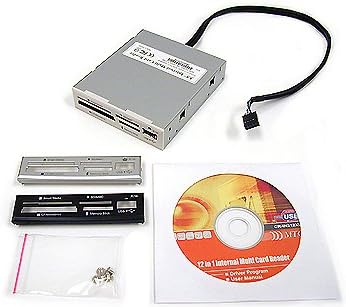
SABRENT 74 in 1 3.5 Inch Internal Flash Media Card Reader/Writer with USB Port
4.0Editor score
Supports 74 Different Types
Internal Power Connector Included
Plus 1 USB 2.0 Port
This guide compares the top internal media card reader options for desktop PCs, evaluating speed, compatibility, and build quality to help you choose the right
An internal media card reader provides reliable access to various memory formats directly from your desktop chassis. It eliminates the need for external adapters and keeps your workspace organized while ensuring fast data transfers for creators and professionals.
We evaluated ten leading models based on interface speed, card format support, and installation ease. Our analysis covers 3.5 inch and 5.25 inch bay options with USB 2.0 and 3.0 connectivity to suit different system requirements and budgets.
Each pick highlights specific strengths like simultaneous slot access or broad format compatibility. Prices fluctuate frequently so check current listings before buying to ensure you get the best value for your specific desktop setup today.
4.0Editor score

4.5Editor score

3.8Editor score
The following table compares all ten selected internal card readers side by side. Review the specifications to find the model that matches your drive bay size and required memory card formats.


The StarTech Internal Card Reader stands out as the top choice for professionals needing reliable internal access. It holds a strong 4.5 star rating from users who value its build quality and speed.
We may earn a commission when you buy through this link, at no additional cost to you.
Its USB 3.0 interface ensures fast transfers while supporting simultaneous access to four different card slots. This capability is vital for videographers copying footage from multiple cameras efficiently.
While it requires an internal 20-pin header and costs more than budget options, the performance justifies the investment. The TAA compliance makes it suitable for government contracts too.
Buy this if you need a permanent high-speed solution for your desktop workstation. It offers the best balance of speed and versatility among current internal readers.
You can copy files from or between different media cards at the same time without swapping slots manually.
The front facing USB 3.0 port lets you plug in external drives easily without reaching behind the tower.
We may earn a commission when you buy through this link, at no additional cost to you.
The SABRENT 74 in 1 Reader is the most economical option on this list. It receives solid feedback for offering vast compatibility at a very low entry cost.
We may earn a commission when you buy through this link, at no additional cost to you.
It supports seventy-four different memory card types which covers almost every legacy and modern format you might encounter. The internal power connector ensures stable operation even with high draw cards.
The main drawback is its USB 2.0 speed which is slower than modern standards. However for casual file transfers this speed is often sufficient for most home users.
Choose this if you are on a tight budget but need extensive format support. It provides the best value for money for general desktop storage tasks.
It handles M2 XD SD SDHC SDXC MMC and many older formats so you rarely need external adapters.
An extra USB 2.0 port is included so you can connect a flash drive or keyboard directly here.
We may earn a commission when you buy through this link, at no additional cost to you.
This 5.25 inch Media Dashboard acts as a full front panel expansion hub rather than just a card reader. It offers a robust set of connectivity options for advanced PC builders.
We may earn a commission when you buy through this link, at no additional cost to you.
It combines a USB 3.0 hub with an eSATA port and dedicated audio jacks. This consolidation reduces cable clutter and improves ergonomics for daily computer use.
The card reader supports simultaneous multi-card access and works with large files thanks to USB 3.0 speeds. However installation requires a large drive bay which is less common today.
Buy this if you have a case with an empty 5.25 slot and need comprehensive front panel features. It is the most feature-rich dashboard available for desktop upgrades.
You get five USB ports total plus front speakers and microphone jacks eliminating the need for rear connections.
With 5Gbps USB 3.0 and eSATA support file transfers are significantly faster than standard USB 2.0 models.
We may earn a commission when you buy through this link, at no additional cost to you.
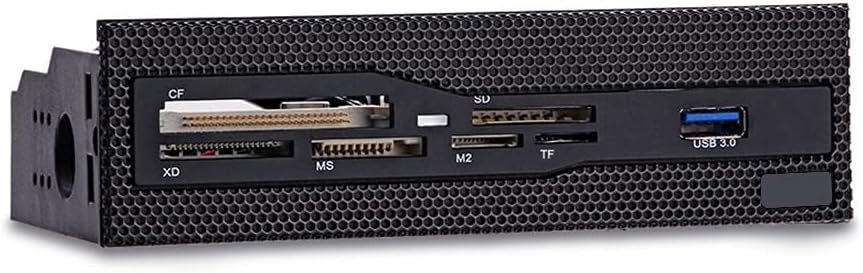
The 5.25 Internal Card Reader offers a stylish grid panel design that matches many modern PC cases. It delivers strong performance with USB 3.0 speeds for quick data access.
We may earn a commission when you buy through this link, at no additional cost to you.
It features six card slots to handle common formats like CF XD MS and TF. The copper-plated slots help ensure stable electrical connections during high speed transfers.
This model is perfect for users who want a clean front panel look without extra audio or USB complexity. It fits neatly into larger bays while providing essential card access.
Choose this if you prioritize a sleek aesthetic and fast card reading speeds. It is a solid middle-ground option for enthusiasts building custom rigs.
The durable grid panel design integrates perfectly with cases that feature a front mesh layout.
Copper plating on the card slots reduces resistance and improves signal stability during data writes.
We may earn a commission when you buy through this link, at no additional cost to you.
The Vantec Link USB 3.0 Reader holds a perfect 5.0 star rating for its technical precision and reliability. It is designed for users who need specific high-level memory card support.
We may earn a commission when you buy through this link, at no additional cost to you.
It supports CompactFlash V6.0 with PIO mode 6 and MicroSD UHS-I speeds. These specs make it ideal for legacy high-end cameras or industrial devices that use specific protocols.
The Multi-LUN feature allows multiple devices to be accessed simultaneously which is rare in this price range. However it requires a 20-pin header connection inside your motherboard.
Buy this if you need precise technical support for CF and MicroSD cards. It is a highly specialized tool for power users and IT professionals.
It handles Ultra DMA mode 7 and LBA48 capacity up to 144PB for massive legacy storage devices.
Multiple memory cards can be accessed at once which improves workflow for editing multiple sources.
We may earn a commission when you buy through this link, at no additional cost to you.
The TCC-QL5E offers a comprehensive 5.25 inch front panel with six USB ports and a five-in-one card reader. It targets users needing maximum connectivity expansion.
We may earn a commission when you buy through this link, at no additional cost to you.
It includes SATA and eSATA ports alongside USB 3.0 for high speed data. The audio ports solve the inconvenience of rear jack access for headsets and mics.
LED indicators for power and hard disk status help monitor system activity easily. While it offers great versatility the cabling is complex for simple setups.
Choose this if you want a full connectivity hub with card reading built in. It is best for users who need many USB ports on the front.
With six USB ports and two SATA data cables you can connect many peripherals directly to the front.
LED indicators show power status and hard disk read write status for quick visual checks.
We may earn a commission when you buy through this link, at no additional cost to you.
The Sony MRW620 is a classic internal reader known for brand reliability and simple design. It supports 17 common card formats which covers many legacy devices.
We may earn a commission when you buy through this link, at no additional cost to you.
It includes black and ivory colored faceplates to match your case aesthetics. The Drive Letter Recognition Software simplifies mounting for users accustomed to specific drive paths.
While it lacks USB 3.0 speeds it remains a solid choice for basic memory needs. It works well on older systems where modern headers might not be available.
Buy this if you prefer a trusted brand name with simple plug and play setup. It is ideal for legacy systems or general home office use.
Sony is a known name in memory cards so you expect consistent quality and performance here.
Black and ivory faceplates let you choose the look that fits your build theme better.
We may earn a commission when you buy through this link, at no additional cost to you.
This All-In-One Internal Card Reader is a compact 2.5 inch unit designed for smaller drive bays. It has received perfect feedback for reliability and build quality from users.
We may earn a commission when you buy through this link, at no additional cost to you.
It comes with black silver and white bezels so you can match your PC case color. The compact size saves space compared to larger 3.5 inch models.
While it handles standard formats well it may lack advanced USB 3.0 speeds. However for basic card access it is a clean and effective solution.
Choose this if you need a small reader for a compact build or mini-tower case. It is a hidden gem for space-conscious PC builders.
The 2.5 inch internal fit allows installation in cases where larger bays are already occupied.
Retail includes black silver and white bezels so you can swap them easily to match your rig.
We may earn a commission when you buy through this link, at no additional cost to you.
The Akasa AK-ICR-07 offers six ports for popular cards plus an extra USB port for phones or sticks. It is a flexible choice for casual desktop users.
We may earn a commission when you buy through this link, at no additional cost to you.
It includes two front fascia panels in black or white so you can swap colors easily. Dedicated ports for adapters eliminate the need for separate trays for microSD cards.
LED indicators for power and data transfer help you know when operations are complete. While speed is not top-tier it provides good everyday convenience.
Buy this if you want a reader with an extra USB slot for other devices. It is a practical choice for home office setups needing mixed connectivity.
Ports for adapters mean you do not need to carry separate trays for tiny memory cards.
The additional USB port lets you connect phones or flash drives directly to the front panel.
We may earn a commission when you buy through this link, at no additional cost to you.
The MTG CR-IN212XU-1 is a versatile 22-in-1 reader with a metal case for durability. It supports up to four simultaneous slots for efficient file swapping.
We may earn a commission when you buy through this link, at no additional cost to you.
It includes beige black and silver bezels for flexible styling. Plug and Play capability ensures easy setup on Windows systems without driver hassle.
While it relies on USB 2.0 it delivers up to 4.5 MBytes per second which is adequate for small files. The metal housing protects internal components better than plastic.
Choose this if you need a durable metal unit with broad format support. It is a sturdy option for users prioritizing build quality over raw speed.
The metal case protects the internals better than plastic and adds a premium feel to the bay.
Four slots can be used simultaneously for fast data exchange between multiple cards without removal.
We may earn a commission when you buy through this link, at no additional cost to you.
Selecting the right internal card reader requires considering bay size interface speed and card formats supported.
Internal readers come in 3.5 inch or 5.25 inch sizes. Check your PC case to see which bays are available before buying.
Ensure you measure the space to confirm fit and avoid compatibility issues during installation.
USB 3.0 offers much faster transfer rates than USB 2.0. If you move large files often choose a USB 3.0 model.
For small documents USB 2.0 may be sufficient but USB 3.0 future proofs your build.
List the card types you currently use like SD MicroSD CF or Memory Stick. Ensure the reader supports them natively.
Broad compatibility reduces the need for separate adapters which saves time and cost.
Some readers allow access to multiple slots at once. This is useful for editing workflows requiring multiple source cards.
Look for multi-lun support if you need to move files between cards without removing them.
Some models offer extra USB ports or audio jacks alongside the card reader. Evaluate if these extras add value for you.
Extra ports reduce rear cable clutter and improve ergonomics for desktop users.
Metal cases offer better protection and cooling than plastic ones. Consider the environment where the tower will sit.
Durable materials ensure the reader lasts longer under frequent use and vibration.
Internal readers usually connect via a 20-pin motherboard header. Verify your motherboard has this header available.
Missing headers can prevent installation or require adapter cables which add complexity.
Ensure the reader supports your operating system. Most are OS independent but check for specific Mac or Linux support.
Drivers should be optional for plug and play functionality to avoid setup issues.
Install the card reader in an empty drive bay by securing it with screws. Connect the data header to the motherboard and the power cable from the PSU.
Insert your memory card into the appropriate slot until it clicks. The device will mount automatically allowing you to access files via your file manager.
Remove cards gently by pushing to eject rather than pulling forcefully. Keep the slots dust free to maintain contact reliability over time.
Generally no because laptops do not have standard desktop drive bays. Laptops usually use external USB card readers for similar functionality.
Most internal readers are plug and play and do not require drivers. They rely on built-in OS support for Windows and Linux systems.
Yes USB 3.0 is significantly faster for large files. It offers up to 5Gbps compared to 480Mbps on USB 2.0.
Standard sizes include SD MicroSD CompactFlash and Memory Stick. Most readers support these natively along with MMC variants.
Yes but you need enough drive bays and motherboard headers. Each unit requires a power cable and data header connection.
Measure the opening in inches. 3.5 inch bays are wider and common for hard drives while 5.25 inch are larger for optical drives.
The StarTech 3.5in Bay reader leads as the top overall choice for its balance of speed and slot access. The SABRENT 74 in 1 model provides unmatched value for budget buyers.
Prioritize USB 3.0 speeds and multi-slot support if you handle large media files regularly. For simple tasks a standard 2.0 reader may suffice to save costs.
Always check your case bay size and motherboard headers before purchasing. Prices change frequently so verify current listings before finalizing your decision.